
#fff, #000000 과 같은 코드를 HEX라 하고, 0, 0, 0, 255, 255, 255 와 같은 코드를 RGB라 한다.
CSS에서 색상을 지정할 때 보통 hex를 많이 사용하지만, 색상에 투명도를 설정할 때는 rgba(0, 0, 0, 0.5) 와 같이 rgb를 사용한다.
1-1. 문제 1
만약 색상이 hex로만 주어져 있고 거기에 투명도를 더하기 위해서는 어떻게 해야할까?
rgba(#3e4bff, 0.5) 와 같이 작성하면 스타일이 적용되지 않을 것이다.
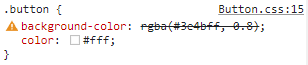
그렇다면 번거롭게 인터넷에서 해당 hex의 rgb를 검색하거나 Figma에서 rgb를 하나하나 찾아봐야한다.
1-2. 해결 1
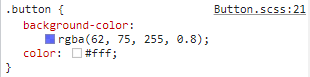
이런 과정은 Sass로 간편하게 해결할 수 있다.
Sass에서는 rgba(#3e4bff, 0.5) 에서 hex를 자동으로 rgb로 바꿔준다.
2-1. 문제 2
그렇다면 변수(Variable)로 선언된 색상을 가져온다면 어떻게 될까?
:root {
	--Button-Background: #3e4bff;
	--opacity: 0.5;
}

.button {
	background-color: rgba(var(--Button-Background), --opacity);
	color: #fff;
}
아마 스타일이 적용되지 않을 것이다.
개발자 도구를 통해 CSS가 어떻게 동작하고 있는지 살펴보자.
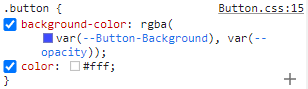
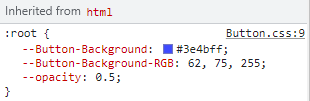
--Button-Background 에 있는 hex가 rgb로 바뀌는 과정이 생략된 채로 rgba 함수 안으로 들어간다.
2-2. 해결
문제를 해결하기 위해서 hex를 rgb로 바꾸는 작업이 필요하다.
@function hexToRGB($hex) {
  @return red($hex), green($hex), blue($hex);
}

$blue: #3e4bff;

:root {
  --Button-Background: #{$blue};
  --Button-Background-RGB: #{hexToRGB($blue)};
  --opacity: 0.5;
}

.button {
  // background-color: var(--Button-Background);
  background-color: rgba(var(--Button-Background-RGB), var(--opacity));
  color: #fff;
}
hexToRGB 함수를 만들어 hex를 매개변수로 받는다.
hex의 각 red, green, blue 값을 찾아 반환한다.
RGB가 필요한 속성에서 함수를 불러와 사용한다.
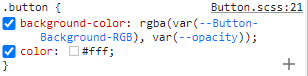
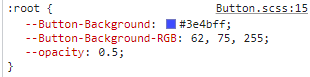
위와 같이 rgb 값이 있는 변수를 rgba 에 넣어 사용하게 된다.
By Docs
You can pass special functions likecalc()orvar()in place of any argument torgb(). You can even usevar()in place of multiple arguments, since it might be replaced by multiple values! When a color function is called this way, it returns an unquoted string using the same signature it was called with.

좋은 글 감사합니다. 자주 올게요 :)