CSS(Cascading Style Sheets)
- 웹 디자인을 적용하는데 사용되는 CSS(Cascading Style Sheets)
1. CSS 적용 방법 3가지
-
인라인 스타일 : 적용하고자 하는 태그 내에서 스타일을 작성
<html> <body style="background: #eee; color: blue"> ... </body> </html> -
내부 스타일 : HTML 내 별도 style 태그 내에 작성
<html> <style> .. </style> </html> -
외부 스타일 : 별도 css 내에 style 태그 작성 후 링크
<html>
	<link rel="stylesheet" href="index.css" />					<== 스타일 링크
	<link rel="stylesheet" href="layout.css" /> 				<== 레이아웃 링크
</html>
2. CSS 작성
- .css 확장자 사용
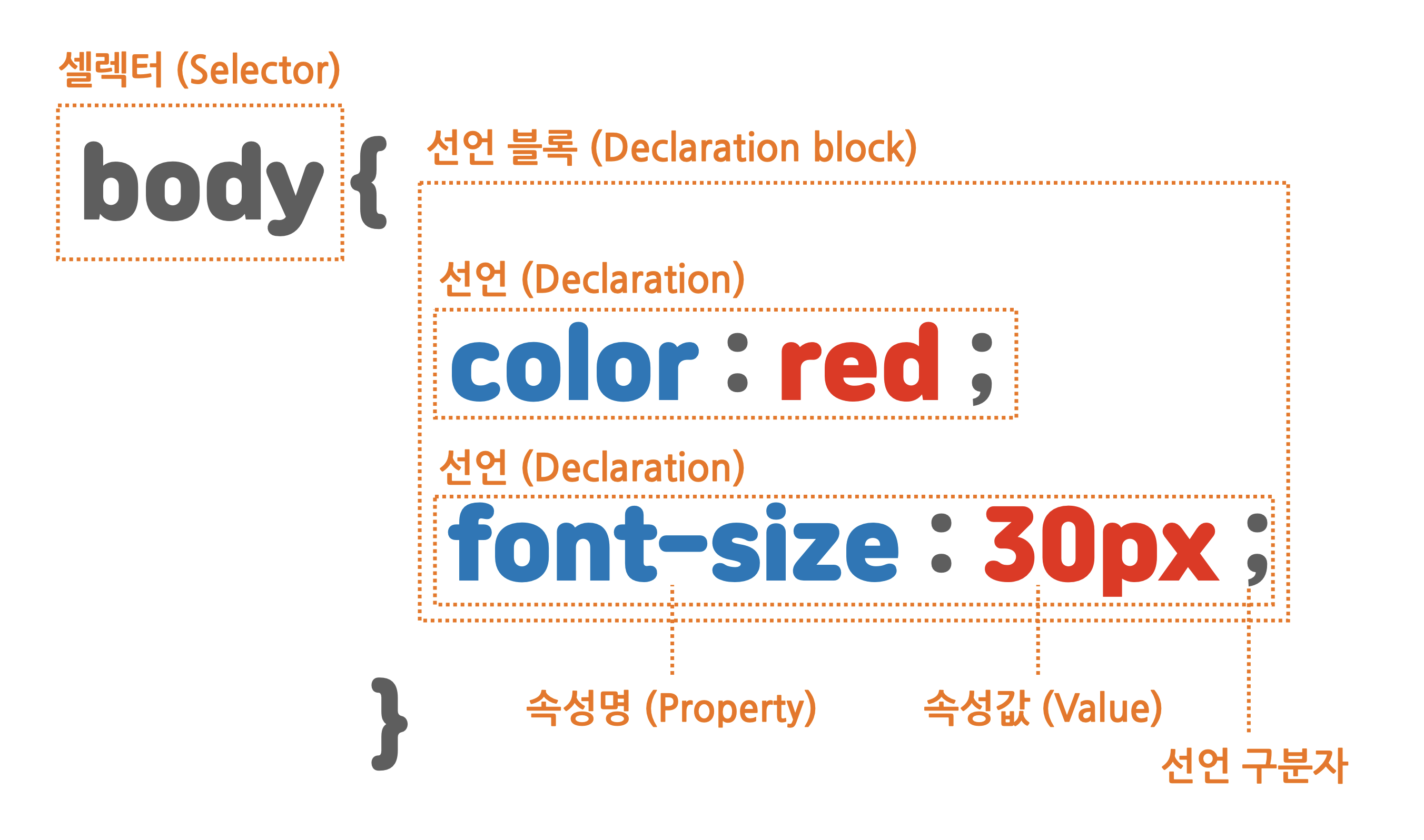
h4 {
	color: red;
}

body {
	background: #fff;
	color: #4a4a4a;
}
3. 기본 셀렉터(selector)
1) id : 문서 내에 단 하나의 요소에만 적용할 때
HTML
<html>
	<h4 id="example">This is the Example.</h4>
</html>
CSS
#example {							<== id는 #으로 시작
	color: red;
}
2) class : 문서 내에 여러 요소에 적용할 때
HTML
<html>
  	<ul>
		<li class="example">This is the Example1.</li>
  		<li class="example">This is the Example2.</li>
        <li class="example">This is the Example3.</li>
  	</ul>
</html>
CSS
.example {							<== class는 .으로 시작
	color: red;
}
3) 여러개의 class를 하나의 엘리먼트에 적용
HTML
<html>
  	<ul>
		<li class="example1 example2">This is the Example1+2.</li>		<== 2개 class 적용
  	</ul>
</html>
CSS
.example1 {
	color: red;
}
.example2 {
	font-weight: bold;
}
4) 스타일 적용 우선 순위
(1) 속성 값 뒤에 !important 를 붙인 속성
(2) HTML에서 style을 직접 지정한 속성
(3) #id 로 지정한 속성
(4) .클래스, :추상클래스 로 지정한 속성
(5) 태그이름 으로 지정한 속성
(6) 상위 객체에 의해 상속된 속성**
HTML
<html>
  	<p id="example1" class="example2 example3">This is the Example.</p>
</html>
CSS
#example1 {									<== id
	color: red;
}
.example2 {									<== class
	font-weight: bold;
}
.example3 {									<== class
	text-align: center !important;    	 	<== !important 우선
}
div, p {									<== 해당 div, p 태그 적용
	background: #fff;
}
* {											<== 모든 태그 적용
	font-size: large
}
4. 텍스트 꾸미기(웹 폰트)
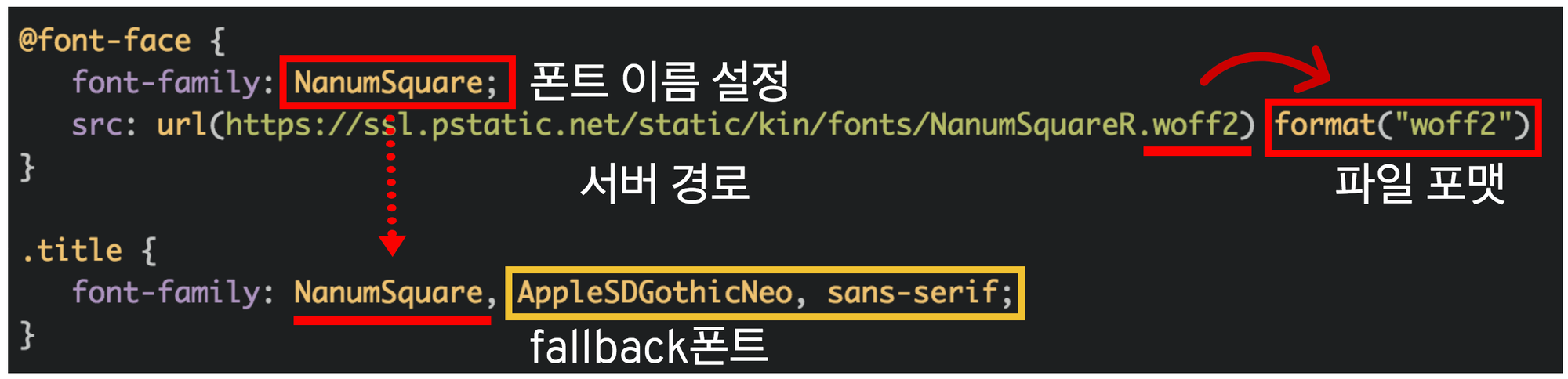
- 사용할 웹 폰트의 이름을 지정, 이때 이름은 폰트 파일의 이름과 일치하지 않아도 상관없음.
- fallback 폰트에 입력된 순서대로 글꼴 적용됨.
1) 글꼴 크기 단위
- 절대 단위 : px, pt 등
- 상대 단위 : %, em, rem, ch, vw, vh 등
5. 박스(box) 모델
- 하나의 웹 페이지 내의 모든 콘텐츠는 고유의 영역을 가지고 있고 그 영역은 항상 직사각형으로 이루어져 있기 때문에, 박스(box)라고 부름.
- 박스는 높이와 넓이, 테두리와 여백 등 다양한 속성을 가지고 있음.
1) 블럭(Block) 박스 : 줄바꿈이 되며, 크기를 지정할 수 있는 박스
<h1>, <p>, <div> 등
2) 인라인(Inline) 박스 : 줄바꿈이 일어나지 않고, 크기 지정을 할 수 없는 박스
<span> 등
3) 인라인-블럭(Inline-block) 박스 : 줄바꿈이 일어나지 않는 동시에 크기를 지정할 수 있는 박스
| Block | Inline-Block | Inline | |
|---|---|---|---|
| 한 줄 차지 | O | X | X |
| 기본적으로 갖는 너비(width) | 100% | 글자가 차지하는 만큼 | 글자가 차지하는 만큼 |
| width, height 사용 가능 여부 | 가능 | 가능 | 불가능 |
4) 박스 구성 요소
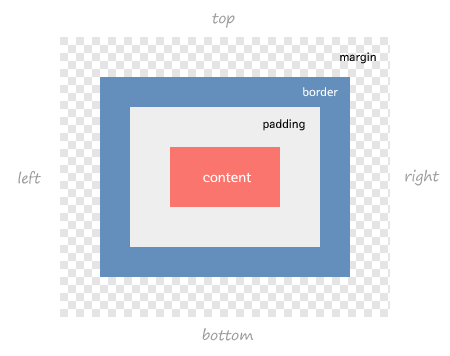
- Margin(바깥 여백)
- Padding(안쪽 여백)
p {
    border: 1px solid red;  				<== border-width, border-style, border-color

	margin: 10px 20px 30px 40px;			<== 각각 시계방향으로 top, right, bottom, left
    margin: 10px 20px;						<== 생략된 값이 마주보고 있는 값으로 자동 지정됨 top=bottom, right=left
    margin: 10px;							<== 모든 값이 적용됨

    padding: 10px 20px 30px 40px;			<== margin 과 동일
    padding: 10px 20px;						<== margin 과 동일
    padding: 10px;  						<== margin 과 동일

	overflow: auto;                         <== 콘텐츠가 박스를 뚫고 나가는 경우, overflow 속성을 auto로 지정하여 넘치는 콘텐츠가 스크롤됨
}
- 박스에 적용할 여백을 고려하지 않고 박스의 크기를 디자인하는 경우 콘텐츠 영역만 고려하면, 개발 과정에서 처음 생각한 레이아웃을 벗어날 수 있음.
* {
    box-sizing: border-box;				 <== 모든 박스에서 여백과 테두리를 포함한 크기로 계산됨
}
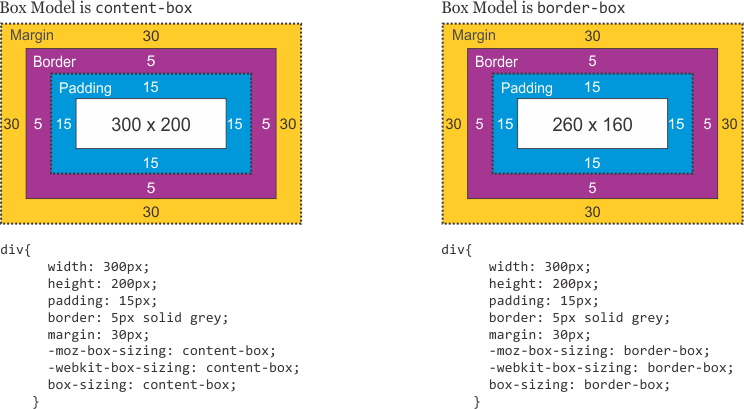
  * 이미지 출처
  : https://velog.io/@juunghunz/CSS%EB%9E%80-TIL-9%EC%9D%BC%EC%B0%A8
  : https://d2.naver.com/helloworld/4969726
  : https://opentutorials.org/module/484/4121
  : https://stackoverflow.com/questions/46923610/css-resetting-margin-and-padding