
0. 시작하기 전에
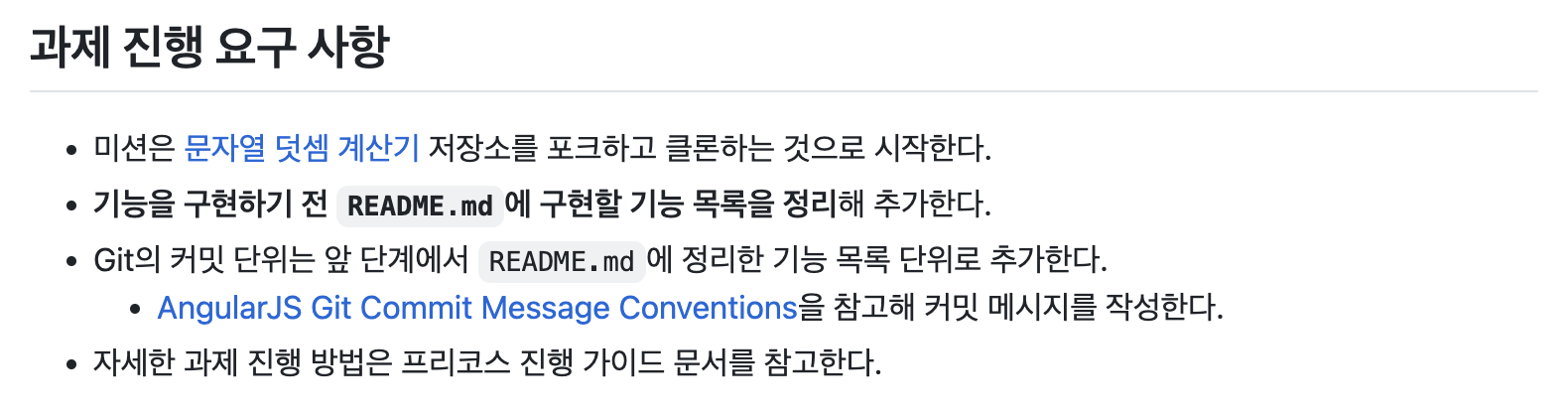
우테코 프리코스 과제에서 AngularJS Git Commit Message Conventions를 참고하여 커밋 메시지를 작성하라는 요구 사항을 확인하고 자세히 알아보고자 한다.
1. Coding Conventions란
Commit Message Conventions에서 Conventions가 어떤 의미로 사용되는지 찾아보다가 Coding Conventions라는 개념을 알게 됐다.
위키피디아에서는 이렇게 정의한다.
Coding conventions are a set of guidelines for a specific programming language that recommend programming style, practices, and methods for each aspect of a program written in that language.
코딩 규칙은 특정 프로그래밍 언어에 대한 일련의 지침으로, 해당 언어로 작성된 프로그램의 각 측면에 대한 프로그래밍 스타일, 관행 및 방법을 권장합니다.
일반적으로 파일 구성, 들여쓰기, 주석, 선언, 진술, 공백, 명명 규약, 프로그래밍 관행, 프로그래밍 원칙, 프로그래밍 경험 규칙, 아키텍처 모범 사례 등을 다룬다.
소스 코드의 가독성을 개선하고 소프트웨어 유지보수를 더 쉽게 만들기 위해 Coding Conventions를 따르는 것이 좋다.
Git Commit Message Conventions는 Git commit을 할 때의 규칙 정도로 이해하면 될 것 같다.
나중에 Coding Conventions에 대한 글도 작성해보겠다.
2. Goals
- allow generating CHANGELOG.md by script
- allow ignoring commits by git bisect (not important commits like formatting)
- provide better information when browsing the history
- CHANGELOG.md를 스크립트에 의해 생성
- 중요하지 않은 commit들 무시
- 히스토리를 검색할 때 더 나은 정보 제공
3. Generating CHANGELOG.md
CHANGELOG.md에서 new features, bug fixes, breaking changes 세 가지 섹션을 구분하여 변경 로그(change log)를 작성하고 스크립트를 통해 자동으로 생성할 수 있다. 릴리스를 할 때 커밋 메시지에서 주요한 정보들을 추출하여 변경 로그를 생성하고, 실제 릴리스 전에 이 변경 로그를 수정할 수도 있다.
마지막 릴리스 이후 모든 커밋 메시지 제목
마지막 태그 이후부터 현재(HEAD)까지의 커밋 메시지 제목(첫 줄)을 나열한다. %s는 커밋 메시지 제목을 표시한다.
git log <last tag> HEAD --pretty=format:%s이번 릴리스에서 추가된 새로운 기능 목록
마지막 릴리스 이후 추가된 기능(feature)과 관련된 커밋만을 필터링하여 출력한다.
git log <last release> HEAD --grep featureRecognizing unimportant commits(중요하지 않은 커밋 무시)
형식 변경(공백/빈 줄 추가/제거, 들여쓰기), 누락된 세미콜론, 코멘트 등 같이 논리적인 코드 변경이 없는 커밋을 무시할 수 있다. 이러한 커밋은 코드의 동작에는 영향을 미치지 않으므로 특정 변경 사항을 찾을 때 무시해도 된다. bisect 명령어를 사용한다.
git bisect skip $(git rev-list --grep irrelevant <good place> HEAD)Provide more information when browsing the history(Git 기록을 더 쉽게 탐색하기 위한 정보 제공)
커밋 기록을 탐색할 때 어디에서 변경이 발생했는지 명확히 하기 위해 커밋 메시지에 변경된 코드의 위치를 추가하는 것이 좋다.
fix comment stripping
fixing broken links
Bit of refactoring
위의 메시지에는 변경된 부분이 명확히 설명되지 않아, 어떤 코드에 변경이 있었는지 바로 알기 어렵다.
docs: 문서화 관련 변경
docs-parser: 문서 파서 관련 변경
compiler: 컴파일러 관련 변경
scenario-runner: 시나리오 실행기 관련 변경
이렇게 커밋 메시지에변경 위치를 포함시키면, Git 기록을 빠르게 탐색할 수 있고 파일을 일일이 확인하지 않아도 된다.
4. Format of the commit messsage
<type>(<scope>): <subject>
<BLANK LINE>
<body>
<BLANK LINE>
<footer>
커밋 메시지의 모든 행은 100자를 초과할 수 없다! 다른 Git 도구뿐만 아니라 GitHub에서 가독성을 높이기 위해서이다.
Subject line
제목 줄은 변경사항을 간결하게 설명한다.
type
- feat (feature): 새로운 기능 추가
- fix (bug fix): 버그 수정
- docs (documentation): 문서화 작업
- style (formatting, missing semi colons, …): 코드 스타일 변경 (포맷, 세미콜론 누락 등)
- refactor: 코드 리팩토링 (기능 변경 없이 코드 개선)
- test (when adding missing tests): 테스트 추가 (누락된 테스트 추가 등)
chore (maintain): 빌드 작업 또는 기타 유지보수- build: 빌드 시스템 또는 외부 종속성에 영향을 주는 변경 (example scopes: gulp, broccoli, npm)
- ci: CI 설정 파일 및 스크립트 변경 (examples: CircleCi, SauceLabs)
- perf: 성능 개선을 위한 코드 변경
최근 Angular Team에서 chore를 삭제하고 build, ci, perf를 추가했다.
https://github.com/angular/angular/blob/main/CONTRIBUTING.md#type
scope
커밋이 영향을 미치는 코드의 특정 부분을 명시한다.
예를 들어 $location, $browser, $compile, ngClick과 같은 부분을 지정할 수 있다.
subject
- 명령형, 현재형을 사용한다.
ex) "changed", "changes"가 아니라 "change" - 첫 글자를 대문자로 쓰지 않는다.
- 마침표(.)로 끝내지 않는다.
Message body
- 명령형, 현재형을 사용한다.
ex) "changed", "changes"가 아니라 "change" - 본문에서는 변경 이유를 설명하고 이전 동작과 비교한다.
Message footer
Breaking changes
Breaking changes(호환성 깨짐)이 발생한 경우, footer에 반드시 이를 기재하고 그 이유와 함께 이전 버전과의 차이점, 그리고 마이그레이션 방법을 설명해야 한다.
feat($compile): simplify isolate scope bindings

Changed the isolate scope binding options to:
  - @attr - attribute binding (including interpolation)
  - =model - by-directional model binding
  - &expr - expression execution binding

BREAKING CHANGE: isolate scope bindings definition has changed and
the inject option for the directive controller injection was removed.

To migrate the code follow the example below:

Before:

scope: {
  myAttr: 'attribute',
  myBind: 'bind',
  myExpression: 'expression',
  myEval: 'evaluate',
  myAccessor: 'accessor'
}

After:

scope: {
  myAttr: '@',
  myBind: '@',
  myExpression: '&',
  myAccessor: '='
}
Referencing issues
footer는 이슈를 참조할 때도 사용되며, “Closes” 키워드 뒤에 이슈 번호를 기재한다.
Closes #234여러 이슈일 경우 다음과 같이 작성한다.
Closes #123, #245, #9925. Example
feat($browser): onUrlChange event (popstate/hashchange/polling)

Added new event to $browser:
- forward popstate event if available
- forward hashchange event if popstate not available
- do polling when neither popstate nor hashchange available

Breaks $browser.onHashChange, which was removed (use onUrlChange instead)
fix($compile): couple of unit tests for IE9
Older IEs serialize html uppercased, but IE9 does not...
Would be better to expect case insensitive, unfortunately jasmine does
not allow to user regexps for throw expectations.
Closes #392
Breaks foo.bar api, foo.baz should be used insteadfeat(directive): ng:disabled, ng:checked, ng:multiple, ng:readonly, ng:selected
New directives for proper binding these attributes in older browsers (IE).
Added coresponding description, live examples and e2e tests.
Closes #351style($location): add couple of missing semi colonsdocs(guide): updated fixed docs from Google Docs
Couple of typos fixed:
- indentation
- batchLogbatchLog -> batchLog
- start periodic checking
- missing bracefeat($compile): simplify isolate scope bindings
Changed the isolate scope binding options to:
- @attr - attribute binding (including interpolation)
- =model - by-directional model binding
- &expr - expression execution binding
This change simplifies the terminology as well as
number of choices available to the developer. It
also supports local name aliasing from the parent.
BREAKING CHANGE: isolate scope bindings definition has changed and
the inject option for the directive controller injection was removed.
To migrate the code follow the example below:
Before:
scope: {
myAttr: 'attribute',
myBind: 'bind',
myExpression: 'expression',
myEval: 'evaluate',
myAccessor: 'accessor'
}
After:
scope: {
myAttr: '@',
myBind: '@',
myExpression: '&',
// myEval - usually not useful, but in cases where the expression is assignable, you can use '='
myAccessor: '=' // in directive's template change myAccessor() to myAccessor
}
The removed `inject` wasn't generaly useful for directives so there should be no code using it.6. 결론
이번 공부를 계기로 공식 문서와 친해졌고, 그동안 내가 얼마나 쓰레기 같은 커밋 메시지를 남겼는지 알게 되었다... 앞으로는 커밋 메시지를 남길 때도 신중하게 작성해야겠다.