✨KB IT's Your Life✨ 5기 TIL 기자단 활동
KB IT's Your Life 5기에서 학습한 내용을 복습하고자 정리한 글
기간: 7/18 ~ 7/26
학습 내용: JDBC & MongoDB
MongoDB 내용은 곧 추가 예정
JDBC(Java Database Connectivity)란?
JAVA로 데이터베이스에 접속하여 각종 SQL문을 수행할 수 있는 기능을 제공하는 API
JDBC API는 JAVA에서 제공하며, 인터페이스가 이미 정의되어있어 DB 종류 상관없이 같은 방법으로 사용 가능
JAVA의 철학: “Write Once, Run Anywhere”
자바의 철학을 데이터베이스 연동에서도 실현하기 위해 만들어진 것이 JDBC
JDBC를 통해 특정 DBMS에 종속되지 않는 코드 작성 가능!
JDBC의 사용 목적
- 데이터베이스 연동
JDBC를 통해 JAVA 애플리케이션에서 데이터베이스에 저장된 데이터 조회, 삽입, 수정, 삭제가 가능
- DBMS 독립성 제공
다양한 DBMS(Oracle, MySQL 등)에 대해 동일한 API 사용 가능
- 유연성 제공
다양한 데이터베이스 드라이버를 통해 여러 종류의 데이터베이스에 접근 가능
- 표준화된 SQL 실행
JDBC 사용을 통해 표준화된 SQL문을 사용하여 데이터베이스 작업 수행 가능
- 트랜잭션 관리
JDBC는 데이터베이스 트랜잭션을 지원하여 트랜잭션을 통해 여러 개의 데이터베이스 작업을 하나의 논리적 작업 단위로 묶어 원자성 보장 가능원자성(Atomcity)이란?
트랜잭션은 더 이상 분해 불가능한 업무의 최소단위이므로 전부 처리되거나 아예 하나도 처리되지 않아야하는 ALL OR NOTHING 특성을 원자성이라고 한다!
JDBC의 주요 구성요소
- JDBC 드라이버
특정 DBMS와 JAVA 애플리케이션 사이에서 데이터 주고받는 통신을 담당
각 DBMS에서 자체 JDBC 드라이버 제공
- DriverManager
적절한 JDBC 드라이버를 불러오고 데이터베이스 연결을 관리하는 클래스
- Connection
데이터베이스와의 연결을 나타내는 인터페이스
Connection 인터페이스를 통해 SQL 명령문 실행 가능
SQL 쿼리 실행을 위한 Statement, PrepareStatement 등을 생성하는데 사용
- Statement
SQL 쿼리를 실행하기 위한 인터페이스
Connection 객체를 통해 생성
- ResultSet
SQL 쿼리의 결과 집합을 나타내는 인터페이스
결과를 반복하고 구조화된 형식으로 데이터베이스에서 데이터를 검색하는 방법 제공
JDBC 어플리케이션 구조
클라이언트(UI) ↔ JAVA 프로그램(DB관련 처리, DAO) ↔ DB 서버의 3-tier 구조
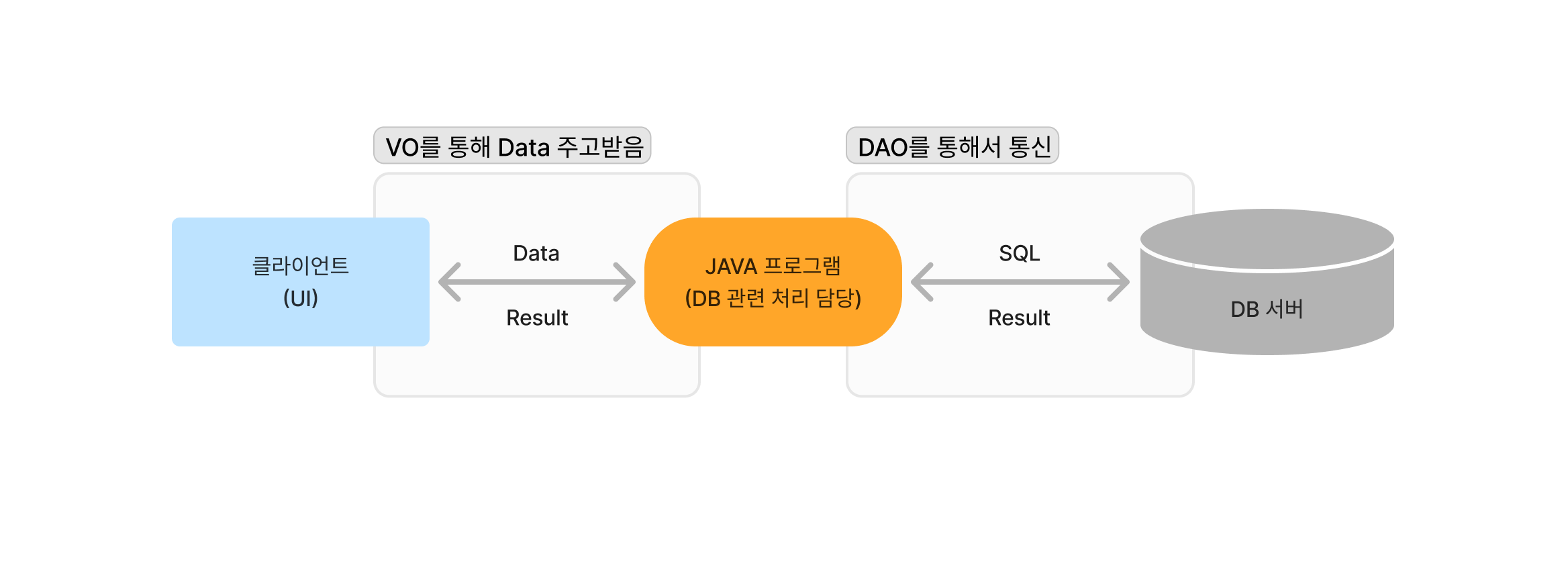
클라이언트가 보낸 데이터 받아서 JDBC API(자바 프로그램)가 아래와 같은 작업 처리하여 DB서버로 전달
- 사용할 드라이버 설정
- DB 연결
- SQL문 생성
- Oracle 서버로 SQL 전송
2-tier 구조와 3-tier 구조란?
2-tier 구조
웹 서버가 DB에 직접 연결되는 형태
하나의 클라이언트에 서버 프로세스가 하나씩 생성되는 방식
클라이언트가 직접 서버의 DB에 접속하여 자원을 활용
보안에 취약하고 유지보수가 어려운 방식
3-tier 구조
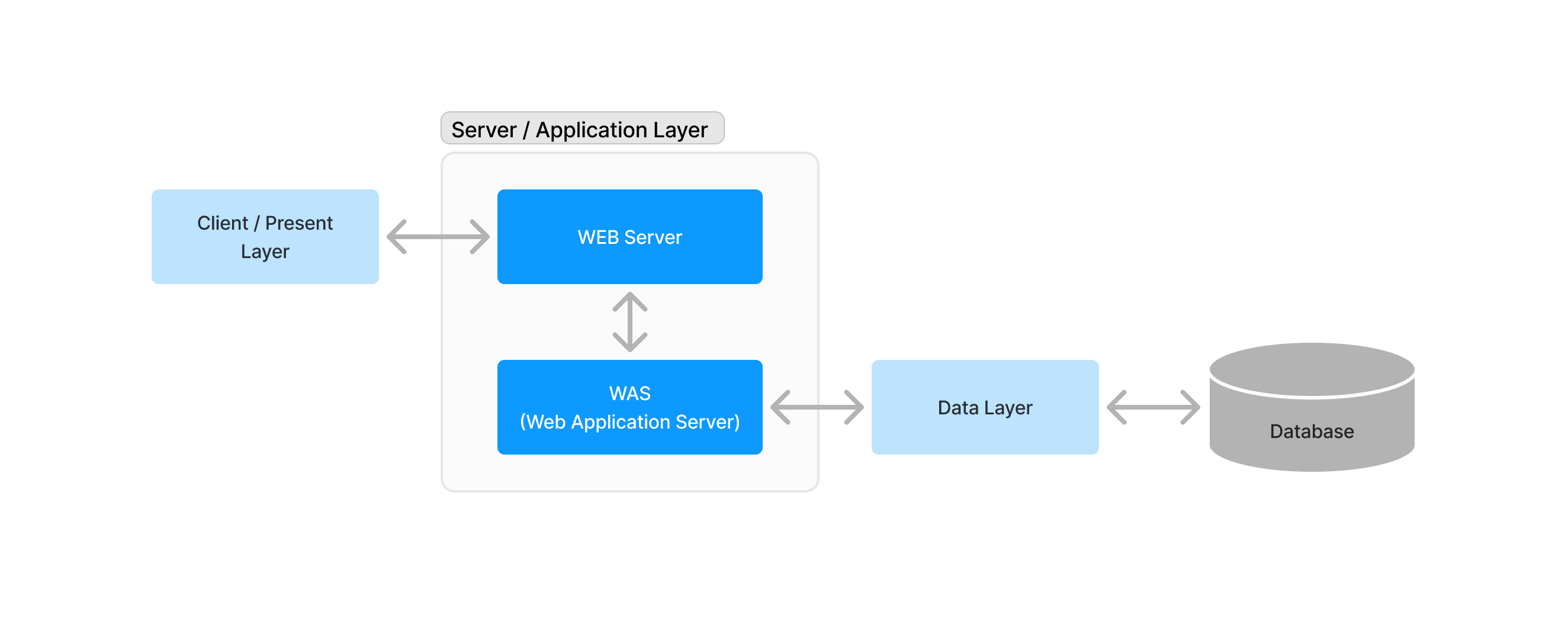
웹 서버와 DB 서버를 논리적 혹은 물리적으로 분리한 형태
서버를 통해서만 DB 서버에 접속 가능한 방식
- WEB Server
보통 사용자(클라이언트)가 마주하는 GUI, 인터페이스, 웹 화면을 제공하는 서버
HTTP 통신을 통해 브라우저 화면 및 기능 요소들을 보여주는 계층
- WAS(Web Application Server)
다양한 기능들의 동작을 실질적으로 처리하는 계층
- Database Server
WAS에서 사용자의 요청 처리 시 데이터의 추가 및 변경 등의 작업과 사용자들의 데이터를 보관하는 계층
DAO & VO(DTO)
DAO(Data Access Object)
DB에 접근하여 DB 관련 처리를 담당하는 클래스
각 기능별로 메서드를 구현
VO(Value Object) = DTO(Data Transfer Object)
많은 양의 데이터를 전달할 목적으로 사용한는 데이터 전달 담당 클래스
값들을 넣어서 전달하고, 전달된 값들을 꺼내서 사용하는 역할
JDBC 프로그래밍
IntelliJ에서 JDBC 연결하기
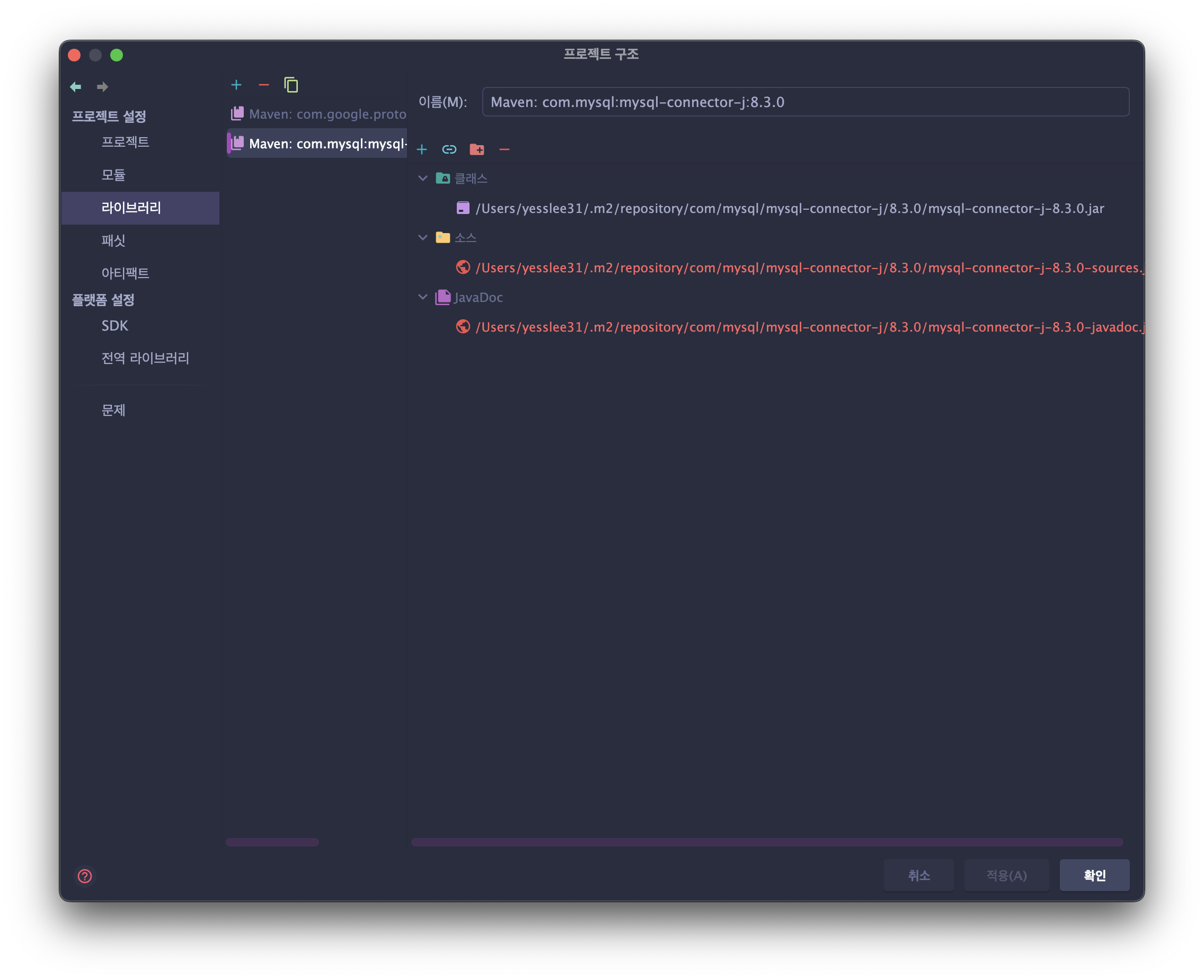
- MVN Repository에서 설치된 mysql 버전과 호환되는 mysql-connector-j 다운로드 후 프로젝트 설정에서 라이브러리 추가
- IntelliJ에서 직접 다운로드하여 설정(프로젝트 구조 > 라이브러리 > 설치된 mysql 버전과 호환되는 mysql-connector-j 선택하여 추가)
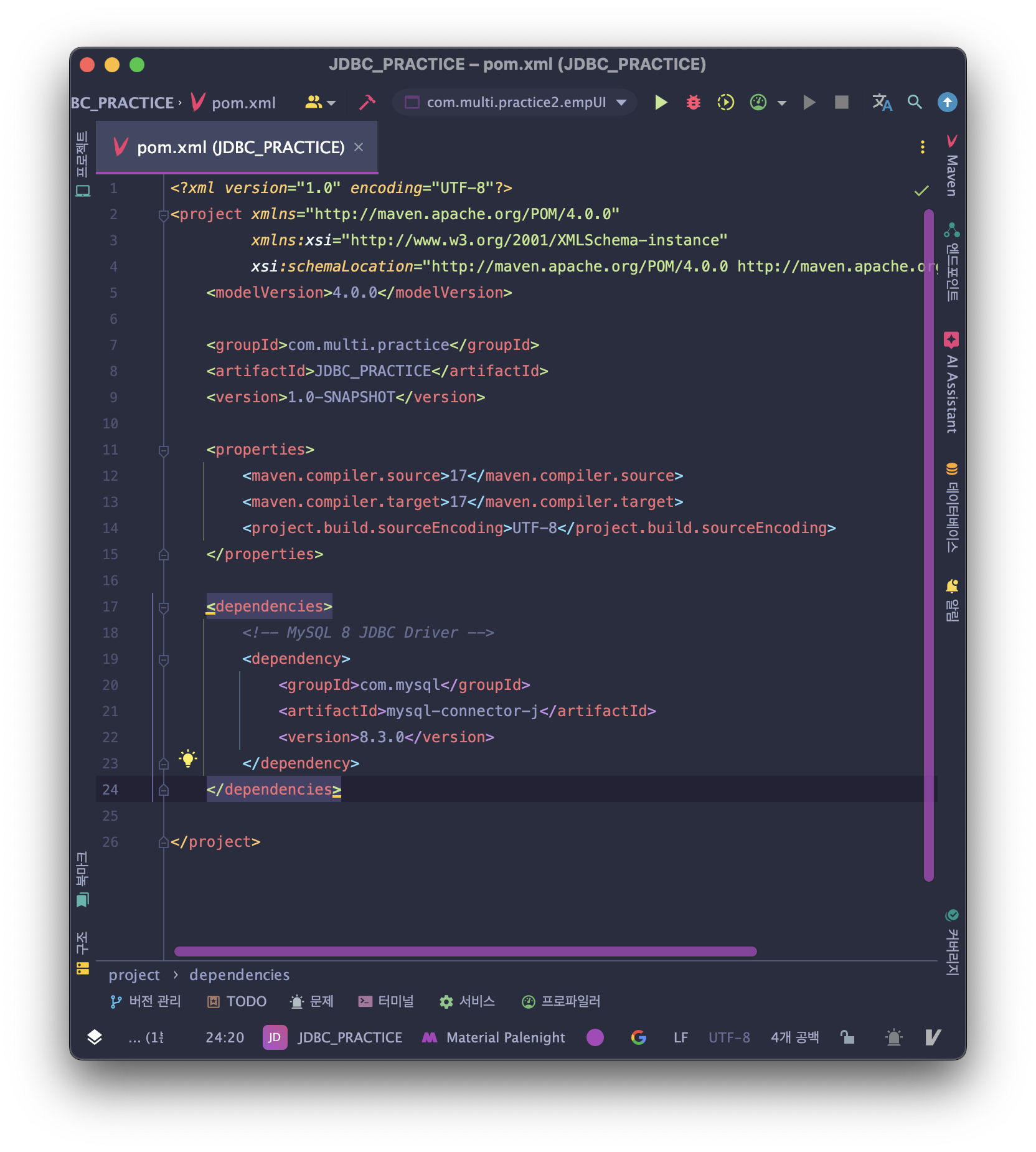
- Maven 프로젝트 생성 후 pom.xml에 dependencies 설정 추가 후 동기화
→ MVN Repository에서 dependencies code 제공
company DB의 emp 테이블 사용
CREATE DATABASE company;

CREATE TABLE emp (
  id INT NOT NULL,
  name VARCHAR(50) DEFAULT NULL,
  age INT DEFAULT NULL,
  office VARCHAR(50) DEFAULT NULL,
  phone VARCHAR(50) DEFAULT NULL,
  PRIMARY KEY (id)
);생성된 emp 테이블에 해당 데이터 import하여 JDBC 프로그래밍 진행
VO Code
// columns: id, name, age, office, phone
public class empVO {
    private int id;
    private String name;
    private int age;
    private String office;
    private String phone;

    public int getId() {
        return id;
    }

    public void setId(int id) {
        this.id = id;
    }

    public String getName() {
        return name;
    }

    public void setName(String name) {
        this.name = name;
    }

    public int getAge() {
        return age;
    }

    public void setAge(int age) {
        this.age = age;
    }

    public String getOffice() {
        return office;
    }

    public void setOffice(String office) {
        this.office = office;
    }

    public String getPhone() {
        return phone;
    }

    public void setPhone(String phone) {
        this.phone = phone;
    }

    @Override
    public String toString() {
        return "empVO { " +
                "id=" + id +
                ", name='" + name + '\'' +
                ", age=" + age +
                ", office='" + office + '\'' +
                ", phone='" + phone + '\'' +
                " }";
    }
}
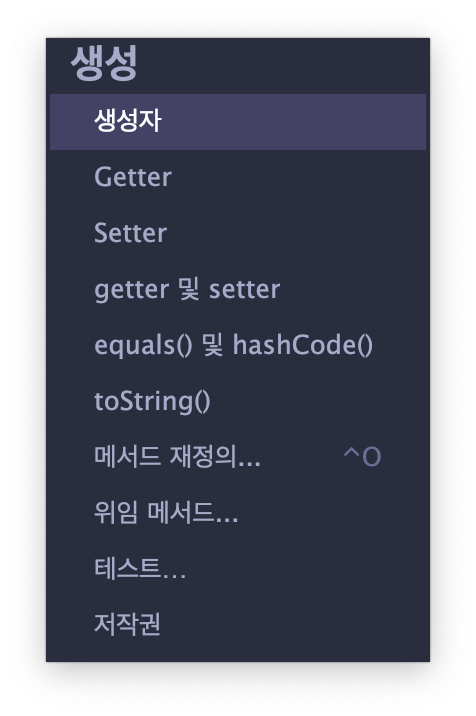
IDE에서 getter/setter 생성 기능을 이용하면 간단하게 작성 가능!
변수 작성한 뒤 코드 > 생성 > getter 및 setter 실행
DAO Code
JDBC 프로그래밍 4단계
- 드라이버 로딩(리플렉션)
- DB 연결
- SQL문 객체화 → DBCP등의 라이브러리가 처리
- SQL문 실행 요청 → Spring, myBatis, JPA 등의 라이브러리가 처리
각 단계별로 처리해주는 라이브러리 많이 존재함!
드라이버 로딩 & DB 연결 생성자
private Connection conn;
private static String url = "jdbc:mysql://localhost:3306/company";
private static String user = "root";
private static String pw = "1234";

public empDAO() {
    try {
        // 드라이버 설정
        Class.forName("com.mysql.cj.jdbc.Driver");
        System.out.println("Connecting to database...");
        // DB 연결
        conn = DriverManager.getConnection(url, user, pw);
    } catch (Exception e) {
        e.printStackTrace();
    }
}
INSERT
public void insert(empVO emp) {
    PreparedStatement ps = null;
    try {
        // SQL 생성
        String sql = "insert into emp values(?, ?, ?, ?, ?)";
        ps = conn.prepareStatement(sql);

        // SQL 전송
        ps.setInt(1, emp.getId());
        ps.setString(2, emp.getName());
        ps.setInt(3, emp.getAge());
        ps.setString(4, emp.getOffice());
        ps.setString(5, emp.getPhone());
        int result = ps.executeUpdate();

        if (result == 1) {
            System.out.println("삽입 성공");
        } else {
            System.out.println("삽입 실패");
        }
    } catch (Exception e) {
        e.printStackTrace();
    } finally {
        if (ps != null) {
            try {
                ps.close();
            } catch (SQLException e) {
                e.printStackTrace();
            }
        }
        if (conn != null) {
            try {
                conn.close();
            } catch (SQLException e) {
                e.printStackTrace();
            }
        }
    }
}
DELETE
public void delete(int id) {
    PreparedStatement ps = null;
    try {
        // SQL 생성
        String sql = "delete from emp where id = ?";
        ps = conn.prepareStatement(sql);

        // SQL 전송
        ps.setInt(1, id);
        int result = ps.executeUpdate();

        if (result == 1) {
            System.out.println("삭제 성공");
        } else {
            System.out.println("삭제 실패");
        }
    } catch (Exception e) {
        e.printStackTrace();
    } finally {
        if (ps != null) {
            try {
                ps.close();
            } catch (SQLException e) {
                e.printStackTrace();
            }
        }
        if (conn != null) {
            try {
                conn.close();
            } catch (SQLException e) {
                e.printStackTrace();
            }
        }
    }
}
UPDATE
public void update(empVO emp) {
    PreparedStatement ps = null;
    try {
        // SQL 생성
        String sql = "update emp set name = ?, age = ?, office = ?, phone = ? where id = ?";
        ps = conn.prepareStatement(sql);

        // SQL 전송
        ps.setString(1, emp.getName());
        ps.setInt(2, emp.getAge());
        ps.setString(3, emp.getOffice());
        ps.setString(4, emp.getPhone());
        ps.setInt(5, emp.getId());

        int result = ps.executeUpdate();
        if (result == 1) {
            System.out.println("갱신 성공");
        } else {
            System.out.println("갱신 실패");
        }
    } catch (Exception e) {
        e.printStackTrace();
    } finally {
        if (ps != null) {
            try {
                ps.close();
            } catch (SQLException e) {
                e.printStackTrace();
            }
        }
        if (conn != null) {
            try {
                conn.close();
            } catch (SQLException e) {
                e.printStackTrace();
            }
        }
    }
}
SELECT (One)
public void selectOne(int id) {
    PreparedStatement ps = null;
    ResultSet rs = null;
    try {
        // SQL 생성
        String sql = "select * from emp where id = ?";
        ps = conn.prepareStatement(sql);

        // SQL 전송
        ps.setInt(1, id);
        rs = ps.executeQuery();

        if (rs.next()) {
            empVO emp = new empVO();
            emp.setId(rs.getInt(1));
            emp.setName(rs.getString(2));
            emp.setAge(rs.getInt(3));
            emp.setOffice(rs.getString(4));
            emp.setPhone(rs.getString(5));
            System.out.println(emp);
        } else {
            System.out.println("검색 결과 없음");
        }
    } catch (Exception e) {
        e.printStackTrace();
    } finally {
        // 자원 해제
        if (rs != null) {
            try {
                rs.close();
            } catch (SQLException e) {
                e.printStackTrace();
            }
        }
        if (ps != null) {
            try {
                ps.close();
            } catch (SQLException e) {
                e.printStackTrace();
            }
        }
        if (conn != null) {
            try {
                conn.close();
            } catch (SQLException e) {
                e.printStackTrace();
            }
        }
    }
}
SELECT (All)
public ArrayList<empVO> selectAll() {
    PreparedStatement ps = null;
    ResultSet rs = null;
    ArrayList<empVO> list = new ArrayList<>();
    try {
        // SQL 생성
        String sql = "select * from emp";
        ps = conn.prepareStatement(sql);

        // SQL 전송
        rs = ps.executeQuery();

        while (rs.next()) {
            empVO emp = new empVO();
            emp.setId(rs.getInt(1));
            emp.setName(rs.getString(2));
            emp.setAge(rs.getInt(3));
            emp.setOffice(rs.getString(4));
            emp.setPhone(rs.getString(5));

            list.add(emp);
        }

        for (empVO vo : list) {
            System.out.println(vo.toString());
        }

    } catch (Exception e) {
        e.printStackTrace();
    } finally {
        // 자원 해제
        if (rs != null) {
            try {
                rs.close();
            } catch (SQLException e) {
                e.printStackTrace();
            }
        }
        if (ps != null) {
            try {
                ps.close();
            } catch (SQLException e) {
                e.printStackTrace();
            }
        }
        if (conn != null) {
            try {
                conn.close();
            } catch (SQLException e) {
                e.printStackTrace();
            }
        }
    }
    return list;
}
DAO 전체 코드
import java.sql.*;
import java.util.ArrayList;

// insert, delete, update, selectOne, selectALL
public class empDAO {
    private Connection conn;
    private static String url = "jdbc:mysql://localhost:3306/company";
    private static String user = "root";
    private static String pw = "1234";

    public empDAO() {
        try {
            // 드라이버 설정
            Class.forName("com.mysql.cj.jdbc.Driver");
            System.out.println("Connecting to database...");
            // DB 연결
            conn = DriverManager.getConnection(url, user, pw);
        } catch (Exception e) {
            e.printStackTrace();
        }
    }

    public void insert(empVO emp) {
        PreparedStatement ps = null;
        try {
            // SQL 생성
            String sql = "insert into emp values(?, ?, ?, ?, ?)";
            ps = conn.prepareStatement(sql);

            // SQL 전송
            ps.setInt(1, emp.getId());
            ps.setString(2, emp.getName());
            ps.setInt(3, emp.getAge());
            ps.setString(4, emp.getOffice());
            ps.setString(5, emp.getPhone());
            int result = ps.executeUpdate();

            if (result == 1) {
                System.out.println("삽입 성공");
            } else {
                System.out.println("삽입 실패");
            }
        } catch (Exception e) {
            e.printStackTrace();
        } finally {
            if (ps != null) {
                try {
                    ps.close();
                } catch (SQLException e) {
                    e.printStackTrace();
                }
            }
            if (conn != null) {
                try {
                    conn.close();
                } catch (SQLException e) {
                    e.printStackTrace();
                }
            }
        }
    }

    public void delete(int id) {
        PreparedStatement ps = null;
        try {
            // SQL 생성
            String sql = "delete from emp where id = ?";
            ps = conn.prepareStatement(sql);

            // SQL 전송
            ps.setInt(1, id);
            int result = ps.executeUpdate();

            if (result == 1) {
                System.out.println("삭제 성공");
            } else {
                System.out.println("삭제 실패");
            }
        } catch (Exception e) {
            e.printStackTrace();
        } finally {
            if (ps != null) {
                try {
                    ps.close();
                } catch (SQLException e) {
                    e.printStackTrace();
                }
            }
            if (conn != null) {
                try {
                    conn.close();
                } catch (SQLException e) {
                    e.printStackTrace();
                }
            }
        }
    }

    public void update(empVO emp) {
        PreparedStatement ps = null;
        try {
            // SQL 생성
            String sql = "update emp set name = ?, age = ?, office = ?, phone = ? where id = ?";
            ps = conn.prepareStatement(sql);

            // SQL 전송
            ps.setString(1, emp.getName());
            ps.setInt(2, emp.getAge());
            ps.setString(3, emp.getOffice());
            ps.setString(4, emp.getPhone());
            ps.setInt(5, emp.getId());

            int result = ps.executeUpdate();
            if (result == 1) {
                System.out.println("갱신 성공");
            } else {
                System.out.println("갱신 실패");
            }
        } catch (Exception e) {
            e.printStackTrace();
        } finally {
            if (ps != null) {
                try {
                    ps.close();
                } catch (SQLException e) {
                    e.printStackTrace();
                }
            }
            if (conn != null) {
                try {
                    conn.close();
                } catch (SQLException e) {
                    e.printStackTrace();
                }
            }
        }
    }

    public void selectOne(int id) {
        PreparedStatement ps = null;
        ResultSet rs = null;
        try {
            // SQL 생성
            String sql = "select * from emp where id = ?";
            ps = conn.prepareStatement(sql);

            // SQL 전송
            ps.setInt(1, id);
            rs = ps.executeQuery();

            if (rs.next()) {
                empVO emp = new empVO();
                emp.setId(rs.getInt(1));
                emp.setName(rs.getString(2));
                emp.setAge(rs.getInt(3));
                emp.setOffice(rs.getString(4));
                emp.setPhone(rs.getString(5));
                System.out.println(emp);
            } else {
                System.out.println("검색 결과 없음");
            }
        } catch (Exception e) {
            e.printStackTrace();
        } finally {
            // 자원 해제
            if (rs != null) {
                try {
                    rs.close();
                } catch (SQLException e) {
                    e.printStackTrace();
                }
            }
            if (ps != null) {
                try {
                    ps.close();
                } catch (SQLException e) {
                    e.printStackTrace();
                }
            }
            if (conn != null) {
                try {
                    conn.close();
                } catch (SQLException e) {
                    e.printStackTrace();
                }
            }
        }
    }

    public ArrayList<empVO> selectAll() {
        PreparedStatement ps = null;
        ResultSet rs = null;
        ArrayList<empVO> list = new ArrayList<>();
        try {
            // SQL 생성
            String sql = "select * from emp";
            ps = conn.prepareStatement(sql);

            // SQL 전송
            rs = ps.executeQuery();

            while (rs.next()) {
                empVO emp = new empVO();
                emp.setId(rs.getInt(1));
                emp.setName(rs.getString(2));
                emp.setAge(rs.getInt(3));
                emp.setOffice(rs.getString(4));
                emp.setPhone(rs.getString(5));

                list.add(emp);
            }

            for (empVO vo : list) {
                System.out.println(vo.toString());
            }

        } catch (Exception e) {
            e.printStackTrace();
        } finally {
            // 자원 해제
            if (rs != null) {
                try {
                    rs.close();
                } catch (SQLException e) {
                    e.printStackTrace();
                }
            }
            if (ps != null) {
                try {
                    ps.close();
                } catch (SQLException e) {
                    e.printStackTrace();
                }
            }
            if (conn != null) {
                try {
                    conn.close();
                } catch (SQLException e) {
                    e.printStackTrace();
                }
            }
        }
        return list;
    }
}
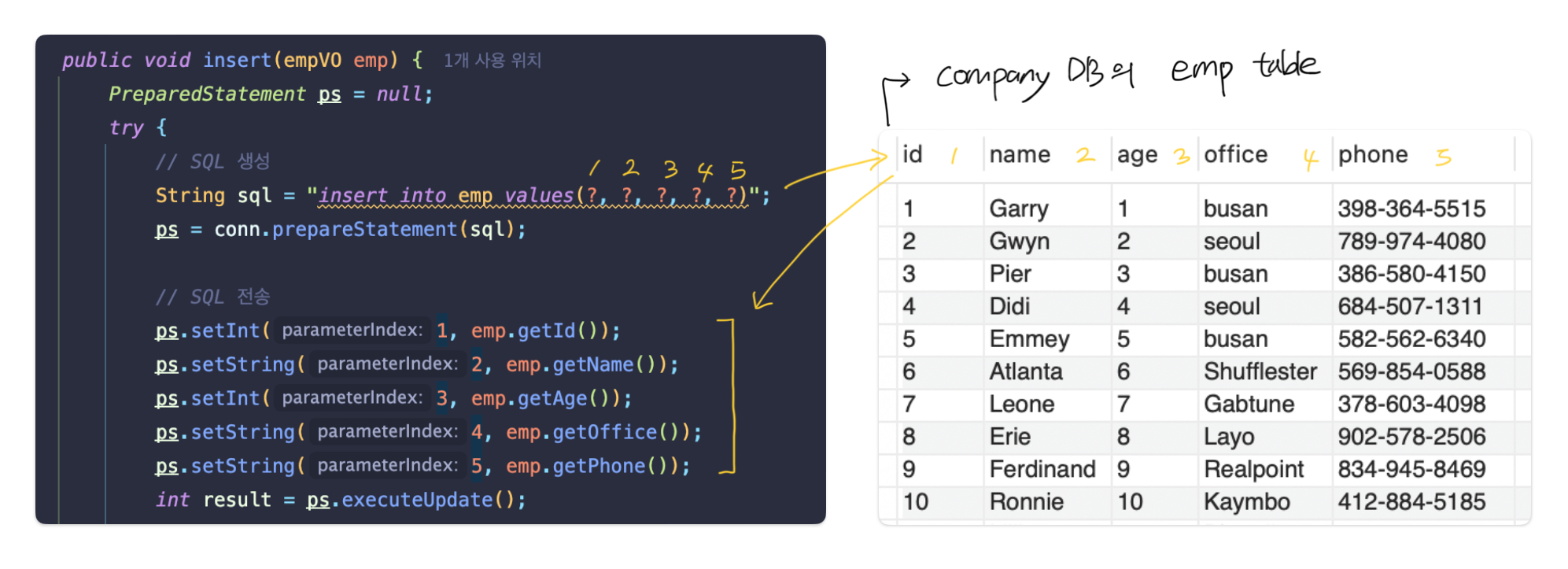
SQL문에서 사용된 ? 는 어떤 의미?
매개변수 값 부분의 위치를 물음표로 표시한 것!
index는 물음표 순서대로 1부터 부여되는 점에 유의할 것
(시작 index가 0이 아님!)
Main Code
import java.util.Scanner;

public class empUI {
    public static void main(String[] args) {
        Scanner sc = new Scanner(System.in);
        empDAO dao = new empDAO();
        empVO emp;

        while (true) {
            System.out.println("---------------------------------------------------------------");
            System.out.println("1. insert | 2. delete | 3. update | 4. select One | 5. select All | 0. exit");
            System.out.println("---------------------------------------------------------------");
            int flag = sc.nextInt();
            sc.nextLine();

            if (flag == 0) break;

            switch (flag) {
                case 1:
                    emp = new empVO();
                    System.out.println("INSERT");
                    System.out.print("insert id: ");
                    emp.setId(sc.nextInt());
                    sc.nextLine();
                    System.out.print("insert name: ");
                    emp.setName(sc.nextLine());
                    System.out.print("insert age: ");
                    emp.setAge(sc.nextInt());
                    sc.nextLine();
                    System.out.print("insert office: ");
                    emp.setOffice(sc.nextLine());
                    System.out.print("insert phone: ");
                    emp.setPhone(sc.nextLine());
                    dao.insert(emp);
                    break;
                case 2:
                    System.out.println("DELETE");
                    System.out.print("delete id: ");
                    dao.delete(sc.nextInt());
                    sc.nextLine();
                    break;
                case 3:
                    emp = new empVO();
                    System.out.println("UPDATE");
                    System.out.print("update id: ");
                    emp.setId(sc.nextInt());
                    sc.nextLine();
                    System.out.print("update name: ");
                    emp.setName(sc.nextLine());
                    System.out.print("update age: ");
                    emp.setAge(sc.nextInt());
                    sc.nextLine();
                    System.out.print("update office: ");
                    emp.setOffice(sc.nextLine());
                    System.out.print("update phone: ");
                    emp.setPhone(sc.nextLine());
                    dao.update(emp);
                    break;
                case 4:
                    System.out.println("SELECT ONE");
                    System.out.print("select id: ");
                    dao.selectOne(sc.nextInt());
                    sc.nextLine();
                    break;
                case 5:
                    System.out.println("SELECT ALL");
                    dao.selectAll();
                    break;
            }
        }
    }
}