Event
벽에 부딪히면 돌아오는 공을 받아쳐서 블록을 깨는 게임을 본 적이 있을 것이다. 최초의 아케이드 비디오게임 중 하나인 PONG 이 이런 방법으로 탁구와 같은 게임을 만들었는데, 우리는 이것을 Space Programming이라 합니다.
Space Programming
-
curses library: 텍스트 기반의 UI를 위한 터미널 제어 라이브러리
-
터미널 스크린: 문자를 표시하기 위한 그리드 형태의 셀로 구성되며, 왼쪽 최상단에서 시작
-
curse.h
Function Description initscr()curse 라이브러리 및 tty 초기화 endwin()curse 모드 종료 refresh()화면 업데이트(갱신): refresh()를 호출하여 변경 사항을 반영 move(row, col)커서를 특정 위치(row, col)로 이동 addstr(s)해당 문자열(s)을 현재 위치에 출력 addch(c)하나의 문자(c)를 현재 위치에 출력 clear()화면을 지움 standout()standout 모드 on(화면 reverse) standend()standout 모드 off - refresh() 함수
- curses 라이브러리는 텍스트 화면을 업데이트 하도록 설계
- refresh는 virtual screen과 physical screen을 동기화
- refresh() 함수
Time Handling
위에서는 출력하는 방법을 알아봤다면, 이번엔 이미지의 애니메이션 효과 및 이미지 이동에 대한 내용입니다.
- 예제
#include <stdio.h> #include <unistd.h> #include <curses.h> #define LEFTEDGE 10 #define RIGHTEDGE 30 #define ROW 10 int main() { char *message = "Hello"; char *blank = " "; // message 길이와 같음 int direction = 1; int position = LEFTEDGE; initscr(); clear(); while (1){ move(ROW, position); // (10, 30)으로 이동 addstr(message); move(LINES - 1, COLS - 1); // cursor 위치 이동 refresh(); sleep(1); move(ROW, position); addstr(blank); // 텍스트 지우기 position += direction; // 1칸 이동 if (position <= LEFTEDGE) direction = 1; // 왼쪽 벽에 닿으면 방향 바꾸기 if (position <= RIGHTEDGE) direction = -1; // 오른쪽 벽에 닿으면 방향 바꾸기 } return 0; }- (10, 10)에서 시작해서 20만큼 오른쪽, 왼쪽으로 반복적으로 이동하는 코드
- 10이나 30에 닿으면 방향 전환
- 텍스트 자체가 이동하는 것처럼 보이지만 출력->커서 이동->출력->커서 이동 을 반복
Alarms
-
프로그램에 초 단위 delay 추가
- sleep(n): n seconds
-
sleep(sec) 함수
- 원하는 지연 시간(초)만큼 alarm 설정
- alarm이 울릴 때까지 프로세스는 일시 정지
-
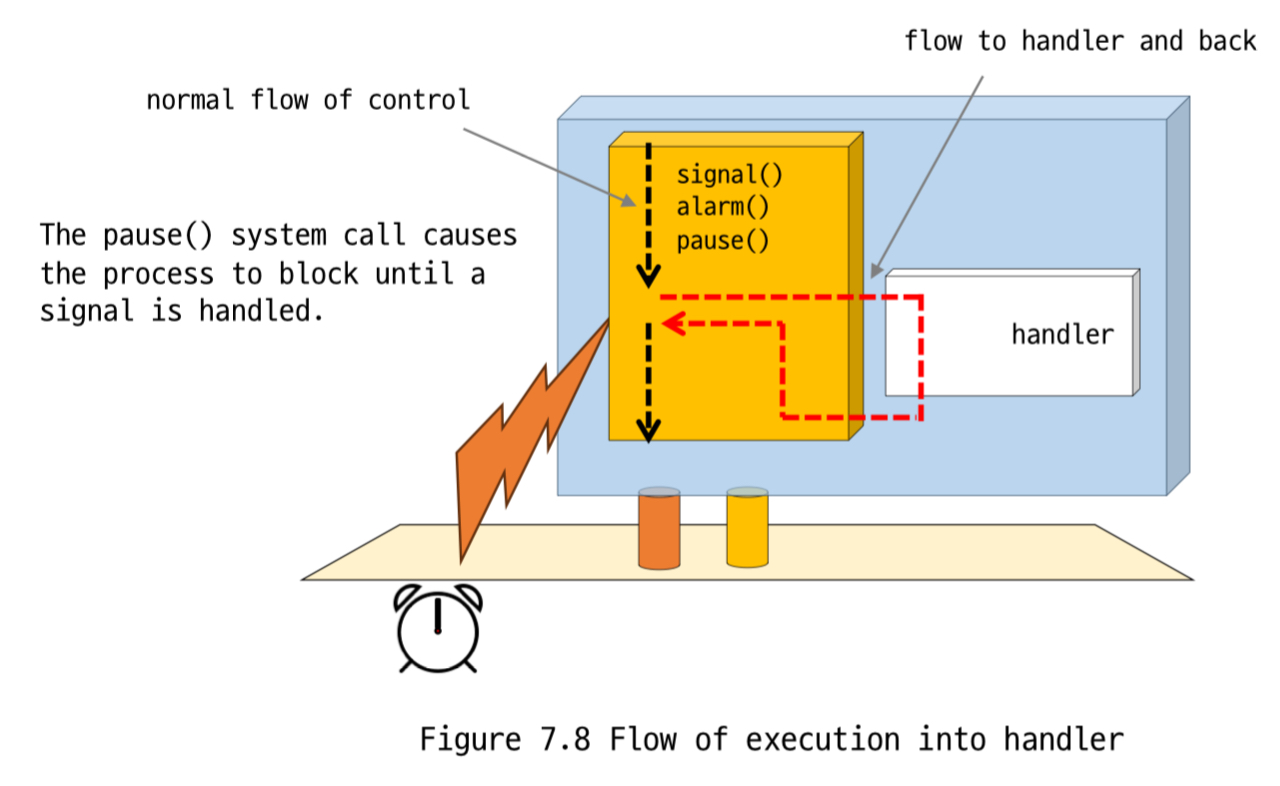
sleep() 동작 과정
-
signal(SIGAARM, handler) 호출
- SIGALRM을 위한 핸들러 등록
- SIGALRM을 위한 핸들러 등록
-
alarm(num_seconds) 호출
- 설정된 초 단위로 타이머 설정
- 설정된 초 단위로 타이머 설정
-
pause() 호출
- 해당 signal이 처리될 때까지 프로세스는 일시 중지
-
Interval Timers
-
매 10.5초 마다 공이 빠르게 움직이는 경우
- 정밀한 delay 함수가 필요함: usleep(n)
- usleep(n) 현재 프로세스를 n microseconds 동안 지연시킴
-
Taxi 요금 계산
- 기본 요금: 2분동안 1000원
- 매 30초마다 100원 증가(repeat)
- interval timer가 필요
-
Interval Timer
- 하나의 alarm 설정 + 반복 타이머
-
각 프로세스는 3개의 타이머를 가짐
- Real timer
- 실제 경과 시간 측정
- ITIMER_REAL: 타이머 만료 시 SIGALRM 신호 보냄
- 실제 경과 시간 측정
- Virtual(Process) timer
- 프로세스가 alarm을 설정하거나 주기적인 이벤트를 설정
- ITIMER_VIRTUAL: 타이머 만료 시 SIGVTALRM 신호 보냄
- 프로세스가 alarm을 설정하거나 주기적인 이벤트를 설정
- Profile timer
- 성능 분석용
- ITIMER_PROF: 타이머 만료 시 SIGPROF 신호 보냄
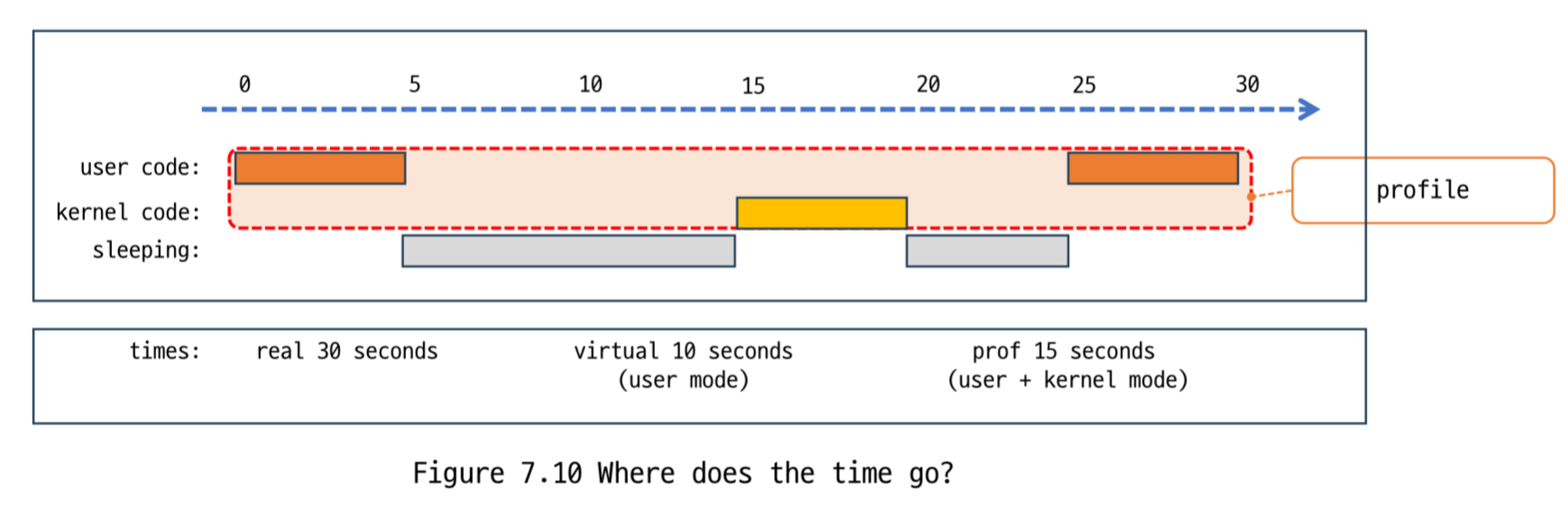 위의 그림은 하나의 프로그램이 실행을 시작한 후 30초 후에 종료되는 경우를 나타냄
- 성능 분석용
- Real timer
-
예시
#include <stdio.h>
#include <stdlib.h>
#include <sys/time.h>
#include <signal.h>
#include <unistd.h>

void count_down(int signum){
    static int num = 10;
    printf("%d..", num--);
    fflush(stdout);
    if (num < 0) {
        printf("DONE!\n");
        exit(EXIT_SUCCESS);
    }
}

int set_ticker(int n_msecs){
    struct itimerval new_timeset;
    long n_secs, n_usecs;

    n_secs = (long)(n_msecs / 1000); // 초기 타이머 값 0초
    n_usecs = (long)(n_msecs % 1000) * 1000L; // 반복 타이머 값 0.5초

    new_timeset.it_value.tv_sec = n_secs;
    new_timeset.it_value.tv_usec = n_usecs; // 시작 타이머

    new_timeset.it_interval.tv_sec = n_secs;
    new_timeset.it_interval.tv_usec = n_usecs; // 인터벌 타이머

    return setitimer(ITIMER_REAL, &new_timeset, NULL); // 타이머가 만료 될 때 마다 SIGALRM 시그널 발생
}

int main(){
    signal(SIGALRM, count_down); // SIGALRM 시그널이 발생할 때 마다 countdown
    if (set_ticker(1000) == -1) {
        perror(NULL);
        exit(EXIT_FAILURE);
    }
    else {
        while (1)
        pause();
    }
    return 0;
}
Signal Handling
signal
signal() 함수를 사용하면 하나의 시그널을 처리하는 것은 효과적이지만, 여러 signal이 도착했을 때는 문제가 될 수 있다.
실제로 signal을 연속적으로 발생 시키고, 그에 따른 handler가 실행되고 있는 중에는 signal이 무시됨.
sigaction
위와 같은 signal 함수의 문제로 인해 이를 대체할 함수가 있는데, 그것이 sigaction이다.
usage: sigaction( int signum, const struct sigaction *action, struct sigaction *prevaction )
sigaction은 함수명도, 구조체명도 다 sigaction이다.
struct sigaction
{
  /* use only one of these two */
  void (*sa_handler)(int); /* Old style:SIG_DFL, SIG_IGN, or function */
  void (*sa_sigaction)(int, siginfo_t *, void *); /* New style handler */
  sigset_t sa_mask; /* signals to block while handling */
  int sa_flags; /* enable various behaviors */
}
sa_sigaction을 사용하려면 sa_flags 멤버 변수에 SA_SIGINFO bit 값을 1로 설정하면 된다.
-
sa_flags: handler의 동작 방식을 제어
sa_flags 값 Meaning SA_RESETHAND signal 발생 handler 호출 후 signal을 SIG_DFL로 설정 SA_NODEFER 해당 signal을 처리하는 중에 같은 signal이 발생하면 kernel이 blocking 하지 못하게 설정 SA_RESTART signal handler에 의해 중지된 시스템 호출을 handler 처리 이후 자동 재시작 SA_SIGINFO 1이면 sa_sigaction, 0이면 sa_handler 수행 -
sa_mask
- handler에서 발생된 signal을 처리하는 동안 다른 signal을 차단할 지 설정
- 차단할 signal들의 집합을 설정
-
siginfo_t
- siginfo_t 구조체에는 signal number, id와 같은 여러 정보들이 담겨있음
- 그 중 si_code는 signal의 발생 원인이 담겨있음
이제 위의 내용을 다 사용한 예제 하나를 보자.
#include <stdio.h>
#include <stdlib.h>
#include <signal.h>
#include <unistd.h>
#include <pwd.h>

#define INPUTLEN 100

char *uid_to_name(uid_t uid){
    struct passwd *pw_ptr;
    static char numstr[10];
    if ((pw_ptr = getpwuid(uid)) == NULL){
        sprintf(numstr, "%d", uid);
        return numstr;
    }
    else
        return pw_ptr->pw_name;
}

void int_handler(int sig, siginfo_t *siginfo, void *context){
    printf("Error value %d, Signal code %d\n", siginfo->si_errno, siginfo->si_code);
    printf("Sending UID %-8s\n", uid_to_name(siginfo->si_code));
    printf("Called with signal %d\n", sig);

    sleep(sig);

    printf("done handling signal %d\n", sig);
}

int main(){
    struct sigaction new_handler;
    sigset_t blocked;
    char x[INPUTLEN];

    new_handler.sa_sigaction = int_handler;
    new_handler.sa_flags = SA_RESETHAND | SA_RESTART | SA_SIGINFO;

    sigemptyset(&blocked);
    sigaddset(&blocked, SIGQUIT);
    new_handler.sa_mask = blocked;

    if (sigaction(SIGINT, &new_handler, NULL) == -1) {
        perror("sigaction");
        exit(EXIT_FAILURE);
    } else {
        while (1) {
            fgets(x, INPUTLEN, stdin);
            printf("input: %s", x);
        }
    }
}
위의 코드를 빌드하고 ^C ^C, ^C ^\ 를 하면 각각 아래와 같은 결과가 출력된다.
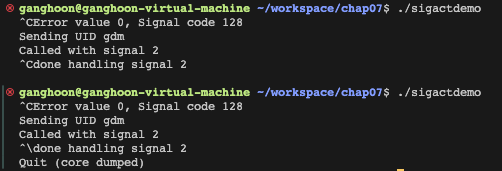
잘 보면 SIGINT 신호 발생 후에 int_handler를 수행하는 중에는 다른 signal은 blocking 됨을 볼 수 있다.
sigaddset(&blocked, SIGQUIT);
new_handler.sa_mask = blocked;
이 코드가 blocking 하는 역할을 하고,
new_handler.sa_flags = SA_RESETHAND | SA_RESTART | SA_SIGINFO;이 코드가 blocking 됐던 signal을 재시작하게 해준다.
Blocking Signals
-
sa_mask: signal handler에서 signal들을 blocking
-
sigprocmask: process에서 signal들을 blocking
예제를 보면 쉽게 이해할 수 있다.
#include <stdio.h>
#include <unistd.h>
#include <signal.h>

int main(void){
    sigset_t mask, prev;
    sigemptyset(&mask);
    sigaddset(&mask, SIGINT); //mask에 SIGINT 추가
    sigprocmask(SIG_BLOCK, &mask, &prev); // SIGINT blocking
    printf("SIGINT blocked.\n");
    for (int count = 3; count > 0; count--){
        printf("count %d\n", count);
        sleep(1);
    } // 이 반복문이 실행되는 동안은 SIGINT는 무시됨
    printf("SIGINT unblocked.\n");
    sigprocmask(SIG_SETMASK, &prev, NULL); // SIGINT unblocking(만약 SIGINT를 발생시켰었다면 여기서 종료
    sleep(5);
    printf("End\n");
    return 0; // 발생시킨 적이 없다면 여기서 종료
}
Kill
하나의 프로세스는 다른 동일한 user ID를 갖는 프로세스에게 signal을 전달할 수 있음
kill() 함수를 사용해서 다른 프로세스 종료 가능
간단한 예제를 보자.
killer.c
#include <stdio.h>
#include <signal.h>
#include <unistd.h>
int main(){
    int sig;
    int id;
    while (1){
        printf("Enter PID: ");
        scanf("%d", &id);
        printf("Enter signal: "); //SIGKILL: 9
        scanf("%d", &sig);
        printf("Send signal %d to %d\n", sig, id);
        kill(id, sig);
    }
    return 0;
}
killed_proc.c
#include <stdio.h>
#include <signal.h>
#include <unistd.h>
int main(){
    int count = 0;
    while (1)
    {
        printf("PID: %i\n", getpid());
        printf("Seconds in process: %i\n", count);
        sleep(2);
        count = +2;
    }
    return 0;
}
killed_proc을 실행 시킨 후 killer를 실행하면 올바른 PID를 입력하고 signal에 9를 입력하면 killed_proc이 종료되는 것을 볼 수 있다.