I/O and Pipe
I/O Redirection
리눅스 환경에도 당연하게도 표준 입출력이 존재합니다. 이는 데이터의 표준 스트림들(stdin, stdout, stderr)에 기반합니다.
데이터 흐름을 위한 세가지 표준 스트림이 존재합니다.
- standard input: 데이터 입력을 위한 스트림
- standard output: 결과 데이터를 위한 스트림
- standard error: 오류 메시지 스트림
위의 세가지 스트림은 각각 특정 file descriptor와 연결됩니다.
0, 1, 2는 이미 open 되어 자동으로 연결됩니다.
- read
- write
- write
Shell
shell에서 아래와 같은 명령어를 사용할 수 있습니다.
Output Redirection 사용
- who > userlist : stdout을 파일(userlist)과 연결
- sort < data : stdin을 파일과 연결(data가 sort의 stdin으로 전달)
- who | sort : who의 stdout과 sort의 stdin을 연결
File Descriptor
파일 디스크립터는 각 프로세스가 open한 파일들을 관리하는 배열의 index 역할을 합니다.
이 때 Lowest-available-file-descriptor rule이 적용되는데, 이는 파일을 open할 때, 배열에서 사용 가능한 가장 낮은 index와 연결되는 규칙입니다.
0, 1, 2는 원래 열려있기 때문에 이후에는 3, 4, 5 ... 이런 식으로 할당되는 것입니다. 하지만 여기서 연결이 끊겨 있는 디스크립터가 있다면 그것에 연결됩니다.
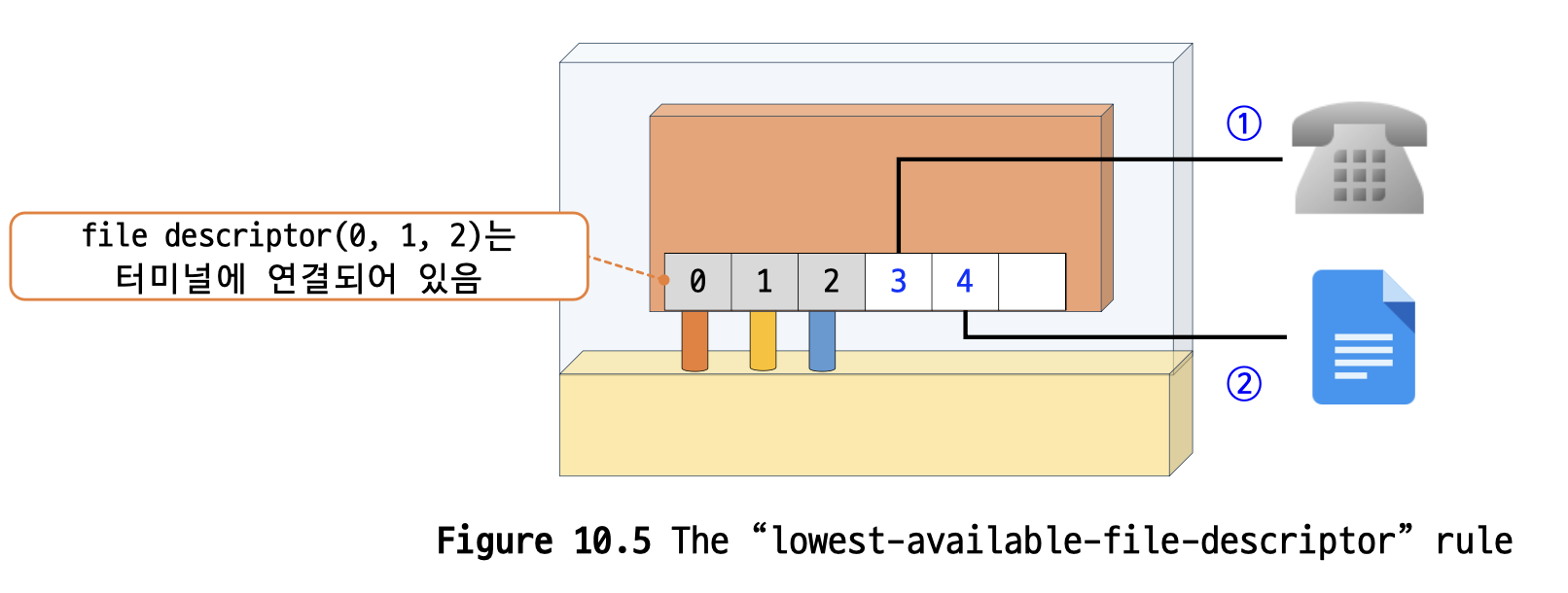
attach stdin to a file
표준 입력을 파일과 연결하는 3가지 방법이 있습니다.
- close-then-open
- open-close-dup-close
- open-dup2-close
close-then-open
이 방식은 원래 연결을 끊고, 새로운 파일에 연결하는 것 입니다.
- 프로세스 실행
- close(0) 호출: file descriptor 0이 사용 가능
- open(filename): 파일이 stdin(0)과 연결
간단한 실습 예제를 보겠습니다.
#include <stdlib.h>
#include <stdio.h>
#include <fcntl.h>
#include <unistd.h>

int main()
{
    int fd;
    char line[100];
    /* read and print three lines */
    fgets(line, 100, stdin);
    printf("%s", line);
    fgets(line, 100, stdin);
    printf("%s", line);
    fgets(line, 100, stdin);
    printf("%s", line);
    close(0);
    fd = open("/etc/passwd", O_RDONLY);
    if (fd != 0)
    {
        fprintf(stderr, "Can not open data as fd 0(fd=%d)\n", fd);
        exit(1);
    }
    fgets(line, 100, stdin);
    printf("%s", line);
    fgets(line, 100, stdin);
    printf("%s", line);
    fgets(line, 100, stdin);
    printf("%s", line);
    close(fd);
    return 0;
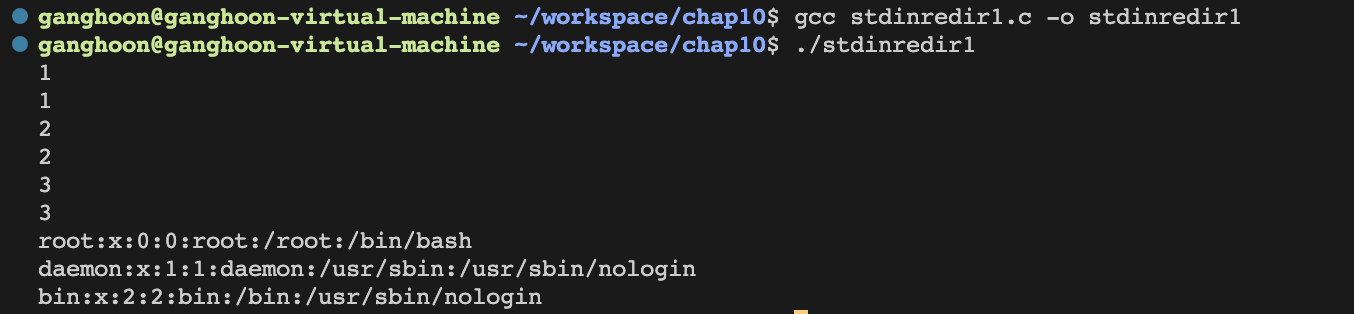
}
-
처음 3번의 fgets는 cmd stdin에서 입력을 받고 그대로 출력 합니다.
-
이 후에 close(0)을 통해 stdin과의 연결을 끊고, /etc/passwd와 연결합니다.
-
이후 fgets로 3줄을 읽어와서 출력합니다.
open-close-dup-close
이 방식은 먼저 파일을 열고, 0번을 끊은 뒤 열었던 파일을 복제 후 기존 파일의 연결을 끊는 방식입니다.
- fd = open(file): fd 값은 3
- close(0): stdin(사용 가능)
- newfd = dup(fd): 사용한 가장 낮은 fd(0)과 연결, newfd = 0
- close(fd): 3과의 연결 끊기
- dup/dup2
- dup(fd): fd를 사용 가능한 가장 낮은 fd와 연결
- dup2(oldfd, newfd): oldfd를 newfd와 연결
간단한 예제를 하나 보겠습니다. 실습 예제는 방법 2,3을 동시에 나타냅니다.
#include <stdlib.h>
#include <stdio.h>
#include <fcntl.h>
#include <unistd.h>

int main()
{
    int fd;
    int newfd;
    char line[100];
    /* read and print three lines */
    fgets(line, 100, stdin);
    printf("%s", line);
    fgets(line, 100, stdin);
    printf("%s", line);
    fgets(line, 100, stdin);
    printf("%s", line);
    fd = open("/etc/passwd", O_RDONLY); // 파일 열기

#ifdef CLOSE_DUP
    close(0);
    newfd = dup(fd); // 방법 2
#else
    newfd = dup2(fd, 0); // 방법 3
#endif
    if (newfd != 0)
    {
        fprintf(stderr, "Could not duplicate fd to 0\n");
        exit(1);
    }

    close(fd);

    fgets(line, 100, stdin);
    printf("%s", line);
    fgets(line, 100, stdin);
    printf("%s", line);
    fgets(line, 100, stdin);
    printf("%s", line);

    return 0;
}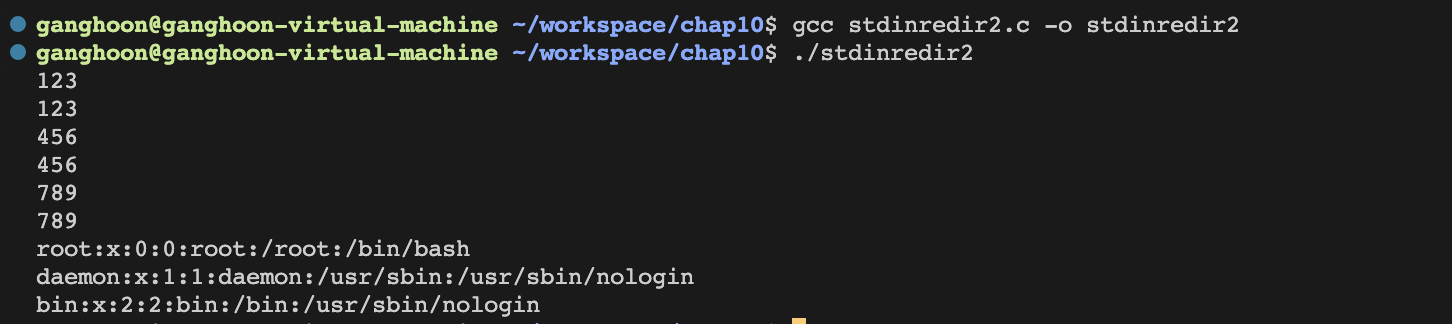
결과는 close-open 과 같지만, 과정은 조금 다른 것을 코드에서 확인 할 수 있습니다.
for Another Program
다른 프로그램에 redirecting 하는 예시를 보겠습니다.
who > userlist
라는 명령어의 동작 과정을 살펴보면 5가지의 과정을 거칩니다.
-
프로그램 실행: 프로세스 fork 전의 상황이며, 디스크립터 1은 stdout에 연결됨
-
부모 프로세스 fork: stdout이 자식 프로세스에 복사되고, 자식 프로세스는 1과의 연결을 끊습니다.
-
자식 프로세스의 userlist open: creat("userlist", mode)를 함으로써 끊겼던 stdout과의 연결을 userlist와 수행합니다.
-
자식 프로세스의 exec("who") 호출
-
동작 중인 shell의 코드와 데이터는 사라지고 who로 교체됨. who의 출력이 userlist에 저장.
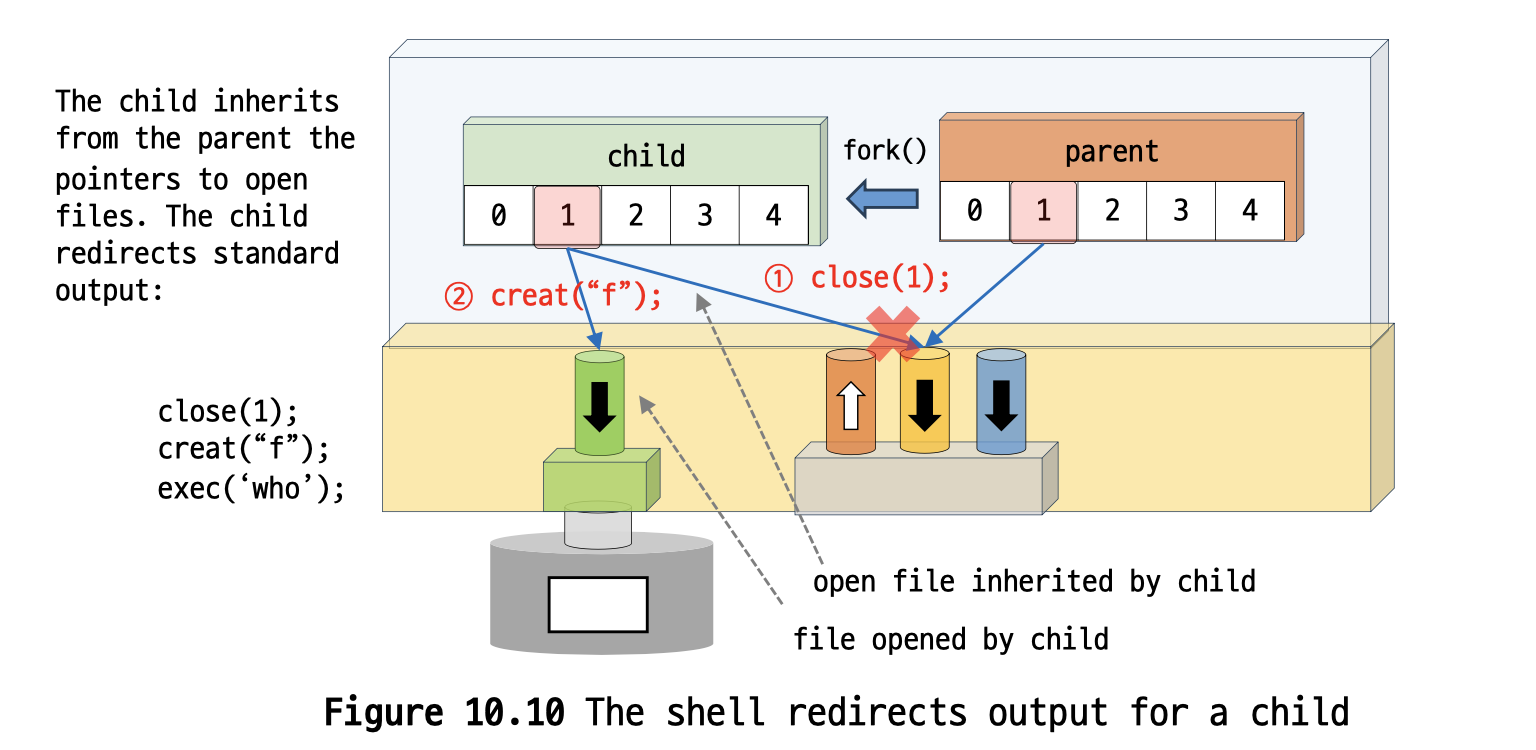
복잡해보이지만 생각보다 코드는 단순합니다.
#include <stdio.h>
#include <fcntl.h>
#include <stdlib.h>
#include <unistd.h>
#include <sys/wait.h>

int main()
{
    int pid;
    int fd;
    printf("About to run who into a file\n");
    /* create a new process or quit */
    if ((pid = fork()) == -1)
    {
        perror("fork");
        exit(1);
    }

    if (pid == 0)
    {
        close(1);
        fd = creat("userlist", 0644);
        execlp("who", "who", NULL);

        perror("execlp");
        exit(1);
    }

    if (pid != 0)
    {
        wait(NULL);
        printf("Done running who. Results in userlist\n");
    }
    return 0;
}
userlist 파일 안에 who의 결과가 잘 들어간 것을 볼 수 있습니다.
Pipe
pipe는 단방향의 데이터 채널이며, 읽기 전용(reading end)과 쓰기 전용(writing end)으로 구분합니다.
예를 들어 who|sort라는 pipe 명령어를 실행하면 who의 stdout이 sort의 stdin으로 들어가는 것입니다.
pipe를 만들 때는 pipe(int array[2]) 함수를 사용합니다.
- array[0]: 읽기 전용 파일 디스크립터 생성
- array[1]: 쓰기 전용 파일 디스크립터 생성
pipe 생성 과정은 이렇습니다.
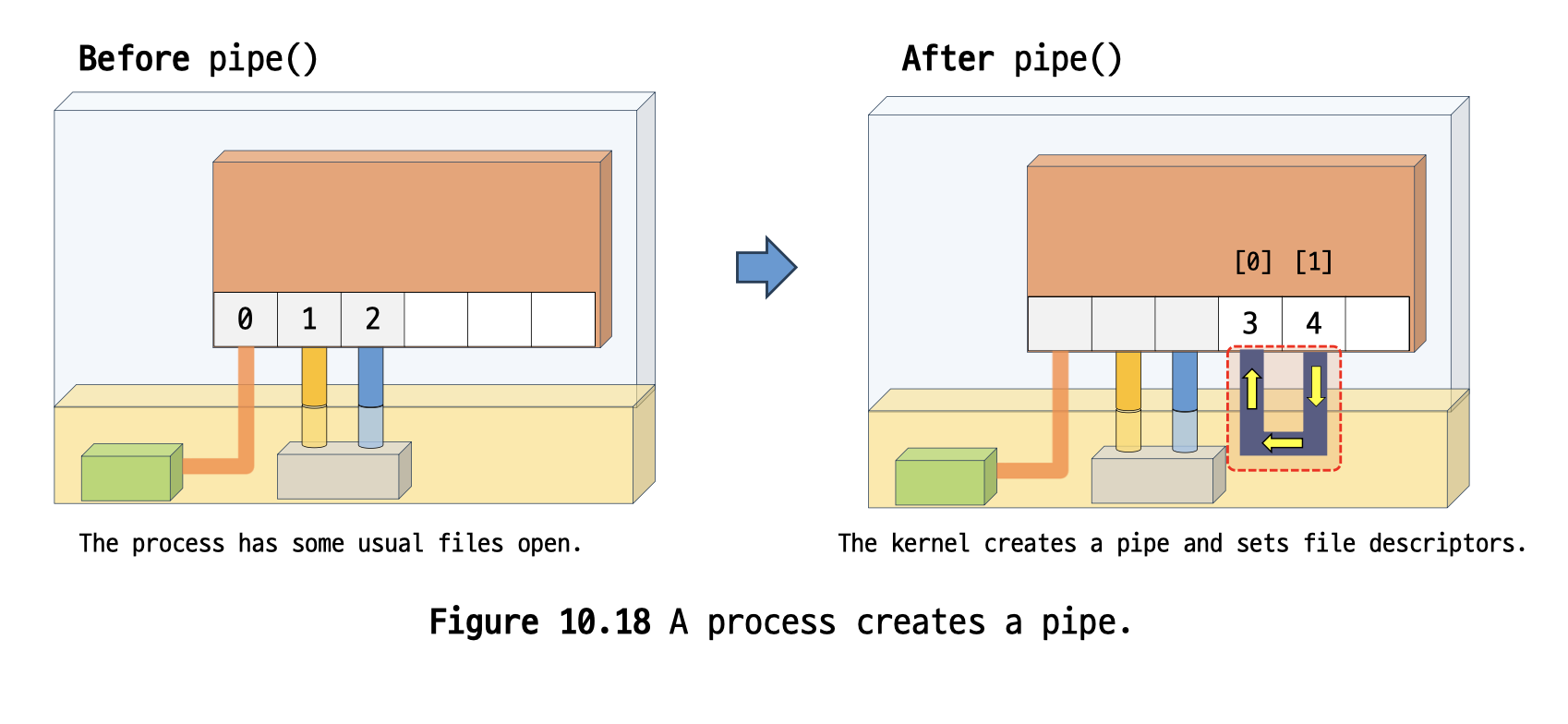
pipe를 공유하기 위해서 fork 함수를 사용합니다.
fork 이후에는 자식 프로세스가 pipe에 연결되고 부모, 자식 프로세스는 read, write가 가능합니다.
예제를 한 번 살펴보겠습니다.
#include <stdio.h>
#include <stdlib.h>
#include <string.h>
#include <unistd.h>
#define CHILD_MSG "Child: I want a cookie\n"
#define PAR_MSG "Parent: testing...\n"
#define oops(m, x) \
    {              \
        perror(m); \
        exit(x);   \
    }

int main()
{
    int pipe_fd[2];         // the pipe
    int len = 0;            // for write
    char buf[100] = {'\0'}; // for read
    int read_len = 0;
    if (pipe(pipe_fd) == -1)
    {
        oops("can not get a pipe", 1);
    }

    switch (fork())
    {
    case -1: // error
        oops("cannot fork", 2);
        break;
    case 0: // in the child
        len = strlen(CHILD_MSG);
        while (1)
        {
            if (write(pipe_fd[1], CHILD_MSG, len) != len)
                oops("write", 3);
            sleep(5);
        }
        break;
    default: // in the parent
        len = strlen(PAR_MSG);
        while (1)
        {
            if (write(pipe_fd[1], PAR_MSG, len) != len)
                oops("write", 4);
            sleep(1);
            read_len = read(pipe_fd[0], buf, 100);
            printf("read_len: %d\n", read_len);
            if (read_len <= 0)
                break;
            write(1, buf, read_len);
        }
    }
    return 0;
}-
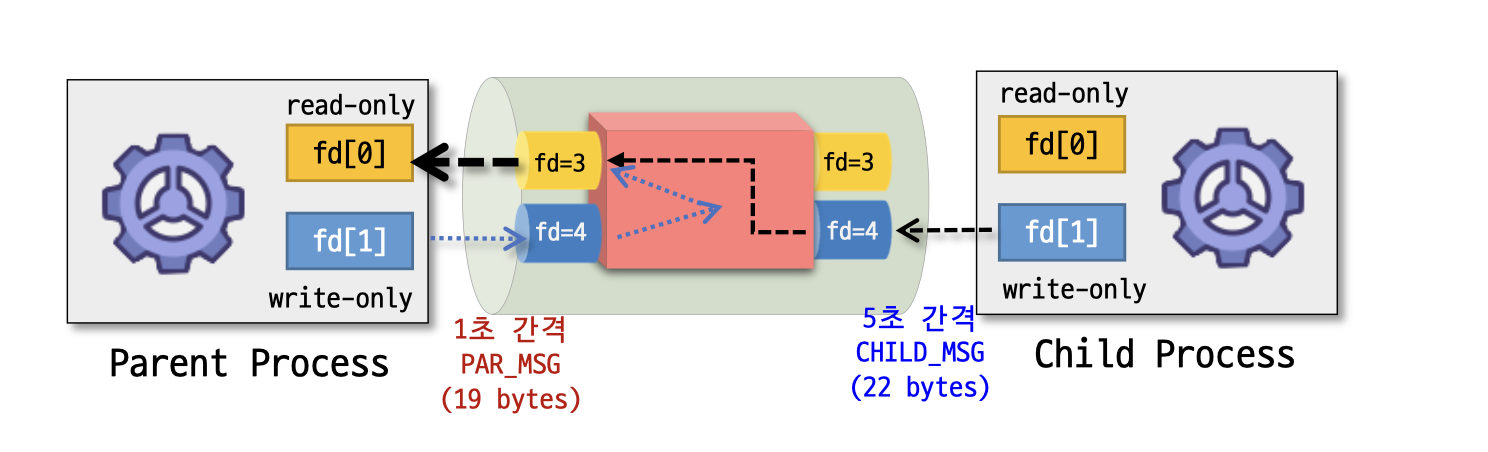
부모 프로세스의 3번과 4번을 연결하는 pipe를 하나 생성합니다.
-
fork를 통해 자식 프로세스를 생성하며, 이 자식 프로세스는 동일하게 3번과 4번을 연결하는 pipe를 갖습니다.
-
부모 프로세스의 fork 반환 값은 양수이기 때문에 default case를 무한 반복하며 1초에 한 번씩 문자열을 파이프에 저장하고, 파이프 버퍼에 있는 문자열 길이와 문자열을 출력합니다.
-
자식 프로세스의 fork 반환 값은 0이므로 case 0을 무한히 반복하며 5초에 한 번씩 문자열을 파이프에 저장합니다.
who | sort
마지막으로 who | sort를 구현함으로써 마무리 하겠습니다.
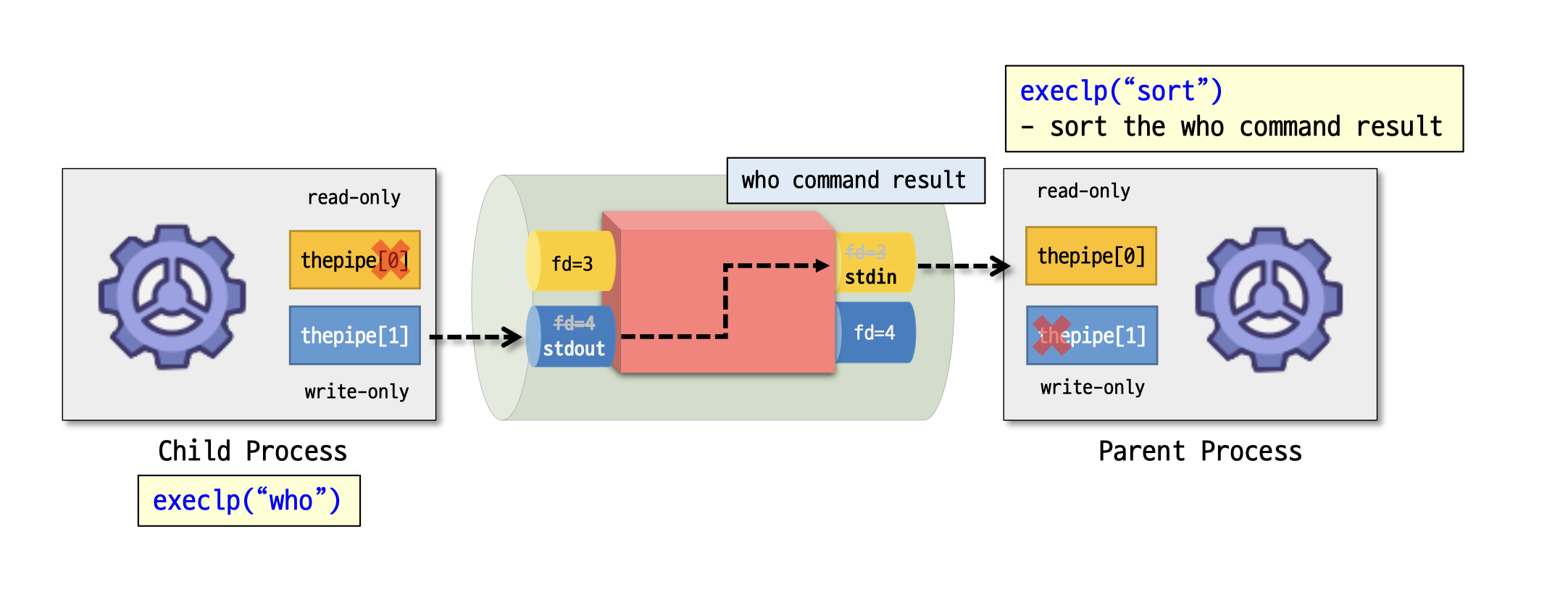
실행 방법을 그림으로 나타내면 이렇습니다.
코드까지 작성 후 설명을 덧붙이겠습니다.
#include <stdio.h>
#include <stdlib.h>
#include <unistd.h>
#define oops(m, x) { perror(m); exit(x); }
int main(int ac, char **av)
{
    int thepipe[2];
    int newfd, pid;
    if (ac != 3)
    {
        exit(1);
        fprintf(stderr, "usage: pipe cmd1 cmd2\n");
    }
    if (pipe(thepipe) == -1) // pipe 생성
        oops("Cannot get a pipe", 1);
    if ((pid = fork()) == -1) // 복제
        oops("Cannot fork", 2);
    if (pid > 0) // parent
    {
        close(thepipe[1]); // parent will exec av[2]
        // parent doesn't write to pipe
        if (dup2(thepipe[0], 0) == -1)
            oops("could npt redirect stdin", 3);
        close(thepipe[0]); // stdin is duped. close pipe
        printf("parent: execlp %s\n", av[2]);
        execlp(av[2], av[2], NULL);
        oops(av[2], 4);
    }
    else                   // child
    {                      // child execs av[1] and writes into pipe
        close(thepipe[0]); // child doesn't read from pipe
        if (dup2(thepipe[1], 1) == -1)
            oops("could not redirect stdout", 4);
        close(thepipe[1]); // stdout is duped, close pipe
        printf("child: execlp %s\n", av[1]);
        execlp(av[1], av[1], NULL);
        oops(av[1], 5);
    }
    return 0;
}-
pipe를 생성합니다.
-
pipe가 생성된 부모 프로세스를 복제합니다.
-
부모 프로세스에는 who의 결과값을 받아와서 sort하여 출력할 것이기 때문에 stdin과 연결을 진행해야 합니다.
- write_only 파이프 제거
- read_only 파이프 stdin에 복제
- read_only 파이프 제거(stdin만 부모 프로세스에 연결됨)
-
자식 프로세스는 who의 결과값을 부모 프로세스에 전달해야하므로 stdout과 연결을 진행합니다.
- read_only 파이프 제거
- write_only 파이프 stdout에 복제
- write_only 파이프 제거(stdout만 자식 프로세스에 연결됨)
-
이후 자식 프로세스에서는 who를 실행 후 전달, 부모 프로세스에서는 전달 받은 who 결과값을 sort 후 터미널에 출력합니다.

여기서 부모 프로세스의 printf는 실행되고 자식 프로세스의 printf는 실행되지 않는 것을 볼 수 있는데, 이는 부모 프로세스의 stdout은 여전히 터미널에 연결되어있고, 자식 프로세스의 stdout은 pipe에 연결되어있기 때문입니다.
자식 프로세스에서는 printf를 해도 파이프에만 남을 뿐 터미널에는 출력되지 않습니다.