20241122 D43 웹문서 특제작해보기
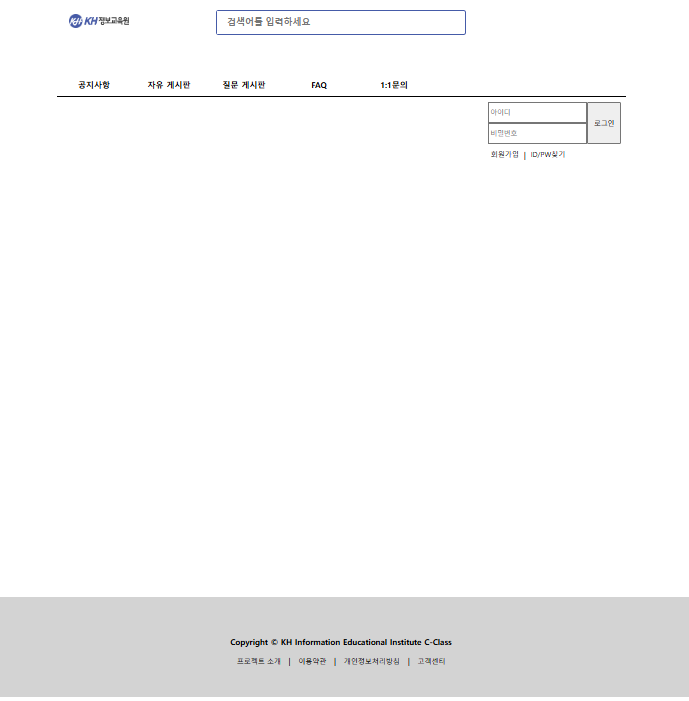
<!DOCTYPE html>
<html lang="en">
<head>
<meta charset="UTF-8">
<meta name="viewport" content="width=device-width, initial-scale=1.0">
<title>통합웹문서</title>
<link rel="stylesheet" href="css/union.css">
</head>
<body>
<div id="container">
<div id="header">
<div class="header1">
<a href="#">
<img src="../resources/image/kh_logo.jpg" id="home-logo">
</a>
</div>
<div class="header2">
<div>
<div>
<input type="search" name="" id="" placeholder="검색어를 입력하세요">
<i class="fa-solid fa-magnifying-glass" id="btn"></i>
</div>
</div>
</div>
<div class="header3"></div>
</div>
<ul id="nav">
<li>공지사항</li>
<li>자유 게시판</li>
<li>질문 게시판</li>
<li>FAQ</li>
<li>1:1문의</li>
</ul>
<div id="main">
<div></div>
<div>
<form id="login-form">
<div>
<div class="id-pw-area">
<input type="text" placeholder="아이디">
<input type="password" placeholder="비밀번호">
</div>
<div class="btn-area">
<input type="submit" value="로그인">
</div>
</div>
<div class="signup-find-area">
<a href="#">회원가입 </a> | <a href="#">ID/PW찾기</a>
</div>
</form>
</div>
</div>
</div>
<div class="footer">
<p>Copyright © KH Information Educational Institute C-Class </p>
<div>
<a href="#">프로젝트 소개 </a> <span>|</span>
<a href="#">이용약관</a> <span>|</span>
<a href="#">개인정보처리방침</a> <span>|</span>
<a href="#">고객센터</a>
</div>
</div>
</body>
</html>
/*.css 폴더에 작성한 레이아웃 속성*/
#container{
width: 1138px;
height: 1250px;
margin: 0 auto;
}
/* 헤더 */
div, li, ul, input, button{
box-sizing: border-box;
}
#header{
width: 100%;
height: 16%;
display: flex;
}
#header>div{
height: 100%;
}
#header>div:nth-child(1){
flex-basis: 15%;
}
#header>div:nth-child(2){
flex-basis: 70%;
}
#header>div:nth-child(3){
flex-basis: 15%;
}
.header1{
display: flex;
justify-content: center;
align-items: center;
}
#home-logo{
width: 120px;
}
.header2{
position: relative;
}
.header2>div{
width: 500px;
height: 50px;
position:absolute;
top: 0;
bottom: 0;
left: 0;
right: 0;
margin: auto;
}
.header2>div>div{
width: 100%;
height: 100%;
position: relative;
border: 1px solid #455ba8;
border-radius: 5px;
}
.header2>div>div>input{
width: 92%;
height: 100%;
border: none;
font-size: 18px;
font-weight: bold;
padding: 20px;
}
.header2 input:focus{
border: none;
outline: none;
/* 테두리보다 바깥에 존재하는 선 focus시 테두이를 표현하기 위해 사용*/
}
#btn{
position: absolute;
right: 0;
margin: 3%;
font-size: 1.2em;
color: #455ba8;
}
/*해더끝*/
/*네비시작*/
ul{
list-style-type: none;
padding: 0;
margin: 0;
}
#nav{
width: 100%;
display: flex;
height: 4%;
border-bottom: 2px solid;
}
#nav>li{
flex: 0 1 150px;
/* 팽창, 수축, 점유율*/
text-align: center;
line-height: 50px;
font-weight: bold;
}
#nav>li:hover{
background-color: #455ba8;
color: white;
border-radius: 5px;
}
/*네비끝*/
/*메인시작*/
#main{
width: 100%;
height: 80%;
display: flex;
}
#main>div:nth-child(1){
flex-basis: 75%;
}
#main>div:nth-child(2){
flex-basis: 25%;
}
#login-form{
height: 140px;
padding: 10px;
display: flex;
flex-direction: column;
}
#login-form>div:nth-child(1){
flex-basis: 60%;
}
#login-form>div{
display: flex;
}
.id-pw-area{
flex-basis: 75%;
}
.id-pw-area>input{
width: 100%;
height: 50%;
}
.id-pw-area>input:focus{
border: 2px solid #455ba8;
outline: none;
}
.btn-area{
flex-basis: 25%;
}
.btn-area>input{
width: 100%;
height: 100%;
}
.btn-area>input:hover{
background-color: #455ba8;
color: white;
cursor: pointer;
}
.signup-find-area{
margin-top: 10px;
padding-left: 5px;
}
.signup-find-area>a{
text-decoration: none;
color: black;
font-size: 14px;
}
.signup-find-area>a:nth-child(1){
padding-right: 10px;
}
.signup-find-area>a:nth-child(2){
padding-left: 10px;
}
/*메인끝*/
/*풋터시작*/
.footer{
height: 200px;
display: flex;
flex-direction: column;
align-items: center;
justify-content: center;
background-color: lightgray;
}
.footer>p{
font-weight: bold;
}
.footer a{
color: black;
text-decoration: none;
font-size: 14px;
}
.footer > div > span{
padding: 0 10px;
}
/*풋터끝*/
시멘틱 태그를 이용한 웹작성
- 시멘틱 태그 (Semantic Tag) : 의미 있는 태그
- 기존에 영역분할에 사용되었던 div spen등의 태그는 태그 이름만 봤을때
영역을 구분하는것외의 의미 파악이 힘들다 태그의 의미, 목적 부여하기 위해 id, class 속성을 이용해야했다
- 태그의 이름으로 구성의 역할을 나누고 웹에 대한 접근성 향상이 되는 시멘틱 태그가 추가
1 ★제공하는 태그
- header 태그 : 문서의 제목, 머릿말 영역
- foorer : 문서의 하단, 꼬리말 등을 작성하는 영역
- nav : 나침반의 역할(다른페이지, 사이트 이동) 의 링크 작성
- main : 현재 문서의 주된 콘텐츠가 오는 영역
- section : 구역 구분을 위한 태그
- article(작은 토막) : 본문과 독립된 콘텐츠를 작성하는 영역
- aside : 사이드바 광고를 작성하는 영역