1. 리플렉션이란
- 자바의 리플렉션(Reflection)은 클래스, 인터페이스, 메소드들을 찾을 수 있고, 객체를 생성하거나 변수를 변경할 수 있고 메소드를 호출할 수도 있습니다.
- Reflection은 자바에서 기본적으로 제공하는 API입니다.
- 테스트 코드 작성을 위해 private 변수를 변경할 때 리플렉션을 사용할 수 있습니다.
- 3rd party 라이브러리를 사용하고 이것의 private 변수를 변경하고 싶을 때 리플렉션을 사용하면 라이브러리 코드 변경없이 값을 변경할 수 있습니다.
- Reflection은 다음과 같은 정보를 가져올 수 있습니다. 이 정보를 가져와서 객체를 생성하거나 메소드를 호출하거나 변수의 값을 변경할 수 있습니다.
- Class
- Constructor
- Method
- Field
2. 리플렉션 사용법
사전 준비 클래스
- 상속되는 클래스에서의 리플렉션을 확인하기 위해 Parent 클래스를 만든다.
- str1 변수와 method1, 3 가 private 임을 주의하자.
package reflectiontest;

public class Parent {
	private String str1 = "1";
	public String str2 = "2";

	public Parent() {
	}

	private void method1() {
		System.out.println("method1");
	}

	public void method2(int n) {
		System.out.println("method2: " + n);
	}

	private void method3() {
		System.out.println("method3");
	}
}
- 상속되는 클래스에서의 리플렉션을 확인하기 위해 Child 클래스를 만든다.
- cstr2 변수와 method5가 private 임을 주의하자.
package reflectiontest;

public class Child extends Parent{
	public String cstr1 = "1";
	private String cstr2 = "2";

	public Child() {
	}

	private Child(String str) {
		cstr1 = str;
	}

	public int method4(int n) {
		System.out.println("method4: " + n);
		return n;
	}

	private int method5(int n) {
		System.out.println("method5: " + n);
		return n;
	}
}
- static 변수와 메소드에서 어떻게 사용되는지 확인하기 위해 StaticExample 클래스를 만든다.
package reflectiontest;

public class StaticExample {
	public static String EXAMPLE = "Example";


	public static int getSquare(int num) {
		System.out.println("Get square: " + num * num);
		return num * num;
	}
}
사용법
package reflectiontest;

import java.lang.reflect.Constructor;
import java.lang.reflect.Field;
import java.lang.reflect.InvocationTargetException;
import java.lang.reflect.Method;

public class Test {
	public static void main(String[] args) throws
		ClassNotFoundException,
		NoSuchMethodException,
		NoSuchFieldException,
		InvocationTargetException,
		IllegalAccessException, InstantiationException {
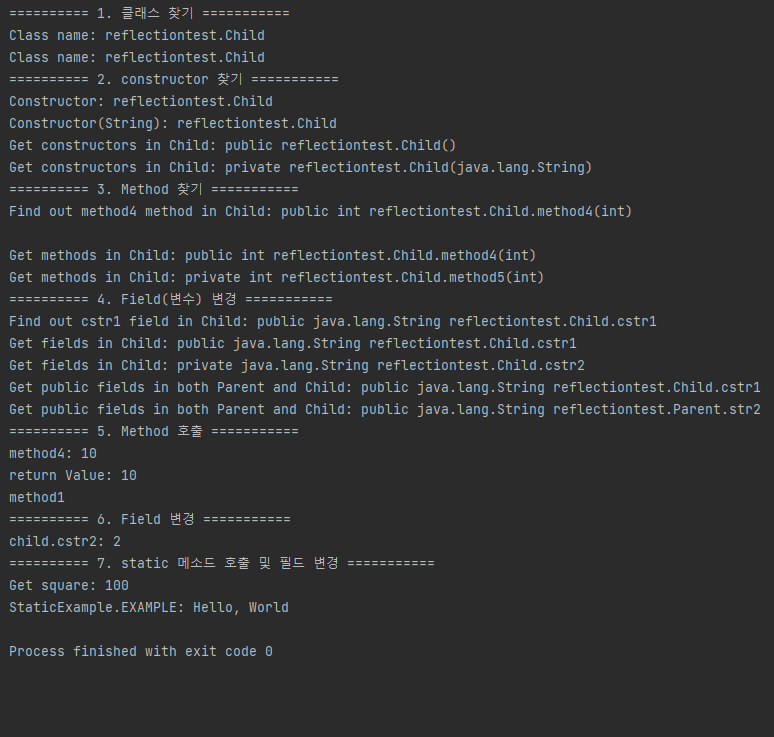
		// 1. class 찾기
		// IDE 에서 클래스를 알고 있는 전제시 사용가능
		Class<Child> clazz = Child.class;
		System.out.println("Class name: " + clazz.getName());

		// 클로새를 참조할 수 없고, 이름만 알고 있을대 클래스 정보를 가져오는 방법
		Class<?> clazz2 = Class.forName("reflectiontest.Child");
		System.out.println("Class name: " + clazz2.getName());

		// 2. constructor 찾기
		// 클래스로부터 생성자를 가져오는 코드. getDeclaredConstructor()는 인자 없는 생성자를 가져온다
		Class<?> clazz3 = Class.forName("reflectiontest.Child");
		Constructor<?> constructor = clazz3.getDeclaredConstructor();
		System.out.println("Constructor: " + constructor.getName());

		// getDeclaredConstructor(Param)에 인자를 넣으면 그 타입과 일치하는 생성자를 찾습니다.
		Constructor<?> constructor2 = clazz3.getDeclaredConstructor(String.class);
		System.out.println("Constructor(String): " + constructor2.getName());

		// getDeclaredConstructors()는 클래스의 private, public 등의 모든 생성자를 리턴해 줍니다.
		// + getConstructors()는 public 생성자만 리턴해준다.
		Class<?> clazz4 = Class.forName("reflectiontest.Child");
		Constructor<?>[] constructors = clazz4.getDeclaredConstructors();
		for (Constructor<?> cons : constructors) {
			System.out.println("Get constructors in Child: " + cons);
		}

		// 3. Method 찾기
		// getDeclaredMethod()의 인자로 메소드의 파라미터 정보를 넘겨주면 일치하는 것을 찾아준다
		Class<?> clazz5 = Class.forName("reflectiontest.Child");
		Method method1 = clazz5.getDeclaredMethod("method4", int.class);
		System.out.println("Find out method4 method in Child: " + method1);
		System.out.println();

		// 인자가 없는 메소드라면 다음과 같이 null을 전달하면 된다
		// getDeclaredMethod()으로 메소드를 찾을 때 존재하지 않는다면 NoSuchMethodException 에러 발생
		// Method method2 = clazz.getDeclaredMethod("method4", null); - 에러 발생

		// 인자가 두개 이상이라면 아래처럼 클래스 배열을 만들어서 인자를 넣어주면 된다.
		Class<?> clazz6 = Class.forName("reflectiontest.Child");
		Class partypes[] = new Class[1];
		partypes[0] = int.class;
		Method method2 = clazz.getDeclaredMethod("method4", partypes);

		// 모든 메소드를 찾으려면, 다음과 같이 getDeclaredMethods를 사용하면 된다.
		// 공통적으로 함수 이름에 Declared가 들어가면 Super 클래스의 정보는 가져오지 않는다.
		Class<?> clazz7 = Class.forName("reflectiontest.Child");
		Method methods[] = clazz7.getDeclaredMethods();
		for (Method method : methods) {
			System.out.println("Get methods in Child: " + method);
		}

		// 4. Field(변수) 변경
		// getDeclaredField()에 전달된 이름과 일치하는 Field를 찾아준다
		Class<?> clazz8 = Class.forName("reflectiontest.Child");
		Field field = clazz8.getDeclaredField("cstr1");
		System.out.println("Find out cstr1 field in Child: " + field);

		// 객체에 선언된 모든 Field를 찾으려면 getDeclaredFields()를 사용하면 된다.
		// 위에서 말한 것처럼 상속받은 객체의 정보는 찾아주지 않는다.
		Class<?> clazz9 = Class.forName("reflectiontest.Child");
		Field fields[] = clazz9.getDeclaredFields();
		for (Field fi : fields) {
			System.out.println("Get fields in Child: " + fi);
		}

		// 상속받은 클래스를 포함한 public Field를 찾으려면 getFields()를 사용하면 된다.
		Class<?> clazz10 = Class.forName("reflectiontest.Child");
		Field fields2[] = clazz10.getFields();
		for (Field fi : fields2) {
			System.out.println("Get public fields in both Parent and Child: " + fi);
		}

		// 5. Method 호출
		// 클래스로부터 메소드 정보를 가져와 객체의 메소드를 호출할 수 있다.
		// 메서드 객체를 생성했다면, Method.invoke() 로 호출할 수 있다.
		// 첫번째 인자는 호출하려는 객체이고, 두번째 인자는 전달할 파라미터 값이다.
		Child child = new Child();
		Class<?> clazz11 = Class.forName("reflectiontest.Child");
		Method method3 = clazz11.getDeclaredMethod("method4", int.class);
		int returnValue = (int)method3.invoke(child, 10);
		System.out.println("return Value: " + returnValue);

		// Parent 의 method1() 을 호출해보자. 이 메소드는 인자가 없다
		// 따라서 getDeclaredMethod() 에 인자를 입력하지 않아도 () 된다
		// getDeclaredMethod 는 상속받은 클래스의 정보를 가져오지 않기 때문에 Parent 에 대한 클래스 정보를 가져와야 한다.
		Child child2 = new Child();
		Class clazz12 = Class.forName("reflectiontest.Parent");
		Method method4 = clazz12.getDeclaredMethod("method1");
		method4.setAccessible(true); // 해당설정을 통해 private 메소드에 접근가능하다
		method4.invoke(child2);

		// 6. Field 변경
		// 클래스로부터 변수 정보를 가져와 객체의 변수를 변경할 수 있다.
		// 다음 코드는 cstr1 변수를 가져와서 값을 출력하고 변경한 뒤 다시 출력하는 예제이다.
		Child child3 = new Child();
		Class clazz13 = Class.forName("reflectiontest.Child");
		Field fld2 = clazz13.getDeclaredField("cstr2");
		fld2.setAccessible(true); // private 변수 수정을 위해 setAccessible 사용
		fld2.set(child3, "cstr2");
		System.out.println("child.cstr2: " + fld2.get(child));

		// 7. static 메소드 호출 및 필드 변경
		// 메소드 정보를 가져오는 방법은 위와 동일하다.
		// 다만 호출할 때 invoke()로 객체를 전달하는 인자에 null을 넣어주시면 된다.
		// 그럼 static 메소드가 호출됩니다.
		Class clazz14 = Class.forName("reflectiontest.StaticExample");
		Method method = clazz14.getDeclaredMethod("getSquare", int.class);
		method.invoke(null, 10);

		// static 필드 정보를 가져오는 방법도 위와 동일하다.
		// 대신 set() 또는 get()함수를 사용할 때 객체로 전달되는 인자에 null을 넣어야 한다.
		Class clazz15 = Class.forName("reflectiontest.StaticExample");
		Field fld = clazz15.getDeclaredField("EXAMPLE");
		fld.set(null, "Hello, World");
		System.out.println("StaticExample.EXAMPLE: " + fld.get(null));
	}
}
3. 리플렉션의 단점
- 컴파일타임 타입 검사가 주는 이점을 하나도 누릴 수 없다.
- 예외검사도 마찬가지며 존재하지 않는 혹은 접근할 수 없는 메서드 호출시 런타임 오류가 발생한다.
- 리플렉션을 이용하면 코드가 지저분하고 장황해진다.
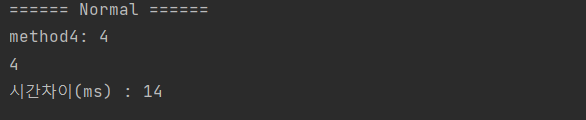
- 성능이 떨어진다.
- 속도가 굉장히 느리다.
package reflectiontest;

public class Test4 {
	public static void main(String[] args) {
		// normal
		System.out.println("====== Normal ======");
		long beforeTime = System.currentTimeMillis();

		Child child = new Child();
		System.out.println(child.method4(4));

		long afterTime = System.currentTimeMillis();
		long secDiffTime = (afterTime - beforeTime);
		System.out.println("시간차이(ms) : "+secDiffTime);

	}
}
package reflectiontest;

import java.lang.reflect.Constructor;
import java.lang.reflect.InvocationTargetException;
import java.lang.reflect.Method;

public class Test3 {
	public static void main(String[] args) throws
		ClassNotFoundException,
		NoSuchMethodException,
		InvocationTargetException,
		IllegalAccessException, InstantiationException {
		// reflection
		System.out.println("====== reflection ======");
		long beforeTime2 = System.currentTimeMillis();

		Class<?> clazz = Class.forName("reflectiontest.Child");
		Constructor<?> cons = clazz.getDeclaredConstructor();
		Child child2 = (Child) cons.newInstance();
		Method method = clazz.getDeclaredMethod("method4", int.class);
		System.out.println((int)method.invoke(child2, 4));

		long afterTime2 = System.currentTimeMillis();
		long secDiffTime2 = (afterTime2 - beforeTime2);
		System.out.println("시간차이(ms) : " + secDiffTime2);

	}
}

- 굉장히는 아니고 좀 느리다.
- 확실히 코드가 지저분하다
- 코드 분석 도구나 외존관계 주입 프레임워크는 리플렉션을 써야하지만 명백한 단점으로 인해 사용을 줄이고 있다고 한다.
- 리플렉션은 아주 제한된 형태로만 사용해야 그 단점을 피하고 이점만 취할 수 있다.
4. 리플렉션의 제한된 사용
    public static void main(String[] args) {
        // 클래스 이름을 Class 객체로 변환
        Class<? extends Set<String>> cl = null;
        try {
            cl = (Class<? extends Set<String>>) // 비검사 형변환
                    Class.forName(treeSet);
        } catch (ClassNotFoundException e) {
            fatalError("클래스를 찾을 수 없습니다.");
        }

        // 생성자를 얻는다.
        Constructor<? extends Set<String>> cons = null;
        try {
            cons = cl.getDeclaredConstructor();
        } catch (NoSuchMethodException e) {
            fatalError("매개변수 없는 생성자를 찾을 수 없습니다.");
        }

        // 집합의 인스턴스를 만든다.
        Set<String> s = null;
        try {
            s = cons.newInstance();
        } catch (IllegalAccessException e) {
            fatalError("생성자에 접근할 수 없습니다.");
        } catch (InstantiationException e) {
            fatalError("클래스를 인스턴스화 할 수 없습니다.");
        } catch (InvocationTargetException e) {
            fatalError("생성자가 예외를 던졌습니다." + e.getCause());
        } catch (ClassCastException e) {
            fatalError("Set을 구현하지 않은 클래스입니다.");
        }

        // 생성한 집합을 사용한다.
        s.addAll(Arrays.asList(strings));
        System.out.println(s);
    }

    private static void fatalError(String msg) {
        System.err.println(msg);
        System.exit(1);
}- 이펙티브 자바에 있는 예시이다.
- 리플렉션은 인스턴스 생성에만 쓰고, 이렇게 만든 인스턴스는 인터페이스나 상위 클래스로 참조해 사용하라고 한다.
- 해당 코드에서 2가지 단점이 보인다.
- 런타임에 총 6가지 에러를 던진다. 물론 ReflectiveOperationException 으로 상위로 1번에 잡을 수도 있다.
- 생성자 1줄이면 되는게 리플렉션 쓸려고 하니 25줄로 늘어났다.
- 비검사 형변환 경고가 뜨지만 Class<? extends Set> 의 사용을 통해 Set 을 구현하지 않더라고 성공을 하게 된다.
5. 정리
- 리플렉션은 런타임에 존재하지 않을 수도 있는다른 클래스, 메서드, 필드와의 의존성을 관리할 때 적합하다.
- 버전이 여러개 존재하는 외부 패키지를 다룰 때 유용하다.
- 단 런타임 시 접근하려는 클래스나 메서드가 존재하지 않을 수 있음을 감안해야한다.
- 하지만 단점도 많기에 되도록 객체 생성에만 사용하고, 적절한 인터페이스나 상위 클래스로 형변환해 사용하자.
참고 사이트

클린코드 지향