Texture
GeometryHelper에서 사각형뿐만 아니라 큐브, 구, 그리드 형식의 텍스처를 만들기
1. 사각형 만들기 (uv활용)
우선 쉐이더부터 수정하기
Texture.fx
matrix world;
matrix view;
matrix projection;
Texture2D Texture0; // 사용할 Texture2D 만들기


struct VertexInput
{
    float4 position : POSITION;
    float2 uv : TEXCOORD; // color -> uv 교체
};

struct VertexOutput
{
    float4 position : SV_POSITION; //SV : System Value
    float2 uv : TEXCOORD;
};

VertexOutput VS(VertexInput input)
{
    VertexOutput output;
    output.position = mul(input.position, world);
    output.position = mul(output.position, view);
    output.position = mul(output.position, projection);


    output.uv = input.uv;


    return output;
}

SamplerState Sampler0; // 사용할 Sampler 만기르

float4 PS(VertexOutput input) : SV_TARGET
{
    return Texture0.Sample(Sampler0, input.uv); // Sampler와 uv 활용
}

RasterizerState FillModeWireframe
{
    FillMode = Wireframe;
    CullMode = None;
};


technique11 T0
{
    pass P0
    {
        SetVertexShader( CompileShader( vs_5_0, VS() ) );
        SetPixelShader( CompileShader( ps_5_0, PS() ) );
    }
    pass P1
    {
        SetRasterizerState(FillModeWireframe);
        SetVertexShader( CompileShader( vs_5_0, VS() ) );
        SetPixelShader( CompileShader( ps_5_0, PS() ) );
    }
}
2. Geometryhelper
VertexColorData가 아닌 VertexTextureData를 사용하는 CreateQuad()생성
GeometryHelper.h
#pragma once

#include "Geometry.h"
#include "VertexData.h"

class GeometryHelper
{
public:
	// 사각형, 큐브, 구형, 그리드, 실린더 등 기본 도형 생성 헬퍼 함수들
	static void CreateQuad(shared_ptr<Geometry<VertexColorData>> geometry, Color color);

	static void CreateQuad(shared_ptr<Geometry<VertexTextureData>> geometry);
	static void CreateCube(shared_ptr<Geometry<VertexTextureData>> geometry);
	static void CreateSphere(shared_ptr<Geometry<VertexTextureData>> geometry);
	static void CreateGrid(shared_ptr<Geometry<VertexTextureData>> geometry);
};
GeometryHelper.cpp
void GeometryHelper::CreateQuad(shared_ptr<Geometry<VertexTextureData>> geometry)
{
	vector<VertexTextureData> vtx;
	vtx.resize(4);

	// 1 3
	// 0 2


	vtx[0].position = Vec3(-0.5f, -0.5f, 0.f);
	vtx[0].uv = Vec2(0.f, 1.f);
	vtx[1].position = Vec3(-0.5f, 0.5f, 0.f);
	vtx[1].uv = Vec2(0.f, 0.f);
	vtx[2].position = Vec3(0.5f, -0.5f, 0.f);
	vtx[2].uv = Vec2(1.f, 1.f);
	vtx[3].position = Vec3(0.5f, 0.5f, 0.f);
	vtx[3].uv = Vec2(1.f, 0.f);
	geometry->SetVertices(vtx);

	vector<uint32> idx = { 0, 1, 2, 2, 1, 3 };
	geometry->SetIndices(idx);
}
3. TextureDemo
- 이전 CameraDemo에서 Texture변수를 저장할 shared_ptr변수를 만들고, RESOURCE에 텍스처를 로드하고, Texture변수에 가져오기
- SRV를 통해서 쉐이더의 Texture0과 연결시키기
TextureDemo.h
#pragma once
#include "IExecute.h"
#include "Geometry.h"

class GameObject;

class TextureDemo : public IExecute
{
public:
	void Init() override;
	void Update() override;
	void Render() override;


	shared_ptr<Shader> _shader;

	// Object
	shared_ptr<Geometry<VertexTextureData>> _geometry;
	shared_ptr<VertexBuffer> _vertexBuffer;
	shared_ptr<IndexBuffer> _indexBuffer;
	Matrix _world = Matrix::Identity;


	// Camera
	shared_ptr<GameObject> _camera;

	shared_ptr<Texture> _texture;
};
TextureDemo.cpp
#include "pch.h"
#include "05. TextureDemo.h"
#include "GeometryHelper.h"
#include "Camera.h"
#include "GameObject.h"
#include "CameraScript.h"
#include "Transform.h"
#include "Texture.h"

void TextureDemo::Init()
{
	_shader = make_shared<Shader>(L"04.Texture.fx");

	_geometry = make_shared<Geometry<VertexTextureData>>();
	GeometryHelper::CreateQuad(_geometry);


	_vertexBuffer = make_shared<VertexBuffer>();
	_vertexBuffer->Create(_geometry->GetVertices());

	_indexBuffer = make_shared<IndexBuffer>();
	_indexBuffer->Create(_geometry->GetIndices());

	_camera = make_shared<GameObject>();
	_camera->GetOrAddTransform();
	_camera->AddComponent(make_shared<Camera>());
	_camera->AddComponent(make_shared<CameraScript>());
	_camera->GetTransform()->SetPosition(Vec3(0, 0, -2.f));

	_texture = RESOURCES->Load<Texture>(L"Veigar", L"../Resources/Textures/Veigar.jpg");

	//RESOURCES->Get<Texture>(L"Veigar")->GetComPtr();
}

void TextureDemo::Update()
{
	_camera->Update();
}

void TextureDemo::Render()
{
	//
	_shader->GetMatrix("world")->SetMatrix((float*)&_world);
	_shader->GetMatrix("view")->SetMatrix((float*)&Camera::S_MatView);
	_shader->GetMatrix("projection")->SetMatrix((float*)&Camera::S_MatProjection);
	_shader->GetSRV("Texture0")->SetResource(_texture->GetComPtr().Get());


	uint32 stride = _vertexBuffer->GetStride();
	uint32 offset = _vertexBuffer->GetOffset();

	DC->IASetVertexBuffers(0, 1, _vertexBuffer->GetComPtr().GetAddressOf(), &stride, &offset);

	DC->IASetIndexBuffer(_indexBuffer->GetComPtr().Get(), DXGI_FORMAT_R32_UINT, 0);


	//_shader->Draw(0, 0, 3);
	_shader->DrawIndexed(0, 0, _indexBuffer->GetCount(), 0, 0);
}
결과
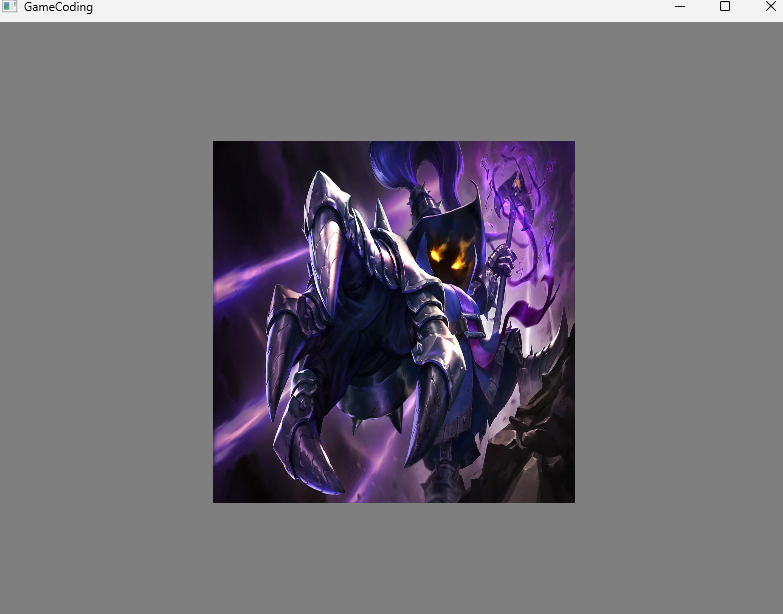
Geometry
큐브
- 큐브는 정점으로 보면 8개, uv로 보게되면 한면에4개씩 24개가 존재
TextureDemo.cpp에서GeometryHelper::CreateCube(geometry)로 변경
GeometryHelper.cpp
void GeometryHelper::CreateCube(shared_ptr<Geometry<VertexTextureData>> geometry)
{
	//x y z
	float w2 = 0.5f;
	float h2 = 0.5f;
	float d2 = 0.5f;

	vector<VertexTextureData> vtx(24);

	// 앞면
	vtx[0]  = VertexTextureData{ Vec3(-w2, -h2, -d2), Vec2(0.0f, 1.0f) };
	vtx[1]  = VertexTextureData{ Vec3(-w2, +h2, -d2), Vec2(0.0f, 0.0f) };
	vtx[2]  = VertexTextureData{ Vec3(+w2, +h2, -d2), Vec2(1.0f, 0.0f) };
	vtx[3]  = VertexTextureData{ Vec3(+w2, -h2, -d2), Vec2(1.0f, 1.0f) };
	// 뒷면
	vtx[4]  = VertexTextureData{ Vec3(-w2, -h2, +d2), Vec2(1.0f, 1.0f) };
	vtx[5]  = VertexTextureData{ Vec3(+w2, -h2, +d2), Vec2(0.0f, 1.0f) };
	vtx[6]  = VertexTextureData{ Vec3(+w2, +h2, +d2), Vec2(0.0f, 0.0f) };
	vtx[7]  = VertexTextureData{ Vec3(-w2, +h2, +d2), Vec2(1.0f, 0.0f) };
	// 윗면
	vtx[8]  = VertexTextureData{ Vec3(-w2, +h2, -d2), Vec2(0.0f, 1.0f) };
	vtx[9]  = VertexTextureData{ Vec3(-w2, +h2, +d2), Vec2(0.0f, 0.0f) };
	vtx[10] = VertexTextureData{ Vec3(+w2, +h2, +d2), Vec2(1.0f, 0.0f) };
	vtx[11] = VertexTextureData{ Vec3(+w2, +h2, -d2), Vec2(1.0f, 1.0f) };
	// 아랫면
	vtx[12] = VertexTextureData{ Vec3(-w2, -h2, -d2), Vec2(1.0f, 1.0f) };
	vtx[13] = VertexTextureData{ Vec3(+w2, -h2, -d2), Vec2(0.0f, 1.0f) };
	vtx[14] = VertexTextureData{ Vec3(+w2, -h2, +d2), Vec2(0.0f, 0.0f) };
	vtx[15] = VertexTextureData{ Vec3(-w2, -h2, +d2), Vec2(1.0f, 0.0f) };
	// 왼쪽면
	vtx[16] = VertexTextureData{ Vec3(-w2, -h2, +d2), Vec2(0.0f, 1.0f) };
	vtx[17] = VertexTextureData{ Vec3(-w2, +h2, +d2), Vec2(0.0f, 0.0f) };
	vtx[18] = VertexTextureData{ Vec3(-w2, +h2, -d2), Vec2(1.0f, 0.0f) };
	vtx[19] = VertexTextureData{ Vec3(-w2, -h2, -d2), Vec2(1.0f, 1.0f) };
	// 오른쪽면
	vtx[20] = VertexTextureData{ Vec3(+w2, -h2, -d2), Vec2(0.0f, 1.0f) };
	vtx[21] = VertexTextureData{ Vec3(+w2, +h2, -d2), Vec2(0.0f, 0.0f) };
	vtx[22] = VertexTextureData{ Vec3(+w2, +h2, +d2), Vec2(1.0f, 0.0f) };
	vtx[23] = VertexTextureData{ Vec3(+w2, -h2, +d2), Vec2(1.0f, 1.0f) };

	geometry->SetVertices(vtx);

	vector<uint32> idx(36);

	// 앞면
	idx[0] = 0; idx[1] = 1; idx[2] = 2;
	idx[3] = 0; idx[4] = 2; idx[5] = 3;
	// 뒷면
	idx[6] = 4; idx[7] = 5; idx[8] = 6;
	idx[9] = 4; idx[10] = 6; idx[11] = 7;
	// 윗면
	idx[12] = 8; idx[13] = 9; idx[14] = 10;
	idx[15] = 8; idx[16] = 10; idx[17] = 11;
	// 아랫면
	idx[18] = 12; idx[19] = 13; idx[20] = 14;
	idx[21] = 12; idx[22] = 14; idx[23] = 15;
	// 왼쪽면
	idx[24] = 16; idx[25] = 17; idx[26] = 18;
	idx[27] = 16; idx[28] = 18; idx[29] = 19;
	// 오른쪽면
	idx[30] = 20; idx[31] = 21; idx[32] = 22;
	idx[33] = 20; idx[34] = 22; idx[35] = 23;

	geometry->SetIndices(idx);
}
결과
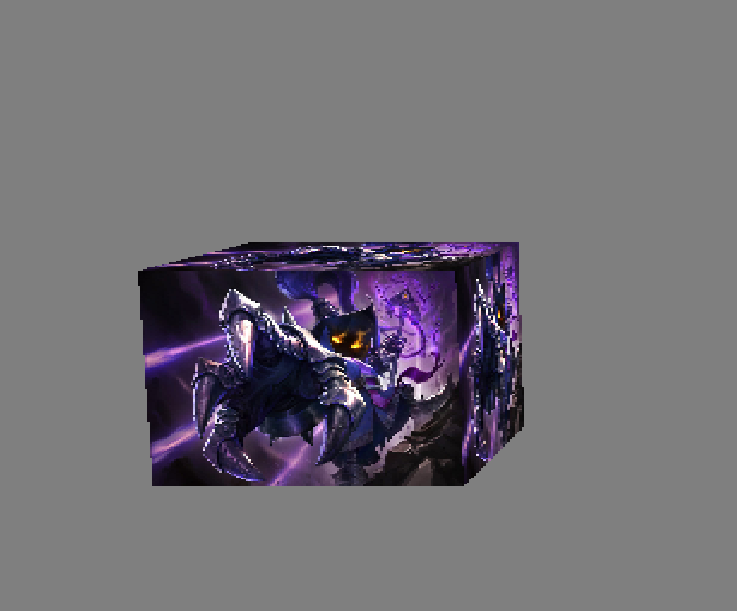
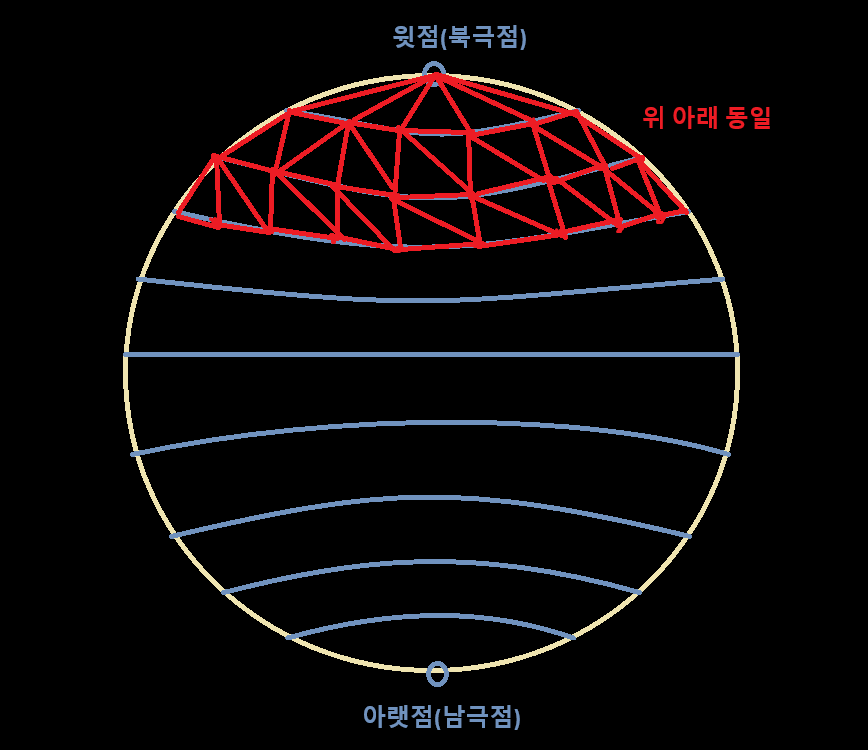
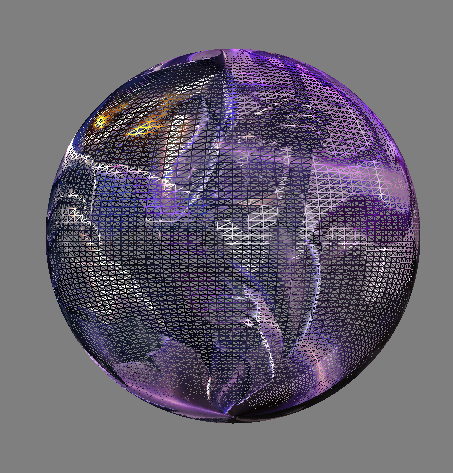
구체
- 윗점(북극점), 아랫점(남극점)에서 가로로 자르고, 자른 부분에서 각도마다 정점을 잡아주고, 정점끼리 삼각형 형식으로 연결
void GeometryHelper::CreateSphere(shared_ptr<Geometry<VertexTextureData>> geometry)
{
	//옵션, 인자로 받아도되는 것
	float radius = 0.5f; // 구의 반지름
	uint32 stackCount = 100; // 가로 분할
	uint32 sliceCount = 100; // 세로 분할

	vector<VertexTextureData> vtx;

	VertexTextureData v;

	// 북극
	//제일 위가 0,0
	v.position = Vec3(0.0f, radius, 0.0f);
	v.uv = Vec2(0.5f, 0.0f);
	vtx.push_back(v);

	//가로 분할
	float stackAngle = XM_PI / stackCount;
	//도넛 분할
	float sliceAngle = XM_2PI / sliceCount;

	float deltaU = 1.f / static_cast<float>(sliceCount);
	float deltaV = 1.f / static_cast<float>(stackCount);

	// 고리마다 돌면서 정점을 계산한다 (북극/남극 단일점은 고리가 X)
	for (uint32 y = 1; y <= stackCount - 1; ++y)
	{
		float phi = y * stackAngle;

		// 고리에 위치한 정점
		for (uint32 x = 0; x <= sliceCount; ++x)
		{
			float theta = x * sliceAngle;

			v.position.x = radius * sinf(phi) * cosf(theta);
			v.position.y = radius * cosf(phi);
			v.position.z = radius * sinf(phi) * sinf(theta);

			v.uv = Vec2(deltaU * x, deltaV * y);

			vtx.push_back(v);
		}
	}

	// 남극
	v.position = Vec3(0.0f, -radius, 0.0f);
	v.uv = Vec2(0.5f, 1.0f);
	vtx.push_back(v);

	geometry->SetVertices(vtx);

	vector<uint32> idx(36);

	// 북극 인덱스
	for (uint32 i = 0; i <= sliceCount; ++i)
	{
		//  [0]
		//   |  \
		//  [i+1]-[i+2]
		idx.push_back(0);
		idx.push_back(i + 2);
		idx.push_back(i + 1);
	}

	// 몸통 인덱스
	//도넛 - 도넛 사이 삼각형
	uint32 ringVertexCount = sliceCount + 1;
	for (uint32 y = 0; y < stackCount - 2; ++y)
	{
		for (uint32 x = 0; x < sliceCount; ++x)
		{
			//  [y, x]-[y, x+1]
			//  |		/
			//  [y+1, x]
			idx.push_back(1 + (y)*ringVertexCount + (x));
			idx.push_back(1 + (y)*ringVertexCount + (x + 1));
			idx.push_back(1 + (y + 1) * ringVertexCount + (x));
			//		 [y, x+1]
			//		 /	  |
			//  [y+1, x]-[y+1, x+1]
			idx.push_back(1 + (y + 1) * ringVertexCount + (x));
			idx.push_back(1 + (y)*ringVertexCount + (x + 1));
			idx.push_back(1 + (y + 1) * ringVertexCount + (x + 1));
		}
	}

	// 남극 인덱스
	uint32 bottomIndex = static_cast<uint32>(vtx.size()) - 1;
	uint32 lastRingStartIndex = bottomIndex - ringVertexCount;
	for (uint32 i = 0; i < sliceCount; ++i)
	{
		//  [last+i]-[last+i+1]
		//  |      /
		//  [bottom]
		idx.push_back(bottomIndex);
		idx.push_back(lastRingStartIndex + i);
		idx.push_back(lastRingStartIndex + i + 1);
	}

	geometry->SetIndices(idx);
}
결과
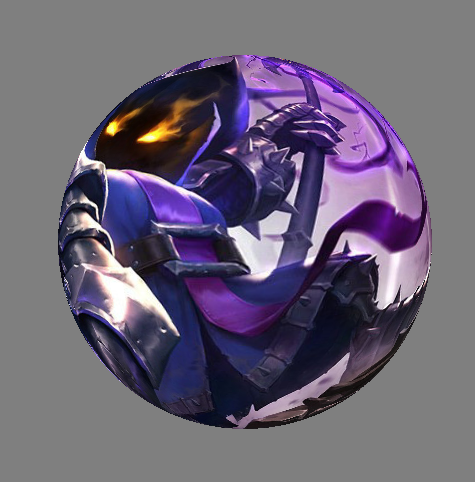
그리드
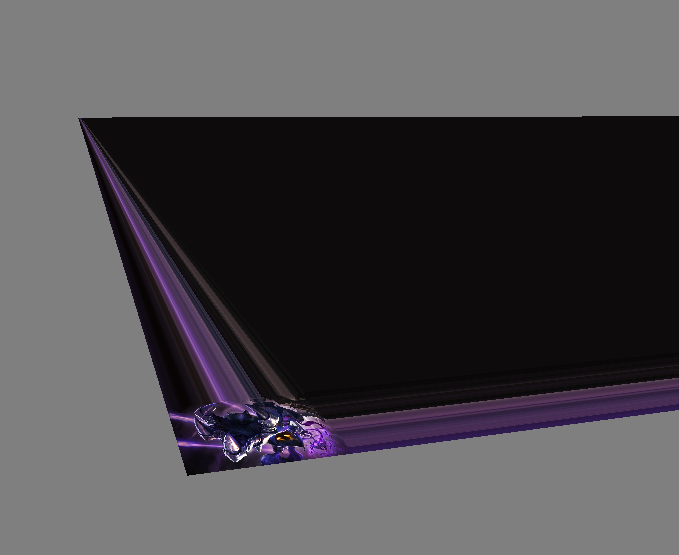
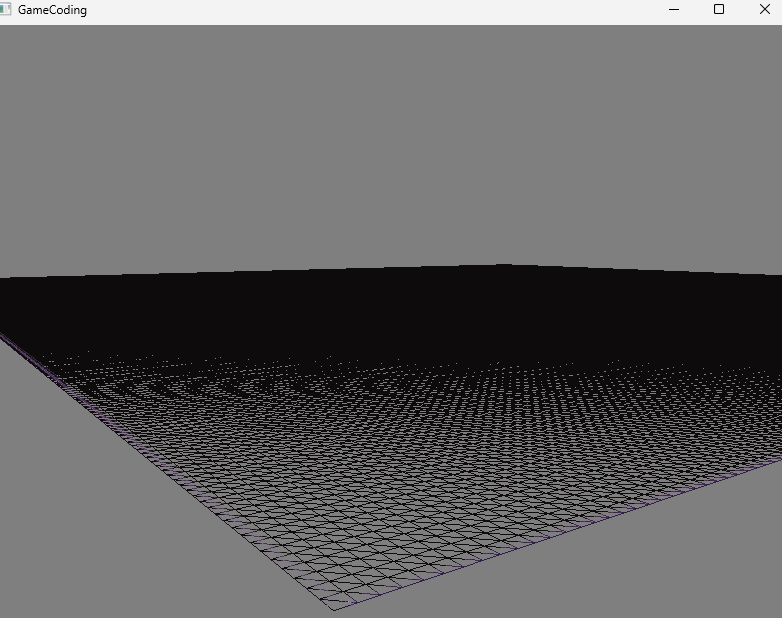
- 격자 모양의 판으로 나중에 지형을 만들때 사용
- 각 선 사이를 정점으로 나눠줄때 정점의 수는 지정해주는 수보다 하나 많게 설정
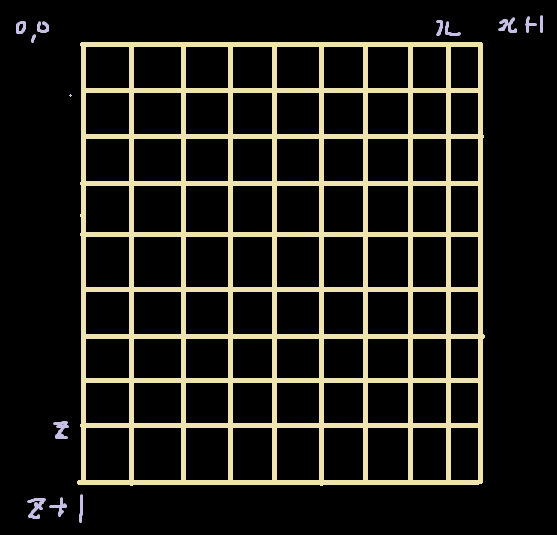
void GeometryHelper::CreateGrid(shared_ptr<Geometry<VertexTextureData>> geometry, int32 sizeX, int32 sizeZ)
{
	vector<VertexTextureData> vtx;

	for (int32 z = 0; z < sizeZ + 1; z++)
	{
		for (int32 x = 0; x < sizeX + 1; x++)
		{
			VertexTextureData v;
			v.position = Vec3(static_cast<float>(x), 0, static_cast<float>(z));
			v.uv = Vec2(static_cast<float>(x), static_cast<float>(z));

			vtx.push_back(v);
		}
	}

	geometry->SetVertices(vtx);

	vector<uint32> idx;

	for (int32 z = 0; z < sizeZ; z++)
	{
		for (int32 x = 0; x < sizeX; x++)
		{
			//  [0]
			//   |	\
			//  [2] - [1]
			idx.push_back((sizeX + 1) * (z + 1) + (x));
			idx.push_back((sizeX + 1) * (z)+(x + 1));
			idx.push_back((sizeX + 1) * (z)+(x));
			//  [1] - [2]
			//   	\  |
			//		  [0]
			idx.push_back((sizeX + 1) * (z)+(x + 1));
			idx.push_back((sizeX + 1) * (z + 1) + (x));
			idx.push_back((sizeX + 1) * (z + 1) + (x + 1));
		}
	}

	geometry->SetIndices(idx);
}
결과
Sampling
- 텍스터 샘플링
- Filter : 확대/ 축소 시 텍스처 픽셀을 어떻게 보간할 것인지 결정
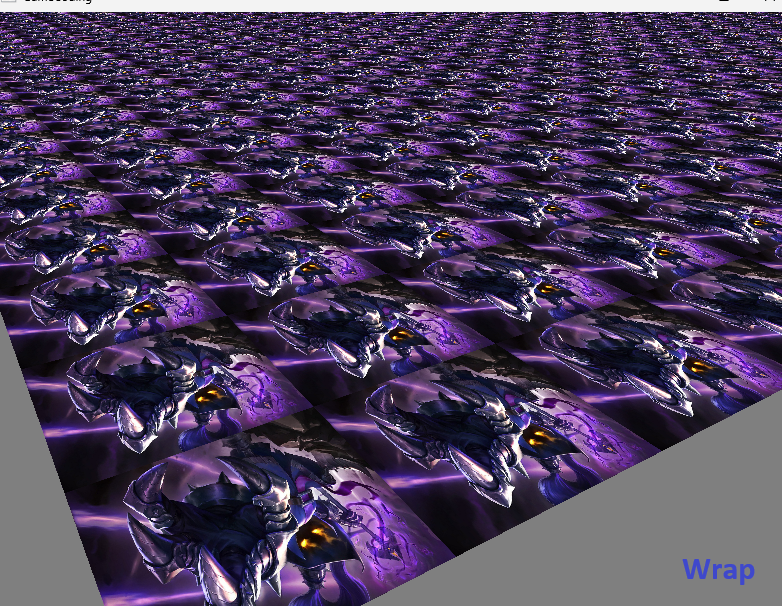
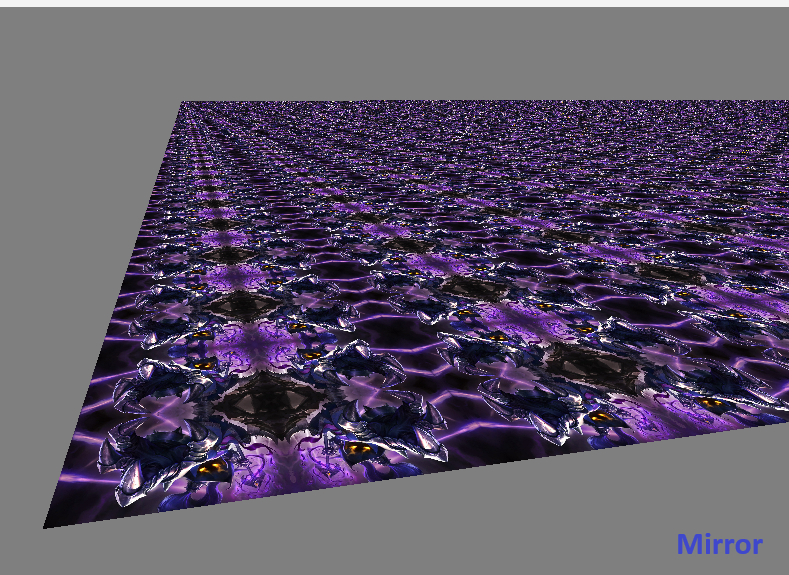
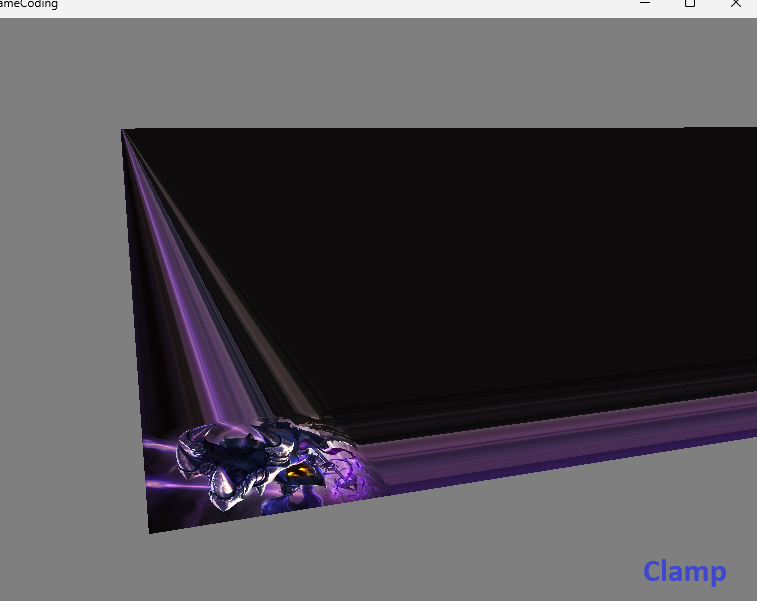
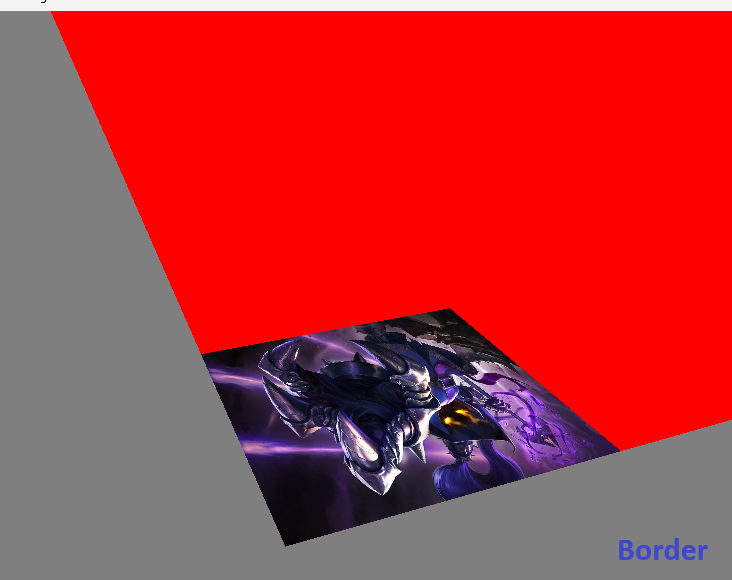
- Address : 텍스처 좌표가 0~1 범위를 벗어날 때 어떻게 처리할 것인지 결정
Sampler.fx
matrix world;
matrix view;
matrix projection;
Texture2D Texture0;
uint Address;

struct VertexInput
{
    float4 position : POSITION;
    float2 uv : TEXCOORD;
};

struct VertexOutput
{
    float4 position : SV_POSITION; //SV : System Value
    float2 uv : TEXCOORD;
};

VertexOutput VS(VertexInput input)
{
    VertexOutput output;
    output.position = mul(input.position, world);
    output.position = mul(output.position, view);
    output.position = mul(output.position, projection);


    output.uv = input.uv;


    return output;
}

// Filter   : 확대/ 축소 시 텍스처 픽셀을 어떻게 보간할 것인지 결정
// Address  : 텍스처 좌표가 0~1 범위를 벗어날 때 어떻게 처리할 것인지 결정

SamplerState Sampler0;

SamplerState SamplerAddressWrap
{
    AddressU = Wrap;
    AddressV = Wrap;
};

SamplerState SamplerAddressMirror
{
    AddressU = Mirror;
    AddressV = Mirror;
};

SamplerState SamplerAddressClamp
{
    AddressU = Clamp;
    AddressV = Clamp;
};

SamplerState SamplerAddressBorder
{
    AddressU = Border;
    AddressV = Border;
    BorderColor = float4(1.0f, 0.0f, 0.0f, 1.0f); // Red
};

float4 PS(VertexOutput input) : SV_TARGET
{
    if (Address == 0)
    {
        return Texture0.Sample(SamplerAddressWrap, input.uv);
    }
    if (Address == 1)
    {
        return Texture0.Sample(SamplerAddressMirror, input.uv);
    }
    if (Address == 2)
    {
        return Texture0.Sample(SamplerAddressClamp, input.uv);
    }
    if (Address == 3)
    {
        return Texture0.Sample(SamplerAddressBorder, input.uv);
    }

    return Texture0.Sample(Sampler0, input.uv);
}


technique11 T0
{
    pass P0
    {
        SetVertexShader( CompileShader( vs_5_0, VS() ) );
        SetPixelShader( CompileShader( ps_5_0, PS() ) );
    }
}
SlamperDemo.cpp
void SamplerDemo::Render()
{
	_shader->GetMatrix("world")->SetMatrix((float*)&_world);
	_shader->GetMatrix("view")->SetMatrix((float*)&Camera::S_MatView);
	_shader->GetMatrix("projection")->SetMatrix((float*)&Camera::S_MatProjection);
	_shader->GetSRV("Texture0")->SetResource(_texture->GetComPtr().Get());

	// Sampler Address 설정
	enum ADDRESS_VALUE
	{
		ADDRESS_WRAP = 0,
		ADDRESS_MIRROR = 1,
		ADDRESS_CLAMP = 2,
		ADDRESS_BORDER = 3
	};

	_shader->GetScalar("Address")->SetInt(ADDRESS_BORDER);


	uint32 stride = _vertexBuffer->GetStride();
	uint32 offset = _vertexBuffer->GetOffset();

	DC->IASetVertexBuffers(0, 1, _vertexBuffer->GetComPtr().GetAddressOf(), &stride, &offset);
	DC->IASetIndexBuffer(_indexBuffer->GetComPtr().Get(), DXGI_FORMAT_R32_UINT, 0);

	_shader->DrawIndexed(0, 0, _indexBuffer->GetCount(), 0, 0);
}
결과
- Wrap - 모든 텍스처가 동일하게
- Mirror - 이미지가 대칭형식으로
- Clamp - 기본값
- Border - 텍스쳐 한번을 제외하고는 설정한 색상으로 유지
참고 강의

게임 클라이언트 프로그래머 준비중 (공부 및 기록용)