인스턴싱과 드로우콜
드로우콜
- GPU에 "이 메쉬를 이 쉐이더와 이 머터리얼로 그려줘"라고 요청하는 명령 한 번을 의미. 즉, CPU-> GPU로 그리기 명령을 전달하는 단위
- CPU가 GPU에게
Draw()명령을 보낼 때마다 발생한다. - 예를 들어, 나무 1000개를 각각 개별로
Draw()하면 1000번의 드로우콜이 생긴다. - 매번 CPU가 상태(쉐이더, 텍스처, 버퍼 등)를 세팅하고 명령을 보내야 되기에, 드로우콜이 많아지면 CPU 부하가 급격히 늘어나면서 성능 저하가 발생한다. (GPU는 빠른데 CPU가 병목이 되는 이유 중 하나)
- 코드 예시
_shader->DrawIndexed(0, _pass, mesh->indexBuffer->GetCount(), 0 ,0);드로우콜은 GPU 성능보다는 CPU → GPU 명령 전달 오버헤드로 인해 병목을 만든다.
인스턴싱
- 같은 메쉬를 여러 번 그릴 때, 한 번의 드로우 콜로 여러개를 동시에 렌더링 하는 기술. 즉, "같은 모델을 100개 그려줘, 단 위치만 다르게"와 같은 상황에서 사용
- 같은 모델 (예: 같은 나무, 같은 병사)를 여러 개 렌더링할 때, 하나의 드로우콜로 여러 인스턴스를 GPU에서 반복 처리한다.
- 예시 코드
// instanceCount에 1000을 넣게 되면, 1000개의 동일 모델을 한 번에 렌더링
deviceContext->DrawIndexedInstanced(indexCount, instanceCount, 0, 0, 0);- GPU는 각 인스턴스의 행렬(Transform Matrix), 색상, 인덱스, 오프셋 등만 다르게 적용해준다. ->이러한 데이터들은 Instance Buffer로 따로 넘겨준다.
정리
| 항목 | 드로우콜 | 인스턴싱 |
|---|---|---|
| 호출 | 횟수 | 객체마다 1번 |
| CPU 오버헤드 | 높음 | 낮음 |
| GPU 처리 | 동일 | 동일 모델을 반복 |
| 사용 예시 | 전부 다른 모델 | 같은 모델 다수 |
| 예시 | 1000개의 다른 나무 | 같은 나무 1000그루 |
- 언리얼에서는
InstancedStaticMeshComponent나HierarchicalInstancedStaticMeshComponent가 이 기능을 활용- DirectX에서는
DrawInstanced()나DrawIndexedInstanced()로 구현- 단, 머티리얼이나 셰이더가 다르면 인스턴싱 불가 (즉, 동일 렌더 상태여야 함).
실습
기본 셋팅(Demo, 쉐이더 생성)
InstancingDemo
- 100개의 구체를 랜덤한 위치에 그려주기
InstancingDemo.h
#pragma once
#include "IExecute.h"

class InstancingDemo : public IExecute
{

public:
	void Init() override;
	void Update() override;
	void Render() override;


private:
	shared_ptr<Shader> _shader;
	shared_ptr<GameObject> _camera;
	vector<shared_ptr<GameObject>> _objs;

};
InstancingDemo.cpp
#include "pch.h"
#include "InstancingDemo.h"
#include "Camera.h"
#include "CameraScript.h"
#include "Material.h"
#include "MeshRenderer.h"


void InstancingDemo::Init()
{
	RESOURCES->Init();
	_shader = make_shared<Shader>(L"19.Instancing.fx");

	// Camera
	_camera = make_shared<GameObject>();
	_camera->GetOrAddTransform()->SetPosition(Vec3{ 0.f, 0.f, -10.f });
	_camera->AddComponent(make_shared<Camera>());
	_camera->AddComponent(make_shared<CameraScript>());

	// Material
	{
		shared_ptr<Material> material = make_shared<Material>();
		material->SetShader(_shader);
		auto texture = RESOURCES->Load<Texture>(L"Veigar", L"../Resources/Textures/veigar.jpg");
		material->SetDiffuseMap(texture);
		MaterialDesc& desc = material->GetMaterialDesc();
		desc.ambient = Vec4(1.f);
		desc.diffuse = Vec4(1.f);
		desc.specular = Vec4(1.f);
		RESOURCES->Add(L"Veigar", material);
	}

	for (int32 i = 0; i < 100; i++)
	{
		auto obj = make_shared<GameObject>();
		obj->GetOrAddTransform()->SetPosition(Vec3(rand() % 10, 0, rand() % 10));
		obj->AddComponent(make_shared<MeshRenderer>());
		{
			obj->GetMeshRenderer()->SetMaterial(RESOURCES->Get<Material>(L"Veigar"));
		}
		{
			auto mesh = RESOURCES->Get<Mesh>(L"Sphere");
			obj->GetMeshRenderer()->SetMesh(mesh);
		}

		_objs.push_back(obj);
	}


	RENDER->Init(_shader);
}

void InstancingDemo::Update()
{
	_camera->Update();

	RENDER->Update();

	{
		LightDesc lightDesc;
		lightDesc.ambient = Vec4(0.f);
		lightDesc.diffuse = Vec4(0.f);
		lightDesc.specular = Vec4(0.f);
		lightDesc.direction = Vec3(1.f, 0.f, 1.f); // right, look
		RENDER->PushLightData(lightDesc);
	}

	for (auto& obj : _objs)
	{
		obj->Update();
	}
}

void InstancingDemo::Render()
{
}
Instaning.fx
#include "00.Global.fx"
#include "00.Light.fx"

struct VS_In
{
    float4 position : POSITION;
    float2 uv : TEXCOORD;
    float3 normal : NORMAL;
    float3 tangent : TANGENT;
    // INSTANCING
};


struct VS_OUT
{
    float4 position : SV_POSITION;
    float3 worldPosition : POSITION1;
    float2 uv : TEXCOORD;
    float3 normal : NORMAL;
};

VS_OUT VS(VS_In input)
{
    VS_OUT output;

    output.position = mul(input.position, W);
    output.worldPosition = output.position;
    output.position = mul(output.position, VP);
    output.uv = input.uv;
    output.normal = input.normal;

	return output;
}

float4 PS(VS_OUT input) : SV_TARGET
{
	float4 color = DiffuseMap.Sample(LinearSampler, input.uv);
	return color;
}

technique11 T0
{
    PASS_VP(P0, VS, PS)
};
효율적인지 확인하기 위한 로그
Game.cpp
- 단순하게 프레임을 찍기 위한 코드
void Game::Update()
{
	TIME->Update();
	INPUT->Update();
	ShowFps();

	GRAPHICS->RenderBegin();

	GUI->Update();

	_desc.app->Update();
	_desc.app->Render();

	GUI->Render();

	GRAPHICS->RenderEnd();
}

void Game::ShowFps()
{
	uint32 fps = GET_SINGLE(TimeManager)->GetFps();

	WCHAR text[100] = L"";
	::wsprintf(text, L"FPS : %d", fps);

	::SetWindowText(_desc.hWnd, text);
}
결과
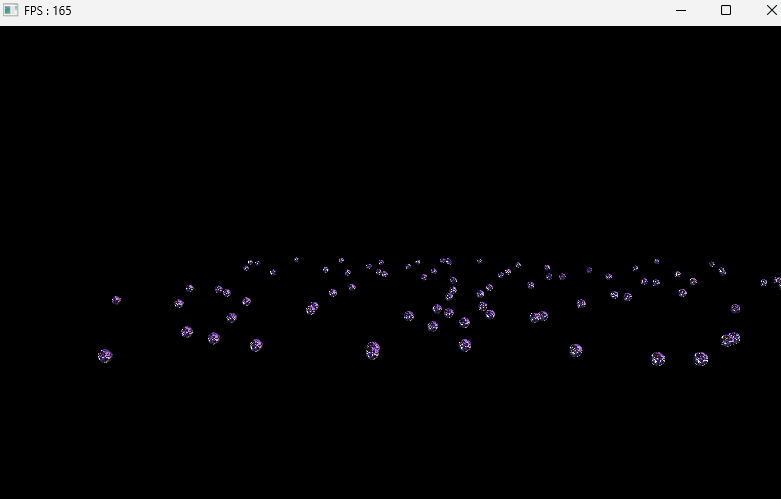
- 100개 생성했을때
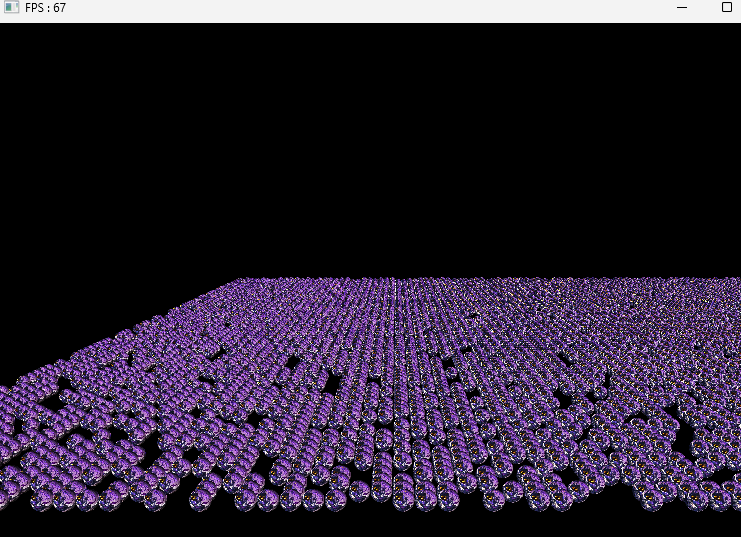
- 10000개 생성했을때
인스턴싱 사용
- 만개의 물체가 서로 다른 부분은 Transform
- 그래서 Transform을 각각 처리해주는 방식으로 진행
- 전체 복사 작업은 진행되지만,
shader랑material은 달라지지않고,World값만 변경해주는 작업
VertexBuffer
- InstanceBuffer를 슬롯 1번에 지정하기 위해
Create()에서 slot값을 받아주고, cpu, gpu정보도 넘겨주는 방식으로 수정 PushData()를 추가해서IASetVertexBuffer를 내부에서 해주는 방향으로 수정
class VertexBuffer
{

	template<typename T>
	void Create(const vector<T>& vertices, uint32 slot = 0, bool cpuWrite = false, bool gpuWrite = false)
	{
		_stride = sizeof(T);
		_count = static_cast<uint32>(vertices.size());

		_slot = slot;
		_cpuWrite = cpuWrite;
		_gpuWrite = gpuWrite;

		D3D11_BUFFER_DESC desc;
		ZeroMemory(&desc, sizeof(desc));
		desc.BindFlags = D3D11_BIND_VERTEX_BUFFER;
		desc.ByteWidth = (uint32)(_stride * _count);

		if (cpuWrite == false && gpuWrite == false)
		{
			desc.Usage = D3D11_USAGE_IMMUTABLE; // CPU Read, GPU Read
		}
		else if (cpuWrite == true && gpuWrite == false)
		{
			desc.Usage = D3D11_USAGE_DYNAMIC; // CPU Write, GPU Read
			desc.CPUAccessFlags = D3D10_CPU_ACCESS_WRITE;
		}
		else if (cpuWrite == false && gpuWrite == true) // CPU Read, GPU Write
		{
			desc.Usage = D3D11_USAGE_DEFAULT;
		}
		else
		{
			desc.Usage = D3D11_USAGE_STAGING;
			desc.CPUAccessFlags = D3D11_CPU_ACCESS_READ | D3D11_CPU_ACCESS_WRITE;
		}

		D3D11_SUBRESOURCE_DATA data;
		ZeroMemory(&data, sizeof(data));
		data.pSysMem = vertices.data();

		HRESULT hr = DEVICE->CreateBuffer(&desc, &data, _vertexBuffer.GetAddressOf());
		CHECK(hr);
	}

	void PushData()
	{
		DC->IASetVertexBuffers(_slot, 1, _vertexBuffer.GetAddressOf(), &_stride, &_offset);
	}

private:
	uint32 _slot = 0;
	bool _cpuWrite = false;
	bool _gpuWrite = false;
}
IndexBuffer
- 여기도
PushData()함수 추가
class IndexBuffer
{
	void PushData()
	{
		DC->IASetIndexBuffer(_indexBuffer.Get(), DXGI_FORMAT_R32_UINT, 0);
	}
}
InstancingDemo
- 모든 오브젝트의
MeshRenderer가 Update를 하는 부분을 대표적으로 한 오브젝트만 업데이트 해주는 방향으로 수정 - 각 World를 가져오는 부분을 없애고, 대표적으로 한번만
InstanceBuffer를 통해서PushData()를 해주는 방향으로 수정
InstancingDemo.h
- Instancing에 사용할 변수 추가
class InstancingDemo : public IExecute
{

// 추가 부분
private:
	// INSTANCING
	shared_ptr<Mesh> _mesh;
	shared_ptr<Material> _material;

	vector<Matrix> _worlds;
	shared_ptr<VertexBuffer> _instanceBuffer;
};
InstancingDemo.cpp
void InstancingDemo::Init()
{
	// 위 내용은 동일해서 생략 //
	RENDER->Init(_shader);


	// INSTANCING
	_instanceBuffer = make_shared<VertexBuffer>();

	for (auto& obj : _objs)
	{
		Matrix world = obj->GetTransform()->GetWorldMatrix();
		_worlds.push_back(world);
	}
	_instanceBuffer->Create(_worlds, /*slot*/1);
}

void InstancingDemo::Update()
{
	_camera->Update();

	RENDER->Update();

	{
		LightDesc lightDesc;
		lightDesc.ambient = Vec4(0.f);
		lightDesc.diffuse = Vec4(0.f);
		lightDesc.specular = Vec4(0.f);
		lightDesc.direction = Vec3(1.f, 0.f, 1.f); // right, look
		RENDER->PushLightData(lightDesc);
	}

    /*for (auto& obj : _objs)
    {
    	obj -> update();
    }*/

	_material->Update();

	//auto world = GetTransform()->GetWorldMatrix();
	//RENDER->PushTransformData(TransformDesc{ world });

	_mesh->GetVertexBuffer()->PushData();
	_instanceBuffer->PushData();
	_mesh->GetIndexBuffer()->PushData();
    // shader->DrawIndexed(0, 0, _mesh->GetIndexBuffer()->GetCount(), 0, 0);
	_shader->DrawIndexedInstanced(0, 0, _mesh->GetIndexBuffer()->GetCount(), _objs.size());
}
Instancing.fx
Input.world를 통해서 물체마다world를 세팅해줄 수 있다.
struct VS_In
{
    float4 position : POSITION;
    float2 uv : TEXCOORD;
    float3 normal : NORMAL;
    float3 tangent : TANGENT;
    // INSTANCING
    matrix world : INST;
};

VS_OUT VS(VS_In input)
{
    VS_OUT output;

    output.position = mul(input.position, input.world);
    output.worldPosition = output.position;
    output.position = mul(output.position, VP);
    output.uv = input.uv;
    output.normal = input.normal;

	return output;
}
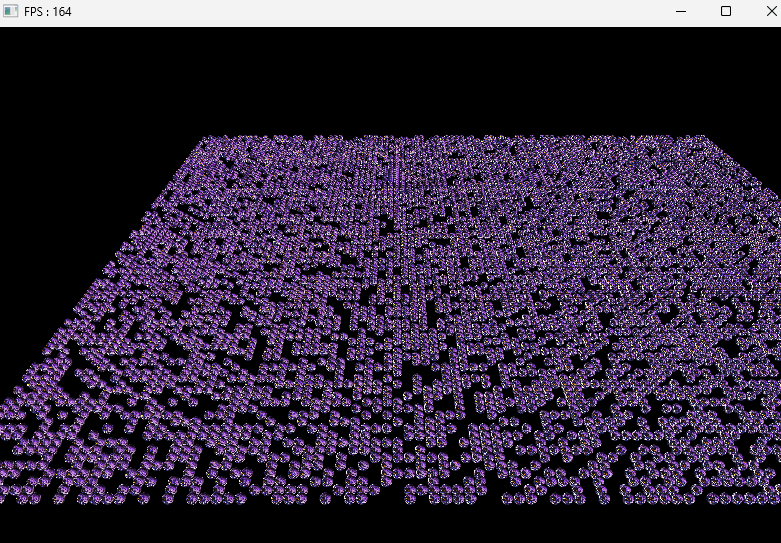
결과
- 10000개를 만들어도 프레임이 떨어지지 않는걸 확인
참고 강의

게임 클라이언트 프로그래머 준비중 (공부 및 기록용)