이 글을,,, 보이스를 구현하려는 모든 사람에게 바칩니다. 유니티 6버전 기준으로 만들어졌습니다@@!
포톤 보이스에 대한 기본적인 기능은 있는데 음소거 ON/OFF, 말하는 사람 아이콘 활성화 등의 기능을 다룬 게시물이 없어서 씀
근데 나도 야매로 한거라 약간의 하자가 있습니다.
먼저, Photon Voice2를 임포트하고
기본 세팅은 다른 곳에서 찾아보면 알 수 있듯이, Voice Manager라는 오브젝트를 만들어줌
아래처럼 Recorder 오브젝트와 Pun Voice Client를 부착
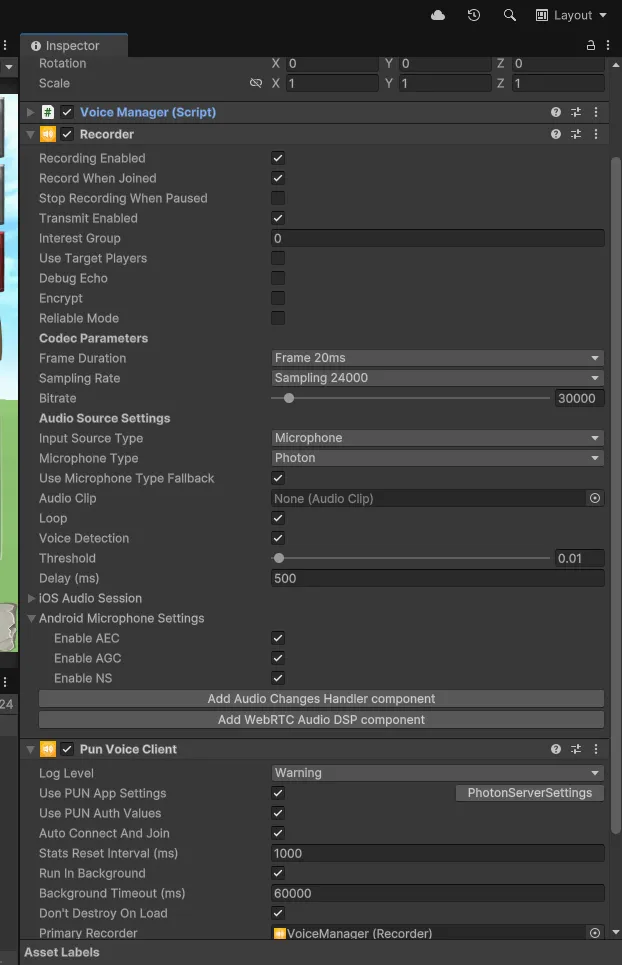
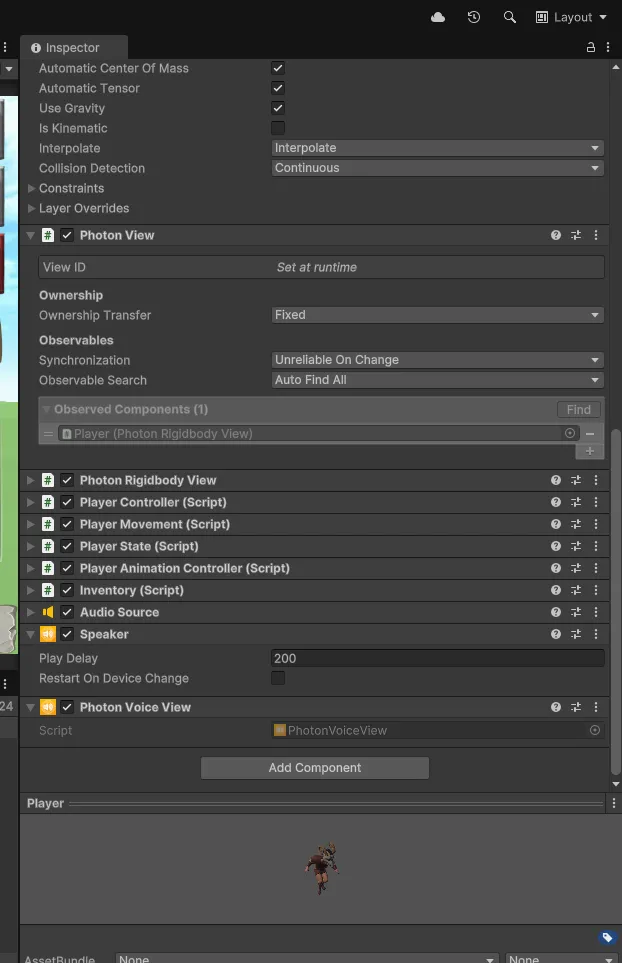
플레이어에 Speaker와 Photon Voice View 컴포넌트를 부착해주면 준비 끝
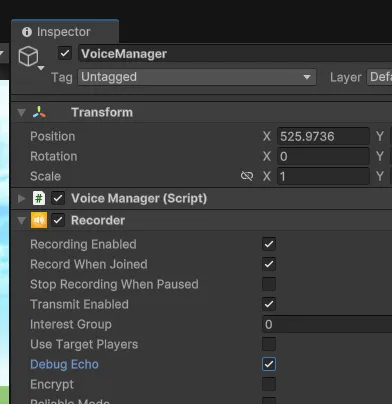
이때, Recorder에 Debug Echo를 체크하면 내 목소리가 들려서 테스트가 가능하다
조금 복잡하게 생겼지만 내 게임의 구조는 PlayerGroup이라는 오브젝트 아래 Player1,2,3,4 자식으로 각각 플레이어가 생성될 것이고
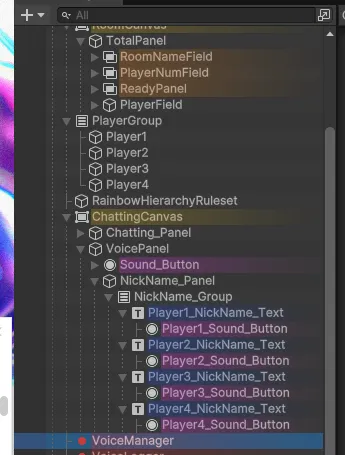
VoicePanel은이렇게 생겼따.
내 코드인것,,. 정말정말 길고 복잡하고 막 짠거(아님 ㅠㅠ 열심히 한거야)같지만 최선이였따.
using Photon.Pun;
using Photon.Realtime;
using Photon.Voice.Unity;
using TMPro;
using UnityEngine;
using UnityEngine.UI;
using static TotalMultiManager;
using System.Collections;

public class VoiceManager : MonoBehaviourPunCallbacks
{
    public static VoiceManager Instance { get; private set; } // Singleton 인스턴스

    [SerializeField] private Transform playerGroup; // PlayerGroup의 Transform

    [SerializeField] private GameObject[] players;  // 각 플레이어 GameObject
    [SerializeField] private TextMeshProUGUI[] playerTexts;  // 각 플레이어의 TextMeshProUGUI 배열

    [SerializeField] private Sprite speakImage;  // 말하는 이미지
    [SerializeField] private Sprite defaultImage;  // 기본 이미지
    [SerializeField] private Sprite muteImage;  // 기본 이미지

    [SerializeField] private GameObject speakerPanel;

    private Speaker[] speakers;  // Speaker 컴포넌트를 담을 배열
    private bool[] isMuted = new bool[4];  // 각 플레이어의 음소거 상태

    private Recorder recorder;
    // 로컬 플레이어의 자체 음소거 상태 변수
    private bool selfMuted = false;

    private void Awake()
    {
        if (Instance == null)
        {
            Instance = this;
        }
        else
        {
            Destroy(Instance.gameObject);
            Instance = this;
        }
    }

    private void Start()
    {
        StartCoroutine(UpdatePlayerText());
    }

    /// <summary>
    /// 매 프레임의 후반부에 호출되는 함수
    /// 스피커 목록을 최신 상태로 유지하기 위해 업데이트 호출
    /// </summary>
    private void LateUpdate()
    {
        StartCoroutine(UpdatePlayerText());
        CheckIsPlaying();
    }


    public void OnClickSpeakerPanel()
    {
        speakerPanel.SetActive(!speakerPanel.activeSelf);
    }

    /// <summary>
    /// 각 스피커의 재생 상태에 따라 플레이어 UI를 업데이트하는 함수
    /// </summary>
    private void CheckIsPlaying()
    {
        // 모든 플레이어 UI를 비활성화
        for (int i = 0; i < players.Length; i++)
        {
            players[i].SetActive(false);
        }

        speakers = playerGroup.GetComponentsInChildren<Speaker>(true);

        foreach (var speaker in speakers)
        {
            PhotonView pv = speaker.GetComponent<PhotonView>();
            if (pv == null) continue;

            int index = pv.OwnerActorNr - 1;
            if (index < 0 || index >= players.Length) continue;

            players[index].SetActive(true);

            Image img = playerTexts[index].GetComponentInChildren<Image>();


            // 로컬 플레이어 처리
            if (pv.IsMine)
            {
                // 로컬 플레이어의 AudioSource 가져오기
                AudioSource audioSource = speaker.GetComponent<AudioSource>();
                if (audioSource != null)
                {
                    // 본인이 말할 때는 볼륨을 0, 그렇지 않을 때는 1로 설정
                    audioSource.volume = speaker.IsPlaying ? 0f : 1f;
                }
                // 로컬 플레이어의 음소거 여부 및 말하는 상태에 따른 이미지 설정
                img.sprite = selfMuted ? muteImage : (speaker.IsPlaying ? speakImage : defaultImage);
            }
            else
            {
                // 원격 플레이어 처리: 음소거 상태 및 말하는 상태에 따른 이미지 설정
                img.sprite = isMuted[index]
                    ? muteImage
                    : (speaker.IsPlaying ? speakImage : defaultImage);
            }
            // 플레이어 닉네임 업데이트
            playerTexts[index].text = pv.Owner.NickName;
        }
    }

    /// <summary>
    /// 모든 Speaker 컴포넌트를 가진 플레이어를 확인하고 playerTexts를 업데이트
    /// </summary>
    private IEnumerator UpdatePlayerText()
    {
        while (!AllhasTag("HasInfo"))
        {
            yield return null; // 모든 플레이어의 CustomProperties가 준비될 때까지 대기
        }

        speakers = playerGroup.GetComponentsInChildren<Speaker>(true);

        foreach (var speaker in speakers)
        {
            PhotonView pv = speaker.GetComponent<PhotonView>();
            if (pv == null) continue;

            int index = pv.OwnerActorNr - 1;
            if (index < 0 || index >= playerTexts.Length) continue;

            players[index].SetActive(true);
            playerTexts[index].text = pv.Owner.NickName;
        }
    }

    /// <summary>
    /// 방에 입장했을 때 호출되는 콜백 함수
    /// 로컬 플레이어의 CustomProperties에 "HasInfo"를 설정
    /// </summary>
    public override void OnJoinedRoom()
    {
        base.OnJoinedRoom();

        // 로컬 플레이어의 정보가 준비되었음을 표시하는 프로퍼티 설정
        ExitGames.Client.Photon.Hashtable props = new ExitGames.Client.Photon.Hashtable
        {
            { "HasInfo", true }
        };

        PhotonNetwork.LocalPlayer.SetCustomProperties(props);
    }

    // 방에 들어왔을때
    public override void OnPlayerEnteredRoom(Player newPlayer)
    {
        // 입장한 플레이어의 ActorNumber를 인덱스로 사용
        int index = newPlayer.ActorNumber - 1;

        // 인덱스가 유효하면 UI를 활성화하고 닉네임을 업데이트
        if (index >= 0 && index < players.Length)
        {
            players[index].SetActive(true);
            playerTexts[index].text = newPlayer.NickName;
        }
    }

    /// <summary>
    /// 플레이어가 방을 떠났을 때 호출되는 콜백 함수
    /// 해당 플레이어의 UI를 비활성화(또는 닉네임 삭제)하고 스피커 목록을 업데이트
    /// </summary>
    public override void OnPlayerLeftRoom(Player otherPlayer)
    {
        // 나간 플레이어의 ActorNumber를 인덱스로 사용
        int index = otherPlayer.ActorNumber - 1;

        // 인덱스가 유효하면 UI를 비활성화(또는 닉네임을 지움)하여 표시하지 않음
        if (index >= 0 && index < players.Length)
        {
            players[index].SetActive(true);
            playerTexts[index].text = "";
        }
    }


    /// <summary>
    /// 특정 ActorNumber에 해당하는 플레이어의 음소거 상태를 토글하는 함수
    /// - 로컬 플레이어인 경우 Recorder를 토글하여 자신의 목소리 전송 여부 제어
    /// - 원격 플레이어인 경우 해당 Speaker 컴포넌트의 활성화를 토글하여 클라이언트에서만 음소거 처리
    /// </summary>
    /// <param name="actorNumber">음소거할 플레이어의 ActorNumber</param>
    public void ToggleSpeaker(int actorNumber)
    {
        if (actorNumber == PhotonNetwork.LocalPlayer.ActorNumber)
        {
            ToggleSelfMute();
            return;
        }

        // ActorNumber를 인덱스로 변환 (배열은 0부터 시작)
        int index = actorNumber - 1;
        foreach (var speaker in speakers)
        {
            PhotonView pv = speaker.GetComponent<PhotonView>();
            // 해당 Speaker의 소유자와 전달된 ActorNumber가 일치하면 음소거 상태를 토글
            if (pv != null && pv.OwnerActorNr == actorNumber)
            {
                // Speaker 컴포넌트의 활성화 여부를 반전시킴 (비활성화되면 음소거)
                speaker.enabled = !speaker.enabled;
                // isMuted 배열에도 반영 (speaker가 비활성화이면 음소거 상태)
                isMuted[index] = !speaker.enabled;

                // UI의 이미지도 즉시 업데이트하여 음소거 상태를 표시
                Image img = playerTexts[index].GetComponentInChildren<Image>();
                img.sprite = isMuted[index] ? muteImage : (speaker.IsPlaying ? speakImage : defaultImage);
                return;
            }
        }
    }
    /// <summary>
    /// 로컬 플레이어의 음소거를 토글
    /// </summary>
    private void ToggleSelfMute()
    {
        if (recorder == null)
        {
            Debug.LogWarning("Recorder is not assigned!");
            return;
        }

        // selfMuted 상태 반전
        selfMuted = !selfMuted;
        // 음소거 상태이면 전송하지 않음, 아니면 전송
        // TransmitEnabled : 시작하자마자 말하기가 가능함(눌러서 말하기 제어 가능)
        recorder.TransmitEnabled = !selfMuted;

        // UI 업데이트: 로컬 플레이어 인덱스에 해당하는 이미지 변경
        int index = PhotonNetwork.LocalPlayer.ActorNumber - 1;
        Image img = playerTexts[index].GetComponentInChildren<Image>();

        img.sprite = selfMuted ? muteImage : defaultImage;
        Debug.Log(img);
        Debug.Log("Self mute toggled: " + (selfMuted ? "Muted" : "Unmuted"));
    }
}
자, 하나씩 살펴보면 전체적인 구조는 Player가 Speaker 컴포넌트를 가지고 있으니 PlayerGroup에서 speaker컴포넌트를 가진 애가 들어올때마다 위의 VoicePanel에 닉네임과 아이콘을 활성화시켜주는것임
여기서 ActorNumber란 무엇인가!!
플레이어를 구분할때 사용하는 고유한 넘버인데, 내 코드에서는 닉네임 배열의 인덱스로 활용함
그리고 누군가가 말하고 있으면 CheckIsPlaying 함수를 사용해 말하는 아이콘을 활성화해줌
이때 Recorder에 Debug Echo를 체크를 한 상태로 진행했는데, 어째서인지 체크를 해제하면 상대방에게도 내 목소리가 들리지 않은 버그가 생겼었음
그래서 아래의 코드로 내 목소리는 들리지 않도록 처리를 해줬음
// 본인이 말할 때는 볼륨을 0, 그렇지 않을 때는 1로 설정
audioSource.volume = speaker.IsPlaying ? 0f : 1f;
on/off는 ToggleSelfMute함수로 해줄건데 내가 상대방의 목소리를 끌 수도 있고, 내 목소리를 끌 수도 있음
내 코드에서 로컬과 원격을 분리한 이유는 자신의 음성 전송과 관련된 직접적인 제어가 필요하고, 원격 플레이어는 단순히 해당 클라이언트에서 음성이 재생되는지 여부에 따라 UI와 음소거 상태를 관리해야하기 때문에 두가지를 나눠 구현했다.
