Airflow DAG
Python Operator를 사용한 Airflow DAG 작성
from airflow.operators.python import PythonOperator
load_nps = PythonOperator(
dag=dag,
task_id='task_id',
python_callable=python_func,
params={
'table': 'delighted_nps',
'schema': 'raw_data'
},
)
def python_func(**cxt):
table = cxt["params"]["table"]
schema = cxt["params"]["schema"]
ex_date = cxt["execution_date"]
# do what you need to do
PythonOperator로 인스턴스를 만들고, dag지정해주고 task_id지정해준다.
실행될 때 실행되는 파이썬 함수를 python_callable에 지정
그러면 이 태스크가 실행될 때 python_callable로 지정된 함수가 실행됨
인자를 넘기고싶을 경우 params라는 필드에 지정해주면 됨
params는 딕셔너리고 위에서는 table과 schema라는 두개의 파라미터를 params의 딕셔너리형태로 지정
python_func라는 함수에서는 cxt라는 인자에서 params라는 키 밑에 딕셔너리가 놓이게 되는데, 넘겨준 인자에 접근할 수 있다.
그 밑에는 일반 파이썬 코드를 작성하면 되며, 자유도가 높으며 내가 원하는 어떤 기능이든 파이썬으로 할 수 있는걸 작성할 수 있다.
from airflow import DAG
from airflow.operators.python import PythonOperator
from datetime import datetime

dag = DAG(
    dag_id='HelloWorld',
    start_date=datetime(2022,5,5),
    catchup=False,
    tags=['example'],
    schedule='0 2 * * *' # 하루에 한번 2시 0분에 실행)

def print_hello():
    print("hello!")
    return "hello!"

def print_goodbye():
    print("goodbye!")
    return "goodbye!"

print_hello = PythonOperator(
    task_id = 'print_hello',
    #python_callable param points to the function you want to run
    python_callable = print_hello,
    #dag param points to the DAG that this task is a part of
    dag = dag)

print_goodbye = PythonOperator(
    task_id = 'print_goodbye',
    python_callable = print_goodbye,
    dag = dag)

#Assign the order of the tasks in our DAG
print_hello >> print_goodbye- 2개의 태스크로 구성된 데이터 파이프라인
- print_hello : PythonOperator로 구성되어 있으며 먼저 실행
- print_goodbye : PythonOperator로 구성되어 있으며 두번째로 실행
Airflow Decorators: 프로그래밍이 단순해짐
from airflow import DAG
from airflow.decorators import task
from datetime import datetime

@task
def print_hello():
    print("hello!")
    return "hello!"

@task
def print_goodbye():
    print("goodbye!")
    return "goodbye!"

with DAG(
    dag_id = 'HelloWorld_v2',
    start_date = datetime(2022,5,5),
    catchup=False,
    tags=['example'],
    schedule = '0 2 * * *'
) as dag:

# Assign the tasks to the DAG in order
print_hello() >> print_goodbye()
데코레이터를 사용하면 따로 함수 태스크 인스턴스 만들필요없이 함수자체에 태스크를 부여할 수 있음.
함수 이름이 task id가 된다.
task decorator를 사용하면 훨씬 더 프로그램이 직관적
중요한 DAG 파라미터 (not task parameters)
with DAG(
   dag_id = 'HelloWorld_v2',
   start_date = datetime(2022,5,5),
   catchup=False,
   tags=['example'],
   schedule = '0 2 * * *'
) as dag:- max_active_runs : # of DAGs instance, 한번에 동시에 실행될 수 있는 dag의 수가 몇개냐
- max_active_tasks : # of tasks that can run in parallel, Dag에 속한 태스크가 한번에 몇개에 돌 수 있냐
- catchup : whether to backfill past runs, 밀린날짜 catchup할거냐 말거냐.full-refresh는 의미 없음
- DAG parameters vs Task parameters의 차이점 이해가 중요
- 위의 파라미터들은 모두 DAG 파라미터로 DAG 객체를 만들 때 지정해주어야함
Name Gender 예제 프로그램 포팅
from airflow import DAG
from airflow.operators.python import PythonOperator
from datetime import datetime
import requests
import logging
import psycopg2

def get_Redshift_connection():
    host = "learnde.cduaw970ssvt.ap-northeast-2.redshift.amazonaws.com"
    user = "kyongjin1234"  # 본인 ID 사용
    password = "..."  # 본인 Password 사용
    port = 5439
    dbname = "dev"
    conn = psycopg2.connect(f"dbname={dbname} user={user} host={host} password={password} port={port}")
    conn.set_session(autocommit=True)
    return conn.cursor()


def extract(url):
    logging.info("Extract started")
    f = requests.get(url)
    logging.info("Extract done")
    return (f.text)


def transform(text):
    logging.info("Transform started")
    lines = text.strip().split("\n")[1:] # 첫 번째 라인을 제외하고 처리
    records = []
    for l in lines:
      (name, gender) = l.split(",") # l = "Keeyong,M" -> [ 'keeyong', 'M' ]
      records.append([name, gender])
    logging.info("Transform ended")
    return records


def load(records):
    logging.info("load started")
    """
    records = [
      [ "Keeyong", "M" ],
      [ "Claire", "F" ],
      ...
    ]
    """
    schema = "kyongjin1234"
    # BEGIN과 END를 사용해서 SQL 결과를 트랜잭션으로 만들어주는 것이 좋음
    cur = get_Redshift_connection()
    try:
        cur.execute("BEGIN;")
        cur.execute(f"DELETE FROM {schema}.name_gender;")
        # DELETE FROM을 먼저 수행 -> FULL REFRESH을 하는 형태
        for r in records:
            name = r[0]
            gender = r[1]
            print(name, "-", gender)
            sql = f"INSERT INTO {schema}.name_gender VALUES ('{name}', '{gender}')"
            cur.execute(sql)
        cur.execute("COMMIT;")   # cur.execute("END;")
    except (Exception, psycopg2.DatabaseError) as error:
        print(error)
        cur.execute("ROLLBACK;")
    logging.info("load done")


def etl():
    link = "https://s3-geospatial.s3-us-west-2.amazonaws.com/name_gender.csv"
    data = extract(link)
    lines = transform(data)
    load(lines)


dag_second_assignment = DAG(
	dag_id = 'name_gender',
	catchup = False,
	start_date = datetime(2023,4,6), # 날짜가 미래인 경우 실행이 안됨
	schedule = '0 2 * * *')  # 적당히 조절

task = PythonOperator(
	task_id = 'perform_etl',
	python_callable = etl,
	dag = dag_second_assignment)
세개의 함수를 하나의 함수로(etl)묶어서 하나의 태스크로 만들었음. 하나의 태스크엔 하나의 python operator가 있다.
- 개선할 부분
-
get_Redshift_connection 함수에서 정보가 하드코딩되어있어서 정보가 변경될 경우 또 바꿔야하고, 정보가 노출되어 해킹에 대한 위협이 있을 수 있으므로 코드바깥으로 나가는게 좋다
-
csv파일 링크도 하드코딩되어있어서 환경변수로 빼면 좋음
-
각각의 함수를 태스크로 빼는게 좋을 수 있음
-
TaskOperator사용하면 더 코드가 간결해짐
NameGenderCSVtoRedshift.py 개선 #2
- params를 통해 변수 넘기기
- execution_date 얻어내기 <- execution_date은 곧 사라지고 logical_date이 대체할 예정
- "delete from" vs "truncate"
- DELETE FROM raw_data.name_gender; --WHERE 사용 가능 SQL 트랜잭션 존중
- TRUNCATE raw_data.name_gender; SQL트랜잭션 존중 X
...

def etl(**context):
    link = context["params"]["url"]
    # task 자체에 대한 정보 (일부는 DAG의 정보가 되기도 함)를 읽고 싶다면 context['task_instance'] 혹은 context['ti']를 통해 가능
    # https://airflow.readthedocs.io/en/latest/_api/airflow/models/taskinstance/index.html#airflow.models.TaskInstance
    task_instance = context['task_instance']
    execution_date = context['execution_date']

    logging.info(execution_date)

    data = extract(link)
    lines = transform(data)
    load(lines)


dag = DAG(
    dag_id = 'name_gender_v2',
    start_date = datetime(2023,4,6), # 날짜가 미래인 경우 실행이 안됨
    schedule = '0 2 * * *',  # 적당히 조절
    catchup = False,
    max_active_runs = 1,
    default_args = {
        'retries': 1,
        'retry_delay': timedelta(minutes=3),
    }
)


task = PythonOperator(
    task_id = 'perform_etl',
    python_callable = etl,
    params = {
        'url': "https://s3-geospatial.s3-us-west-2.amazonaws.com/name_gender.csv"
    },
    dag = dag)
etl함수에 원래는 link가 하드코딩되어있었는데 params의 url을 받는식으로 바뀜.
execution_date 변수를 context['execution_date']로부터 받아옴.
Connections and Variables in Airflow
Connections (연결)
호스트명, 포트 번호, 접근 자격 증명과 같은 연결 관련 정보를 저장하는 데 사용된다.
Variables (변수)
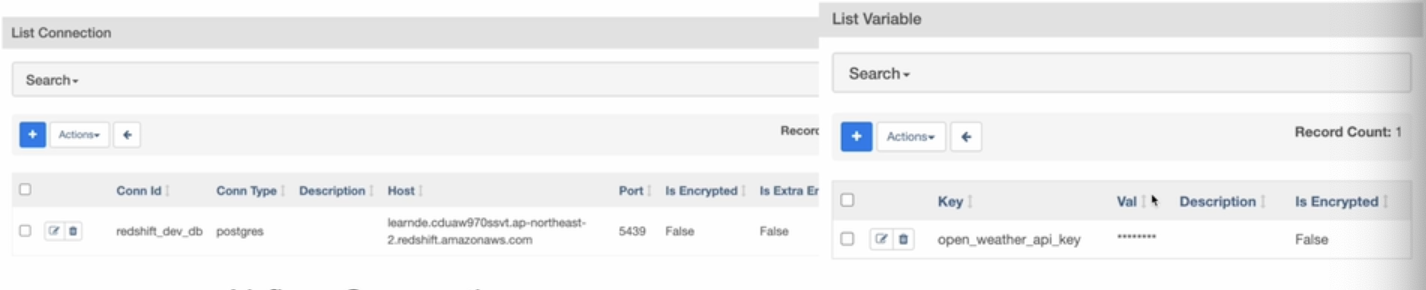
API 키나 구성 정보를 저장하는 데 사용됨
값이 암호화되기를 원한다면 이름에 “access” 또는 “secret”을 포함해야함.
Airflow Web UI에 Admin에 Variables와 Connections가 있다.
NameGenderCSVtoRedshift.py 개선하기 #3
- Variable를 이용해 CSV 파라미터 넘기기
- Xcom을 사용해서 3개의 태스크로 나눠보기
- 3개의 함수를 별도의 태스크로 구성
- 태스크간 어떻게 값을 넘길지를 생각해봐야하는데, 전 함수의 출력이 후 함수의 입력으로 넘어갈 때 Xcom을 사용할 수 있음.
Xcom이란?
- 태스크(Operator)들간에 데이터를 주고 받기 위한 방식
- 보통 한 Operator의 리턴값을 다른 Operator에서 읽어가는 형태가 됨
- 이 값들은 Airflow 메타 데이터 DB에 저장이 되기에 큰 데이터를 주고받는데는 사용불가
- 보통 큰 데이터는 S3등에 로드하고 그 위치를 넘기는 것이 일반적
from airflow import DAG
from airflow.operators.python import PythonOperator
from airflow.models import Variable # airflow가 갖고있는 key value 스토리지 액세스에 사용, 우리가 사용할 수 있는 두개의 메소드(get, set)

from datetime import datetime
from datetime import timedelta
import requests
import logging
import psycopg2

def get_Redshift_connection():
    host = "learnde.cduaw970ssvt.ap-northeast-2.redshift.amazonaws.com" #추후에 connection 사용으로 변경
    redshift_user = "keeyong"  # 본인 ID 사용
    redshift_pass = "..."  # 본인 Password 사용
    port = 5439
    dbname = "dev"
    conn = psycopg2.connect(f"dbname={dbname} user={redshift_user} host={host} password={redshift_pass} port={port}")
    conn.set_session(autocommit=True)
    return conn.cursor()


def extract(**context):# 인자가 context로 변경된걸 확인할 수 있음
    link = context["params"]["url"]
    task_instance = context['task_instance']
    execution_date = context['execution_date']

    logging.info(execution_date)
    f = requests.get(link)
    return (f.text)


def transform(**context):# 인자가 context로 변경된걸 확인할 수 있음
    logging.info("Transform started")
    **text = context["task_instance"].xcom_pull(key="return_value", task_ids="extract")** # 앞에 실행된 태스크의 리턴값을 달라는 구문
    lines = text.strip().split("\n")[1:] # 첫 번째 라인을 제외하고 처리
    records = []
    for l in lines:
      (name, gender) = l.split(",") # l = "Keeyong,M" -> [ 'keeyong', 'M' ]
      records.append([name, gender])
    logging.info("Transform ended")
    return records


def load(**context):# 인자가 context로 변경된걸 확인할 수 있음
    logging.info("load started")
    schema = context["params"]["schema"]
    table = context["params"]["table"]

    lines = context["task_instance"].xcom_pull(key="return_value", task_ids="transform") # 앞에 실행된 태스크의 리턴값을 달라는 구문
    """
    records = [
      [ "Keeyong", "M" ],
      [ "Claire", "F" ],
      ...
    ]
    """
    # BEGIN과 END를 사용해서 SQL 결과를 트랜잭션으로 만들어주는 것이 좋음
    cur = get_Redshift_connection()
    try:
        cur.execute("BEGIN;")
        cur.execute(f"DELETE FROM {schema}.name_gender;")
        # DELETE FROM을 먼저 수행 -> FULL REFRESH을 하는 형태
        for r in records:
            name = r[0]
            gender = r[1]
            print(name, "-", gender)
            sql = f"INSERT INTO {schema}.name_gender VALUES ('{name}', '{gender}')"
            cur.execute(sql)
        cur.execute("COMMIT;")   # cur.execute("END;")
    except (Exception, psycopg2.DatabaseError) as error:
        print(error)
        cur.execute("ROLLBACK;")
    logging.info("load done")


dag = DAG(
    dag_id = 'name_gender_v3',
    start_date = datetime(2023,4,6), # 날짜가 미래인 경우 실행이 안됨
    schedule = '0 2 * * *',  # 적당히 조절
    catchup = False,
    max_active_runs = 1,
    default_args = {
        'retries': 1,
        'retry_delay': timedelta(minutes=3),
    }
)


extract = PythonOperator(
    task_id = 'extract',
    python_callable = extract,
    params = {
        'url':  Variable.get("csv_url") # 이 메소드를 써서 내가 읽고 싶은 키가 무엇인지 지정
    },
    dag = dag)

transform = PythonOperator(
    task_id = 'transform',
    python_callable = transform,
    params = {
    },
    dag = dag)

load = PythonOperator(
    task_id = 'load',
    python_callable = load,
    params = {
        'schema': 'kyongjin1234',
        'table': 'name_gender'
    }, # 이전에 하드코딩되어있던걸 params로 schema와 table를 넘겨주는식으로 변경
    dag = dag)

extract >> transform >> load # 3개 태스크의 실행순서 지정
PythonOperator가 각 함수별로 생성된걸 확인할 수 있음.
태스크들간에 데이터가 넘어가는게 복잡해지는걸 Xcom으로 해결한 것임.
xcom_pull이라는걸 이전 태스크의 리턴값을 읽어오냐 ? airflow의 메타데이터 데이터베이스에 저장되어있는거임. 태스크의 실행이 끝나면 함수가 리턴해준 값과 그 태스크id를 묶어서 db에 저장. db라는건 유한한 공간을 갖고 있는데, 내가 큰 값을 리턴할 경우 저장하다가 db가 금방 차기 때문에 만약 큰 데이터를 주고받을 경우 사용이 불가능함. 작은 경우에만 편리하게 주고받기 위해 사용하는거고, 데이터가 클 경우 S3라든지 스토리지가 크고 가격이 경제적인 곳에 저장해놓고 그 링크를 Xcom pull로 받아오는식으로 함.
NameGenderCSVtoRedshift.py 개선하기 #4
Redshift Connection 설정 (Data Warehouse)
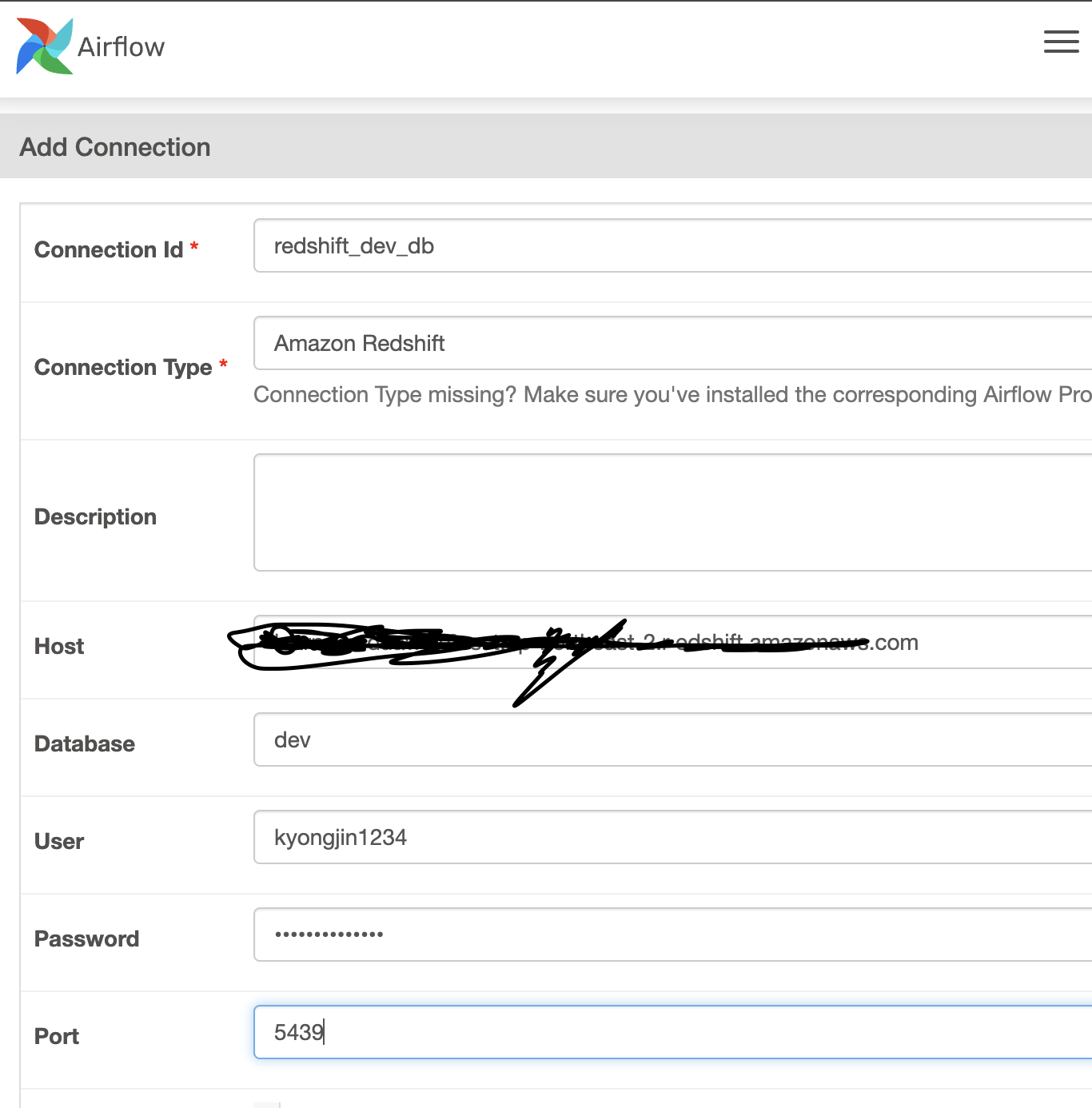
Admin-Connection에서 추가
from airflow import DAG
from airflow.operators.python import PythonOperator
from airflow.models import Variable
from airflow.providers.postgres.hooks.postgres import PostgresHook # 추가됨.

from datetime import datetime
from datetime import timedelta
# from plugins import slack

import requests
import logging
import psycopg2


def get_Redshift_connection(autocommit=True): # 굉장히 단순해짐.
    hook = PostgresHook(postgres_conn_id='redshift_dev_db')
    conn = hook.get_conn()
    conn.autocommit = autocommit
    return conn.cursor()


def extract(**context):
    link = context["params"]["url"]
    task_instance = context['task_instance']
    execution_date = context['execution_date']

    logging.info(execution_date)
    f = requests.get(link)
    return (f.text)


def transform(**context):
    logging.info("Transform started")
    text = context["task_instance"].xcom_pull(key="return_value", task_ids="extract")
    lines = text.strip().split("\n")[1:] # 첫 번째 라인을 제외하고 처리
    records = []
    for l in lines:
      (name, gender) = l.split(",") # l = "Keeyong,M" -> [ 'keeyong', 'M' ]
      records.append([name, gender])
    logging.info("Transform ended")
    return records


def load(**context):
    logging.info("load started")
    schema = context["params"]["schema"]
    table = context["params"]["table"]

    records = context["task_instance"].xcom_pull(key="return_value", task_ids="transform")
    """
    records = [
      [ "Keeyong", "M" ],
      [ "Claire", "F" ],
      ...
    ]
    """
    # BEGIN과 END를 사용해서 SQL 결과를 트랜잭션으로 만들어주는 것이 좋음
    cur = get_Redshift_connection()
    try:
        cur.execute("BEGIN;")
        cur.execute(f"DELETE FROM {schema}.name_gender;")
        # DELETE FROM을 먼저 수행 -> FULL REFRESH을 하는 형태
        for r in records:
            name = r[0]
            gender = r[1]
            print(name, "-", gender)
            sql = f"INSERT INTO {schema}.name_gender VALUES ('{name}', '{gender}')"
            cur.execute(sql)
        cur.execute("COMMIT;")   # cur.execute("END;")
    except (Exception, psycopg2.DatabaseError) as error:
        print(error)
        cur.execute("ROLLBACK;")
        raise
    logging.info("load done")


dag = DAG(
    dag_id = 'name_gender_v4',
    start_date = datetime(2023,4,6), # 날짜가 미래인 경우 실행이 안됨
    schedule = '0 2 * * *',  # 적당히 조절
    max_active_runs = 1,
    catchup = False,
    default_args = {
        'retries': 1,
        'retry_delay': timedelta(minutes=3),
        # 'on_failure_callback': slack.on_failure_callback, # 실패시 지정된 함수가 실행됨
    } # 모든 태스크에 적용되는 기본 인자들
)


extract = PythonOperator(
    task_id = 'extract',
    python_callable = extract,
    params = {
        'url':  Variable.get("csv_url")
    },
    dag = dag)

transform = PythonOperator(
    task_id = 'transform',
    python_callable = transform,
    params = {
    },
    dag = dag)

load = PythonOperator(
    task_id = 'load',
    python_callable = load,
    params = {
        'schema': 'kyongjin1234',   ## 자신의 스키마로 변경
        'table': 'name_gender'
    },
    dag = dag)

extract >> transform >> load
NameGenderCSVtoRedshift.py 개선하기 #5
- from airflow.decorators import task
- task decorator를 사용
- 이 경우 xcom을 사용할 필요가 없음
- 기본적으로 PythonOperator 대신에 airflow.decorators.task를 사용
from airflow import DAG
from airflow.models import Variable
from airflow.providers.postgres.hooks.postgres import PostgresHook
from airflow.decorators import task #PythonOperator 임포트 삭제하고 대신 이거 임포트

from datetime import datetime
from datetime import timedelta

import requests
import logging


def get_Redshift_connection(autocommit=True):
    hook = PostgresHook(postgres_conn_id='redshift_dev_db')
    conn = hook.get_conn()
    conn.autocommit = autocommit
    return conn.cursor()


@task # 모든 3개의 함수가 task가 데코레이트
def extract(url): # **context인자대신 함수코딩하듯이 일반적인 인자들이 넘겨지게됨.
    logging.info(datetime.utcnow())
    f = requests.get(url)
    return f.text


@task
def transform(text):
    lines = text.strip().split("\n")[1:] # 첫 번째 라인을 제외하고 처리
    records = []
    for l in lines:
      (name, gender) = l.split(",") # l = "Keeyong,M" -> [ 'keeyong', 'M' ]
      records.append([name, gender])
    logging.info("Transform ended")
    return records


@task
def load(schema, table, records):
    logging.info("load started")
    cur = get_Redshift_connection()
    """
    records = [
      [ "Keeyong", "M" ],
      [ "Claire", "F" ],
      ...
    ]
    """
    # BEGIN과 END를 사용해서 SQL 결과를 트랜잭션으로 만들어주는 것이 좋음
    try:
        cur.execute("BEGIN;")
        cur.execute(f"DELETE FROM {schema}.name_gender;")
        # DELETE FROM을 먼저 수행 -> FULL REFRESH을 하는 형태
        for r in records:
            name = r[0]
            gender = r[1]
            print(name, "-", gender)
            sql = f"INSERT INTO {schema}.name_gender VALUES ('{name}', '{gender}')"
            cur.execute(sql)
        cur.execute("COMMIT;")   # cur.execute("END;")
    except (Exception, psycopg2.DatabaseError) as error:
        print(error)
        cur.execute("ROLLBACK;")
    logging.info("load done")


with DAG(
    dag_id='namegender_v5',
    start_date=datetime(2022, 10, 6),  # 날짜가 미래인 경우 실행이 안됨
    schedule='0 2 * * *',  # 적당히 조절
    max_active_runs=1,
    catchup=False,
    default_args={
        'retries': 1,
        'retry_delay': timedelta(minutes=3),
        # 'on_failure_callback': slack.on_failure_callback,
    }
) as dag:

    url = Variable.get("csv_url")
    schema = 'kyongjin1234'   ## 자신의 스키마로 변경
    table = 'name_gender'

    lines = transform(extract(url))
    load(schema, table, lines)
5개의 Dag를 docker의 dags폴더로 복사
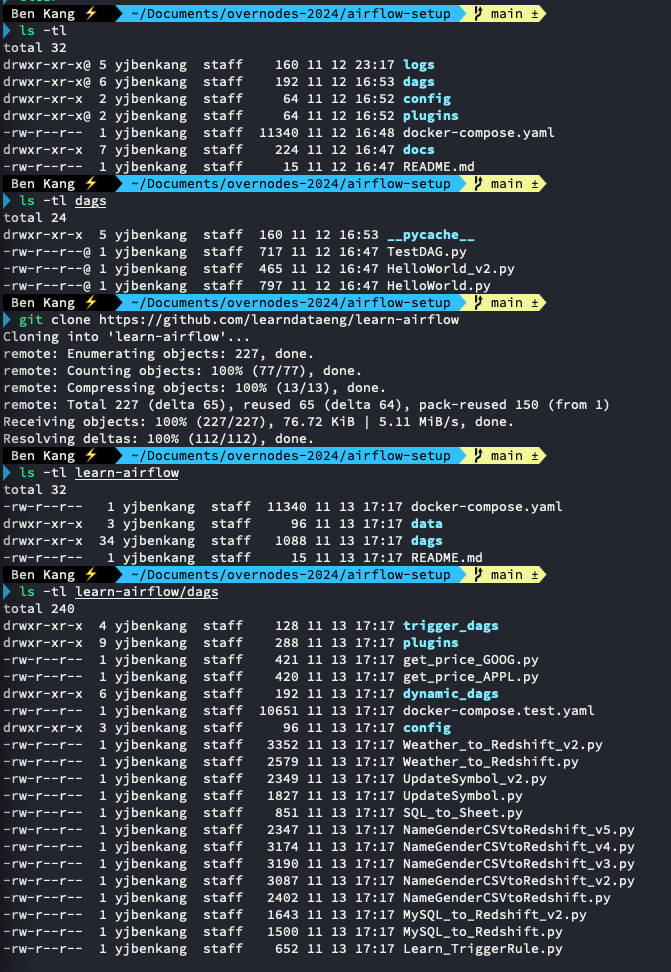
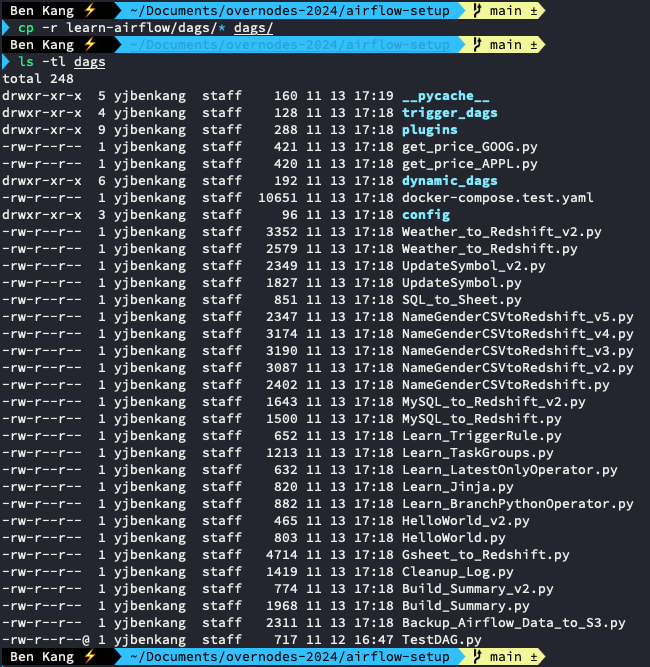
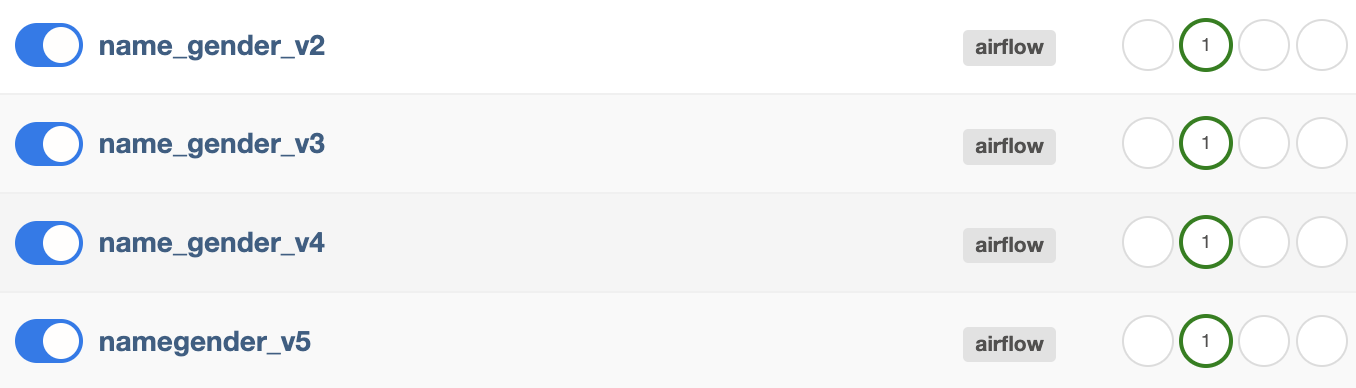
복사한 각 dag의 환경변수값(스키마 등등)과 같은 것들을 내꺼로 바꿔주고 실행해보면 각버전의 Dag들이 모두 정상적으로 동작하는걸 확인할 수 있다.
PostgresHook의 autocommit 파라미터
- Default 값은 Fault로 주어짐
- 이 경우 BEGIN은 아무런 영향이 없음 (no-operation)
Dag에서 task를 어느정도로 분리하는 것이 좋을까?
- task를 많이 만들면 전체 DAG가 실행되는데 오래 걸리고 스케줄러에 부하가 감
- task를 너무 적게 만들면 모듈화가 안되고 실패시 재실행 시간이 오래걸림
- 오래 걸리는 DAG는 실패시 재실행이 쉽게 다수의 task로 나누는 것이 좋음
Airflow의 Variable 관리 vs 코드관리
- 장점: 코드 푸시의 필요성이 없음
- 단점: 관리나 테스트가 안되어서 사고로 이어질 가능성이 있음
