데이터 웨어하우스 Primary Key Uniqueness 보장하기
Primary Key Uniqueness란?
-
테이블에서 하나의 레코드를 유일하게 지칭할 수 있는 필드(들)
- 하나의 필드가 일반적이지만 다수의 필드를 사용할 수도 있음
- 이를 CREATE TABLE 사용 시 지정
-
관계형 데이터베이스 시스템이 Primary key의 값이 중복 존재하는 것을 막아줌
- 빅데이터 기반 웨어하우스는 보장해주지 않음.
-
예 1) Users 테이블에서 email 필드
-
예 2) Products 테이블에서 product_id 필드
ex)
CREATE TABLE products (
  product_id INT PRIMARY KEY,
  name VARCHAR(50),
  price decimal(7,2)
);
CREATE TABLE orders (
 order_id INT,
 product_id INT,
 PRIMARY KEY (order_id, product_id),
 FOREIGN KEY (product_id) REFERENCES products (product_id)
);
빅데이터 기반 데이터 웨어하우스들은 Primary Key를 지켜주지 않음
-
Primary key를 기준으로 유일성 보장을 해주지 않음
- 이를 보장하는 것은 데이터 인력의 책임
-
Primary key 유일성을 보장해주지 않는 이유는 ?
- 보장하는데 메모리와 시간이 더 들기 때문에 대용량 데이터의 적재가 걸림돌이 됨
CREATE TABLE yongjin.test (
  date date primary key,
  value big int
);

INSERT INTO yongjin.test VALUES ('2023-05-10', 100);
INSERT INTO yongjin.test VALUES ('2023-05-10', 150); -- 이 작업이 성공함!
Primary Key 유지 방법
1.
ex)
CREATE TABLE yongjin.weather_forecast (
  date date primary key,
  temp float,
  min_temp float,
  max_temp float,
  created_date timestamp default GETDATE()
);-
날씨 정보이기 때문에 최근 정보를 더 신뢰할 수 있음.
-
그래서 어느 정보가 더 최근 정보인지를 created_date 필드에 기록하고 이를 활용
-
즉 date가 같은 레코드들이 있다면 created_date을 기준으로 더 최근 정보를 선택
이를 하는데 적합한 SQL 문법이 ROW_NUMBER
2.
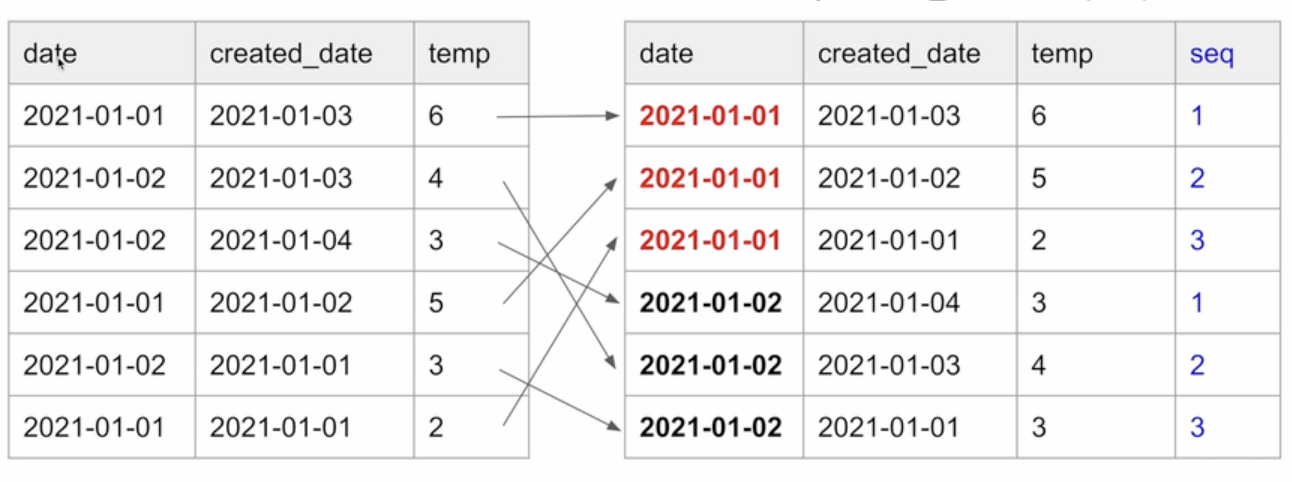
- date별로 created_date의 역순으로 일련번호를 매기고 싶다면?
- 새로운 컬럼을 추가한다.
- date별로 레코드를 모으고 그 안에서 created_date의 역순으로 소팅한 후 1번부터 일련 번호(seq) 부여
-
ROW_NUMBER를 쓰면 2를 구현 가능.
ROW_NUMBER() OVER(partition by date order by created_date DESC) seq3.
- 임시 테이블(스테이징 테이블)을 만들고 거기로 현재 모든 레코드를 복사
- 임시 테이블에 새로 데이터 소스에서 읽어들인 레코드들을 복사
- 이 때 중복 존재 가능
- 중복을 걸러주는 SQL 작성:
- 최신 레코드를 우선 순위로 선택
- ROW_NUMBER를 이용해서 primary key로 partition을 잡고 적당한 다른 필드(보통 타임스탬프 필드)로 ordering(역순 DESC)을 수행해 primary key별로 하나의 레코드를 잡아냄
- 위의 SQL을 바탕으로 최종 원본 테이블로 복사
- 이 때 원본 테이블에서 레코드들을 삭제
- 임시 temp 테이블을 원본 테이블로 복사
sql문의 흐름을 살펴보자.
1.
CREATE TEMP TABLE t AS SELECT * FROM yongjin.weather_forecast;- 원래 테이블의 내용을 임시 테이블 t로 복사
-
DAG는 임시 테이블(스테이징 테이블)에 레코드를 추가
DELETE FROM yongjin.weather_forecast;- 중복을 없앤 형태로 새로운 테이블 생성
INSERT INTO yongjin.weather_forecast
SELECT date, temp, min_temp, max_temp, created_date
FROM (
  SELECT *, ROW_NUMBER() OVER (PARTITION BY date ORDER BY created_date DESC) seq
  FROM t
)
WHERE seq = 1;
위의 코드는 매번 새로 덮어쓰는 형식의 업데이트를 가정
여기서 transaction으로 처리되어야 하는 최소 범위의 SQL들은?
3번과 4번을 하나의 트랜잭션으로 묶어주는게 필요하다.
Incremental Update 실습
- 5월 30일 8개의 레코드를 읽어옴

- 5월 31일 8개의 레코드를 읽어옴

- 이 레코드들이 우선시 되어야 함. 이를 위해 created_date을 만들었고 이를 기준으로 ROW_NUMBER로 일련번호를 만듬.
from airflow import DAG
from airflow.decorators import task
from airflow.models import Variable
from airflow.providers.postgres.hooks.postgres import PostgresHook

from datetime import datetime
from datetime import timedelta

import requests
import logging
import json


def get_Redshift_connection():
    # autocommit is False by default
    hook = PostgresHook(postgres_conn_id='redshift_dev_db')
    return hook.get_conn().cursor()


@task
def etl(schema, table, lat, lon, api_key):

    # https://openweathermap.org/api/one-call-api
    url = f"https://api.openweathermap.org/data/3/onecall?lat={lat}&lon={lon}&appid={api_key}&units=metric&exclude=current,minutely,hourly,alerts"
    response = requests.get(url)
    data = json.loads(response.text)

    """
    {'dt': 1622948400, 'sunrise': 1622923873, 'sunset': 1622976631, 'moonrise': 1622915520, 'moonset': 1622962620, 'moon_phase': 0.87, 'temp': {'day': 26.59, 'min': 15.67, 'max': 28.11, 'night': 22.68, 'eve': 26.29, 'morn': 15.67}, 'feels_like': {'day': 26.59, 'night': 22.2, 'eve': 26.29, 'morn': 15.36}, 'pressure': 1003, 'humidity': 30, 'dew_point': 7.56, 'wind_speed': 4.05, 'wind_deg': 250, 'wind_gust': 9.2, 'weather': [{'id': 802, 'main': 'Clouds', 'description': 'scattered clouds', 'icon': '03d'}], 'clouds': 44, 'pop': 0, 'uvi': 3}
    """
    ret = []
    for d in data["daily"]:
        day = datetime.fromtimestamp(d["dt"]).strftime('%Y-%m-%d')
        ret.append("('{}',{},{},{})".format(day, d["temp"]["day"], d["temp"]["min"], d["temp"]["max"]))

    cur = get_Redshift_connection()

    # 원본 테이블이 없다면 생성
    create_table_sql = f"""CREATE TABLE IF NOT EXISTS {schema}.{table} (
    date date,
    temp float,
    min_temp float,
    max_temp float,
    created_date timestamp default GETDATE()
);"""
    logging.info(create_table_sql)

    # 임시 테이블 생성
    create_t_sql = f"""CREATE TEMP TABLE t AS SELECT * FROM {schema}.{table};"""
    logging.info(create_t_sql)
    try:
        cur.execute(create_table_sql)
        cur.execute(create_t_sql)
        cur.execute("COMMIT;")
    except Exception as e:
        cur.execute("ROLLBACK;")
        raise

    # 임시 테이블 데이터 입력
    insert_sql = f"INSERT INTO t VALUES " + ",".join(ret)
    logging.info(insert_sql)
    try:
        cur.execute(insert_sql)
        cur.execute("COMMIT;")
    except Exception as e:
        cur.execute("ROLLBACK;")
        raise

    # 기존 테이블 대체
    alter_sql = f"""DELETE FROM {schema}.{table};
      INSERT INTO {schema}.{table}
      SELECT date, temp, min_temp, max_temp FROM (
        SELECT *, ROW_NUMBER() OVER (PARTITION BY date ORDER BY created_date DESC) seq
        FROM t
      )
      WHERE seq = 1;"""
    logging.info(alter_sql)
    try:
        cur.execute(alter_sql)
        cur.execute("COMMIT;")
    except Exception as e:
        cur.execute("ROLLBACK;")
        raise


with DAG(
    dag_id = 'Weather_to_Redshift_v2',
    start_date = datetime(2022,8,24), # 날짜가 미래인 경우 실행이 안됨
    schedule = '0 4 * * *',  # 적당히 조절
    max_active_runs = 1,
    catchup = False,
    default_args = {
        'retries': 1,
        'retry_delay': timedelta(minutes=3),
    }
) as dag:

    etl("yongjin", "weather_forecast_v2", 37.5665, 126.9780, Variable.get("open_weather_api_key"))
Upsert란?
- Primary Key를 기준으로 존재하는 레코드라면 새 정보로 수정
- 존재하지 않는 레코드라면 새 레코드로 적재
- 보통 데이터 웨어하우스마다 UPSERT를 효율적으로 해주는 문법을 지원해줌

keep growing