[Next.js에서 Tanstack Query 사용]
https://tanstack.com/query/latest/docs/framework/react/guides/advanced-ssr
아래 설정을 안 하면 절!대! 안 된다고 합니당.
// In Next.js, this file would be called: app/providers.jsx
'use client'

// Since QueryClientProvider relies on useContext under the hood, we have to put 'use client' on top
import {
  isServer,
  QueryClient,
  QueryClientProvider,
} from '@tanstack/react-query'

function makeQueryClient() {
  return new QueryClient({
    defaultOptions: {
      queries: {
        // With SSR, we usually want to set some default staleTime
        // above 0 to avoid refetching immediately on the client
        staleTime: 60 * 1000,
      },
    },
  })
}

let browserQueryClient: QueryClient | undefined = undefined

function getQueryClient() {
  if (isServer) {
    // Server: always make a new query client
    return makeQueryClient()
  } else {
    // Browser: make a new query client if we don't already have one
    // This is very important, so we don't re-make a new client if React
    // suspends during the initial render. This may not be needed if we
    // have a suspense boundary BELOW the creation of the query client
    if (!browserQueryClient) browserQueryClient = makeQueryClient()
    return browserQueryClient
  }
}

export default function Providers({ children }) {
  // NOTE: Avoid useState when initializing the query client if you don't
  //       have a suspense boundary between this and the code that may
  //       suspend because React will throw away the client on the initial
  //       render if it suspends and there is no boundary
  const queryClient = getQueryClient()

  return (
    <QueryClientProvider client={queryClient}>{children}</QueryClientProvider>
  )
}
// In Next.js, this file would be called: app/layout.jsx
import Providers from './providers'
export default function RootLayout({ children }) {
return (
<html lang="en">
<head />
<body>
<Providers>{children}</Providers>
</body>
</html>
)
}[Next.js Emoji사용]
[Shadcn 컴포넌트에서 asChild사용]
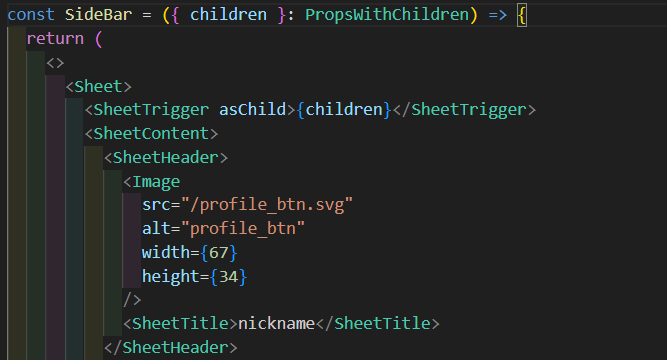
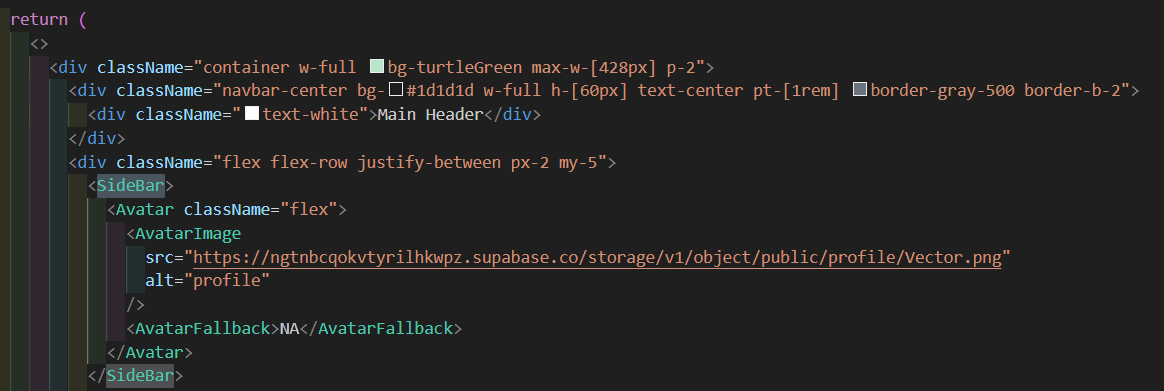
SheetTrigger가 SideBar를 펼치는 버튼 역할을 해주는데,
AvatarImage를 클릭했을 때 동작하게 하려면
asChild를 사용, children props를 감싸주고 타입은 PropsWithChildren!
아무튼, 개발자