▶ SendMessage
- 유니티 API 메세지 기반 명령어
ㄴ 다른 오브젝트에 있는 명령을 실행하거나 혹은 명령을 내릴때 사용한다.
- 또한 샌드메세지는 다른 오브젝트의 특정 명령만 실행하게 할 수 있다. (코루틴 포함)
- 유니티 엔진의 특성상 사용 빈도가 높을 수 밖에 없다.
ㄴ 컴포넌트 기반 프로그래밍
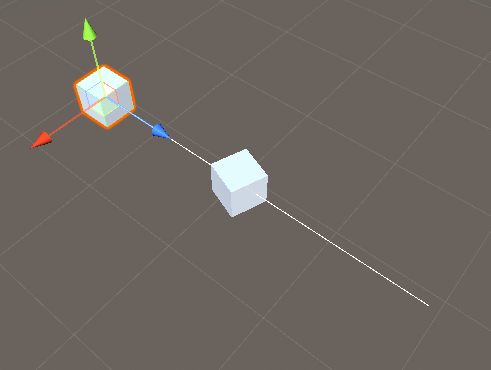
▶ Sender 스크립트
public class CMessageSender : MonoBehaviour
{
    [SerializeField , Range(0,10)]
    #region public 변수
    public float rayDistance = 10.0f;
    #endregion

    // Ray 변수
    private Ray ray;
    // RayCast로 구해진 정보 구조체 배열 (Hit 정보)
    private RaycastHit[] rayHits;
    void Start()
    {
        ray = new Ray
        {
            origin = this.transform.position,
            direction = this.transform.forward
        };
    }
    void Update()
    {
        SendMessageSample();
    }

    void SendMessageSample()
    {
        if(Input.GetKeyDown(KeyCode.Return))
        {
            rayHits = Physics.RaycastAll(ray, rayDistance);

            for (int i = 0; i < rayHits.Length; i++)
            {
                Debug.Log("샌드 메세지 : " + rayHits[i].collider.gameObject.name);

         //샌드 메세지를 이용해 함수를 호출한다.
rayHits[i].collider.gameObject.SendMessage("ReceiveMessageSample",
                                                           "회전", SendMessageOptions.DontRequireReceiver);
            }
        }
    }
  // 그려주기
    private void OnDrawGizmos()
    {
        Gizmos.DrawLine(ray.origin, ray.origin + ray.direction * rayDistance);
    }
}
▶ 샌더메세지를 이용해서 다른 스크립트에서 참조를 하지 않고 string 값을 통해 함수를 실행 시킬수 있다.
rayHits[i].collider.gameObject.SendMessage("ReceiveMessageSample",
                                           "회전",
                                          SendMessageOptions.DontRequireReceiver);
▶ Receiver 스크립트
public class CMessageReceiver : MonoBehaviour
{
    void ReceiveMessageSample(string msg)
    {
        Debug.Log(this.gameObject.name + " : ReceivedMessage" + msg);
        this.transform.Rotate(0, 100.0f, 0); // 회전
    }
}
두가지 스크립트에서 서로 참조를 안하고 있지만 함수의 실행이 가능하다.

노력하자 즐겁게 개발할수 있는 환경을 위해