
why
- 간편한 통합: Firebase는 다양한 소셜 로그인 제공자(Google, Facebook, Twitter, Apple 등)를 지원하며, 이들을 쉽게 통합할 수 있는 SDK와 가이드를 제공
- 보안 관리: Firebase Authentication은 보안 토큰을 사용하여 사용자 인증을 처리합니다. 이를 통해 사용자의 인증 정보를 안전하게 관리
- 유저 관리 기능
- 서버리스 인프라
- 다양한 추가 기능
- Cross-platform 지원
- 문서화 및 커뮤니티 지원
Process
1. 파이어베이스에 프로젝트 추가
파이어베이스 -> 콘솔 -> 프로젝트 추가 -> 프로젝트 생성
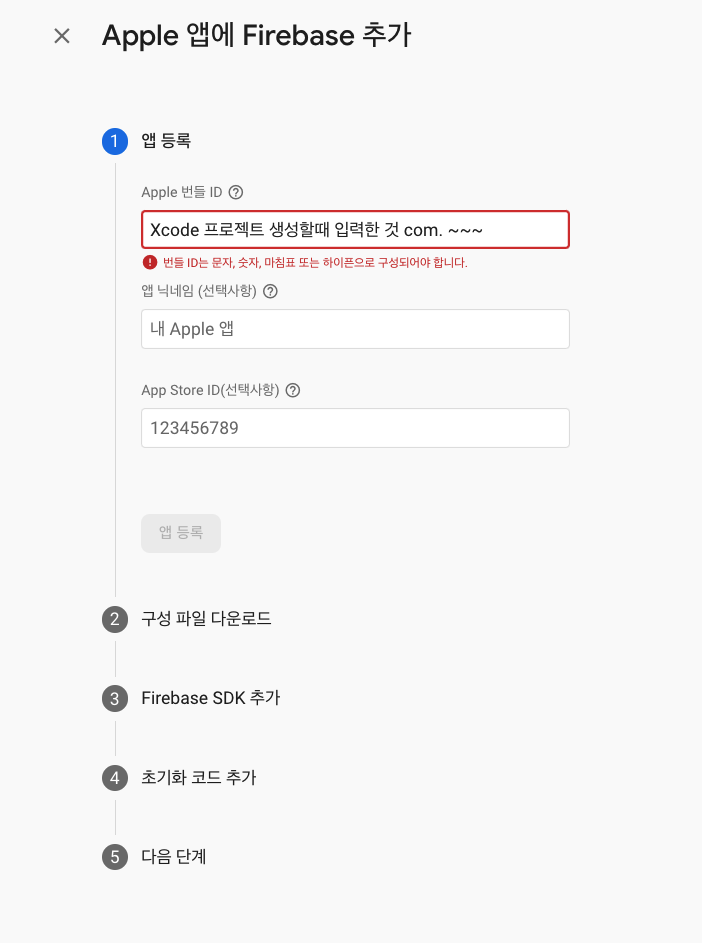
2. Xcode 사전 작업 파이어베이스 SDK 추가


Facebook 앱 설정
- Facebook 개발자 콘솔에서 앱 생성:
- Facebook 개발자 콘솔에 접속하여 새 앱을 생성
- 앱 설정:
- Facebook 로그인 제품을 추가하고, iOS 플랫폼을 선택
- 앱 ID와 번들 ID를 입력.
- Firebase 콘솔에서 Facebook 로그인 설정:
- Firebase 콘솔의 Authentication 섹션으로 이동하여 로그인 방법에서 Facebook을 활성화.
- Facebook 앱 ID와 앱 시크릿을 입력

3. Pod
"""
pod 'Firebase/Core'
pod 'Firebase/Auth'
pod 'GoogleSignIn'
pod 'FBSDKLoginKit'

"""
예시 코드
-
AppDelegate.swift 설정:
import UIKit import Firebase import GoogleSignIn @UIApplicationMain class AppDelegate: UIResponder, UIApplicationDelegate { var window: UIWindow? func application(_ application: UIApplication, didFinishLaunchingWithOptions launchOptions: [UIApplication.LaunchOptionsKey: Any]?) -> Bool { FirebaseApp.configure() //이거 return true } @available(iOS 9.0, *) func application(_ app: UIApplication, open url: URL, options: [UIApplication.OpenURLOptionsKey : Any]) -> Bool { return GIDSignIn.sharedInstance.handle(url) } } -
ViewController.swift:
import UIKit
import Firebase
import GoogleSignIn

class ViewController: UIViewController {

    override func viewDidLoad() {
        super.viewDidLoad()

        GIDSignIn.sharedInstance.signIn(with: .init(clientID: FirebaseApp.app()?.options.clientID), presenting: self) { user, error in
            if let error = error {
                print(error.localizedDescription)
                return
            }

            guard let authentication = user?.authentication, let idToken = authentication.idToken else {
                return
            }

            let credential = GoogleAuthProvider.credential(withIDToken: idToken, accessToken: authentication.accessToken)

            Auth.auth().signIn(with: credential) { authResult, error in
                if let error = error {
                    print("Firebase Sign in Error: \\(error)")
                    return
                }

                print("User signed in: \\(authResult?.user.email ?? "No email")")
            }
        }
    }
}
