COBOL
- English-like, imperative, procedural, object-oriented since 2002.
- The average American interacts with a cobol programming 13 times a day!
- 70% of world's data is processed by COBOL.
- COBOL supports 30 billion number of transaction per day.
- Most government agencies will have some COBOL code they need to deal with, but some are more dependent on it than others.
Installing IDE
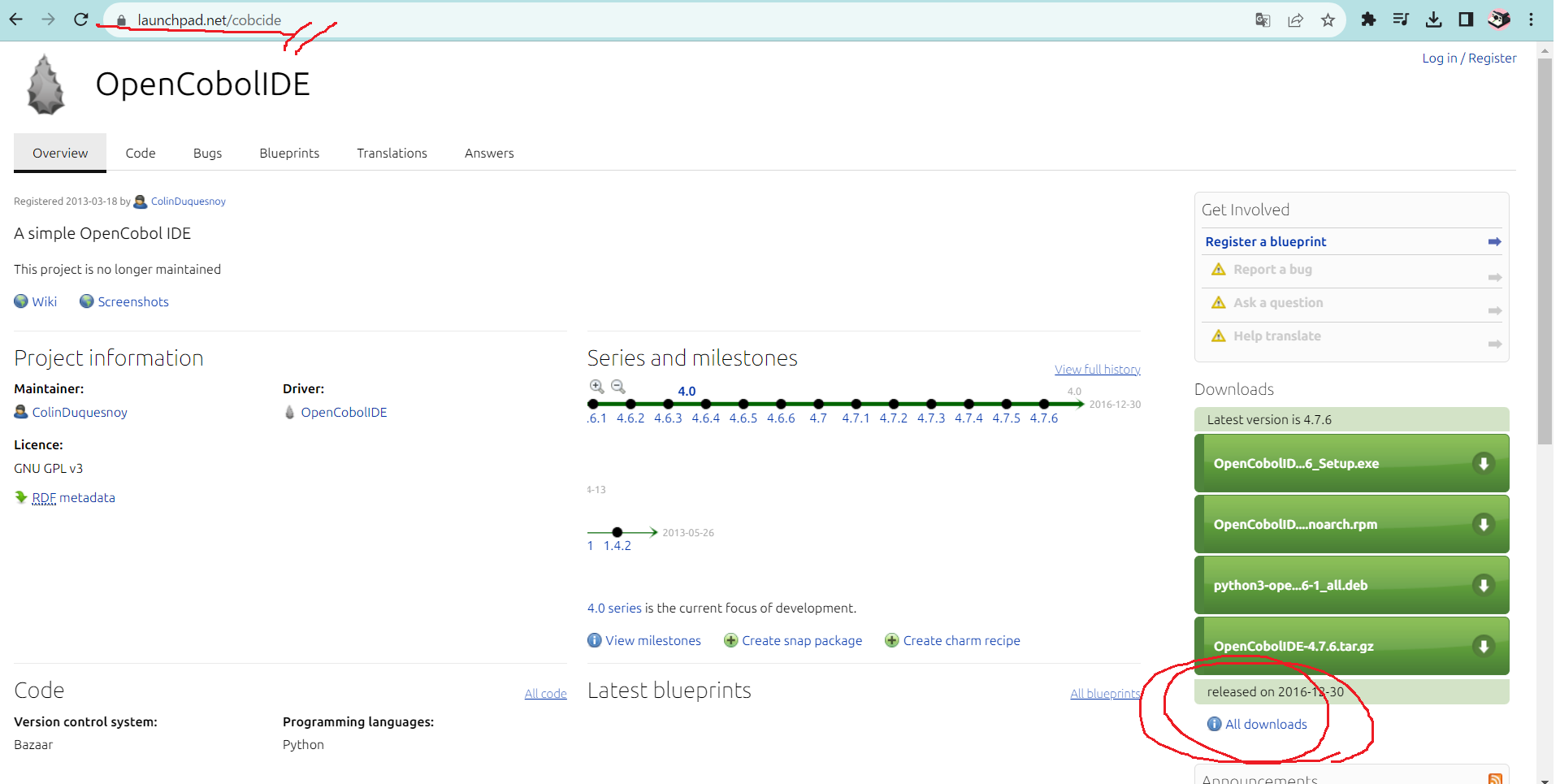
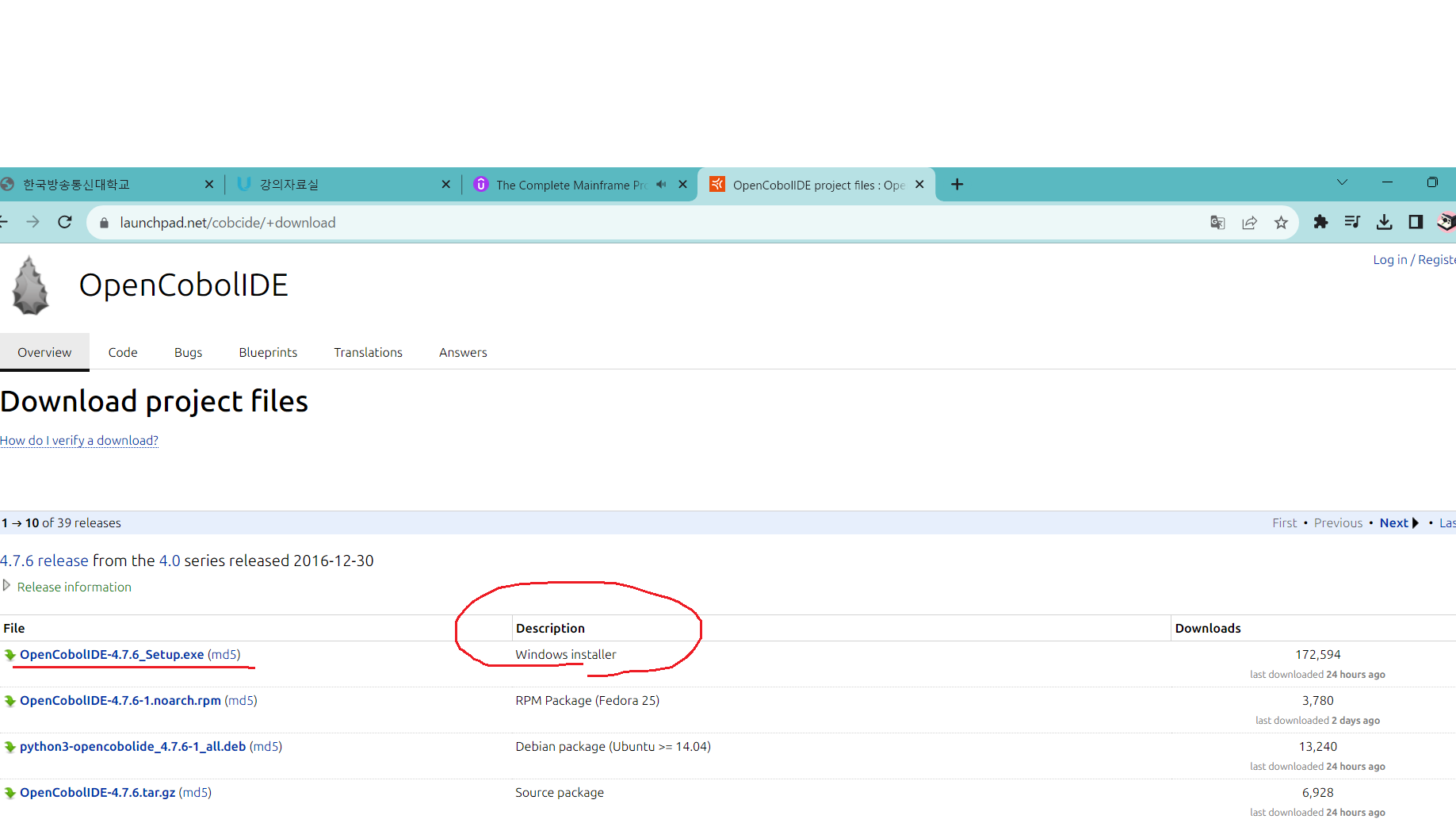
- launchpad.net/cobcide

How to code Identification Division
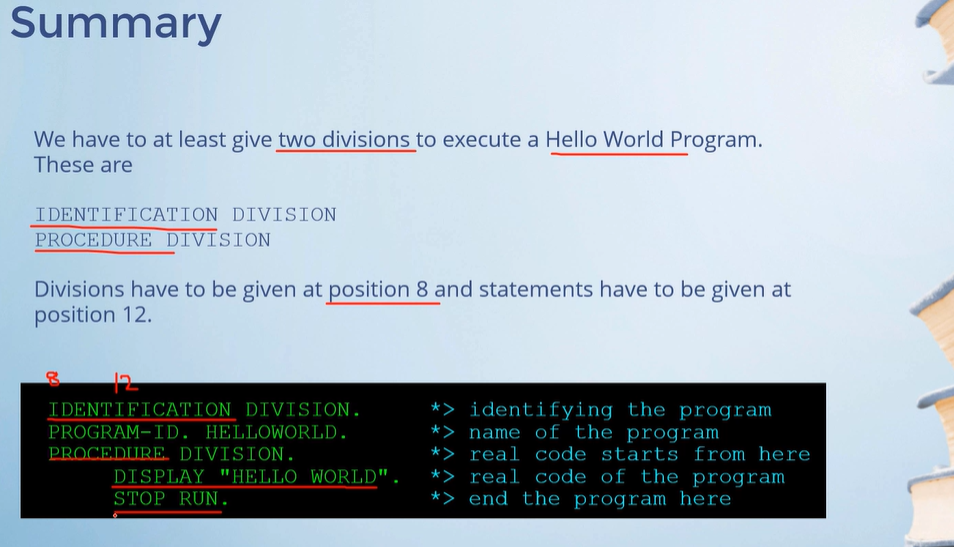
- This should come first before any other divisions.
- Used to Identify a program.
- Program-ID is required.
	IDENTIFICATION DIVISION.
PROGRAM-ID. HELLOWORLD.- Program-ID is maximum 8 characters on IBM Mainframe. It can be up to 30 characters on a normal PC.
- Program-ID can have alphabets, number and hyphen.
- Program-ID should not start or end with hyphen.
IDENTIFICATION DIVISION. *> mandatory
PROGRAM-ID. HELLOWORLD. *> mandatory
REMARKS. i write this prog as a practice. *> optional
DATE-COMPILED. may 20 2023. *> optional
DATE-WRITTEN. may 15 2023. *> optional

ENVIRONMENT DIVISION.
DATA DIVISION.
PROCEDURAL DIVISION.
	DISPLAY "HELLO WORLD!!!!!"
    STOP RUN.
How to code working-storage section
- This is given in Data division, which is the third division.
- Used to identify the data associated with a program such as the variables of the program.
DATA DIVISION.
WORKING-STORAGE SECTION.

01 MY-NAME PIC XXXX.- To define a variable give a two digit number called level number in Area A, followed by the variable name in Area B.
- Level numbers are used to tell whether the variables are related or not. Related variables are grouped together. Unrelated variables can be given level number 77.
- Variable name can be a maximum of 30 characters.
- Variable names can have alphabets, digits or hyphen.
- Name should not start or end with hyphen.
// 세 변수가 연결되어 있다.
IDENTIFICATION DIVISION. *> mandatory
PROGRAM-ID. HELLOWORLD. *> mandatory


ENVIRONMENT DIVISION.
DATA DIVISION.
WORKING-STORAGE SECTION.
	01 MY-NAME PICTURE X. *> DECLARE VARIABLE.
    					  *> LEVEL NUM : 01
                          *> X : ALPHABET, 9 : NUMERIC
    	05 FIRST-NAME PICTURE X.
        05 LAST-NAME PICTURE X.
PROCEDURE DIVISION.
	MOVE "J" TO FIRST-NAME.
    MOVE "K" TO LAST-NAME.
	DISPLAY MY-NAME.
    STOP RUN.
// 이런 경우라면 세 변수가 연결되어 있지 아니함.
// 레벨 넘버가 상위가 있고 하위가 있으면 서로 연결되어 있다.
IDENTIFICATION DIVISION. *> mandatory
PROGRAM-ID. HELLOWORLD. *> mandatory
ENVIRONMENT DIVISION.
DATA DIVISION.
WORKING-STORAGE SECTION.
01 MY-NAME. *> DECLARE VARIABLE.
*> LEVEL NUM : 01
*> X : ALPHABET, 9 : NUMERIC
05 FIRST-NAME PICTURE X.
05 LAST-NAME PICTURE X.
PROCEDURE DIVISION.
MOVE "J" TO FIRST-NAME.
MOVE "K" TO LAST-NAME.
DISPLAY MY-NAME.
STOP RUN.How to code PICTURE clause
- PICTURE clause is used to tell whether the idata item cannot contain numeric, alphabets etc.
- It is given after the name of the data name.
	IDENTIFICATION DIVISION.
    PROGRAM-ID. HELLO.
    ENVIRONMENTAL DIVISION.
    DATA DIVISION.
    WORKING-STORAGE SECTION.

    01 MY-NAME PIC X(10),
    01 PHONE PIC 9(10).

    PROCEDURAL DIVISION.
    	MOVE "JOHN" TO MY-NAME.
        MOVE "433235252" TO PHONE.

        DISPLAY PHONE.
        DISPLAY MY-NAME
        STOP RUN.
- A PICTURE caluse of X means alphanumeric which can hold alphabets, numeric and special characters as well.
- PICTURE clause of 9 means numeric and it can only hold numeric values.
- The length of the data item can be given in brackets.
- Each character or digit require only one byte of storage.
- One byte of storage is required for each alphabet, digit, decimal or sign.
How to code VALUE clause
- Can be used to give a starting value to a variable.
- The most common way is to assign a figurative constant to a variable for example ZEROES or SPACES.
DATA DIVISION.
WORKING-STORAGE SECTION.

01 PHONE PIC 9(10) VALUE 9238472637.
01 INCOME PIC 9(2) VALUE ZEROES.
01 HEIGHT PIC X(3) VALUE SPACES.
How to code PICTURE clause
- Related data items could be grouped together.
- Level numbers are used for this grouping. The top item is called Group item and the child items are called elementary items.
- Group item cannot have a PICTURE clause.
- Group item must begin in AREA A.
- Level numbers from 01 to 49 can be used.
DATA DIVISION.
WORKING-STORAGE SECTION.

01 MY-NAME.
	05 FIRST-NAME PIC X(10).
05 LAST-NAME PIC X(10).- Data items unrelated to each other can be given level numbers of 77.
How to code the PROCEDURE DIVISION
PROCEDURE DIVISION.

000-CALCULATE-TOTAL-MARKS.
	PERFORM 100-CALCULATE-PHYSICS-MARKS.
    PERFORM 200-CALCULATE-BIOLOGY-MARKS.
    PERFORM 300-CALCULATE-MATHS-MARKS.
    PERFORM 400-CALCULATE-CHEMISTRY-MARKS
    PERFORM 500-CALCULATE-TOTAL-MARKS.
    STOP RUN.

100-CALCULATE-PHYSICS-MARKS.
	.....
    .......
    .........
200-CALCULATE-BIOLOGY-MARKS.
	.....
    .......
.........- Procedure names can have a maximum of 30 characters.
- It can contain digits, alphabets and hyphen, but the name should not start or end with hyphen.
- Procedure names should start in AREA A and statements should be in AREA B.
DISPLAY statement
DISPLAY DIVISION.
DISPLAY "This is a display statement".- DISPLAY is used to display data on the screen or terminal.
- You can display a variable or a literal.
- You can also display mutiple variables or literals at the same time.
MOVE statement
PROCEDURE DIVISION.

MOVE "This is a MOVE statement" to VAR-A.
MOVE 24232 TO PHONE.
MOVE VAR-A TO VAR-B.- MOVE is used to move literal or sending field to a receiving field.
- You can move a variable or a literal.
- You can move alphanemeric to alphanumeric, numeric to numeric, numeric to numeric edited variables.
- You can move alphanumeric to numeric, alphanumeric to numeric edited, numeric to alphanumeric only if the sending field is unsigned.
- You can move alphanumeric to numeric, alphanumeric to numeric edited, numeric to alphanumeric only if the sending field is unsigned.
- If the sending field is smaller than receiving field then the receiving field is filled with trailing blanks in case of alphanumeric and with leading zeroes in case of numeric.
ACCEPT statement
DATA DIVISION.
WORKING-STORAGE SECTION.
01 PHONE PICTURE 9(10).

PROCEDURE DIVISION.
ACCEPT PHONE.- ACCPET is used to accept values from the user.
- The program will wait for the user to enter a value and press the enter key.
- The value will be stored in the variable defined in working storage section.
PERFORM and STOP RUN
PERFORM procedure_name
	.......
    .......
STOP RUN.
PERFORM
- Used to execute a procedure.
- Code can be divided into a set of paragraphs known as procedures.
- Control is passed to the procedure named in the PERFORM statement.
- After all the statements in the PROCEDURE are executed then the return comes back to the next statement after the PERFORM.
STOP RUN
- STOP RUN is used to end the execution of the program.
- It is coded only once in a program.
- It is generally the last statement in the main procedure.

Working Abroad ...