github와 같은 협업툴을 사용하면서 commit을 하게되면 개발자가 발급받은 api 키값이 노출될 수 있다.
api호출량이 정해져 있기도하고, testapi라도 노출되서 악용되게 된다면 문제가 발생할 수 있기 때문에 github에서 노출되지않게
노출되지 않을 프로퍼티를 localproperty에 저장하고 .gitignore 를 통해서 로컬 프로퍼티를 commit할때 무시게되 하는 방법이다.
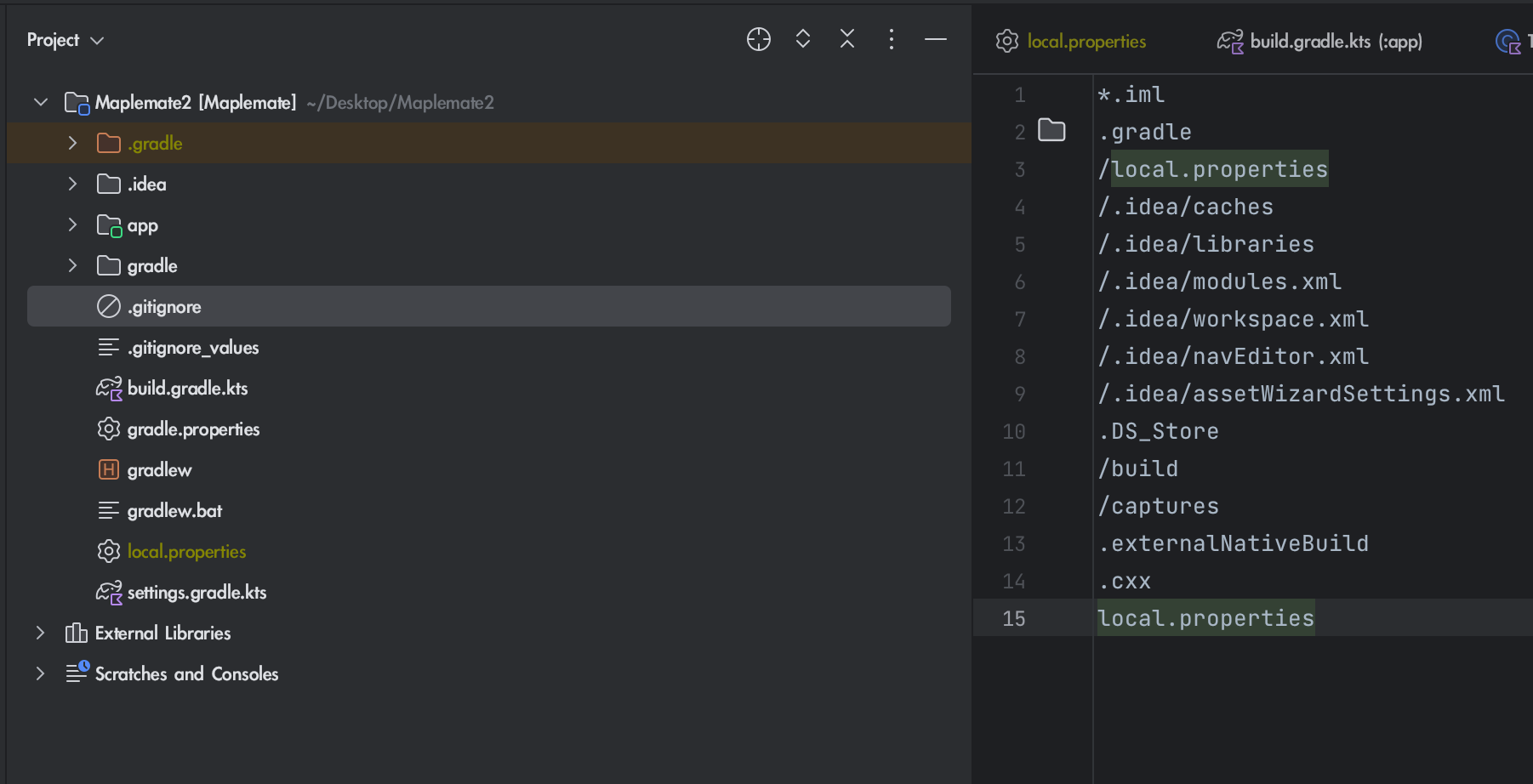
기본적으로 .gitignore 파일에서 로컬 프로퍼티 파일 자체가 등록되어있기때문에 특별한일이 아니라면 추가해줄 필요는 없을것이다.
###.gitignore 파일 찾는법

- 좌상단에서 Android수준 > Project수준 으로 변경
- Project 최상단 경로에 .gitignore 존재
보는것처럼 기본적으로 local.properties 파일이 ignore에 등록되어있다.
로컬에 항상 두고 써야하는 정보이지만 git에 올라가면 안되는 민감한 정보는 여기서 파일명을 입력해주면된다.
gitignore의 자세한 문법은 설명하지 않겠다.
build.gradle.kts(Module :app)
import org.jetbrains.kotlin.konan.properties.Properties

plugins {
    id("com.android.application")
    id("org.jetbrains.kotlin.android")
}
	//	Proerties 표준함수명이 Java > kotlin 으로 넘어오면서 변함.
    //.inputStream() 부분도 표준 함수명이 변해 kotlin 환경에서 사용하시는분들은 이렇게 참고해서 사용하시면 됩니다.
    val properties = Properties()
    properties.load(project.rootProject.file("local.properties").inputStream())


android {
    namespace = "com.android.maplemate"
    compileSdk = 34

    defaultConfig {
        applicationId = "com.android.maplemate"
        minSdk = 29
        targetSdk = 33
        versionCode = 1
        versionName = "1.0"

        testInstrumentationRunner = "androidx.test.runner.AndroidJUnitRunner"

        buildConfigField(

            "String", // String 타입으로 저장하고
            "api_key", // 태그될 string 명
            properties.getProperty("api.key") // api.key = localproperty 에 키 = 값 형태로 저장된 이름이다
            								  // api.key = "실제 api키값"
        )
    }

    buildTypes {
        release {
            isMinifyEnabled = false
            proguardFiles(
                getDefaultProguardFile("proguard-android-optimize.txt"),
                "proguard-rules.pro"
            )
        }
    }
    compileOptions {
        sourceCompatibility = JavaVersion.VERSION_1_8
        targetCompatibility = JavaVersion.VERSION_1_8
    }
    kotlinOptions {
        jvmTarget = "1.8"
    }
    viewBinding { enable = true }
    dataBinding { enable = true }
}

dependencies {

    implementation("androidx.core:core-ktx:1.9.0")
    implementation("androidx.fragment:fragment-ktx:1.6.1")
    implementation("androidx.appcompat:appcompat:1.6.1")
    implementation("com.google.android.material:material:1.10.0")
    implementation("androidx.constraintlayout:constraintlayout:2.1.4")
    implementation("io.coil-kt:coil:2.5.0")


    implementation ("org.jetbrains.kotlinx:kotlinx-coroutines-android:1.5.1")
    implementation ("com.google.code.gson:gson:2.10.1")
    implementation ("com.squareup.retrofit2:retrofit:2.9.0")
    implementation ("com.squareup.retrofit2:converter-gson:2.9.0")
    implementation ("com.squareup.okhttp3:okhttp:4.10.0")
    implementation ("com.squareup.okhttp3:logging-interceptor:4.10.0")


    testImplementation("junit:junit:4.13.2")
    androidTestImplementation("androidx.test.ext:junit:1.1.5")
    androidTestImplementation("androidx.test.espresso:espresso-core:3.5.1")
}
localproperty 에 변수를 저장하고 태그하여 사용
local.properties
## This file must *NOT* be checked into Version Control Systems,
# as it contains information specific to your local configuration.
#
# Location of the SDK. This is only used by Gradle.
# For customization when using a Version Control System, please read the
# header note.
#Wed Nov 22 23:34:38 KST 2023
sdk.dir=/Users/younee/Library/Android/sdk
api.key = "실제 Api키값으로 대체"
사용예시
class SecondFragment : Fragment() {

    companion object {
        fun newInstance(): SecondFragment = SecondFragment()
    }

    private var _binding: FragmentSecondBinding? = null
    private val binding get() = _binding!!

    private lateinit var testApikey:String // 지연초기화


    override fun onCreate(savedInstanceState: Bundle?) {
        super.onCreate(savedInstanceState)

        testApikey = "${BuildConfig.nexon_api_key}" // 초기화하는부분 Buildconfig에서 꺼내면 됩니다

    }

    override fun onCreateView(
        inflater: LayoutInflater, container: ViewGroup?,
        savedInstanceState: Bundle?
    ): View? {
        _binding = FragmentSecondBinding.inflate(inflater, container, false)
        return binding.root
    }

    override fun onViewCreated(view: View, savedInstanceState: Bundle?) {
        super.onViewCreated(view, savedInstanceState)


    }

    override fun onDestroyView() {
        super.onDestroyView()
        _binding = null
    }

}
정돈된 공간에서 생각하기를 좋아합니다.