SELinux Security Framwork
- Allow administrator to specify security policy
동작과정
- 유저/프로세스
- 1) 이들은 SELinux를 통해 퍼미션 확인
- 2) 추가적으로 이들은 SELinux를 통해 security context(like label) 확인
- 퍼미션, security context 두 개가 정상적이라면 파일/디렉토리에 접근하게됨.
- SELinux <-> policy
security context
- identity:role:type:security_level
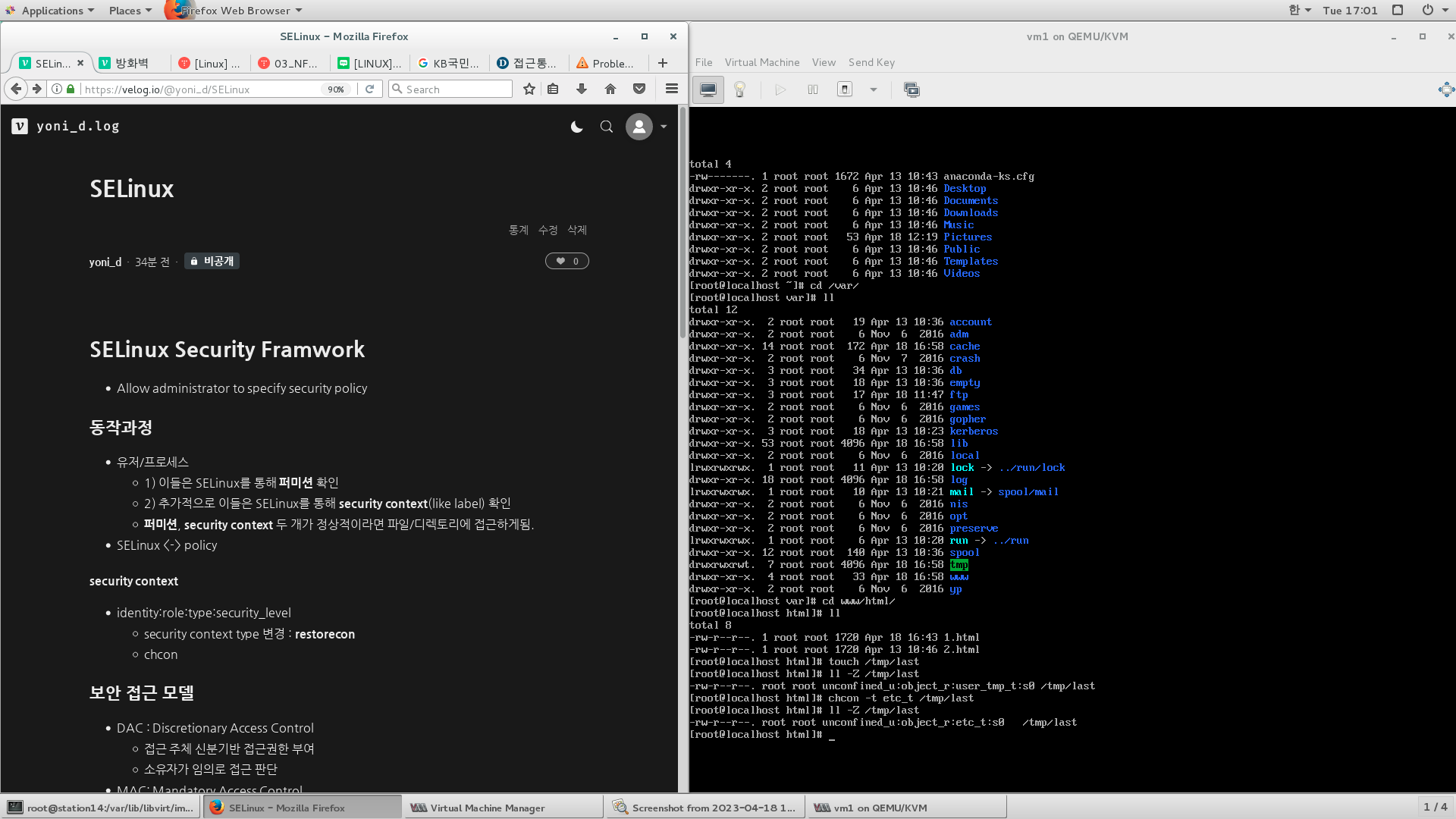
- security context type 변경 : restorecon
- chcon
보안 접근 모델
- DAC : Discretionary Access Control
- 접근 주체 신분기반 접근권한 부여
- 소유자가 임의로 접근 판단
- MAC: Mandatory Access Control
- 주체, 객체 등급기반 접근권한 부여
- RAC : Role-Based Access Control
- 주체, 객체 역할 기반 권한 부여 기반 접근 판단
cp initial-setup-ks.cfg /var/www/html/1.html
mv initial-setup-ks.cfg /var/www/html/2.html
ll /var/www/html
systemctl start httpd
ifconfig eth0 : 192.168.122.253
http://192.168.122.253/1.html
http://192.168.122.253/2.html
ps -eZ | grep httpd
ll -Z /var/www/html
restorecon -vFR /var/www/html
SElinux Modes
- getenforce
- setenforce
[root@station14 images]# getenforce
Enforcing
[root@station14 images]# setenforce 1
[root@station14 images]# getenforce
Enforcing
[root@station14 images]# setenforce 0
[root@station14 images]# getenforce
Permissive
- /etc/sysconfig/selinux를 수정해야됨.
- disable <-> permissive, enforcing 은 재부팅 필요
Booleans
- sestatus -b
- getsebool -a
[root@station14 images]# sestatus -b
SELinux status:                 enabled
SELinuxfs mount:                /sys/fs/selinux
SELinux root directory:         /etc/selinux
Loaded policy name:             targeted
Current mode:                   permissive
Mode from config file:          enforcing
Policy MLS status:              enabled
Policy deny_unknown status:     allowed
Max kernel policy version:      28

Policy booleans:
abrt_anon_write                             off
abrt_handle_event                           off
abrt_upload_watch_anon_write                on
antivirus_can_scan_system                   off
antivirus_use_jit                           off
auditadm_exec_content                       on
authlogin_nsswitch_use_ldap                 off
authlogin_radius                            off
authlogin_yubikey                           off
awstats_purge_apache_log_files              off
boinc_execmem                               on
cdrecord_read_content                       off
...

> ftp 관련 정책들을 보여줘
[root@station14 images]# getsebool -a | grep ftp
ftpd_anon_write --> off
ftpd_connect_all_unreserved --> off
ftpd_connect_db --> off
ftpd_full_access --> off
ftpd_use_cifs --> off
ftpd_use_fusefs --> off
ftpd_use_nfs --> off
ftpd_use_passive_mode --> off
httpd_can_connect_ftp --> off
httpd_enable_ftp_server --> off
tftp_anon_write --> off
[root@station14 images]# iptables -F
[root@station14 images]# iptables -P INPUT ACCEPT
[root@station14 images]# iptables -nL
Chain INPUT (policy ACCEPT)
target     prot opt source               destination

Chain FORWARD (policy ACCEPT)
target     prot opt source               destinatimeson

Chain OUTPUT (policy ACCEPT)
target     prot opt source               destination

su - 일반유저 -> touch bye.txt -> ftp localhost -> 암호 -> cd /tmp -> put bye.txt

>오류 해결해보기
cat /var/log/messages


[root@localhost ~]# setsebool -P ftpd_full_access  1

[root@localhost ~]# getsebool -a | grep ftp
ftpd_anon_write --> off
ftpd_connect_all_unreserved --> off
ftpd_connect_db --> off
ftpd_full_access --> on			--this check! (접근 허용하겠다.)
ftpd_use_cifs --> off
ftpd_use_fusefs --> off
ftpd_use_nfs --> off
ftpd_use_passive_mode --> off
httpd_can_connect_ftp --> off
httpd_enable_ftp_server --> off
tftp_anon_write --> off
tftp_home_dir --> off
Permissive Domains

study log