JSON이란?
-
개념
JSON : JavaScript Object Notation
자바스크립트 객체 문법에 토대를 둔, 문자 기반의 데이터 교환 형식 -
구조
일반적인 JSON 구조는 자바스크립트 객체 리터럴 작성법을 따른다.
자바스크립트의 원시 자료형인 문자열, 숫자, 불린을 가질 수 있고 중첩된 계층 구조 또한 가질 수 있다.
출처 : MDN 공식 문서
{
  "squadName": "Super hero squad",
  "homeTown": "Metro City",
  "formed": 2016,
  "secretBase": "Super tower",
  "active": true,
  "members": [
    {
      "name": "Molecule Man",
      "age": 29,
      "secretIdentity": "Dan Jukes",
      "powers": [
        "Radiation resistance",
        "Turning tiny",
        "Radiation blast"
      ]
    },
    {
      "name": "Madame Uppercut",
      "age": 39,
      "secretIdentity": "Jane Wilson",
      "powers": [
        "Million tonne punch",
        "Damage resistance",
        "Superhuman reflexes"
      ]
    },
    {
      "name": "Eternal Flame",
      "age": 1000000,
      "secretIdentity": "Unknown",
      "powers": [
        "Immortality",
        "Heat Immunity",
        "Inferno",
        "Teleportation",
        "Interdimensional travel"
      ]
    }
  ]
}
자바스크립트 객체 형태와 완전히 같지는 않다. 작은 따옴표''가 아닌 큰 따옴표""만 허용된다.
- 메서드
JSON ➡ 문자열 형태 ➡ 서버 - 클라이언트 간 데이터 전송 시 사용
하지만 다음 두 경우를 위해 파싱(parsing) 과정이 필요하다.
1. JS 객체를 JSON 형태로 전송
2. JSON 형태를 JS 객체 형태로 사용
- stringify()
자바스크립트 객체 ➡ JSON 문자열 변환. 네트워크를 통해 객체를 JSON 문자열로 변환할 때 주로 사용한다.
console.log(JSON.stringify({x:5, y:6});
// expected output : "{"x":5, "y":6}"

console.log(JSON.stringify([new Number(3), new String('false'), new Boolean(false)]));
// expected output: "[3,"false",false]"

console.log(JSON.stringify({ x: [10, undefined, function(){}, Symbol('')] }));
// expected output: "{"x":[10,null,null,null]}"

console.log(JSON.stringify(new Date(2006, 0, 2, 15, 4, 5)));
// expected output: ""2006-01-02T15:04:05.000Z""- parse()
JSON 문자열 ➡ 자바스크립트 객체 변환. 네트워크 통신의 결과를 통해 받아온 JSON 문자열을 프로그램 내부에서 사용하기 위해 JS 객체로 변환할 때 사용
const json = '{"result":true, "count":42}';
const obj = JSON.parse(json);

console.log(obj.count);
// Expected output: 42

console.log(obj.result);
// Expected output: true- JSONPlaceholder
가짜 서버(= fake server, mock API server)
아래 API를 통해 JSON 기반 DB 통신을 일으켜보자
fetch('https://jsonplaceholder.typicode.com/posts')
  .then((response) => response.json())
  .then((json) => console.log(json));
App.jsx
import "./App.css";
import { useEffect, useState } from "react";

function App() {
  const [data, setData] = useState([]);

  useEffect(() => {
    fetch("https://jsonplaceholder.typicode.com/posts")
      .then((response) => {
        console.log();
        console.log("response.json()", response);
        return response.json();
      })
      .then((json) => {
        console.log("json", json);
        setData([...json]);
      });
  }, []);

  return (
    <div>
      {data.map((item) => {
        return (
          <div
            style={{
              border: "1px solid black",
              margin: "3px",
            }}
            key={item.id}
          >
            <ul>
              <li>userId : {item.userId}</li>
              <li>id : {item.id}</li>
              <li>title : {item.title}</li>
              <li>body : {item.body}</li>
            </ul>
          </div>
        );
      })}
    </div>
  );
}

export default App;
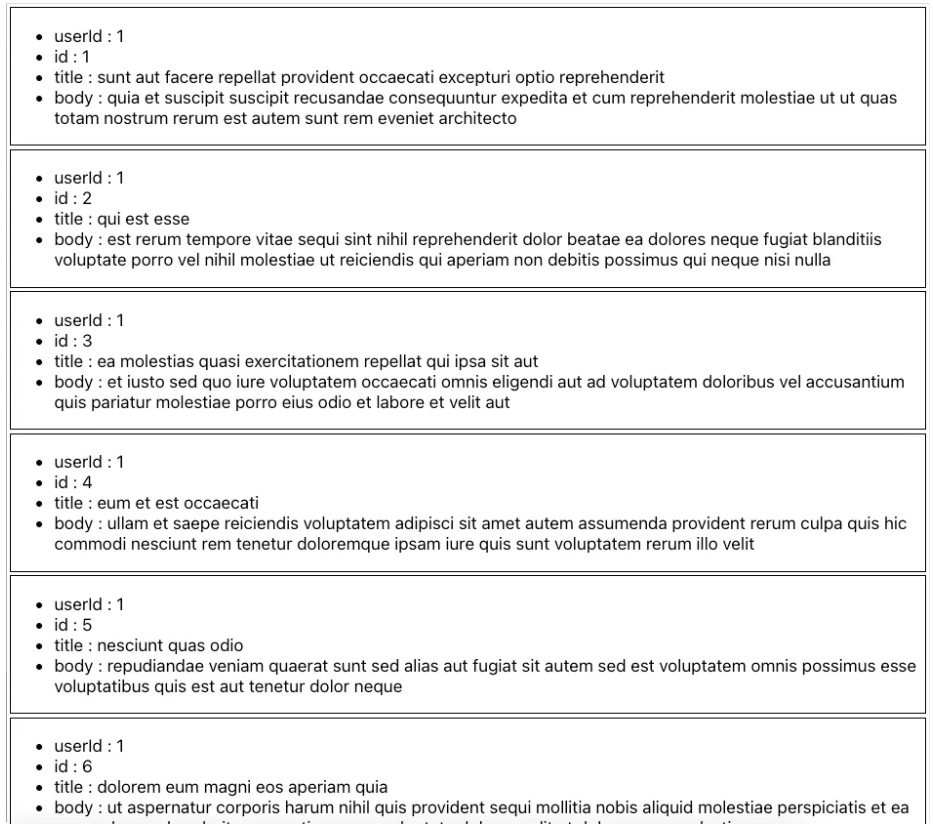
실행하면 아래와 같은 결과가 나온다

프론트가 되고싶은 웹디자이너