이전 글에서, 디스크에서 데이터를 다 로드하지 않고,
page 구조체로 만들어서 가지고 있는다 라고 표현한 적이 있다.
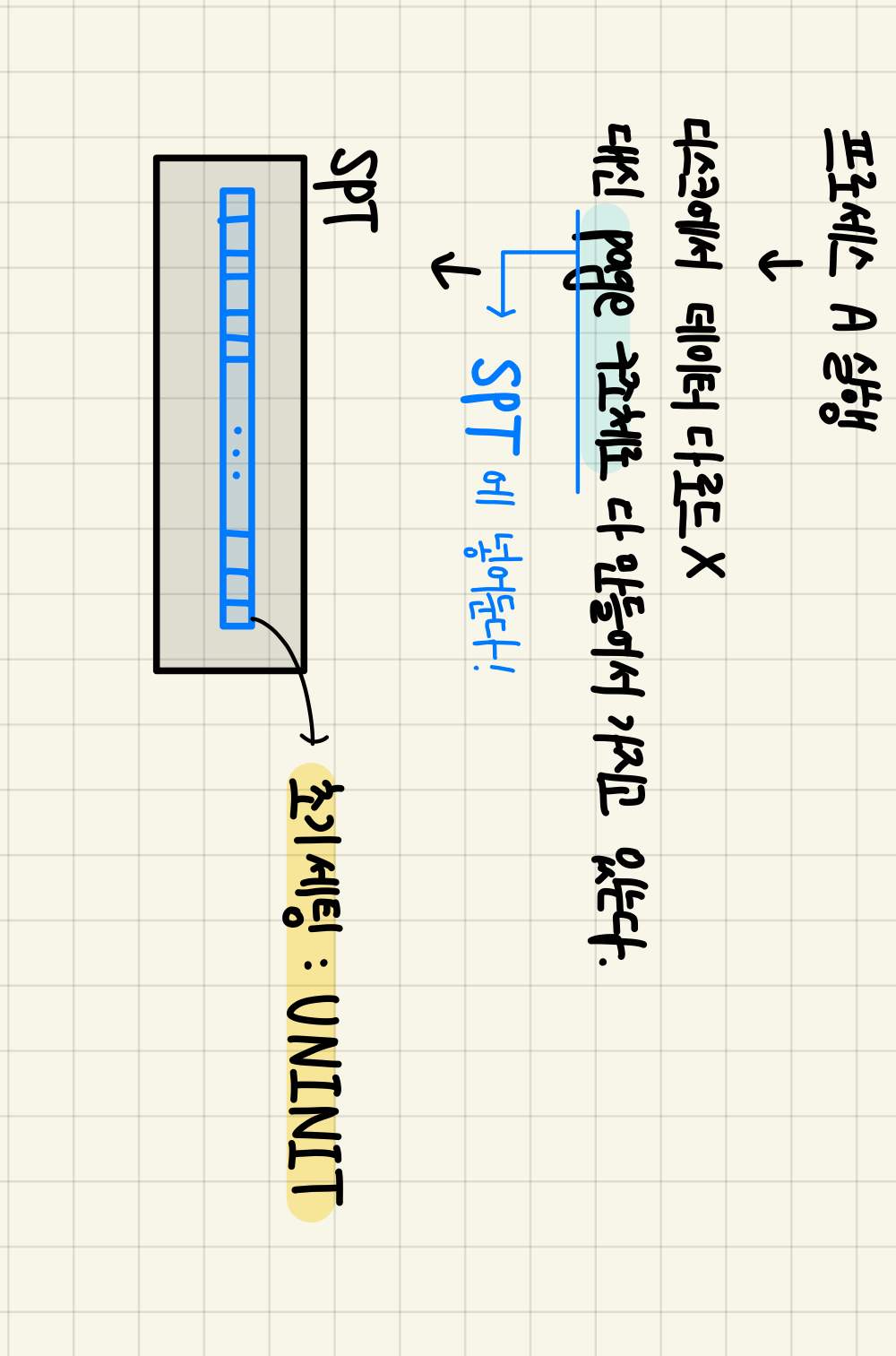

실제로 코드에서 어떻게 이를 불러오는지 살펴보자.
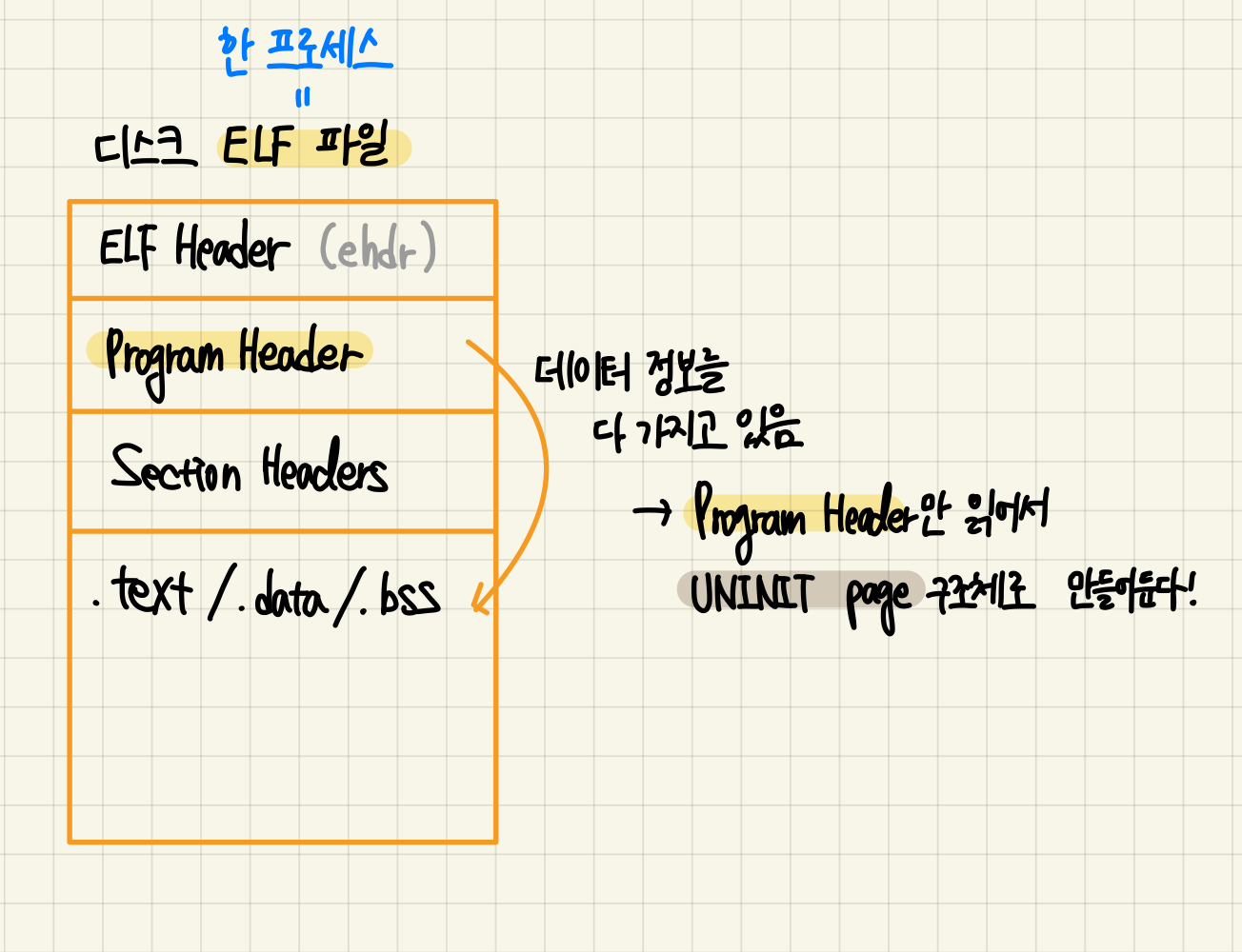
사실 한 프로세스에 대한 데이터는, ELF 파일을 기반으로 구성되어 있다.
이 ELF 파일 중 가장 눈여겨볼 만한 부분은,
- program Header (두번째 칸)
- 데이터 영역 (네번째 칸)
이다.
우리는 네번째 칸에 있는 segment들에 대해 ( .text, .data, .bss 등),
그에 대응하는 UNINIT 페이지 구조체를 만들어놓아야 한다.
다행히도, Program Header에 데이터에 대한 정보가 모두 담겨있다!
즉, 우리는 Program Header만 읽어서 page 구조체를 만들면 되는 것이다.
static bool load (const char file_name, struct intr_frame if_)
static bool
load (const char *file_name, struct intr_frame *if_) {
	struct thread *t = thread_current ();
	struct ELF ehdr;
	struct file *file = NULL;
	off_t file_ofs;
	bool success = false;
	int i;

	/* Allocate and activate page directory. */
	t->pml4 = pml4_create ();
	if (t->pml4 == NULL)
		goto done;
	process_activate (thread_current ());

	/* Open executable file. */
	file = filesys_open (file_name);


	if (file == NULL) {
		printf ("load: %s: open failed\n", file_name);
		goto done;
	}

	file_deny_write(file);
	thread_current()->running_file = file;

	/* Read and verify executable header. */
	if (file_read (file, &ehdr, sizeof ehdr) != sizeof ehdr
			|| memcmp (ehdr.e_ident, "\177ELF\2\1\1", 7)
			|| ehdr.e_type != 2
			|| ehdr.e_machine != 0x3E // amd64
			|| ehdr.e_version != 1
			|| ehdr.e_phentsize != sizeof (struct Phdr)
			|| ehdr.e_phnum > 1024) {
		printf ("load: %s: error loading executable\n", file_name);
		goto done;
	}

	/* Read program headers. */
	file_ofs = ehdr.e_phoff;
    // ❗️ 바로 이 부분에서 program header를 읽는다. ❗️ //
	for (i = 0; i < ehdr.e_phnum; i++) {
		struct Phdr phdr;

		if (file_ofs < 0 || file_ofs > file_length (file))
			goto done;
		file_seek (file, file_ofs);

		if (file_read (file, &phdr, sizeof phdr) != sizeof phdr)
			goto done;
		file_ofs += sizeof phdr;
		switch (phdr.p_type) {
			case PT_NULL:
			case PT_NOTE:
			case PT_PHDR:
			case PT_STACK:
			default:
				/* Ignore this segment. */
				break;
			case PT_DYNAMIC:
			case PT_INTERP:
			case PT_SHLIB:
				goto done;
            //❗️ 로드해야될 때❗️//
			case PT_LOAD:
				if (validate_segment (&phdr, file)) {
					bool writable = (phdr.p_flags & PF_W) != 0;
					uint64_t file_page = phdr.p_offset & ~PGMASK;
					uint64_t mem_page = phdr.p_vaddr & ~PGMASK;
					uint64_t page_offset = phdr.p_vaddr & PGMASK;
					uint32_t read_bytes, zero_bytes;
					if (phdr.p_filesz > 0) {
						/* Normal segment.
						 * Read initial part from disk and zero the rest. */
						read_bytes = page_offset + phdr.p_filesz;
						zero_bytes = (ROUND_UP (page_offset + phdr.p_memsz, PGSIZE)
								- read_bytes);
					} else {
						/* Entirely zero.
						 * Don't read anything from disk. */
						read_bytes = 0;
						zero_bytes = ROUND_UP (page_offset + phdr.p_memsz, PGSIZE);
					}
                    //❗️ 이곳에서 page 를 만든다. ❗️//
					if (!load_segment (file, file_page, (void *) mem_page,
								read_bytes, zero_bytes, writable))
						goto done;
				}
				else
					goto done;
				break;
		}
	}

	/* Set up stack. */
	if (!setup_stack (if_))
		goto done;

	/* Start address. */
	if_->rip = ehdr.e_entry;

	/* TODO: Your code goes here.
	 * TODO: Implement argument passing (see project2/argument_passing.html). */

	success = true;

done:
	/* We arrive here whether the load is successful or not. */
	return success;
}
반복문을 열심히 돌면서
SPT 안에 들어갈 작은 파란색 블록들을 만들어주고 있는 것이다.
PintOS 가상 메모리의 전체적인 흐름을 잡기 위해 이번 글을 작성했다.
다음 글에서는 본격적으로 페이지가 어떻게 로드되고 동작하는지를 살펴볼 예정이다.

이유민