
1.생성자란 무엇인가?
생성자는 new 연산자를 통해 객체를 생성할 때 반드시 호출이 되고 제일 먼저 실행되는 일종의 메서드라고 생각하면 편합니다. 생성자는 멤버 변수를 초기화하는 역할을 합니다.
2.디폴트 생성자란 무엇인가?
디폴트 생성자는 생성자가 없을 때 적용합니다.
생성자가 있으면 더 이상 디폴트 생성자는 적용 안됩니다
3.생성자의 용도에 대하여 설명하시오.
생성자는 객체를 만들 때 무조건 호출되는 함수이기 때문에 객체에 반드시 들어가야 하는 값을 넣는 용도로 사용할 수 있다.
4.null 에 대하여 설명하시오.
먼저 null은 참조형에서만 사용가능합니다.
null 사용법
1.객체 생성없이 초기화 시키고싶을때
2. 객체 생성을 했으나 중간에 관계를 끊고 싶을때
개발자들이 사용하는 용도
-
슈퍼맨(jvm)으로 하여금 이 객체를 사용하지 않는다는것을 알려줍니다.
-
슈퍼맨(jvm)한테 해당 메모리 정리해도 좋다 라는 싸인을 주는 것입니다.
5.자바의 명명 규칙에 대하여 설명하시오.
클래스 명
- 클래스 명은 명사로 합니다.
- CamelCase 를 따릅니다.
메소드 명
한 개의 클래스 안에는 메소드가 여러개 존재할 수 있습니다.
- 메소드 명은 동사로 합니다.
- CamelCase 로 작성합니다 (단 시작 문자는 소문자로 합니다. )
변수 명
변수명은 짧지만 의미있게 합니다. ( 타인이 변수명을 보자마자 어떤 변수인지 알 수 있게)
순서를 의미하는 임시적인 정수명은 i , j , k , m , n 을 사용합니다 ( 문자의 경우 c , d , e 등을 사용 )
변수명에 _ , $ 등의 특수문자를 사용할 수 있지만, 시작 문자로 사용하지는 않습니다.
6.패키지에 대하여 설명하시오.
패키지의 필요성
1. 공간에서의 충돌
동일 이름의 클래스 파일을 같은 위치에 둘 수 없습니다.
- 접근 방법에서의 충돌
인스턴스 생성 방법에서 두 클래스에 차이가 없습니다.
패키지
-
다른 패키지의 소스를 쉽게 사용할 수 있게 해줍니다.
-
자바의 기본 클래스를 제공하는 java.lang 패키지는 import없이도 바로 사용할 수 있습니다.
-
코드 상단에 import 키워드를 사용하면 패키지 명을 생략할 수 있습니다.
-
*를 사용하면 하위 클래스에 모두 접근 가능합니다.
7. 아래가 컴파일 클래스를 완성하시오.
public static void main(String[] args) {
TV myTV = new TV("LG", 2017, 32); //LG에서 만든 2017년 32인치
myTV.show();
}
class Tv4{
	String brand;
	int year,  inch;
	Tv4(String brand, int year, int inch){  //생성자 함수
		this.brand=brand;
		this.year=year;
		this.inch=inch;
	}
	Tv4(){
		this.brand="oo";
		this.year=1900;
		this.inch=0;
		show();
	}
	void show(){

	System.out.println(brand+"에서 만든 "+ year+"년"+inch+"인치");
	}
}
public class _14_Tv {

	public static void main(String[] args) {

		   Tv4 myTV = new Tv4("LG", 2017, 32); //LG에서 만든 2017년 32인치
		   myTV.show();

	}
}
8. 아래를 코딩하시오.
int math =90;
int science = 80;
int english = 70;
Grade me = new Grade(math, science, english);
System.out.println("평균은 "+me.average()); // average()는 평균을 계산하여 리턴
class Grade3{
	int math, science, english;

	Grade3(int math, int science, int english){
		this.math = math;
		this.science = science;
		this.english = english;
	}

	double average() {
		return (math+science+english)/3.0;
	}

}

public class _9_Grade_정답 {

	public static void main(String[] args) {

		int math = 90;
		int science = 80;
		int english = 70;
		Grade3 me = new Grade3(math, science, english);
		System.out.println("평균은 " + me.average());
	}
}
9. 노래 한 곡을 나타내는 Song 클래스를 작성하라. Song은 다음 필드로 구성된다.
노래의 제목을 나타내는 title
가수를 나타내는 artist
노래가 발표된 연도를 나타내는 year
국적을 나타내는 country
또한 Song 클래스에 다음 생성자와 메소드를 작성하라.
생성자 2개: 기본 생성자와 매개변수로 모든 필드를 초기화하는 생성자
노래 정보를 출력하는 show() 메소드
main() 메소드에서는 1978년, 스웨덴 국적의 ABBA가 부른 "Dancing Queen"을 song 객체로 생성하고 show()를 이용하여 노래의 정보를 다음과 같이 출력하라.
1978년 스웨덴국적의 ABBA가 부른 Dancing Queen
class Song2 {
	String title, artist, country;
	int year;

	Song2() {
	}

	Song2(String title, String artist, int year, String country) {
		this.title = title;
		this.artist = artist;
		this.country = country;
		this.year = year;

	}

	void show() {
		System.out.println(year + "년" + country + "국적의" + artist + "가 부른 " + title);
	}
}

public class _10_Song_정답 {

	public static void main(String[] args) {
		Song2 song = new Song2("Dancing Queen", "ABBA", 1978, "스웨덴");
		song.show();

	}
}
10. 이름(name), 전화번호(tel) 필드와 생성자 등을 가진 Phone 클래스를 작성하시오.
public static void main(String[] args) {
Phone phone = new Phone("홍길동", "010-0000-0000")
phone.show();
phone = new Phone("홍길순", "010-1111-1111")
phone.show();

phone = new Phone()
phone.show();
}
출력
이름 : 홍길동
전화 번호 : 010-0000-0000
이름 : 홍길순
전화 번호 : 010-1111-1111
이름 : 없음
전화 번호 : 없음
class Phone {
	String name;
	String num;

	Phone() {
		this.name = "없음";
		this.num = "없음";
		show();
	}

	Phone(String name, String num) {
		this.name = name;
		this.num = num;
	}

	void show() {
		System.out.println("이름:" + name);
		System.out.println("전화 번호:" + num);
	}

}

public class _13_Phone {

	public static void main(String[] args) {

		Phone phone = new Phone("홍길동", "010-0000-0000");
		phone.show();

		phone = new Phone("홍길순", "010-1111-1111");
		phone.show();

		phone = new Phone();

	}
}
11. 다음 멤버를 가지고 직사각형을 표현하는 Rectangle 클래스를 작성하라.
int 타입의 x, y, width, height 필드: 사각형을 구성하는 점과 크기 정보
x, y, width, height 값을 매개변수로 받아 필드를 초기화하는 생성자
int square() : 사각형 넓이 리턴
void show() : 사각형의 좌표와 넓이를 화면에 출력
boolean contatins(Rectangle r) : 매개변수로 받은 r이 현 사각형 안에 있으면 true 리턴
main() 메소드의 코드와 실행 결과는 다음과 같다
//////////////////////////////////////////////////////////////////////////
public static void main(String[] args) {
Rectangle r = new Rectangle(2, 2, 8, 7);
Rectangle s = new Rectangle(5, 5, 6, 6);
Rectangle t = new Rectangle(1, 1, 10, 10);
r.show();
System.out.println("s의 면적은 "+s.square());
if(t.contains(r)) System.out.println("t는 r을 포함합니다.");
if(t.contains(s)) System.out.println("t는 s를 포함합니다.");
}
(2,2)에서 크기가 8x7인 사각형
s의 면적은 36
t는 r을 포함합니다.
class Rectangle {
	int x, y, width, height;
	int x2, y2;

	Rectangle(int x, int y, int width, int height) {
		this.x = x;
		this.y = y;
		this.width = width;
		this.height = height;
		this.x2 = x + width;
		this.y2 = y + height;

	}

	void show() {
		System.out.println("(" + x + "," + y + ")에서 크기가" + width + "x" + height + "인 사각형");
	}

	int square() {
		return width * height;
	}

	// t.contains(r) 여기서 t 는 this
	boolean contains(Rectangle rec) {
		boolean isContain = false;

		if ((this.x < rec.x) && (this.x2 > rec.x2) && (this.y2 > rec.y2))
			isContain = true;
		else
			isContain = false;

		return isContain;
	}
}

public class RectangleMain {
	public static void main(String[] args) {
		Rectangle r = new Rectangle(2, 2, 8, 7);
		Rectangle s = new Rectangle(5, 5, 6, 6);
		Rectangle t = new Rectangle(1, 1, 10, 10);

		r.show();
		System.out.println("s의 면적은 " + s.square());

		if (t.contains(r))
			System.out.println("t는 r을 포함합니다.");
		if (t.contains(s))
			System.out.println("t는 s를 포함합니다.");

	}
}
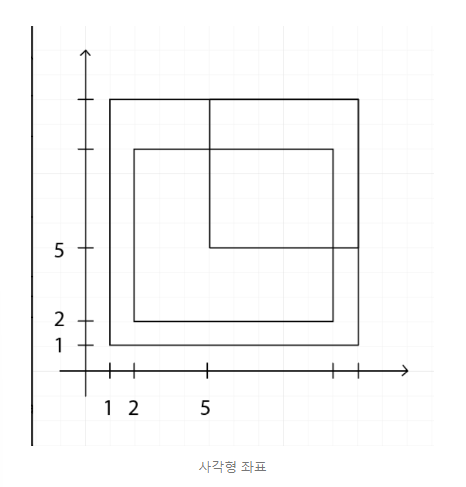
좌표를 보면 더 쉽게 이해할 수 있다!😄😄