1. 스프링에서의 절대 경로 와 상대경로, 컨텍스트 패스에 대하여 설명하시오.
절대경로란?
경로의 처음부터 마지막까지 완전히 적혀진 경로입니다.
예를들어, http://quirky.tistory.com 또는 C:\Quirky_sense\css_one\css경로강좌1.png
이런 경우입니다.
또는 파일(프로그램)아이콘 우클릭해서 속성을 보면 경로로 나오는 것이 절대 경로입니다.
상대경로란?
현재 위치한 곳을 기준으로 해서 목표로 하는 (파일이 있는 곳) 위치입니다.
상대 경로는 항상 비교할 대상이 있어야 합니다.
결국 내가 어디있냐에 따라 경로가 달라지는 것! (내 위치와 파일 경로를 비교하는 것)
현재 디렉터리(비교 대상)를 기준으로 작성된 경로
컨텍스트 패스란?
Tomcat에서 웹상의 어플리케이션들을 구분하기 위한 Path입니다.
2. 아래를 프로그래밍 하시오.
emp/list7 로 치고 들어 오면
salgrade, dept, emp 테이블을 조인 emp/list7.jsp 에서
해서 이름, 월급, 부서번호,부서위치,등급이 나오도록하시오.
(단 resultmap 을 활용 하시오)
EmpDeptSalgradeVO
public class EmpDeptSalgradeVO {

	private EmpVO emp;
	private SalGradeVO salgrade;
	private DeptVO dept;

}
EmpController
	@GetMapping("/list7")
	public String list6(Model model) {
		System.out.println("list7()..");

		model.addAttribute("empList", empService.getEmpDeptSalList());

		return "emp/list7";
	}
EmpService
	public List<EmpDeptSalgradeVO> getEmpDeptSalList() {

		return empMapper.getEmpDeptSalList();
	}
EmpMapper.java
List<EmpDeptSalgradeVO>getEmpDeptSalList(); EmpMapper.xml
<select id="getEmpDeptSalList" resultMap="empDeptSalMap">
		<![CDATA[
			select * from emp e , dept d, salgrade s where e.deptno=d.deptno and sal between losal and hisal
		]]>
	</select>

	<resultMap id="salgradeMap7" type="SalGradeVO">
		<result property="grade" column="grade" />
		<result property="losal" column="losal" />
		<result property="hisal" column="hisal" />
	</resultMap>

	<resultMap id="deptMap7" type="DeptVO">
		<result property="deptno" column="deptno" />
		<result property="loc" column="loc" />
		<result property="dname" column="dname" />
	</resultMap>

	<resultMap id="empMap7" type="EmpVO">
		<id property="empno" column="empno" />
		<result property="ename" column="ename" />
		<result property="job" column="job" />
		<result property="mgr" column="mgr" />
		<result property="hiredate" column="hiredate" />
		<result property="sal" column="sal" />
		<result property="comm" column="comm" />
		<result property="deptno" column="deptno" />
	</resultMap>

	<resultMap id="empDeptSalMap" type="EmpDeptSalgradeVO">
		<association property="emp" resultMap="empMap7"></association>
		<association property="salgrade" resultMap="salgradeMap7" ></association>
		<association property="dept" resultMap="deptMap7" ></association>
	</resultMap>
list7
<%@ page language="java" contentType="text/html; charset=UTF-8"
	pageEncoding="UTF-8"%>
<%@ taglib uri="http://java.sun.com/jsp/jstl/core" prefix="c"%>
<%@ taglib uri="http://java.sun.com/jsp/jstl/fmt" prefix="fmt"%>
<!DOCTYPE html>
<html>
<head>
<meta charset="UTF-8">
<title>Insert title here</title>
</head>
<body>
	<h1>emp 리스트7</h1>
	<table width="50%" border="1">
		<tr>
			<td>사원이름</td>
			<td>월급</td>
			<td>부서번호</td>
			<td>부서위치</td>
			<td>부서이름</td>
		</tr>

		<c:forEach var="vo" items="${empList}">
			<tr>
				<td>${vo.emp.ename}</td>
				<td><fmt:formatNumber value="${vo.emp.sal}" type="number"/></td>
				<td>${vo.emp.deptno}</td>
				<td>${vo.dept.loc}</td>
				<td>${vo.dept.dname}</td>
			</tr>
		</c:forEach>

	</table>
</body>
</html>
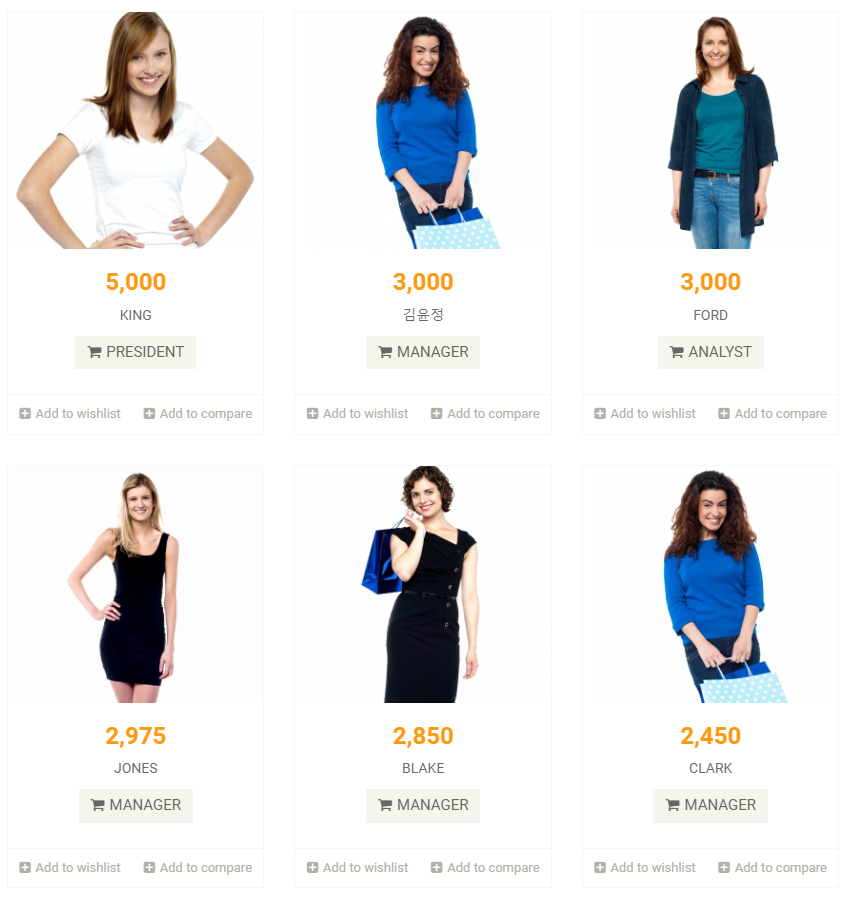
3. 쇼핑몰 프로그래밍 하시오.
ShopController
package edu.ict.ex.controller;


import org.springframework.beans.factory.annotation.Autowired;
import org.springframework.stereotype.Controller;
import org.springframework.ui.Model;
import org.springframework.web.bind.annotation.GetMapping;

import edu.ict.ex.service.EmpService;


@Controller

public class ShopController {

	@Autowired
	private EmpService empService;

	@GetMapping("/")
	public String shop(Model model) {
		System.out.println("shop()..");

		model.addAttribute("empList", empService.getEmpDeptSalList());

		return "index";
	}

}
EmpDeptSalgradeVO
package edu.ict.ex.vo;


import lombok.AllArgsConstructor;
import lombok.Getter;
import lombok.NoArgsConstructor;
import lombok.Setter;
import lombok.ToString;

@Getter
@Setter
@NoArgsConstructor
@AllArgsConstructor
@ToString
public class EmpDeptSalgradeVO {

	private EmpVO emp;
	private SalGradeVO salgrade;
	private DeptVO dept;

	   public int getRandImgNum() {
		      return (int)(Math.random()*6) + 1;
		   }
}
index.jsp
   <div class="col-sm-9 padding-right">
               <div class="features_items"><!--features_items-->
                  <h2 class="title text-center">Features Items</h2>

                  <c:forEach var="vo" items="${empList}">
                     <div class="col-sm-4">
                        <div class="product-image-wrapper">
                           <div class="single-products">
                                 <div class="productinfo text-center">
                                    <img src="images/home/product${vo.getRandImgNum() }.jpg" alt="" />
                                    <h2><fmt:formatNumber value="${vo.emp.sal}" type="number"/></h2>
                                    <p>${vo.emp.ename}</p>
                                    <a href="#" class="btn btn-default add-to-cart"><i class="fa fa-shopping-cart"></i>${vo.emp.job}</a>
                                 </div>
                                 <div class="product-overlay">
                                    <div class="overlay-content">
                                       <h2><fmt:formatNumber value="${vo.emp.sal}" type="number"/></h2>
                                       <p>${vo.emp.ename}</p>
                                       <a href="#" class="btn btn-default add-to-cart"><i class="fa fa-shopping-cart"></i>${vo.emp.job}</a>
                                    </div>
                                 </div>
                           </div>
                           <div class="choose">
                              <ul class="nav nav-pills nav-justified">
                                 <li><a href="#"><i class="fa fa-plus-square"></i>Add to wishlist</a></li>
                                 <li><a href="#"><i class="fa fa-plus-square"></i>Add to compare</a></li>
                              </ul>
                           </div>
                        </div>
                     </div>
                  </c:forEach>
               </div><!--features_items-->
랜덤 사진 결과