1.람다에 대하여 설명하시오.
람다 함수는 익명 함수를 지칭하는 용어입니다.
표현식
-
람다는 매개변수 화살표(->) 함수몸체로 이용하여 사용 할 수 있습니다.
-
함수몸체가 단일 실행문이면 괄호{}를 생략 할 수 있습니다.
-
함수몸체가 return문으로만 구성되어 있는 경우 괄호{}를 생략 할 수 없습니다.
@FunctionalInterface
Functional Interface는 일반적으로 '구현해야 할 추상 메소드가 하나만 정의된 인터페이스'를 가리킵니다.
자바 컴파일러는 추상함수가 두 개 이상이면 오류를 발생시킵니다.
2. 리눅스에서 22번 포트를 열기위한 파일이름은?
sshd_config
3. 아래를 프로그래밍 하시오.
리액트
/emps/list
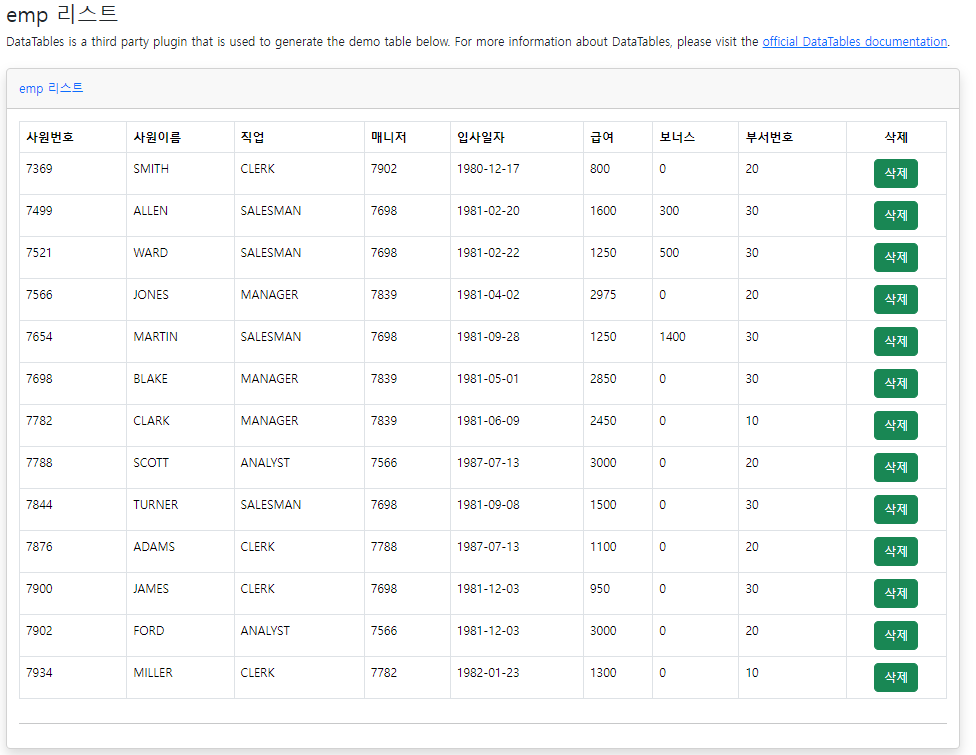
- emp 리스트를 리스트를 뿌리고 삭제버튼 누르면 삭제가 되도록 하시오.
EmpListPage
import React, { useEffect, useState } from "react";
import empService from "../../services/EmpService";
import { Link } from "react-router-dom";

const EmpListPage = () => {
const [emps, setEmps] = useState([]);

useEffect(() => {
  console.log("use Effective 실행");
  initEmps();
}, []);

const initEmps = () => {
  empService
    .getPagingList()
    .then((response) => {
      console.log(response);
      setEmps(response.data);
    })
    .catch((e) => {
      console.log(e);
    });
};

const deleteEmp = (e) => {
  const { value } = e.target;
  setEmps(emps.filter((emp) => emp.empno !== Number(value)));
};

return (
  <div className="container mt-3">
    <div className="container-fluid">
      <h1 className="h3 mb-2 text-gray-800">emp 리스트</h1>
      <p className="mb-4">
        DataTables is a third party plugin that is used to generate the demo
        table below. For more information about DataTables, please visit the{" "}
        <a target="_blank" href="https://datatables.net">
          official DataTables documentation
        </a>
        .
      </p>

      {/* <!-- DataTales Example --> */}
      <div className="card shadow mb-4">
        <div className="card-header py-3">
          <h6 className="m-0 font-weight-bold text-primary">emp 리스트</h6>
        </div>
        <div className="card-body">
          <div className="table-responsive">
            <table
              className="table table-bordered"
              id="dataTable"
              width="100%"
              cellspacing="0"
            >
              <thead>
                <tr>
                  <th>사원번호</th>
                  <th>사원이름</th>
                  <th>직업</th>
                  <th>매니저</th>
                  <th>입사일자</th>
                  <th>급여</th>
                  <th>보너스</th>
                  <th>부서번호</th>
                  <th className="text-center">삭제</th>
                </tr>
              </thead>

              <tbody>
                {emps &&
                  emps.map((emp) => (
                    <tr key={emp.empno}>
                      <td>{emp.empno}</td>
                      <td>{emp.ename}</td>
                      <td>{emp.job}</td>
                      <td>{emp.mgr}</td>
                      <td>{emp.hiredate}</td>
                      <td>{emp.sal}</td>
                      <td>{emp.comm}</td>
                      <td>{emp.deptno}</td>

                      <td className="text-center">
                        <button
                          className="btn btn-success"
                          value={emp.empno}
                          onClick={deleteEmp}
                        >
                          삭제
                        </button>
                      </td>
                    </tr>
                  ))}
              </tbody>
            </table>
          </div>

          <hr />
        </div>
      </div>
    </div>
  </div>
  // <!-- /.container-fluid -->);
);
};

export default EmpListPage;
EmpService
import http from "./HttpCommon";

const getPagingList = (path = "/emps/list", search = "") => {
  return http.get(path + search);
};

const remove = (empno) => {
  return http.delete(`emps/${empno}`);
};

export default {
  getPagingList,
  remove,
};
Router 일부
 {
    path: "/emps",
    element: <App />,
    loader: () => "emp리스트",
    children: [
      {
        path: "/emps",
        loader: () => "emp리스트",
        element: <EmpListPage />,
      },
    ],
  },