Showing Single Posts
Creating a Single Post Page
- Add a
SinglePostPagecomponent to ourpostsfeature folder
import React from 'react'
import { useSelector } from 'react-redux'

export const SinglePostPage = ({ match }) => {
    // URL 경로에서 추출한 매개변수를 객체로 제공
    const { postID } = match.params
    // Redux 상태에서 데이터를 선택하기 위한 React Hook
    const post = useSelector(state =>
        // state.posts 배열에서 postID와 일치하는 id를 가진 게시물을 찾음
        state.posts.find(post => post.id === postID)
    )

    if (!post) {
        return (
            <section>
                <h2>Post Not Found!</h2>
            </section>
        )
    }

    return (
        <section>
            <article className="post">
                <h2>{post.title}</h2>
                <p className="post-content">{post.content}</p>
            </article>
        </section>
    )
}- React Router will pass in a
matchobject as a prop that contains the URL informationn we're looking for. - Part the second part of the URL as a variable named
postID, and we can read that value frommatch.params - Array.find() function to loop through the array and return the post entry with the ID we're looking for.
- The component will re-render any time the value returned from useSelector changes to a new reference
Adding the Single Post Route
App.js
import React from 'react'
import { BrowserRouter as Router, Routes, Route, Navigate } from 'react-router-dom'
import { Navbar } from './components/Navbar'
import { AddPostForm } from './features/posts/AddPostForm'
import { PostsList } from './features/posts/PostsList'
import { SinglePostPage } from './features/posts/SinglePostPage'

function App() {
  return (
    <Router>
      <Navbar />
      <div className="App">
        <Routes>
          {/* 기본 경로("/")에 대해 PostsList를 렌더링 */}
          <Route path="/" element={
            <>
              <AddPostForm />
              <PostsList />
            </>
          } />
          <Route exact path="/posts/:postID" component={SinglePostPage} />

          {/* 잘못된 경로로 접근할 경우 리디렉션 */}
          <Route path="*" element={<Navigate to="/" />} />
        </Routes>
      </div>
    </Router>
  )
}

export default App
features/posts/PostsList.js
import React from 'react'
// React components read data from Redux store
import { useSelector } from 'react-redux'
import { Link } from 'react'

export const PostsList = () => {
    // Read `state.posts` value from Redux store
    const posts = useSelector(state => state.posts)

    const renderedPosts = posts.map(post => (
        <article className="post-excerpt" key={post.id}>
            <h3>{post.title}</h3>
            <p className="post-content">{post.content.substring(0, 100)}</p>
            <Link to={`/posts/${post.id}`} className="button muted-button">View Post</Link>
        </article>
    ))

    return (
        <section className="posts-list">
            <h2>Posts</h2>
            {renderedPosts}
        </section>
    )
}
app/Navbar.js
import React from 'react'
import { Link } from 'react-router-dom'

export const Navbar = () => {
  return (
    <nav>
      <section>
        <h1>Redux 핵심 Example</h1>

        <div className="navContent">
          <div className="navLinks">
            <Link to="/">Posts</Link>
          </div>
        </div>
      </section>
    </nav>
  )
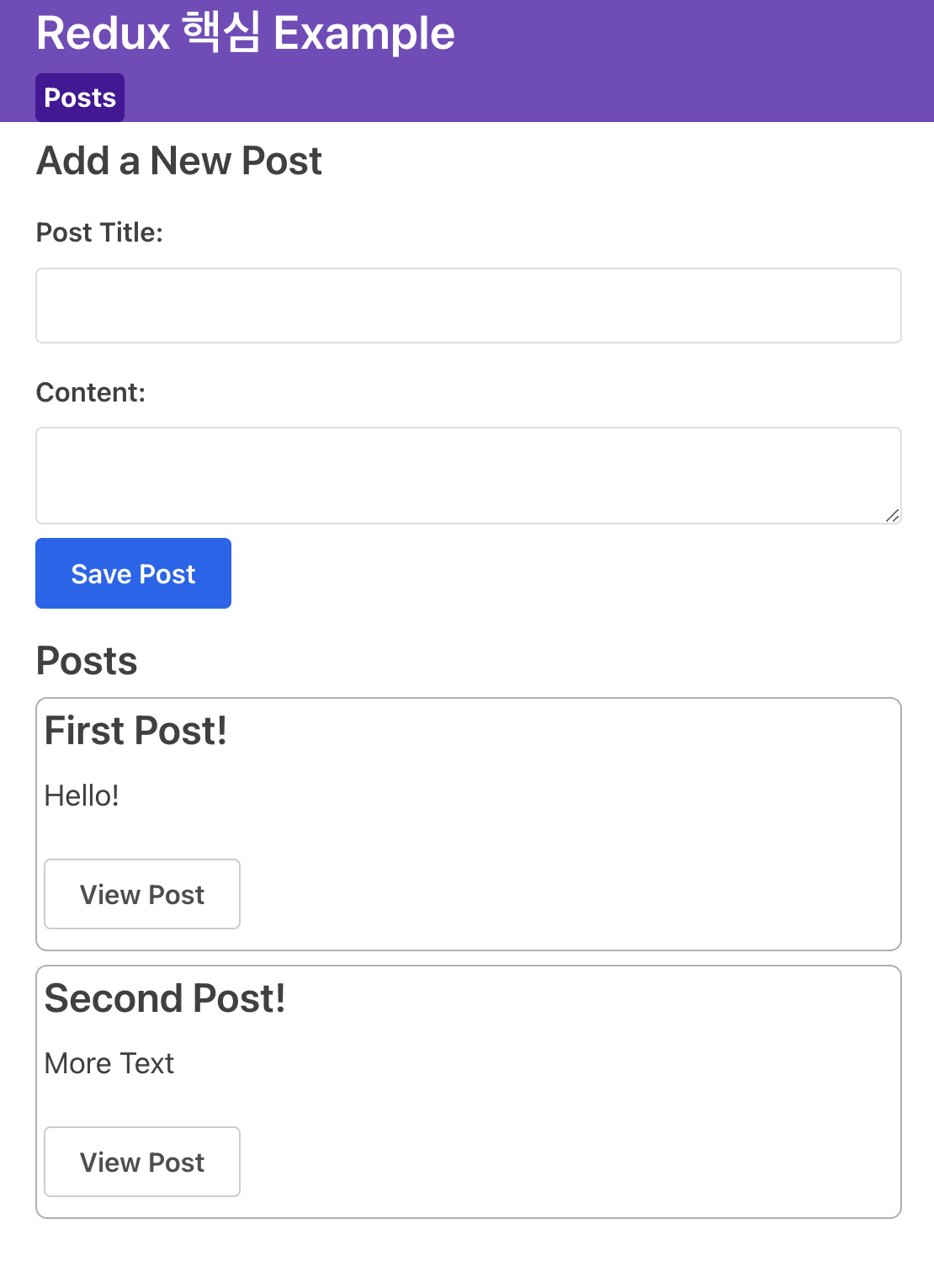
}
Editing Posts
- Add
<EditPostForm>component
- Take an existing post ID- Read that post form from the store
- Lets user edit the title and post content
- Save the changes to update the post in the store
Updating Post Entries
- Update
postsSliceto create a reducer function and an action so that the store knows how to actually update posts - Reducer
postUpdated
- The ID of the post being updated, that we can find the right post object in the state- New
titleandcontentfields that user typed in
- New
- React action objects are required to have a
typefield, a descriptive string - Additional info in
action.payload - Action creators generated by
createSliceexpect you to pass in one argument and that value will be put into the action object asaction.payload
import { createSlice } from '@reduxjs/toolkit'

// Define initial posts array
const initialState = [
    { id: '1', title: 'First Post!', content: 'Hello!' },
    { id: '2', title: 'Second Post!', content: 'More Text' },
]

const postsSlice = createSlice({ // createSlice generates posts reducer
    name: 'posts',
    initialState, // Pass initialState to createSlice
    reducers: {
        postAdded(state, action) {
            state.push(action.payload)
        },
        postUpdated(state, action) {
            const { id, title, content } = action.payload
            const existingPost = state.find(post => post.id === id)
            if (existingPost) {
                existingPost.title = title
                existingPost.content = content
            }
        }
    }
})

// Export the posts reducer function
export const { postAdded, postUpdated } = postsSlice.actions
export default postsSlice.reducer
Creating an Edit Post Form
features/posts/EditPostForm.js
import React, { useState } from 'react'
import { useDispatch, useSelector } from 'react-redux'
import { useHistory } from 'react-router-dom'

import { postUpdated } from './postsSlice'

export const EditPostForm = ({ match }) => {
    const { postID } = match.params

    const post = useSelector(state =>
        state.posts.find(post => post.id === postID)
    )

    const [title, setTitle] = useState(post.title)
    const [content, setContent] = useState(post.content)

    const dispatch = useDispatch()
    const history = useHistory()

    const onTitleChanged = e => setTitle(e.target.value)
    const onContentChanged = e => setContent(e.target.value)

    const onSavePostClicked = () => {
        if (title && content) {
            dispatch(postUpdated({ id: postID, title, content }))
            history.push(`/posts/${postID}`)
        }
    }

    return (
        <section>
          <h2>Edit Post</h2>
          <form>
            <label htmlFor="postTitle">Post Title:</label>
            <input
              type="text"
              id="postTitle"
              name="postTitle"
              placeholder="What's on your mind?"
              value={title}
              onChange={onTitleChanged}
            />
            <label htmlFor="postContent">Content:</label>
            <textarea
              id="postContent"
              name="postContent"
              value={content}
              onChange={onContentChanged}
            />
          </form>
          <button type="button" onClick={onSavePostClicked}>
            Save Post
          </button>
        </section>
      )
}
App.js
import { PostsList } from './features/posts/PostsList'
import { AddPostForm } from './features/posts/AddPostForm'
import { SinglePostPage } from './features/posts/SinglePostPage'
import { EditPostForm } from './features/posts/EditPostForm'

function App() {
  return (
    <Router>
      <Navbar />
      <div className="App">
        <Switch>
          <Route
            exact
            path="/"
            render={() => (
              <React.Fragment>
                <AddPostForm />
                <PostsList />
              </React.Fragment>
            )}
          />
          <Route exact path="/posts/:postId" component={SinglePostPage} />
          <Route exact path="/editPost/:postId" component={EditPostForm} />
          <Redirect to="/" />
        </Switch>
      </div>
    </Router>
  )
}
features/post/SinglePostPage.js
import { Link } from 'react-router-dom'

export const SinglePostPage = ({ match }) => {

        // omit other contents

        <p  className="post-content">{post.content}</p>
        <Link to={`/editPost/${post.id}`} className="button">
          Edit Post
        </Link>
Preparing Action Payloads
- Prepare Callback Function
- Take multiple arguments
- Generate random values like unique ID
- Run whatever other synchronous logic is needed to decide what values go into the action object.
- It should then return an object with the
payloadfield inside.
App.js
import React from 'react'
import { BrowserRouter as Router, Routes, Route, Navigate } from 'react-router-dom'
import { Navbar } from './components/Navbar'
import { AddPostForm } from './features/posts/AddPostForm'
import { PostsList } from './features/posts/PostsList'
import { SinglePostPage } from './features/posts/SinglePostPage'
import { EditPostForm } from './features/posts/EditPostForm'

function App() {
  return (
    <Router>
      <Navbar />
      <div className="App">
        <Routes>
          {/* 기본 경로("/")에 대해 PostsList를 렌더링 */}
          <Route path="/" element={
            <>
              <AddPostForm />
              <PostsList />
            </>
          } />
          <Route path="/posts/:postID" element={<SinglePostPage />} />
          <Route path="/editPost/:postID" element={<EditPostForm />} />

          {/* 잘못된 경로로 접근할 경우 리디렉션 */}
          <Route path="*" element={<Navigate to="/" />} />
        </Routes>
      </div>
    </Router>
  )
}

export default App
EditPostForm.jsx
import React, { useState, useEffect } from 'react'
import { useDispatch, useSelector } from 'react-redux'
import { useNavigate, useParams } from 'react-router-dom'

import { postUpdated } from './postsSlice'

export const EditPostForm = () => {
    const { postID } = useParams()

    const post = useSelector(state =>
        state.posts.find(post => post.id === postID)
    )

    const [title, setTitle] = useState('')
    const [content, setContent] = useState('')

    const dispatch = useDispatch()
    const navigate = useNavigate()

    useEffect(() => {
        if (post) {
            setTitle(post.title)
            setContent(post.content)
        }
    }, [post])

    const onTitleChanged = e => setTitle(e.target.value)
    const onContentChanged = e => setContent(e.target.value)

    const onSavePostClicked = () => {
        if (title && content) {
            dispatch(postUpdated({ id: postID, title, content }))
            navigate(`/posts/${postID}`)
        }
    }

    console.log(postID)


    return (
        <section>
          <h2>Edit Post</h2>
          <form>
            <label htmlFor="postTitle">Post Title:</label>
            <input
              type="text"
              id="postTitle"
              name="postTitle"
              placeholder="What's on your mind?"
              value={title}
              onChange={onTitleChanged}
            />
            <label htmlFor="postContent">Content:</label>
            <textarea
              id="postContent"
              name="postContent"
              value={content}
              onChange={onContentChanged}
            />
          </form>
          <button type="button" onClick={onSavePostClicked}>
            Edit Post
          </button>
        </section>
      )
}
postsSlice.jsx
import { createSlice } from '@reduxjs/toolkit'
import { nanoid } from 'nanoid'

// Define initial posts array
const initialState = [
    { id: '1', title: 'First Post!', content: 'Hello!' },
    { id: '2', title: 'Second Post!', content: 'More Text' },
]

const postsSlice = createSlice({ // createSlice generates posts reducer
    name: 'posts',
    initialState, // Pass initialState to createSlice
    reducers: {
        postAdded: {
            reducer(state, action) {
            state.push(action.payload)
            },
            prepare(title, content) {
                return {
                    payload: {
                        id: nanoid(),
                        title,
                        content
                    }
                }
            },
        },
        postUpdated(state, action) {
            const { id, title, content } = action.payload
            const existingPost = state.find(post => post.id === id)
            if (existingPost) {
                existingPost.title = title
                existingPost.content = content
            }
        }
    }
})

// Export the posts reducer function
export const { postAdded, postUpdated } = postsSlice.actions
export default postsSlice.reducer
Users and Posts
Adding a Users Slice
features/users/usersSlice.js
import { createSlice } from '@reduxjs/toolkit'

const initialState = [
    { id: '0', name: '서휘경'}
    { id: '1', name: '박기람'}
    { id: '2', name: '신지수'}
]

const usersSlice = createSlice({
    name: 'users',
    initialState,
    reducers: {}
})

export default usersSlice.reducer
app.js
import { configureStore } from '@reduxjs/toolkit'

// import `postReducer` function
import postsReducer from '../features/posts/postsSlice'
import usersReducer from '../features/usres/usersSlice'

// Update the call to `configureStore`
// `postReducer` is being passed as a reducer field named `posts`
export default configureStore({
    reducer: {
        posts: postsReducer,
        users: usersReducer,
    }
})
Adding Authors for Posts
**features/posts/postsSlice.js
import { createSlice } from '@reduxjs/toolkit'
import { nanoid } from 'nanoid'

// Define initial posts array
const initialState = [
    { id: '1', title: 'First Post!', content: 'Hello!' },
    { id: '2', title: 'Second Post!', content: 'More Text' },
]

const postsSlice = createSlice({ // createSlice generates posts reducer
    name: 'posts',
    initialState, // Pass initialState to createSlice
    reducers: {
        postAdded: {
            reducer(state, action) {
            state.push(action.payload)
            },
            prepare(title, content, userID) {
                return {
                    payload: {
                        id: nanoid(),
                        title,
                        content,
                        user: userID
                    }
                }
            },
        },
        postUpdated(state, action) {
            const { id, title, content } = action.payload
            const existingPost = state.find(post => post.id === id)
            if (existingPost) {
                existingPost.title = title
                existingPost.content = content
            }

        }
    }
})

// Export the posts reducer function
export const { postAdded, postUpdated } = postsSlice.actions
export default postsSlice.reducer
feature/posts/AddPostForm.js
import React, { useState } from 'react'
import { useDispatch, useSelector } from 'react-redux'

import { postAdded } from './postsSlice'

export const AddPostForm = () => {
  const [title, setTitle] = useState('')
  const [content, setContent] = useState('')
  const [userId, setUserId] = useState('')

  const dispatch = useDispatch()

  const users = useSelector(state => state.users)

  const onTitleChanged = e => setTitle(e.target.value)
  const onContentChanged = e => setContent(e.target.value)
  const onAuthorChanged = e => setUserId(e.target.value)

  const onSavePostClicked = () => {
    if (title && content) {
      dispatch(postAdded(title, content, userId))
      setTitle('')
      setContent('')
    }
  }

  const canSave = Boolean(title) && Boolean(content) && Boolean(userId)

  const usersOptions = users.map(user => (
    <option key={user.id} value={user.id}>
      {user.name}
    </option>
  ))

  return (
    <section>
      <h2>Add a New Post</h2>
      <form>
        <label htmlFor="postTitle">Post Title:</label>
        <input
          type="text"
          id="postTitle"
          name="postTitle"
          placeholder="What's on your mind?"
          value={title}
          onChange={onTitleChanged}
        />
        <label htmlFor="postAuthor">Author:</label>
        <select id="postAuthor" value={userId} onChange={onAuthorChanged}>
          <option value=""></option>
          {usersOptions}
        </select>
        <label htmlFor="postContent">Content:</label>
        <textarea
          id="postContent"
          name="postContent"
          value={content}
          onChange={onContentChanged}
        />
        <button type="button" onClick={onSavePostClicked} disabled={!canSave}>
          Save Post
        </button>
      </form>
    </section>
  )
}
features/posts/PostAuthor.jsx
import React from 'react'
import { useSelector } from 'react-redux'

export const PostAuthor = ({ userId }) => {
  const author = useSelector(state =>
    state.users.find(user => user.id === userId)
  )

  return <span>by {author ? author.name : 'Unknown author'}</span>
}
More Post Features
Storing Dates for Posts
- prepare callback
post.date
features/posts/postsSlice.jsx
import { createSlice } from '@reduxjs/toolkit'
import { nanoid } from 'nanoid'

// Define initial posts array
const initialState = [
    { id: '1', title: 'First Post!', content: 'Hello!' },
    { id: '2', title: 'Second Post!', content: 'More Text' },
]

const postsSlice = createSlice({ // createSlice generates posts reducer
    name: 'posts',
    initialState, // Pass initialState to createSlice
    reducers: {
        postAdded: {
            reducer(state, action) {
            state.push(action.payload)
            },
            prepare(title, content, userID) {
                return {
                    payload: {
                        id: nanoid(),
                        date: new Date().toISOString(),
                        title,
                        content,
                        user: userID
                    }
                }
            },
        },
        postUpdated(state, action) {
            const { id, title, content } = action.payload
            const existingPost = state.find(post => post.id === id)
            if (existingPost) {
                existingPost.title = title
                existingPost.content = content
            }

        }
    }
})

// Export the posts reducer function
export const { postAdded, postUpdated } = postsSlice.actions
export default postsSlice.reducer
features/posts/TimeAgo.js
import React from 'react'
import { parseISO, formatDistanceToNow } from 'date-fns'
export const TimeAgo = ({ timestamp }) => {
let timeAgo = ''
if (timestamp) {
const date = parseISO(timestamp)
const timePeriod = formatDistanceToNow(date)
timeAgo = `${timePeriod} ago`
}
return (
<span title={timestamp}>
<i>{timeAgo}</i>
</span>
)
}features/posts/postsList
import React from 'react'
// React components read data from Redux store
import { useSelector } from 'react-redux'
import { Link } from 'react-router-dom'
import { TimeAgo } from './TimeAgo'

export const PostsList = () => {
    // Read `state.posts` value from Redux store
    const posts = useSelector(state => state.posts)

    const renderedPosts = posts.map(post => (
        <article className="post-excerpt" key={post.id}>
            <h3>{post.title}</h3>
            <p className="post-content">{post.content.substring(0, 100)}</p>
            <p><TimeAgo timestamp={post.date} /></p>
            <Link to={`/posts/${post.id}`} className="button muted-button">View Post</Link>
        </article>
    ))

    console.log(posts)
    return (
        <section className="posts-list">
            <h2>Posts</h2>
            {renderedPosts}
        </section>
    )
}
features/posts/singlePostPage.jsx
import React from 'react'
import { useSelector } from 'react-redux'
import { useParams, Link } from 'react-router-dom'
import { TimeAgo } from './TimeAgo'

export const SinglePostPage = () => {
    // URL 경로에서 추출한 매개변수를 객체로 제공
    const { postID } = useParams()

    // Redux 상태에서 데이터를 선택하기 위한 React Hook
    const post = useSelector(state =>
        // state.posts 배열에서 postID와 일치하는 id를 가진 게시물을 찾음
        state.posts.find(post => post.id === postID)
    )

    if (!post) {
        return (
            <section>
                <h2>Post Not Found!</h2>
            </section>
        )
    }

    return (

        <section>
            <article className="post">
                <h2>{post.title}</h2>
                <p className="post-content">{post.content}</p>
                <p><TimeAgo timestamp={post.date} /></p>
                <Link to={`/editPost/${post.id}`} className="button">
          Edit Post
        </Link>

            </article>
        </section>
    )
}