라이브러리 설치
//npm
npm install --save react-native-push-notification

//yarn
yarn add react-native-push-notification
android/build.gradle 설정
    ext {
        googlePlayServicesVersion = "+" // default: "+"
        firebaseMessagingVersion = "21.1.0" // default: "21.1.0"

        buildToolsVersion = "33.0.0"
        minSdkVersion = 21
        compileSdkVersion = 33
        targetSdkVersion = 33

        // We use NDK 23 which has both M1 support and is the side-by-side NDK version from AGP.
        ndkVersion = "23.1.7779620"

        supportLibVersion = "23.1.1" // default: 23.1.1
    }
AndroidManifest.xml 설정
위치: android/app/src/main/AndroidManifest.xml
    .....
    <uses-permission android:name="android.permission.VIBRATE" />
    <uses-permission android:name="android.permission.RECEIVE_BOOT_COMPLETED"/>

    <application ....>
        <!-- Change the value to true to enable pop-up for in foreground on receiving remote notifications (for prevent duplicating while showing local notifications set this to false) -->
        <meta-data  android:name="com.dieam.reactnativepushnotification.notification_foreground"
                    android:value="false"/>
        <!-- Change the resource name to your App's accent color - or any other color you want -->
        <meta-data  android:name="com.dieam.reactnativepushnotification.notification_color"
                    android:resource="@color/white"/> <!-- or @android:color/{name} to use a standard color -->

        <receiver android:name="com.dieam.reactnativepushnotification.modules.RNPushNotificationActions" />
        <receiver android:name="com.dieam.reactnativepushnotification.modules.RNPushNotificationPublisher" />
        <receiver android:name="com.dieam.reactnativepushnotification.modules.RNPushNotificationBootEventReceiver" android:exported="false">
            <intent-filter>
                <action android:name="android.intent.action.BOOT_COMPLETED" />
                <action android:name="android.intent.action.QUICKBOOT_POWERON" />
                <action android:name="com.htc.intent.action.QUICKBOOT_POWERON"/>
            </intent-filter>
        </receiver>

        <service
            android:name="com.dieam.reactnativepushnotification.modules.RNPushNotificationListenerService"
            android:exported="false" >
            <intent-filter>
                <action android:name="com.google.firebase.MESSAGING_EVENT" />
            </intent-filter>
        </service>
     .....
마지막 receiver에 공식문서와 다르게 android:exported="false"를 추가해줘야 한다. 안드로이드 버전12이상에서는 이걸 추가하지 않으면 에러가 발생한다.
colors
위치: android/app/src/main/res/values/colors.xml(폴더가 없다면 새로 생성)
<resources>
    <color name="white">#FFF</color>
</resources>
index.js
import PushNotificationIOS from "@react-native-community/push-notification-ios";
import PushNotification from "react-native-push-notification";

// Must be outside of any component LifeCycle (such as `componentDidMount`).
PushNotification.configure({
  // (optional) Called when Token is generated (iOS and Android)
  onRegister: function (token) {
    console.log("TOKEN:", token);
  },

  // (required) Called when a remote is received or opened, or local notification is opened
  onNotification: function (notification) {
    console.log("NOTIFICATION:", notification);

    // process the notification

    // (required) Called when a remote is received or opened, or local notification is opened
    notification.finish(PushNotificationIOS.FetchResult.NoData);
  },

  // (optional) Called when Registered Action is pressed and invokeApp is false, if true onNotification will be called (Android)
  onAction: function (notification) {
    console.log("ACTION:", notification.action);
    console.log("NOTIFICATION:", notification);

    // process the action
  },

  // (optional) Called when the user fails to register for remote notifications. Typically occurs when APNS is having issues, or the device is a simulator. (iOS)
  onRegistrationError: function(err) {
    console.error(err.message, err);
  },

  // IOS ONLY (optional): default: all - Permissions to register.
  permissions: {
    alert: true,
    badge: true,
    sound: true,
  },

  // Should the initial notification be popped automatically
  // default: true
  popInitialNotification: true,

  /**
   * (optional) default: true
   * - Specified if permissions (ios) and token (android and ios) will requested or not,
   * - if not, you must call PushNotificationsHandler.requestPermissions() later
   * - if you are not using remote notification or do not have Firebase installed, use this:
   *     requestPermissions: Platform.OS === 'ios'
   */
  requestPermissions: true,
});
알림 추가
- 추가 예시
PushNotification.localNotification({
  /* Android Only Properties */
  channelId: "your-channel-id", // (required) channelId, if the channel doesn't exist, notification will not trigger.
  ticker: "My Notification Ticker", // (optional)
  showWhen: true, // (optional) default: true
  autoCancel: true, // (optional) default: true
  largeIcon: "ic_launcher", // (optional) default: "ic_launcher". Use "" for no large icon.
  largeIconUrl: "https://www.example.tld/picture.jpg", // (optional) default: undefined
  smallIcon: "ic_notification", // (optional) default: "ic_notification" with fallback for "ic_launcher". Use "" for default small icon.
  bigText: "My big text that will be shown when notification is expanded. Styling can be done using HTML tags(see android docs for details)", // (optional) default: "message" prop
  subText: "This is a subText", // (optional) default: none
  bigPictureUrl: "https://www.example.tld/picture.jpg", // (optional) default: undefined
  bigLargeIcon: "ic_launcher", // (optional) default: undefined
  bigLargeIconUrl: "https://www.example.tld/bigicon.jpg", // (optional) default: undefined
  color: "red", // (optional) default: system default
  vibrate: true, // (optional) default: true
  vibration: 300, // vibration length in milliseconds, ignored if vibrate=false, default: 1000
  tag: "some_tag", // (optional) add tag to message
  group: "group", // (optional) add group to message
  groupSummary: false, // (optional) set this notification to be the group summary for a group of notifications, default: false
  ongoing: false, // (optional) set whether this is an "ongoing" notification
  priority: "high", // (optional) set notification priority, default: high
  visibility: "private", // (optional) set notification visibility, default: private
  ignoreInForeground: false, // (optional) if true, the notification will not be visible when the app is in the foreground (useful for parity with how iOS notifications appear). should be used in combine with `com.dieam.reactnativepushnotification.notification_foreground` setting
  shortcutId: "shortcut-id", // (optional) If this notification is duplicative of a Launcher shortcut, sets the id of the shortcut, in case the Launcher wants to hide the shortcut, default undefined
  onlyAlertOnce: false, // (optional) alert will open only once with sound and notify, default: false

  when: null, // (optional) Add a timestamp (Unix timestamp value in milliseconds) pertaining to the notification (usually the time the event occurred). For apps targeting Build.VERSION_CODES.N and above, this time is not shown anymore by default and must be opted into by using `showWhen`, default: null.
  usesChronometer: false, // (optional) Show the `when` field as a stopwatch. Instead of presenting `when` as a timestamp, the notification will show an automatically updating display of the minutes and seconds since when. Useful when showing an elapsed time (like an ongoing phone call), default: false.
  timeoutAfter: null, // (optional) Specifies a duration in milliseconds after which this notification should be canceled, if it is not already canceled, default: null

  messageId: "google:message_id", // (optional) added as `message_id` to intent extras so opening push notification can find data stored by @react-native-firebase/messaging module.

  actions: ["Yes", "No"], // (Android only) See the doc for notification actions to know more
  invokeApp: true, // (optional) This enable click on actions to bring back the application to foreground or stay in background, default: true

  /* iOS only properties */
  category: "", // (optional) default: empty string
  subtitle: "My Notification Subtitle", // (optional) smaller title below notification title

  /* iOS and Android properties */
  id: 0, // (optional) Valid unique 32 bit integer specified as string. default: Autogenerated Unique ID
  title: "My Notification Title", // (optional)
  message: "My Notification Message", // (required)
  picture: "https://www.example.tld/picture.jpg", // (optional) Display an picture with the notification, alias of `bigPictureUrl` for Android. default: undefined
  userInfo: {}, // (optional) default: {} (using null throws a JSON value '<null>' error)
  playSound: false, // (optional) default: true
  soundName: "default", // (optional) Sound to play when the notification is shown. Value of 'default' plays the default sound. It can be set to a custom sound such as 'android.resource://com.xyz/raw/my_sound'. It will look for the 'my_sound' audio file in 'res/raw' directory and play it. default: 'default' (default sound is played)
  number: 10, // (optional) Valid 32 bit integer specified as string. default: none (Cannot be zero)
  repeatType: "day", // (optional) Repeating interval. Check 'Repeating Notifications' section for more info.
});
channelId: 이 속성이 없으면 알림이 울리지 않는다.
- 보내기 기능
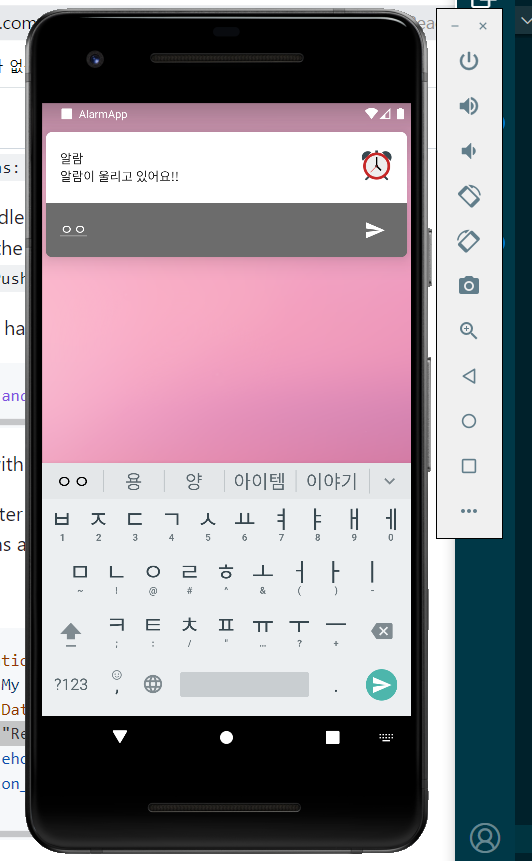
PushNotification.localNotificationSchedule({
  //... You can use all the options from localNotifications
  title:"알람",
  message: "알람이 울리고 있어요!!", // (required)
  date: new Date(Date.now() + 3 * 1000), // in 60 secs
  largeIcon: "alarm_icon",
  priority: 'hight',
  visibility: 'public',
  importance: 'hight',
  vibrate: true, // (optional) default: true
  vibration: 300, // vibration length in milliseconds, ignored if vibrate=false, default: 1000
  playSound: true,
  soundName: 'alarm_bell',
  actions: ["ReplyInput"],
  /* Android Only Properties */
  // repeatType: 'time',
  // repeatTime: 3, // (optional) Increment of configured repeatType. Check 'Repeating Notifications' section for more info.
});
actions: ["ReplyInput"] 로하면 이렇게 보낼 수 있는 input창이 생긴다.
channelId 생성
import PushNotification, {Importance} from 'react-native-push-notification';
...
  PushNotification.createChannel(
    {
      channelId: "channel-id", // (required)
      channelName: "My channel", // (required)
      channelDescription: "A channel to categorise your notifications", // (optional) default: undefined.
      playSound: false, // (optional) default: true
      soundName: "default", // (optional) See `soundName` parameter of `localNotification` function
      importance: Importance.HIGH, // (optional) default: Importance.HIGH. Int value of the Android notification importance
      vibrate: true, // (optional) default: true. Creates the default vibration pattern if true.
    },
    (created) => console.log(`createChannel returned '${created}'`) // (optional) callback returns whether the channel was created, false means it already existed.
  );
이렇게하면 channelId가 생성된다. 여기서 channelId는 alarm이다.
화면 푸시팝업 안뜨는 경우
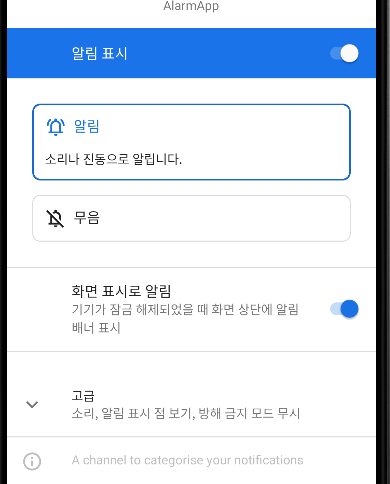
휴대폰 설정에서 배너 표시를 해줘야 한다.(이걸 안해서 몇시간 해맸다.)
