실습으로 따라하는 컨테이너 관리하기
1. 컨테이너 리소스 제한
stress container 생성
# 부하 테스트 프로그램 stress 설치
# cpu 부하테스트 : 2개 cpu core를 100% 사용하도록 부하 발생: stress --cpu 2
# 메모리 부하 테스트 : 프로세스 수 2개와 사용할 메모리만큼 부하 발생: stress --vm 2 --vm-byte < 사용할 크기>
totoro@docker-ubuntu:~/build$ cat Dockerfile
FROM debian
MAINTAINER youngbin jo <youngbin9806@gmail.com>
RUN apt-get update; apt-get install stress -y
CMD ["/bin/sh", "-c", "stress -c 2"]

totoro@docker-ubuntu:~/build$ docker build -t stress .
[+] Building 10.9s (7/7) FINISHED                                                                                                                        docker:default
 => [internal] load build definition from Dockerfile                                                                                                               0.0s
 => => transferring dockerfile: 182B                                                                                                                               0.0s
 => [internal] load metadata for docker.io/library/debian:latest                                                                                                   1.7s
 => [auth] library/debian:pull token for registry-1.docker.io                                                                                                      0.0s
 => [internal] load .dockerignore                                                                                                                                  0.0s
 => => transferring context: 2B                                                                                                                                    0.0s
 => CACHED [1/2] FROM docker.io/library/debian:latest@sha256:1aadfee8d292f64b045adb830f8a58bfacc15789ae5f489a0fedcd517a862cb9                                      0.0s
 => [2/2] RUN apt-get update; apt-get install stress -y                                                                                                            8.6s
 => exporting to image                                                                                                                                             0.3s
 => => exporting layers                                                                                                                                            0.3s
 => => writing image sha256:c1f4268390c340ea49679b2462362d9af5d697db7f1257270c22b21551482cfa                                                                       0.0s
 => => naming to docker.io/library/stress
메모리 리소스 제한
# swap 메모리 용량 제한이 실제메모리 제한과 어떤 관련성이 있는지 확인해본다.
totoro@docker-ubuntu:~/build$ docker run -m 100m --memory-swap 100m stress:latest stress --vm 1 --vm-bytes 90m -t 5s
stress: info: [1] dispatching hogs: 0 cpu, 0 io, 1 vm, 0 hdd
stress: info: [1] successful run completed in 5s

# 사용할 수 있는 메모리보다 크면 kill된다.
totoro@docker-ubuntu:~/build$ docker run -m 100m --memory-swap 100m stress:latest stress --vm 1 --vm-bytes 150m -t 5s
stress: info: [1] dispatching hogs: 0 cpu, 0 io, 1 vm, 0 hdd
stress: FAIL: [1] (425) <-- worker 6 got signal 9
stress: WARN: [1] (427) now reaping child worker processes
stress: FAIL: [1] (431) kill error: No such process
stress: FAIL: [1] (461) failed run completed in 0s

# swap memory를 설정해주지 않았을때 설정된 메모리의 2배로 설정
totoro@docker-ubuntu:~/build$ docker run -m 100m  stress:latest stress --vm 1 --vm-bytes 150m -t 5s
stress: info: [1] dispatching hogs: 0 cpu, 0 io, 1 vm, 0 hdd
stress: info: [1] successful run completed in 5s
cpu 리소스 제한
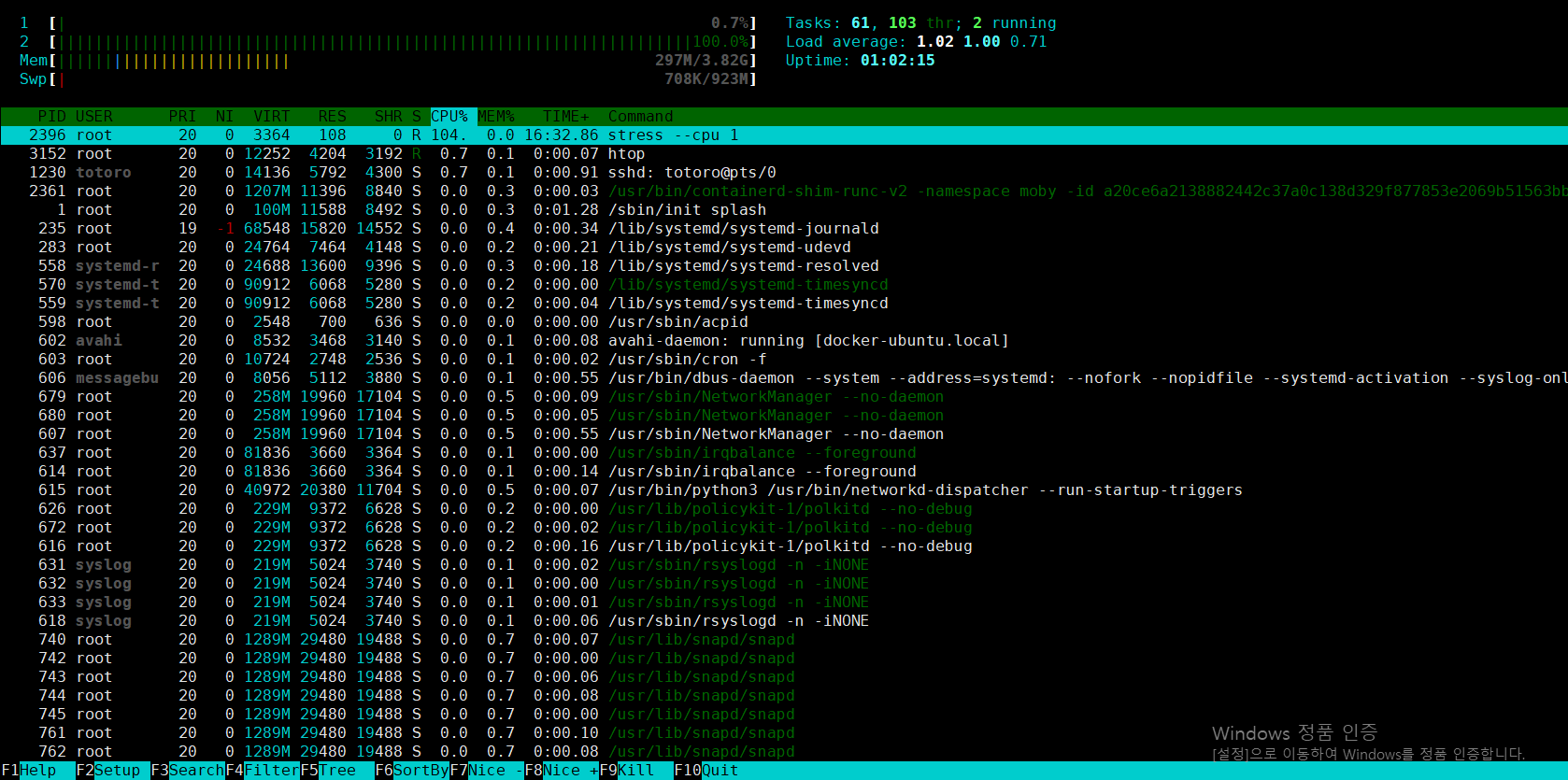
totoro@docker-ubuntu:~/build$ docker run --cpuset-cpus 1 --name c1 -d stress:latest stress --cpu 1
a20ce6a2138882442c37a0c138d329f877853e2069b51563bb826395dbe95e3b
htop 명령어로 cpu 확인
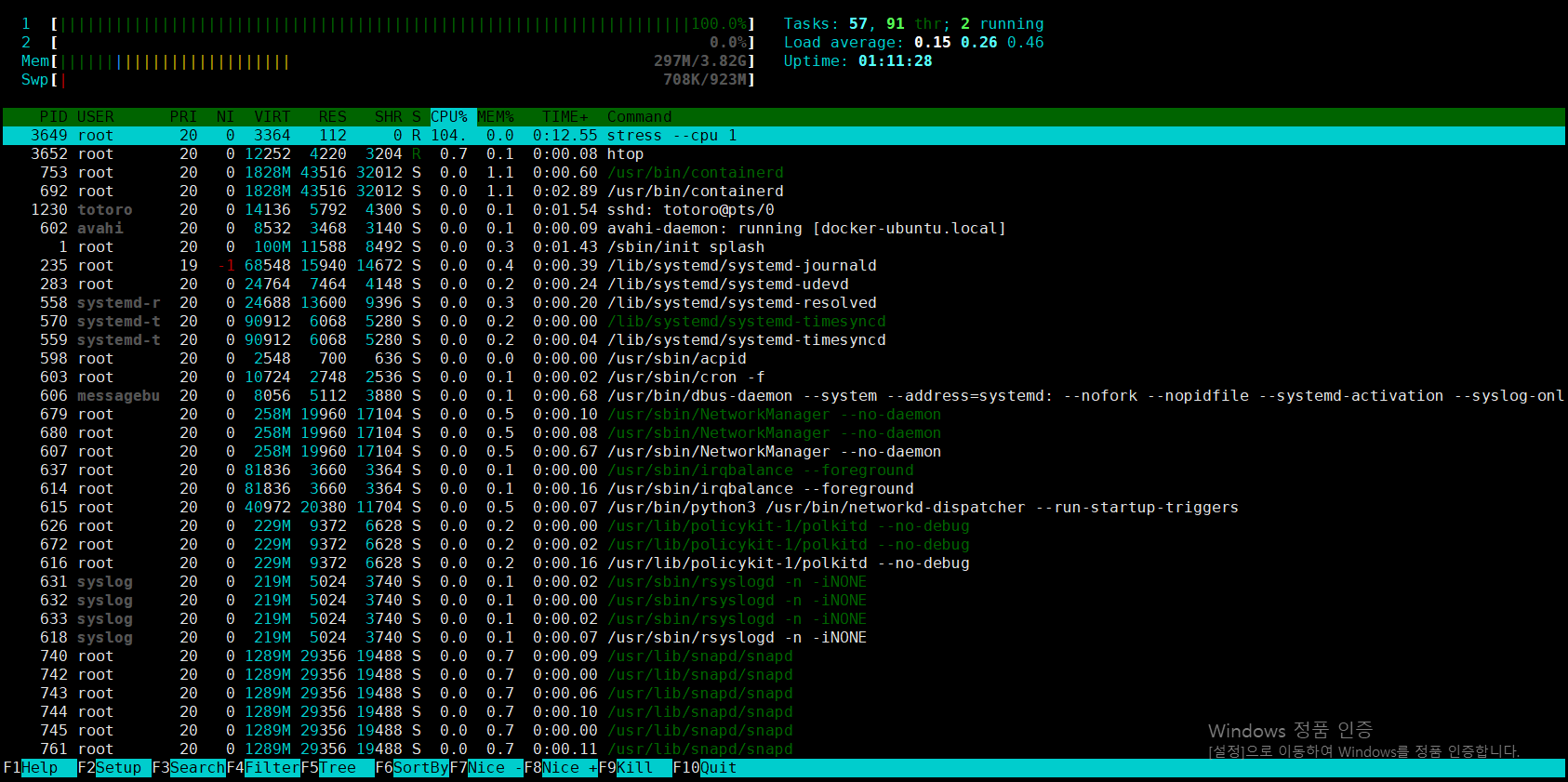
root@docker-ubuntu:~# docker run --cpuset-cpus 0 --name c1 -d stress:latest stress --cpu 1
04b96bf3bc0f5b95f0793b2a7c0466e802bfd3cfcfb1270341c3fd04483caaad
htop 명령어로 cpu 확인
# cpu 2개를 번갈아가면서 부하
totoro@docker-ubuntu:~/build$ docker run --cpuset-cpus 0-1 --name c2 -d stress stress --cpu 1
9bb4ea37f1ebb1d0cf6cf42e23d7caf63864ce0176eaf0eb59b5772d4bc7ecd2
cpu 값 할당 strees 확인
totoro@docker-ubuntu:~/build$ docker run -c 2048 --name cload1 -d stress:latest
ff45702a622e17a8805f70880e0f7d513188880f06930a3fd29ac7c5425fdbbf
totoro@docker-ubuntu:~/build$ docker run --name cload2 -d stress:latest
525749f0068d92f24e1267f65efbe5a1a64a9968553b2f262d149fe4560569f2
totoro@docker-ubuntu:~/build$ docker run -c 512 --name cload3 -d stress:latest
66796c884fa65d9471b9c22673e5fb215da8c653a36de25c05c1de59d8f20d38
totoro@docker-ubuntu:~/build$ docker run -c 512 --name cload4 -d stress:latest
e5df6c8d022880e4708b697ce4abb68d6223f7a6c192d50c182a89ad42f156e3
totoro@docker-ubuntu:~/build$ docker ps
CONTAINER ID   IMAGE           COMMAND                   CREATED              STATUS              PORTS     NAMES
e5df6c8d0228   stress:latest   "/bin/sh -c 'stress …"   4 seconds ago        Up 3 seconds                  cload4
66796c884fa6   stress:latest   "/bin/sh -c 'stress …"   9 seconds ago        Up 7 seconds                  cload3
525749f0068d   stress:latest   "/bin/sh -c 'stress …"   56 seconds ago       Up 55 seconds                 cload2
ff45702a622e   stress:latest   "/bin/sh -c 'stress …"   About a minute ago   Up About a minute             cload1
컨테이너 리소스 사용량 모니터
totoro@docker-ubuntu:~/build$ docker stats
Block I/O 제한
컨테이너에서 --device-write-iops를 적용해서 write 속도의 초당 quota를 제한해서 IO write를 발생시킨다.
totoro@docker-ubuntu:~/build$ docker run -it --rm --device-write-iops /dev/sda:10 ubuntu:latest /bin/bash
Unable to find image 'ubuntu:latest' locally
latest: Pulling from library/ubuntu
49b384cc7b4a: Pull complete
Digest: sha256:3f85b7caad41a95462cf5b787d8a04604c8262cdcdf9a472b8c52ef83375fe15
Status: Downloaded newer image for ubuntu:latest
root@c3dc5a3272df:/# dd if=/dev/zero of=file1 bs=1M count=10 oflag=direct
10+0 records in
10+0 records out
10485760 bytes (10 MB, 10 MiB) copied, 0.1887 s, 55.6 MB/s
root@c3dc5a3272df:/# dd if=/dev/zero of=file1 bs=1M count=10 oflag=direct
10+0 records in
10+0 records out
10485760 bytes (10 MB, 10 MiB) copied, 0.0284459 s, 369 MB/s
root@c3dc5a3272df:/# exit
exit

totoro@docker-ubuntu:~/build$ docker run -it --rm --device-write-iops /dev/sda:100 ubuntu:latest /bin/bash
root@4b25a39756af:/# dd if=/dev/zero of=file1 bs=1M count=10 oflag=direct
10+0 records in
10+0 records out
10485760 bytes (10 MB, 10 MiB) copied, 0.0225374 s, 465 MB/s
root@4b25a39756af:/# dd if=/dev/zero of=file1 bs=1M count=10 oflag=direct
10+0 records in
10+0 records out
10485760 bytes (10 MB, 10 MiB) copied, 0.0231103 s, 454 MB/s
# 속도 차이가 명확한 것을 알 수 있다.
2. cAdvisor 설치해서 사용

Viva La Vida