개요
사이드 프로젝트를 진행하면서 Swagger 문서화 과정에서 공통 응답을 적용하는 데 한계를 느꼈다.
일반적으로 @Schema(implementation = ApiResponse.class)를 사용하면 Swagger에서 응답을 표현할 수 있지만, 제네릭(Generic) 타입의 data 필드를 포함하는 경우 이를 제대로 지원하지 않는다.
따라서, Swagger에서 공통 API 응답을 올바르게 문서화하기 위한 커스텀 처리 방법을 이번 게시물에서 다뤄보려 한다.
Swagger Generic 타입 지원 문제
원하는 결과
- LoginResponseDto와 공통 API 응답이 swagger에 포함
implementation = LoginResponse.class
@Operation(summary = "로그인", description = "아이디와 패스워드를 입력하여 로그인 합니다.")
    @ApiResponses(value = {
            @ApiResponse(
                    responseCode = "200",
                    description = "로그인 성공",
                    content = @Content(
                            mediaType = "application/json",
                            schema = @Schema(implementation = LoginResponse.class)
                    )
            ),
            .... 생략
    })
    @PostMapping
    public SuccessResponse<LoginResponse> login(@Valid @RequestBody LoginRequest loginRequest) {
        // 로그인 인증 처리
        ... 생략

        return SuccessResponse.success(
                SuccessCodes.LOGIN_SUCCESS,
                HttpStatus.OK,
                loginResponse
        );
    }
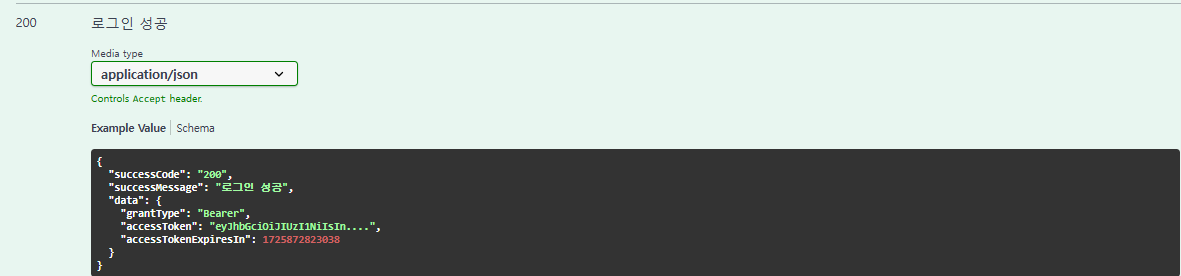
- implementation에 LoginResponse.class를 할당하면, 공통 API 응답(SuccessResponse)이 포함되지 않는다.
implementation = SuccessResponse.class
@Operation(summary = "로그인", description = "아이디와 패스워드를 입력하여 로그인 합니다.")
    @ApiResponses(value = {
            @ApiResponse(
                    responseCode = "200",
                    description = "로그인 성공",
                    content = @Content(
                            mediaType = "application/json",
                            schema = @Schema(implementation = SuccessResponse.class)
                    )
            ),
            .... 생략
    })
    @PostMapping
    public SuccessResponse<LoginResponse> login(@Valid @RequestBody LoginRequest loginRequest) {
        // 로그인 인증 처리
        ... 생략

        return SuccessResponse.success(
                SuccessCodes.LOGIN_SUCCESS,
                HttpStatus.OK,
                loginResponse
        );
    }
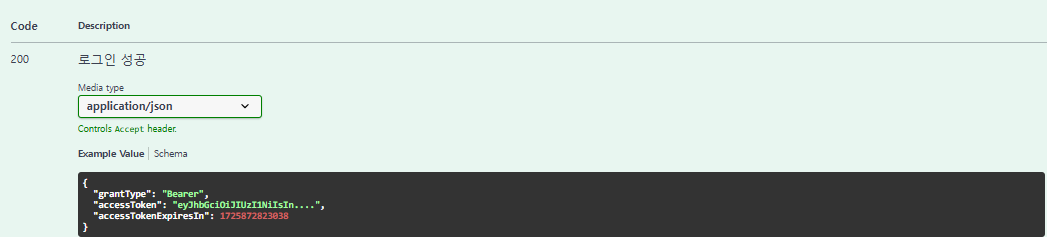
- data 필드가 비어있다.
- generic 타입을 지정할 경우, 컴파일 에러가 발생함을 확인할 수 있다.
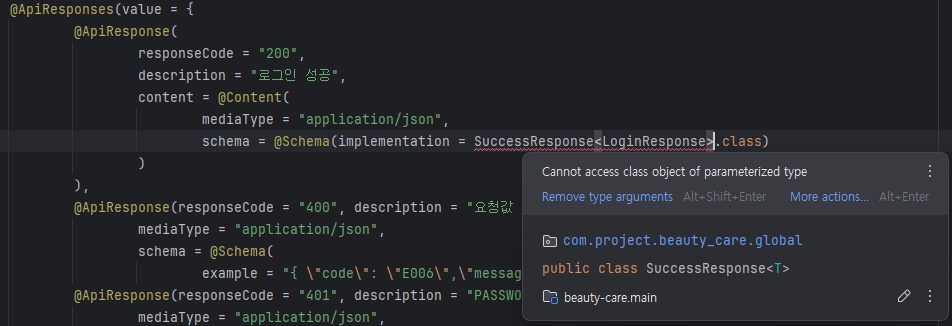
구현
원하는 결과를 얻기 위해서는, Swagger를 커스터마이징 해야한다.
SwaggerConfig.class📜
@Bean
public OperationCustomizer operationCustomizer() {
    return (operation, handlerMethod) -> {
        this.addResponseBodyWrapperSchemaExample(operation, SuccessResponse.class, "data", handlerMethod);
        return operation;
    };
}- API의 응답 정보를 동적으로 수정하기 위해, customizer를 빈으로 등록한다.
- 응답 형식을 SuccessResponse.class로 공통화
private void addResponseBodyWrapperSchemaExample(Operation operation,
                                                 Class<?> type,
                                                 String wrapFieldName,
                                                 HandlerMethod handlerMethod) {
    for (String responseCode : new String[]{"200", "201", "204"}) {
        Content content =
                operation.getResponses().get(responseCode) != null ? operation.getResponses().get(responseCode).getContent() : null;

        if (content != null) {
            content.keySet()
                    .forEach(mediaTypeKey -> {
                        final MediaType mediaType = content.get(mediaTypeKey);
                        mediaType.schema(wrapSchema(mediaType.getSchema(), type, wrapFieldName, handlerMethod));
                    });
        }
    }
}

// 공통 응답 wrapping 처리
@SneakyThrows
private <T> Schema<T> wrapSchema(Schema<?> originalSchema, Class<T> type, String wrapFieldName, HandlerMethod handlerMethod) {
    final Schema<T> wrapperSchema = new Schema<>();

    // httpMethod
    RequestMethod requestMethod = handlerMethod.getMethodAnnotation(RequestMapping.class).method()[0];

    String methodName = handlerMethod.getMethod().getName();

    final String CODE = "successCode";
    final String MESSAGE = "successMessage";

    for (Field field : type.getDeclaredFields()) {
        field.setAccessible(true);
        Schema<Object> objectSchema = new Schema<>();

        switch (requestMethod) {
            case GET:
                if (field.getName().equals(CODE)) {
                    wrapperSchema.addProperty(field.getName(), new Schema<>().example("200"));
                }

                if (field.getName().equals(MESSAGE)) {
                    wrapperSchema.addProperty(field.getName(), new Schema<>().example("조회가 완료 되었습니다."));
                }
                break;
            case POST:
                if (methodName.contains("create")) {
                    // 저장 - 201
                    if (field.getName().equals(CODE))
                        wrapperSchema.addProperty(field.getName(), new Schema<>().example("201"));
                    else if (field.getName().equals(MESSAGE)) {
                        String entity = methodName.replaceAll("^[a-z]+", "");
                        String localizedEntity = messageSource.getMessage(entity, null, Locale.KOREA);

                        wrapperSchema.addProperty(field.getName(), new Schema<>().example(localizedEntity + " 저장이 완료 되었습니다."));
                    }
                } else if (methodName.equals("login")) {
                    // 로그인 - 200
                    if (field.getName().equals(CODE))
                        wrapperSchema.addProperty(field.getName(), new Schema<>().example("200"));
                    else if (field.getName().equals(MESSAGE)) {
                        wrapperSchema.addProperty(field.getName(), new Schema<>().example("로그인 성공"));
                    }
                } else if (methodName.contains("find")) {
                    // 조회 - 200
                    if (field.getName().equals(CODE))
                        wrapperSchema.addProperty(field.getName(), new Schema<>().example("200"));
                    else if (field.getName().equals(MESSAGE)) {
                        wrapperSchema.addProperty(field.getName(), new Schema<>().example("조회가 완료 되었습니다."));
                    }
                }
                else
                    wrapperSchema.addProperty(field.getName(), new Schema<>().example("작업이 완료 되었습니다."));

                break;
            case DELETE:
                if (field.getName().equals(CODE))
                    wrapperSchema.addProperty(field.getName(), new Schema<>().example("204"));

                if (field.getName().equals(MESSAGE))
                    wrapperSchema.addProperty(field.getName(), new Schema<>().example("삭제가 완료되었습니다."));

                break;
            case PUT:
                if (field.getName().equals(CODE))
                    wrapperSchema.addProperty(field.getName(), new Schema<>().example("200"));


                if (field.getName().equals(MESSAGE))
                    wrapperSchema.addProperty(field.getName(), new Schema<>().example("수정 완료되었습니다."));
                break;
            default:
                wrapperSchema.addProperty(field.getName(), new Schema<>());
        }

        field.setAccessible(false);
    }
    wrapperSchema.addProperty(wrapFieldName, originalSchema);
    return wrapperSchema;
}- 특정 API의 응답 정보를 Operation 객체에서 가져온다.
- 응답 코드가 200, 201, 204인 경우에만 스키마를 변경
- API의 HTTP Method와 메서드명을 기반으로 성공 메시지와 성공 코드를 설정
- 응답의 Content를 순회하며 wrapSchema()를 호출하여 공통 응답 형식(SuccessResponse)으로 감싸도록 수정
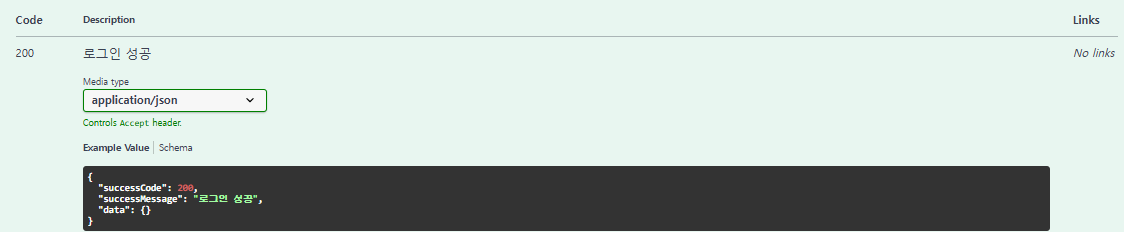
공통 응답(SuccessResponse)과 LogineResponse가 포함되어 있는 것을 확인할 수 있다.
📌정리
- Swagger의 한계: 제네릭 타입의 data 필드를 지원하지 않음.
- 해결 방법:
OperationCustomizer를 활용하여 Swagger 응답을 커스텀 처리. wrapSchema()를 통해 응답 스키마를 SuccessResponse로 변환하여, 일관된 응답 구조를 유지

BACKEND 개발자