
문제
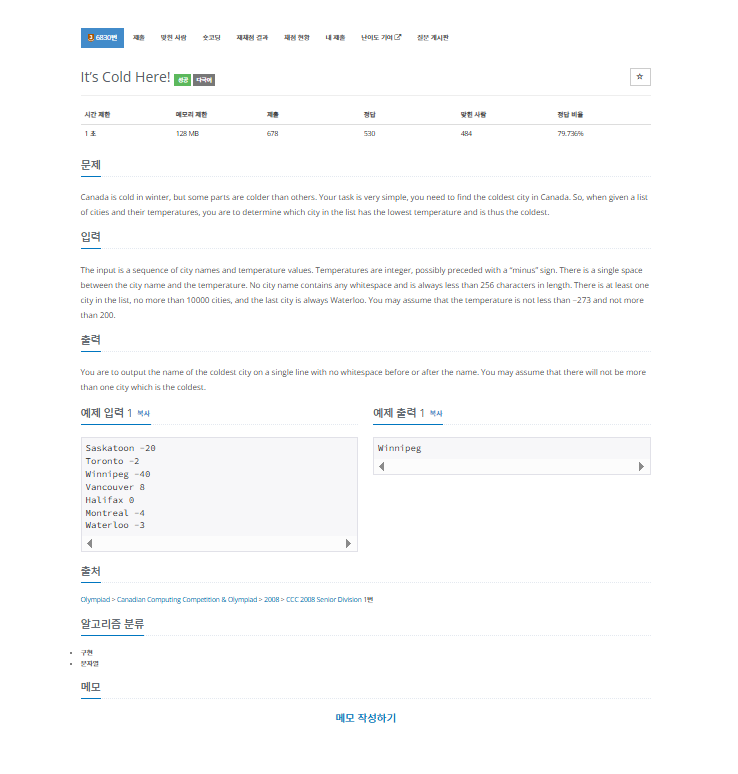
내가 생각했을때 문제에서 원하는부분
The input is a sequence of city names and temperature values.
Temperatures are integer, possibly preceded with a “minus” sign.
There is a single space between the city name and the temperature.
No city name contains any whitespace and is always less than 256 characters in length.
There is at least one city in the list, no more than 10000 cities, and the last city is always Waterloo.
You may assume that the temperature is not less than −273 and not more than 200.

You are to output the name of the coldest city on a single line with no whitespace before or after the name.
You may assume that there will not be more than one city which is the coldest.
내가 이 문제를 보고 생각해본 부분
BufferedReader br = new BufferedReader(new InputStreamReader(System.in));:
사용자의 입력을 읽기 위한 BufferedReader 객체를 생성한다.
System.in은 표준 입력 스트림(보통 키보드 입력)을 의미하고, InputStreamReader는 바이트 스트림을 문자 스트림으로 변환해준다.
BufferedReader는 이 문자 스트림을 효율적으로 읽을 수 있도록 한다.
int minTemperature = Integer.MAX_VALUE;:
가장 낮은 온도를 저장할 변수 minTemperature를 선언하고 초기화한다.
Integer.MAX_VALUE는 int 타입이 가질 수 있는 가장 큰 값이다.
이렇게 초기화하면, 어떤 첫 번째 도시의 온도가 들어오든 이 값보다는 항상 작기 때문에, minTemperature에는 첫 번째 도시의 온도가 정확하게 지정된다.
String coldestCityName = "";:
가장 추운 도시의 이름을 저장할 coldestCityName 변수를 선언하고 빈 문자열로 초기화한다.
String line; / while ((line = br.readLine()) != null) { ... }:
line 변수에 br.readLine()을 통해 한 줄씩 입력받은 문자열을 저장하고, 입력이 더 이상 없을 때(null)까지 while 루프를 반복한다.
문제 조건상 마지막 줄은 "Waterloo"이므로, null이 될 일은 없지만, 이렇게 작성하면 안정적이다.
여기서 중요한 점은 Waterloo 도시의 온도도 비교 대상에 포함되어야 한다는 것이다.
따라서 readLine()으로 일단 읽은 다음, 내부에서 "Waterloo"인지 검사한다.
String[] parts = line.split(" ");:
readLine()으로 읽어들인 한 줄(예: "Winnipeg -40")을 공백(" ")을 기준으로 두 개의 문자열로 분리하여 parts 배열에 저장한다.
parts[0]에는 도시 이름("Winnipeg"), parts[1]에는 온도 문자열("-40")이 들어가게 된다.
String cityName = parts[0];:
분리된 배열의 첫 번째 요소인 도시 이름을 cityName 변수에 저장한다.
int temperature = Integer.parseInt(parts[1]);:
분리된 배열의 두 번째 요소인 온도 문자열(예: "-40")을 Integer.parseInt() 메서드를 사용하여 실제 정수(int)로 변환하여 temperature 변수에 저장한다.
if (temperature < minTemperature) { ... }:
현재 도시의 temperature가 지금까지 기록된 minTemperature보다 더 낮다면 (더 추우면), minTemperature와 coldestCityName을 현재 도시의 정보로 갱신한다.
이 부분이 가장 추운 도시를 찾아가는 핵심 로직이다.
if (cityName.equals("Waterloo")) { break; }:
현재 도시의 이름이 "Waterloo"와 같다면, 문제 조건에 따라 더 이상 입력이 없다는 뜻이므로 break 문을 사용하여 while 루프를 종료한다.
"Waterloo"까지는 정상적으로 처리하고 다음 단계로 넘어가는 것이다.
System.out.println(coldestCityName);:
모든 도시를 검사한 후, coldestCityName에 저장된 최종적으로 가장 추운 도시의 이름을 출력한다.
br.close();:
사용한 BufferedReader를 닫아 시스템 자원을 깔끔하게 반환한다.
코드로 구현
package baekjoon.baekjoon_32;

import java.io.BufferedReader;
import java.io.IOException;
import java.io.InputStreamReader;

// 백준 6830번 문제
public class Main1273 {
    public static void main(String[] args) throws IOException {
        BufferedReader br = new BufferedReader(new InputStreamReader(System.in));

        // 가장 낮은 온도를 저장할 변수를 초기화합니다.
        // 첫 번째 온도가 무조건 더 낮을 수 있도록 충분히 큰 값으로 설정합니다.
        int minTemperature = Integer.MAX_VALUE;

        // 가장 추운 도시의 이름을 저장할 변수입니다.
        String coldestCityName = "";

        String line;
        // 한 줄씩 입력받아 처리합니다. 입력의 마지막은 "Waterloo"입니다.
        // "Waterloo" 도시를 포함하여 마지막 도시까지 처리해야 하므로, 일단 읽고나서 검사합니다.
        while ((line = br.readLine()) != null) {
            // 현재 읽은 줄을 공백 기준으로 분리합니다. (예: "Saskatoon -20" -> ["Saskatoon", "-20"])
            String[] parts = line.split(" ");
            String cityName = parts[0]; // 도시 이름
            int temperature = Integer.parseInt(parts[1]); // 온도를 정수로 변환

            // 현재 도시의 온도가 지금까지 찾은 가장 낮은 온도보다 낮으면 최저 온도를 갱신합니다.
            if (temperature < minTemperature) {
                minTemperature = temperature;
                coldestCityName = cityName;
            }

            // 만약 현재 도시가 "Waterloo"라면 입력의 끝이므로 반복을 종료합니다.
            if (cityName.equals("Waterloo")) {
                break;
            }
        }

        // 가장 추운 도시의 이름을 출력합니다.
        System.out.println(coldestCityName);
        br.close(); // BufferedReader를 닫아 자원을 해제합니다.
    }
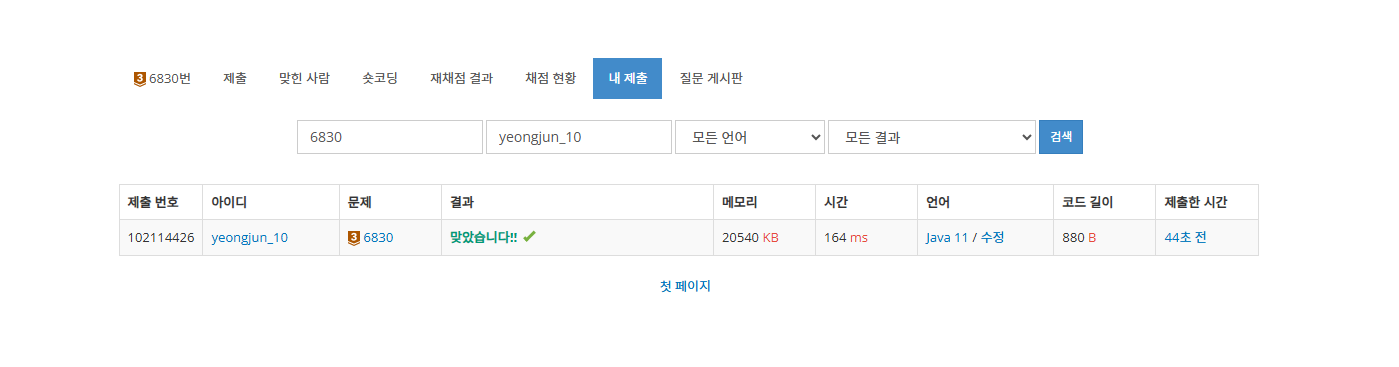
}
마무리
코드와 설명이 부족할수 있습니다. 코드를 보시고 문제가 있거나 코드 개선이 필요한 부분이 있다면 댓글로 말해주시면 감사한 마음으로 참고해 코드를 수정 하겠습니다.

Junior backend developer