[코드라이언] JavaScript
JavaScript 사용방법

(1) html 에 직접 사용
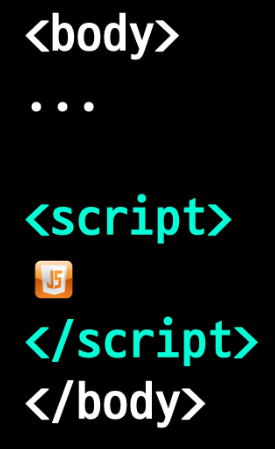
<!DOCTYPE html>
<html lang="ko">
<head>
    <meta charset="UTF-8">
    <title>JavaScript 사용 방법</title>
</head>
<body>
    <h1>JavaScript 사용 방법</h1>
    <script>
        document.write('코드라이언')
    </script>
</body>
</html>
(2) 별도의 js파일 사용
- html 파일에 js파일의 경로를 지정해 줌으로써 js파일을 연결시켜 사용
<!DOCTYPE html>
<html lang="ko">
<head>
    <meta charset="UTF-8">
    <title>JavaScript 사용 방법</title>
</head>
<body>
    <h1>JavaScript 사용 방법</h1>
    <script src='myScript.js'></script>
</body>
</html>
주석
- 주석은 컴퓨터가 읽을 수 없는 글
(1) 코드 설명을 적어줄 때 사용
(2) 코드를 동작시키고 싶지 않을 때 사용 - // 혹은 /* */ 로 주석처리
<!DOCTYPE html>
<html lang="ko">
<head>
    <meta charset="UTF-8">
    <meta name="viewport" content="width=device-width, initial-scale=1.0">
    <title>세미콜론(;)과 주석</title>
</head>
<body>
    <h1>세미콜론(;)과 주석</h1>
    <script>
        //안녕이라는 글씨를 나타내는 코드
        document.write('안녕');
        //document.write('하이');
        /*
            작성자 : 조코딩
            작성년도 : 2020년
        */
    </script>
</body>
</html>
데이터상자 만들기 (Variable)
변수선언
- var 변수명 = 값;
- let 변수명 = 값;
- const 변수명 = 값;
자료형 (typeof 데이터 명령으로 자료형 판별가능)
- 문자열 (String) : "코드라이언" , '코드라이언'
- 숫자 (int, float) : int(정수), float(실수)
- 불 (bool) : true or false
<!DOCTYPE html>
<html lang="ko">
<head>
    <meta charset="UTF-8">
    <meta name="viewport" content="width=device-width, initial-scale=1.0">
    <title>데이터 상자 만들기</title>
</head>
<body>
    <h1>데이터 상자 만들기</h1>
    <script>
        var name = '코드라이언';
        document.write(typeof name);
    </script>
</body>
</html>
JavaScript로 만드는 (*)
(1) 로또번호 추첨기
로또번호 한개 추첨하기
Math.random();0이상 ~ 1미만 실수를 랜덤으로 추출 (float)parseInt();소수점은 버리고 정수로 변환
<body>
    <h1>로또 번호 추첨기 1</h1>
    <script>
        var num = Math.random() * 45 + 1;
        var ball1 = parseInt(num);
        document.write(ball1);
    </script>
</body>
로또번호 여러개 추첨하기
- 배열(Array)
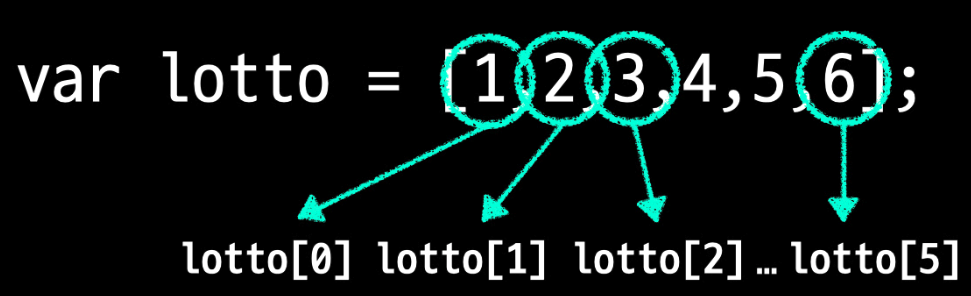
.push()배열의 마지막에 값 추가
<body>
    <h1>로또 번호 추첨기</h1>
    <script>
        var lotto = [];
        lotto.push(parseInt(Math.random() * 45 + 1));
        lotto.push(parseInt(Math.random() * 45 + 1));
        lotto.push(parseInt(Math.random() * 45 + 1));
        lotto.push(parseInt(Math.random() * 45 + 1));
        lotto.push(parseInt(Math.random() * 45 + 1));
        lotto.push(parseInt(Math.random() * 45 + 1));
        document.write(lotto);
    </script>
</body>
반복문 활용 (for)
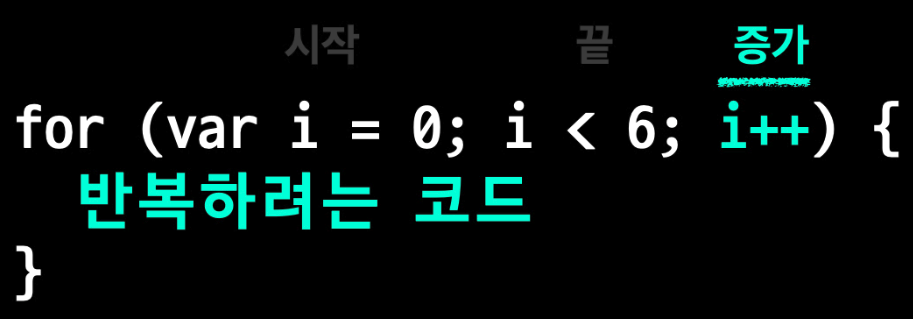
for 반복문
<body>
    <h1>로또 번호 추첨기</h1>
    <script>
        var lotto = [];
        for (var i = 0; i < 6; i++){
            lotto.push(parseInt(Math.random() * 45 + 1));
        }
        document.write(lotto);
    </script>
</body>
조건문 활용 (if)
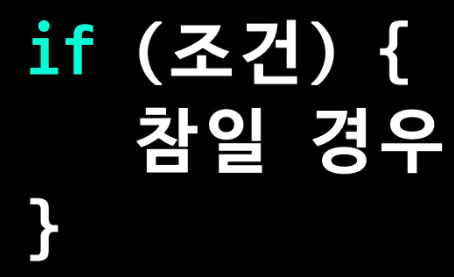
if 조건문 (추출되는 번호가 중복될 수 있기 때문에 사용)
.indexOf(값)값이 있으면 위치, 값이 없으면 -1
<body>
    <h1>로또 번호 추첨기</h1>
    <script>
        var lotto = [];
        for (var i = 0; i < 6; i++){
            var num = parseInt(Math.random() * 45 + 1);
            if (lotto.indexOf(num) == -1) {
                lotto.push(num);
            }
        }
        document.write(lotto);
    </script>
</body>
반복문 활용 (while)
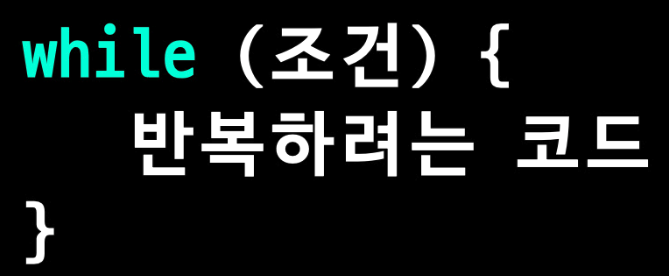
while 반복문 : 특정 조건까지 계속 반복할 때 사용
(for문에서 번호 중복 시 추출되는 숫자의 갯수가 줄어드는 경우 발생)
.length배열의 길이
<body>
    <h1>로또 번호 추첨기</h1>
    <script>
        var lotto = [];
        while (lotto.length < 6) {
            var num = parseInt(Math.random() * 45 + 1);
            if (lotto.indexOf(num) == -1) {
                lotto.push(num);
            }
        }
        document.write(lotto);
    </script>
</body>.sort배열의 값 정렬
<body>
    <h1>로또 번호 추첨기</h1>
    <script>
        var lotto = [1,2,3,33,22,11];
        lotto.sort();
        document.write(lotto);
    </script>
</body>
결과값 : [1, 11, 2, 22, 3, 33]
.sort((a,b)=>a-b)배열의 값 정렬
<body>
    <h1>로또 번호 추첨기</h1>
    <script>
        var lotto = [1,2,3,33,22,11];
        lotto.sort((a,b)=>a-b);
        document.write(lotto);
    </script>
</body>
결과값 : [1, 2, 3, 11, 22, 33]
- 정리
<body>
    <h1>로또 번호 추첨기</h1>
    <script>
        var lotto = [];
        while (lotto.length < 6) {
            var num = parseInt(Math.random() * 45 + 1);
            if (lotto.indexOf(num) == -1) {
                lotto.push(num);
            }
        }
        lotto.sort((a,b)=>a-b);
    </script>
</body>
(2) 자소서 글자수 계산기
DOM (Document Object Model)
document.getElementById('')
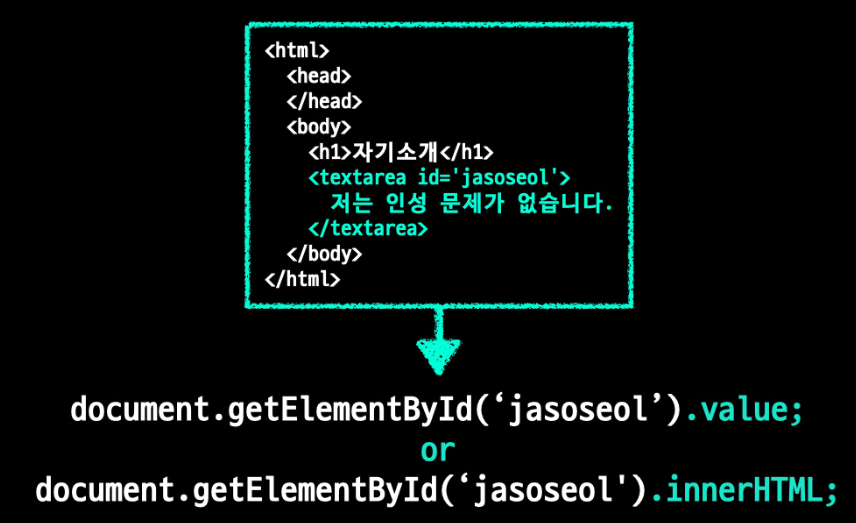
console.log('코드라이언');이미 정의된 모든 종류의 변수를 출력하거나 사용자에게 표시되어야 하는 메시지를 출력하는데 사용되는 javascript 함수
</head>
<body class="container">
    <h1>자기소개</h1>
    <textarea class="form-control" rows="3" id="jasoseol">저는 인성 문제가 없습니다.</textarea>
    <script>
        var content = document.getElementById('jasoseol').value;
        console.log(content);
    </script>
</body>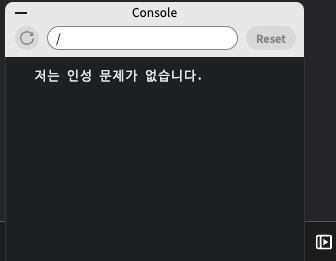
.length문자열의 길이
<body class="container">
    <h1>자기소개</h1>
    <textarea class="form-control" rows="3" id="jasoseol">저는 인성 문제가 없습니다.</textarea>
    <script>
        var content = document.getElementById('jasoseol').value;
        console.log(content.length);
    </script>
</body>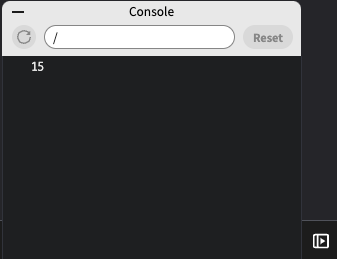
- HTML 화면에 글자수 넣어주기
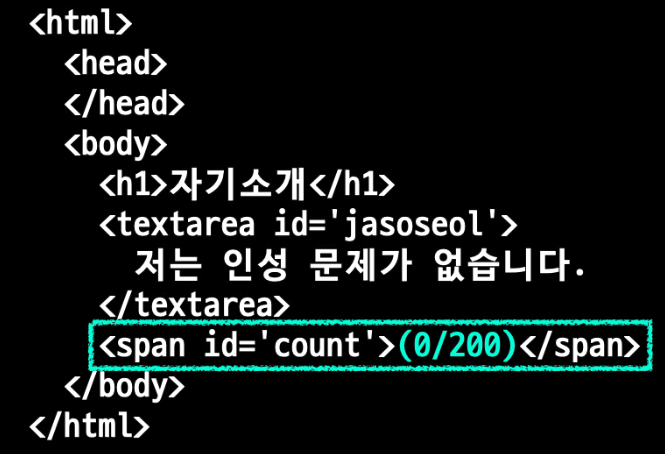
<body class="container">
    <h1>자기소개</h1>
    <textarea class="form-control" rows="3" id="jasoseol">저는 인성 문제가 없습니다.</textarea>
    <span id="count">(0/200)</span>
    <script>
        var content = document.getElementById('jasoseol').value;
        document.getElementById('count').innerHTML = content.length;
    </script>
</body>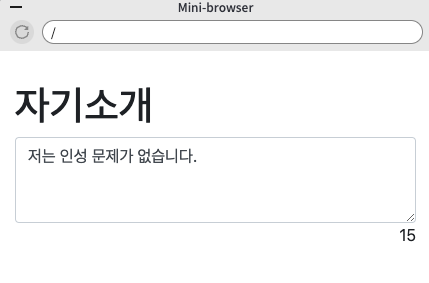
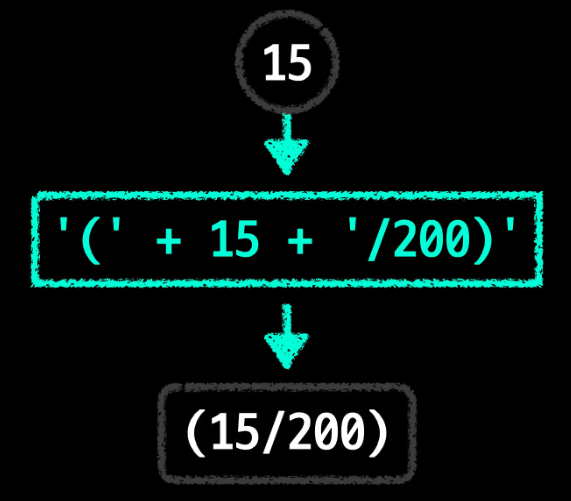
- 형변환 하기
<body class="container">
    <h1>자기소개</h1>
    <textarea class="form-control" rows="3" id="jasoseol">저는 인성 문제가 없습니다.</textarea>
    <span id="count">(0/200)</span>
    <script>
        var content = document.getElementById('jasoseol').value;
        document.getElementById('count').innerHTML = '(' + content.length + '/200)';
    </script>
</body>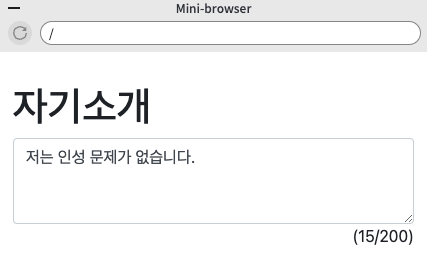
함수 활용하기 (function)
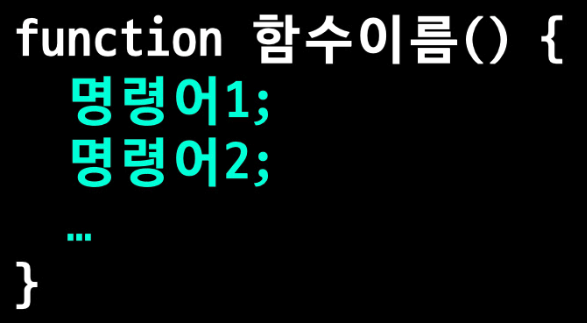
function 함수이름( ) { }
- 함수에 명령어를 입력해 두면 다음에 동일한 명령어를 사용할 때 함수이름만 적으면 해당 명령이 적용된다.
<body class="container">
    <h1>자기소개</h1>
    <textarea class="form-control" rows="3" id="jasoseol">저는 인성 문제가 없습니다.</textarea>
    <span id="count">(0/200)</span>
    <script>
        function counter() {
            var content = document.getElementById('jasoseol').value;
            document.getElementById('count').innerHTML = '(' + content.length + '/200)';
        }
        counter();
    </script>
</body>
- 이벤트 핸들링 (글자 수 자동계산)
키보드를 누를 때 마다 (이벤트)
글자 수를 세주어라 (이벤트 핸들링)

<body class="container">
    <h1>자기소개</h1>
    <textarea onkeydown='counter();' class="form-control" rows="3" id="jasoseol">저는 인성 문제가 없습니다.</textarea>
    <span id="count">(0/200)</span>
    <script>
        function counter() {
            var content = document.getElementById('jasoseol').value;
            document.getElementById('count').innerHTML = '(' + content.length + '/200)';
        }
        counter();
    </script>
</body>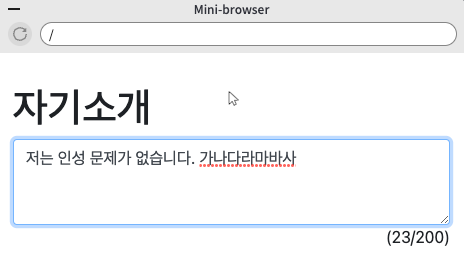
-
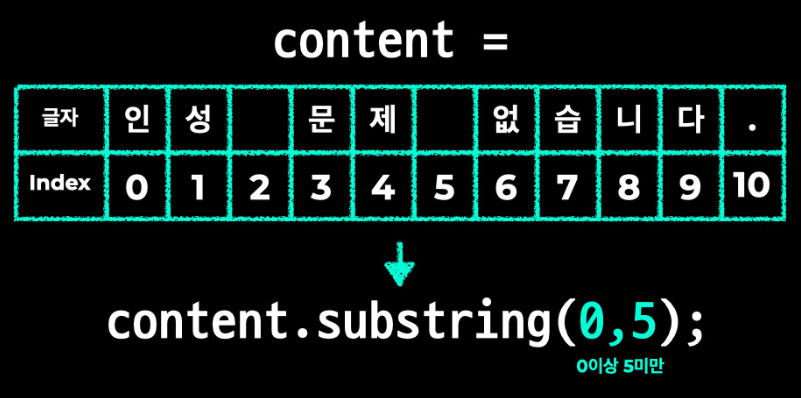
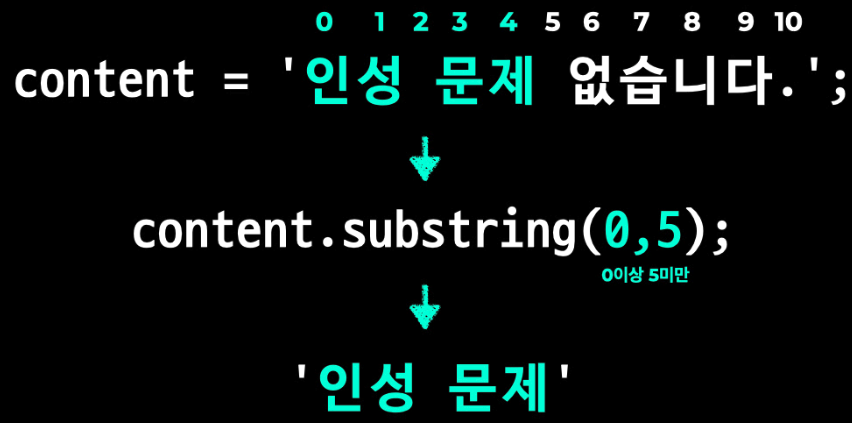
.substring()문자열에서 특정부분만 골라낼 때 사용
-
if문을 활용하여 글자가 200자 초과시 더이상 안써지도록 하기
<body class="container">
    <h1>자기소개</h1>
    <textarea class="form-control" rows="3" id="jasoseol" onkeydown="counter();">저는 인성 문제가 없습니다.</textarea>
    <span id="count">(0/200)</span>
    <script>
        function counter() {
            var content = document.getElementById('jasoseol').value;
            if (content.length > 200) {
                content = content.substring(0,200);
                document.getElementById('jasoseol').value = content;
            }
            document.getElementById('count').innerHTML = '(' + content.length + '/200)';
        }
        counter();
    </script>
</body>
(3) 미니 스타크래프트 만들기
jQuery 이해하기
- 홈페이지에서 코드를 복사하여 html 상에 붙여넣으면 jQuery 라이브러리 이용가능
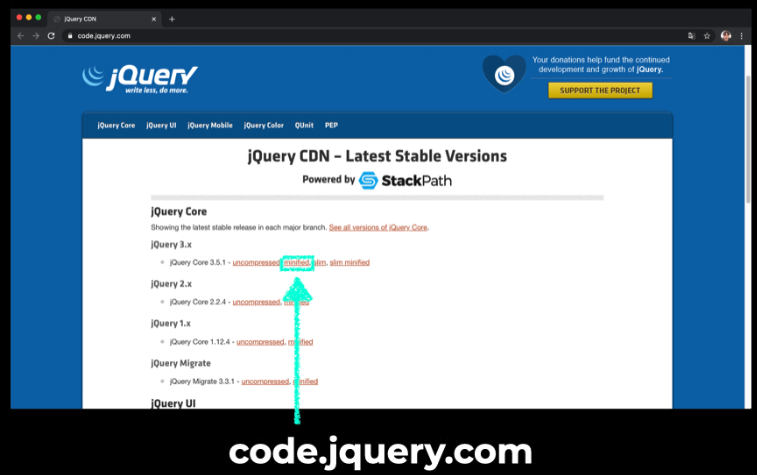
<script
    src="https://code.jquery.com/jquery-3.5.1.js"
    integrity="sha256-QWo7LDvxbWT2tbbQ97B53yJnYU3WhH/C8ycbRAkjPDc="
    crossorigin="anonymous"></script>
$(선택자).행위;
<body>
    <h1>jQuery 기초</h1>
    <textarea id="content">jQuery를 배워보자</textarea>
    <script
    src="https://code.jquery.com/jquery-3.5.1.js"
    integrity="sha256-QWo7LDvxbWT2tbbQ97B53yJnYU3WhH/C8ycbRAkjPDc="
    crossorigin="anonymous"></script>
    <script>
        console.log($('#content').val());
        //id를 의미할 때는 #선택자
    </script>
</body>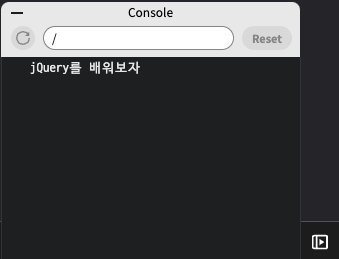
jQuery Event

- JavaScript 사용 (onclick 이벤트)
<body>
    <h1>jQuery 이벤트</h1>
    <button id="click" onclick="hello();">클릭</button>
    <script
  src="https://code.jquery.com/jquery-3.5.1.min.js"
  integrity="sha256-9/aliU8dGd2tb6OSsuzixeV4y/faTqgFtohetphbbj0="
  crossorigin="anonymous"></script>
    <script>
        function hello() {
            console.log('hello');
        }
    </script>
</body>- jQuery 사용 (.click 함수)
<body>
    <h1>jQuery 이벤트</h1>
    <button id="click">클릭</button>
    <script
  src="https://code.jquery.com/jquery-3.5.1.min.js"
  integrity="sha256-9/aliU8dGd2tb6OSsuzixeV4y/faTqgFtohetphbbj0="
  crossorigin="anonymous"></script>
    <script>
        function hello() {
            console.log('hello');
        }
        $('#click').click(hello);
    </script>
</body>
익명함수
- 함수를 따로 정의하지 않고 변수값에 함수코드를 저장하는 방식
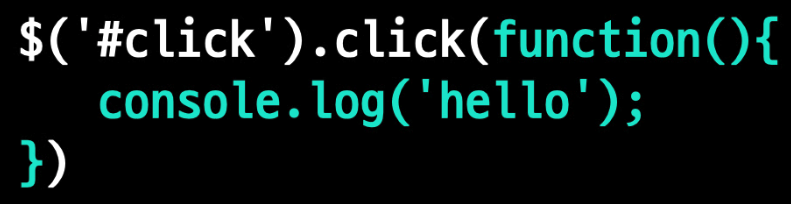
<body>
    <h1>익명 함수</h1>
    <button id="click">클릭</button>
    <script
  src="https://code.jquery.com/jquery-3.5.1.min.js"
  integrity="sha256-9/aliU8dGd2tb6OSsuzixeV4y/faTqgFtohetphbbj0="
  crossorigin="anonymous"></script>
    <script>
        $('#click').click(function(){
            console.log('hello');
        });
    </script>
</body>
미니스타크래프트 만들기
fadeIn()드론이 뱉은 침 나타나기
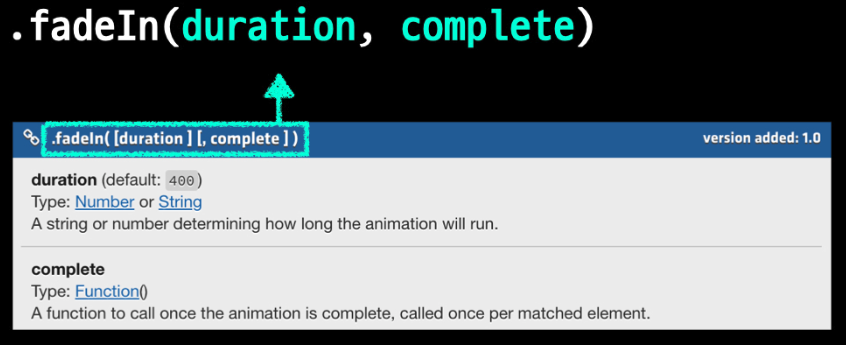
.animate()드론이 뱉은 침 움직이기

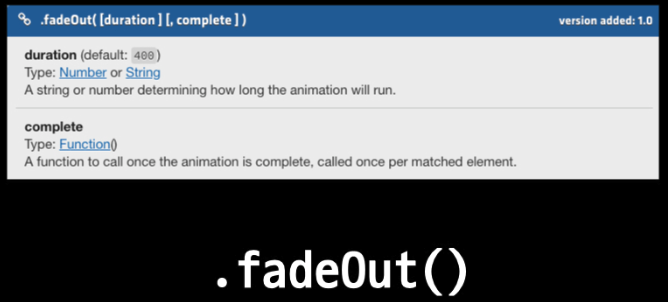
.fadeOut()드론이 뱉은 침 벙커맞고 사라지기
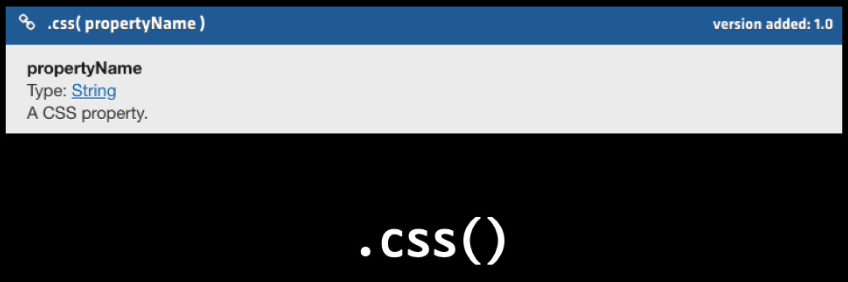
.css()두 번째 뱉은 침의 위치 조정 (드론 앞에서부터 침 나타나기)
<body>
    <h1 id='hp'>HP: 3</h1>
    <div class='background'>
        <img id='drone' src="drone.png" alt="drone">
        <img id='spit' src="spit.png" alt="spit">
        <img id='bunker' src="bunker.png" alt="bunker">
    </div>
    <script
  src="https://code.jquery.com/jquery-3.5.1.js"
  integrity="sha256-QWo7LDvxbWT2tbbQ97B53yJnYU3WhH/C8ycbRAkjPDc="
  crossorigin="anonymous"></script>
    <script>
        $('#drone').click(function(){
            $('#spit').fadeIn();
            $('#spit').animate({left: '+=250'});
            $('#spit').fadeOut();
            $('#spit').css({left: '150px'});
        });
    </script>
</body>.text()벙커가 드론의 침을 맞을 때 hp가 감소하도록 만들기
<body>
    <h1 id='hp'>HP: 3</h1>
    <div class='background'>
        <img id='drone' src="drone.png" alt="drone">
        <img id='spit' src="spit.png" alt="spit">
        <img id='bunker' src="bunker.png" alt="bunker">
    </div>
    <script
  src="https://code.jquery.com/jquery-3.5.1.js"
  integrity="sha256-QWo7LDvxbWT2tbbQ97B53yJnYU3WhH/C8ycbRAkjPDc="
  crossorigin="anonymous"></script>
    <script>
        var hp = 3;
        $('#drone').click(function(){
            $('#spit').fadeIn();
            $('#spit').animate({left: '+=250'});
            $('#spit').fadeOut();
            $('#spit').css({left: '150px'});
            hp = hp - 1;
            $('#hp').text('HP :' + hp);
        });
    </script>
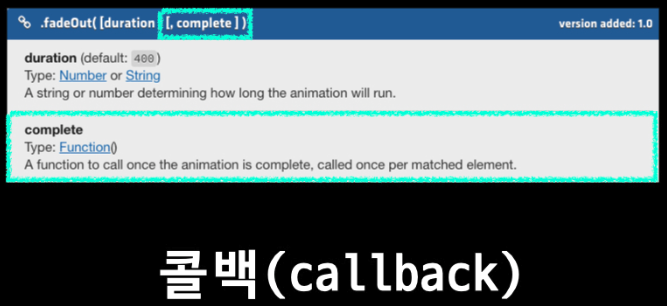
</body>- hp가 감소하는 시점 맞추기 (벙커가 침에 맞은 후 hp 감소)
<body>
    <h1 id='hp'>HP: 3</h1>
    <div class='background'>
        <img id='drone' src="drone.png" alt="drone">
        <img id='spit' src="spit.png" alt="spit">
        <img id='bunker' src="bunker.png" alt="bunker">
    </div>
    <script
  src="https://code.jquery.com/jquery-3.5.1.js"
  integrity="sha256-QWo7LDvxbWT2tbbQ97B53yJnYU3WhH/C8ycbRAkjPDc="
  crossorigin="anonymous"></script>
    <script>
        var hp = 3;
        $('#drone').click(function(){
            $('#spit').fadeIn();
            $('#spit').animate({left: '+=250'});
            $('#spit').fadeOut(function(){
                hp = hp - 1;
                $('#hp').text('HP :' + hp);
            });
            $('#spit').css({left: '150px'});
        });
    </script>
</body>- 벙커의 hp가 0이 되면 사라지도록 만들기 (if문 활용)
<body>
    <h1 id='hp'>HP: 3</h1>
    <div class='background'>
        <img id='drone' src="drone.png" alt="drone">
        <img id='spit' src="spit.png" alt="spit">
        <img id='bunker' src="bunker.png" alt="bunker">
    </div>
    <script
  src="https://code.jquery.com/jquery-3.5.1.js"
  integrity="sha256-QWo7LDvxbWT2tbbQ97B53yJnYU3WhH/C8ycbRAkjPDc="
  crossorigin="anonymous"></script>
    <script>
        var hp = 3;
        $('#drone').click(function(){
            $('#spit').fadeIn();
            $('#spit').animate({left: '+=250'});
            $('#spit').fadeOut(function(){
                hp = hp - 1;
                $('#hp').text('HP: ' + hp);
                if(hp == 0) {
                    $('#bunker').fadeOut();
                }
            });
            $('#spit').css({left: '150px'});
        });
    </script>
</body>
(4) 기념일 계산기
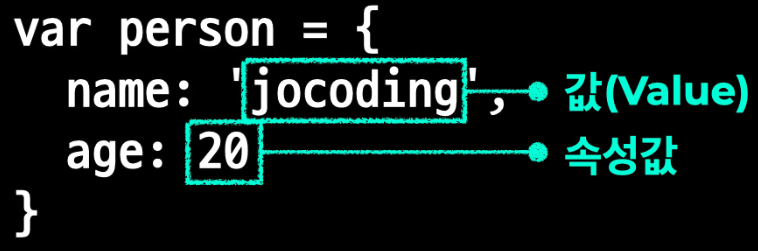
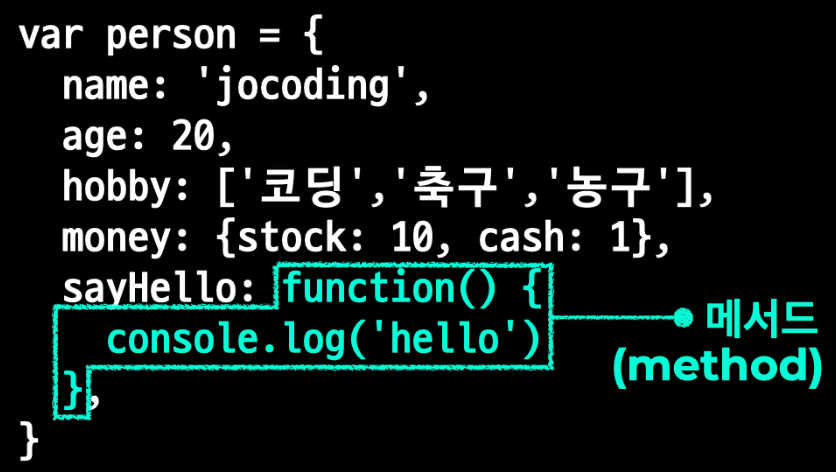
객체(Object) 이해하기

-
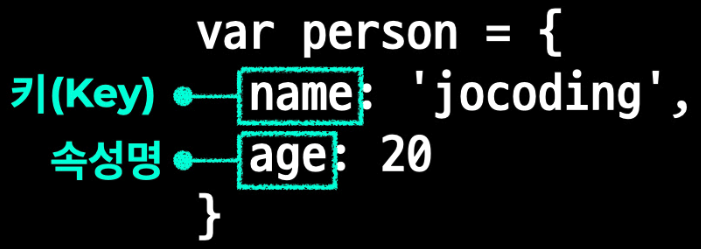
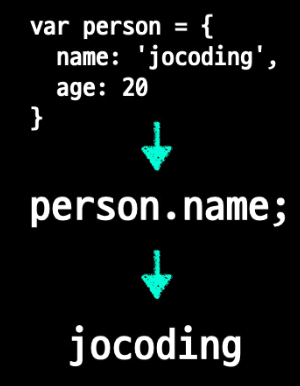
객체(Object).키(Key)

-
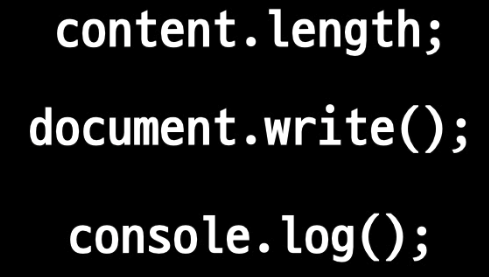
즉, JavaScript의 모든 것은 객체이다
</head>
<body>
    <h1>객체(Object)</h1>
    <script>
        var person = {
            name: 'jocoding',
            sayHello: function() { console.log('hello'); }
        }
        console.log(person.name);
        person.sayHello();
    </script>
</body>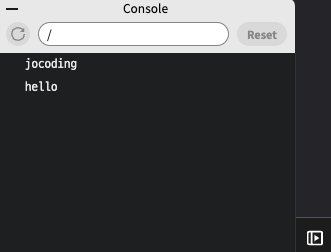
Date 객체 알아보기
참고자료 https://developer.mozilla.org/ko/docs/Web/JavaScript/Reference/Global_Objects/Date
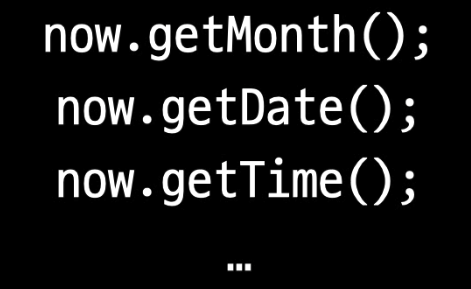
- Date 객체 생성

- 메서드 이용하기
<body>
    <h1>Date 객체</h1>
    <script>
        //1. Date 객체 생성
        var now = new Date();
        //2. 연도를 가져오는 메서드 .getFullYear()
        console.log(now.getFullYear());
        //3. 월 정보를 가져오는 메서드 .getMonth() {0: 1월, 1: 2월, ... 10: 11월, 11: 12월}
        console.log(now.getMonth());
        //4. 일 정보를 가져오는 메서드 .getDate()
        console.log(now.getDate());
        //5. 1970년 1월 1일 00:00:00을 기준으로 흐른 시간을 밀리초로 표시하는 메서드 .getTime()
        console.log(now.getTime());
        //6. 특정 일의 Date 객체 생성
        var christmas = new Date('2020-12-25');
        console.log(christmas);
        //7. 특정 ms의 Date 객체 생성
        var ms = new Date(1000);
        console.log(ms);
    </script>
</body>
기념일 계산기
-
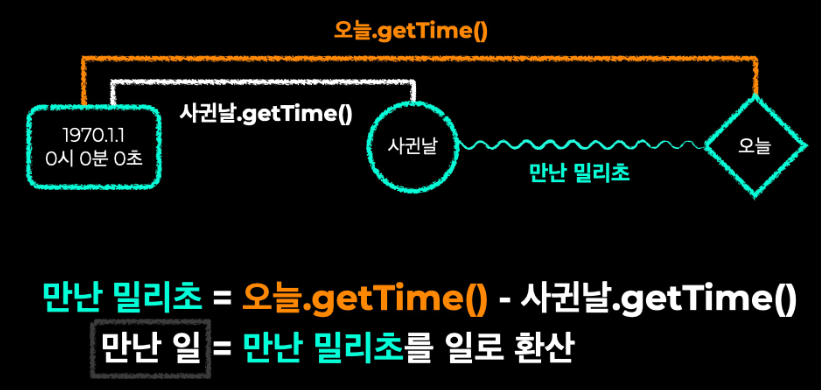
만난 날짜 세기
-
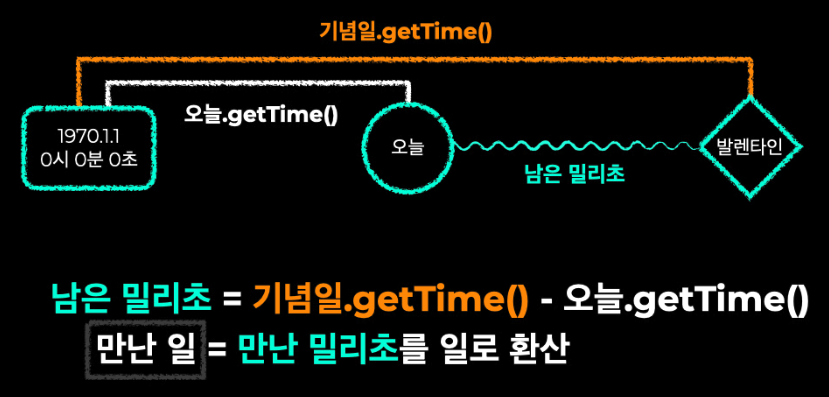
D-day 계산하기
-
1000일은 언제인가?
-
1000일까지 몇일이 남았나?

<body class="container">
    <section class='photos'>
        <img id='duhee' src="duhee.jpeg" alt="duhee">
        <img id='heart' src="heart.png" alt="heart">
        <img id='jisook' src="jisook.jpeg" alt="jisook">
    </section>
    <div class='container d-flex flex-column justify-content-center align-items-center mt-3'>
        <h3>두희♥지숙</h3>
        <h3 id='love'>0일째</h3>
        <h4 class="date">2020.6.30</h4>
    </div>
    <hr/>
    <section class='special-day'>
        <h3 class='title'>발렌타인 데이</h3>
        <div class='date-box'>
            <p id='valentine' class='days-left'>0일 남음</p>
            <p class='date'>2021.2.14</p>
        </div>
    </section>
    <hr/>
    <section class='special-day'>
        <h3 class='title'>1000일</h3>
        <div class='date-box'>
            <p id='thousand' class='days-left'>0일 남음</p>
            <p id='thousand-date' class='date'>0000.00.00</p>
        </div>
    </section>
    <hr/>
    <script
  src="https://code.jquery.com/jquery-3.5.1.min.js"
  integrity="sha256-9/aliU8dGd2tb6OSsuzixeV4y/faTqgFtohetphbbj0="
  crossorigin="anonymous"></script>
    <script>
        var now = new Date();
        var start = new Date('2020-06-30');

        //우리 몇 일째?
        var timeDiff = now.getTime() - start.getTime();
        var day = Math.floor(timeDiff / (1000 * 60 * 60 * 24) + 1);
        $('#love').text(day + '일째');

        //기념일까지 남은 날짜는?
        var valentine = new Date('2021-02-14');
        var timeDiff2 = valentine.getTime() - now.getTime();
        var day2 = Math.floor(timeDiff2 / (1000 * 60 * 60 * 24) + 1);
        $('#valentine').text(day2 + '일 남음');

        //천일은 언제인가?
        var thousand = new Date(start.getTime() + 999 * (1000 * 60 * 60 * 24));
        var thousandDate = thousand.getFullYear() + '.' + (thousand.getMonth()+1) + '.' + thousand.getDate();
        $('#thousand-date').text(thousandDate);

        //기념일까지 남은 날짜는?
        var timeDiff3 = thousand.getTime() - now.getTime();
        var day3 = Math.floor(timeDiff3 / (1000 * 60 * 60 * 24) + 1);
        $('#thousand').text(day3 + '일 남음');
    </script>
</body>
GitHub
참고자료
https://velog.io/@jini_eun/Github-Github%EB%9E%80-%EA%B0%84%EB%8B%A8-%EC%A0%95%EB%A6%AC
GitHub 명령어
- 시작하기: git init
- 유저 이름 설정: git config --global user.name "codelion-jocoding"
- 이메일 등록: git config --global user.email #####@gmail.com
- 파일 추가: git add .
- 메세지 입력: git commit -m "first commit"
- 보낼 곳 등록: git remote add origin https://github.com/youngmk1203/myrepo.git
- 보낼 곳으로 코드 전송: git push origin master
Deploy

“Stay hungry, Stay foolish.”