
실행 컨텍스트(Execution Context)
자바스크립트 스펙에도 명시 되어 있어, 이를 이해하면 자바스크립트의 동작을 스펙 레벨에서 이해하고 활용할 수 있다.
자바스크립트 함수가 실행되는 과정
자바스크립트 실행 환경에는 브라우저 환경, node.js를 이용한 로컬 환경 등이 있음
이 실행 환경에서 공통적으로 벌어지는 일을 확인해보자.
어떤 코드도 없는 경우
// 어떤 코드도 없는 경우HTML, CSS로만 구성된 페이지를 브라우저에서 로드했을 때가 있다.
자바스크립트 엔진은 어떤 코드가 없어도 다음 세가지 변수를 초기화 한다.
- this : window (코드 실행 시점의 환경)
- 변수들을 담는 Variable Object(변수 객체) : {}
- Scope chain : [] (최상위 단의 scope이므로, 연결될 scope가 없음)
👩💻 정리!
- 자바스크립트 엔진은 코드가 없어도 실행 환경(실행 컨텍스트)를 초기화한다.
- 스코프(scope)는 코드가 현재 실행되는 환경, 맥락(context)을 의미한다.
- this 포인터, 스코프에 저장된 변수들, 스코프 체인 등이 환경에 포함된다.
- this 포인터의 경우, 글로벌 스코프에서는 window를 가리킨다.
this 포인터라고 표현을 했는데, 자바스크립트에서는 레퍼런스 변수로 이해하면 된다.
특정 함수가 존재하고, 그 함수가 실행될 때
function myFunc() {
  let a = 10;
  let b = 10;
  function add(first, second) {
    return first + second;
  }
  return add(a, b);
}

myFunc();- 자바스크립트 엔진은 최상위 컨텍스트를 생성한다.
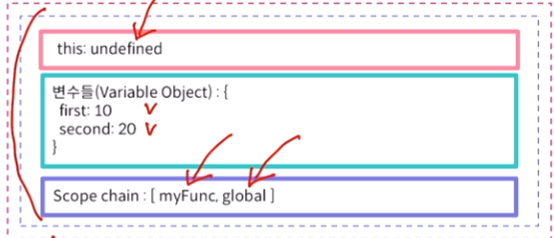
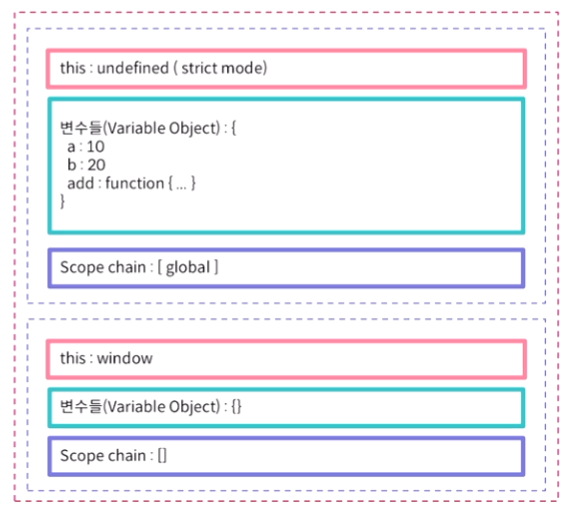
글로벌 컨텍스트의 VO에는 myFunc가 포함된다.
myFunc 함수가 실행되었을 때 myFunc 실행컨텍스트가 새롭게 만들어진다. 기존의 글로벌 컨텍스트는 그대로 존재한다.
myFunc 함수가 종료되면 맨 위의 실행컨텍스트가 제거되고, 모든 코드가 끝나면 글로벌 컨텍스트도 제거된다.
이는 스택 구조로 구성되어있다.
call stack : 실행컨텍스트가 쌓이면서 구성되는 것
자바스크립트가 strict mode로 실행되었을 때 myFunc의 this는 undefined가 된다.
스코프체인
만약 다른 변수를 찾아야 할 경우, 스코프 체인을 따라 변수를 검색하는 용도로 활용된다.
👩💻정리!
- 함수가 실행되면, 함수 스코프에 따라 환경이 만들어진다.
- this, 함수 스코프의 변수들, 그리고 스코프 체인이 형성된다.
- 스코프 체인을 따라 글로벌 환경에 도달한다.
객체가 있고 그 객체의 메소드를 호출하는 경우
let o = {
  name: 'Daniel',
  method: function (number) {
    return this.name.repeat(number);
  },
};

function myFunc() {
  let n = 10;
  return o.method(n);
}

myFunc();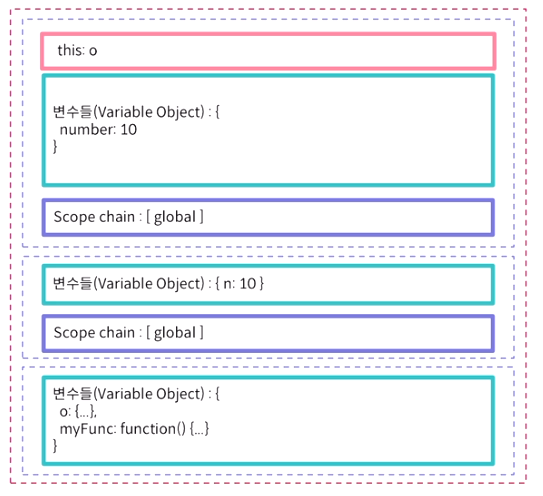
👩💻 정리!
- 객체의 메서드의 경우, 메서드 환경의 this는 해당 객체를 가리키게 된다.
- 하지만 this가 가리키는 것은 환경에 따라 변할 수 있다.
실행 컨텍스트
- 자바스크립트 코드가 실행되는 환경
- 코드에서 참조하는 변수, 객체(함수 포함), this 등에 대한 레퍼런스가 있다.
- 전역에서 시작해 함수가 호출될 때 스택에 쌓이게 된다.
let a = 10;

function f1() {
  let b = 20;

  function print(v) {
    console.log(v);
  }

  function f2() {
    let c = 30;
    print(a + b + c);
  }

  f2();
}

f1();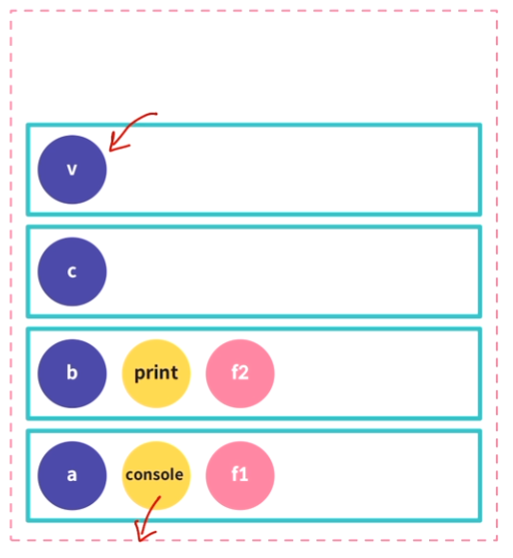
console 은 VO 안이 아니라 윈도우 객체 밑에 있는 변수지만 전역에서 참조할 수 있는 변수라 편의상 같이 표기
아래서부터
전역 - f1 - f2 - print (console은 전역에서 참조)
콜스택
함수가 끝나는대로 실행 컨텍스트 스택 위에서부터 제거된다. 가장 마지막에 쌓인 것이 가장 먼저 제거되는 구조이다.
실행 컨텍스트의 종류
가장 최상위 스코프에는 글로벌 스코프가 있고, 자바스크립트가 처음 실행될 때, 또는 모든 함수 호출이 끝났을 때 자바스크립트는 전역 실행 컨텍스트로 만들어지고, 되돌아온다.
함수가 실행 될 때는 함수 실행 컨텍스트가 만들어진다.
전역에 존재하는 코드는 함수나 클래스 내부의 코드를 무시하고 컨텍스트를 가진다.
함수에 존재하는 코드는 함수 내부에서만 컨텍스트를 가진다.
렉시컬 환경
식별자와 식별자에 연결된 값을 저장하는 자료구조
const myName = "Elice";

function Coder() {
  const title = "Coder Land";
  return title;
}
전역으로 생성되는 렉시컬 환경에서는 myName, Coder 이렇게 2개의 식별자와 식별자에 연결된 값이 저장된다.
myName에는 Elice가 들어있지만, Coder는 스코프 체인으로 Coder와 연결되어 있다.
Coder함수의 렉시컬 환경에서는 title이라는 1개의 식별자와 식별자에 연결된 값이 저장된다. 또한, 전역 렉시컬 환경에 스코프 체인으로 연결되어 있다. 전역에서는 Coder라는 정보를 갖고 있기 때문이다.
this
동적 바인딩(dynamic binding)
함수가 호출되는 상황은 4가지가 있다
- 함수 호출 - 함수를 직접 호출
- 메서드 호출 - 객체의 메서드를 호출
- 생성자 호출 - 생성자함수 호출
- 간접 호출 - call, apply 등으로 함수를 간접 호출
- 문법적으로 호출 되는 것 외에 콜백 함수의 호출이 있다.
- 콜백 함수는 특정 동작 이후 불려지는 함수
- 보통 다른 함수의 인자로 보내지는 함수를 의미
function myFunc() {
  console.log('myFunc called');
}

myFunc(); // 직접 호출 // this는 window를 가리킴

const o = {
  name: 'Daniel',
  printName: function () {
    console.log(this.name);
  },
};

o.printName(); // 메서드 호출 // this는 메서드를 호출한 객체를 가리킴, 하지만 함수의 내부에 또 함수를 만들고 this를 호출하면 동적 바인딩으로 인해 전역 객체를 가리킴

function Person(name) {
  this.name = name;
  this.printName = function () {
    console.log(this.name);
  };
}

const p = new Person('Daniel'); // 생성자 호출

setTimeout(p.printName.bind(p), 1000); // 간접 호출- 함수의 호출 환경에 따라 this는 동적으로 세팅된다.
- 이렇게 this가 환경에 따라 바뀌는 것을 동적 바인딩(dynamic binding)이라 한다.
- bind, apply, call 등으로 this가 가리키는 것을 조작할 수 있다.
let o = {
  name: 'Daniel',
  f1: () => {
    console.log('[f1] this : ', this);
  },
  f2: function () {
    console.log('[f2] this : ', this);
  },
};

o.f1(); // global
o.f2(); // o

setTimeout(o.f1, 10); // global
setTimeout(o.f2, 20); // global- f1은 화살표 함수로, 호출 시 this는 함수가 생성된 환경을 가리키도록 고정된다.
- f2는 일반 함수로, this는 함수를 호출된 환경을 가리키며 동적으로 바뀔 수 있다.
- f2는 객체의 메서드로 호출될 때 객체가 this로 할당된다.
- 최상단 스코프의 실행 컨텍스트는 전역이다.
- setTimeout으로 함수의 실행 환경을 바꾼다.
this를 조작하는 경우
let o = {
  name: 'Daniel',
  printName: function () {
    console.log('내 이름은 ', this.name);
  },
};

o.printName(); // 내 이름은 Daniel

setTimeout(o.printName, 10); // 내 이름은 undefined
setTimeout(o.printName.bind(o), 20); // 내 이름은 Daniel
일반 함수의 경우, 화살표 함수와 다르게 bind로 this를 변경할 수 있다.
- bind, call, apply 등의 함수로 this를 조작
- setTimeout은 콜백 호출
- printName 메서드는 bind 함수를 이용해 this 변수가 o를 가리키도록 컨텍스트를 동적 바인딩한다.
this 고정하기
-
화살표 함수로 고정하기
생성자 함수로 만든 객체, 객체 리터럴 방식으로 만든 객체 모두 내부에서
this가 자기 자신을 가리킨다. 하지만 두 경우 모두 내부에서 함수를 만들고 해당 함수에서this를 출력하면window를 가리킨다.
/* 생성자 함수 방식 */
function createObject() {
  this.myFunc = function () {
    console.log("myFunc this:", this);
    return function () { console.log("myFunc return this:", this) };
  };
}

const o = new createObject();
o.myFunc()();
// myFunc        this: createObject {...}
// myFunc return this: window {...}

/* 객체 리터럴 방식 */
const o = {
  myFunc: function () {
    console.log("myFunc this:", this)
    return function () { console.log("myFunc return this:", this) }
  },
};

o.myFunc()();
// myFunc        this: myFunc {...}
// myFunc return this: window {...}
화살표 함수를 사용하면 객체 최상위 스코프를 가리키도록 유지할 수 있다.
/* 생성자 함수 방식 */
function createObject() {
  this.myFunc = function () {
    console.log("myFunc this:", this);
    // 다음 부분을 화살표 함수로 변경
    return () => { console.log("myFunc return this:", this) };
  };
}

const o = new createObject();
o.myFunc()();
// myFunc        this: createObject {...}
// myFunc return this: createObject {...}

/* 객체 리터럴 방식 */
const o = {
  myFunc: function () {
    console.log("myFunc this:", this)
    // 다음 부분을 화살표 함수로 변경
    return () => { console.log("myFunc return this:", this) };
  },
};

o.myFunc()();
// myFunc        this: myFunc {...}
// myFunc return this: myFunc {...}- call, apply, bind 메서드로 고정하기
bind
/* 생성자 함수 방식 */
function createObject() {
  this.myFunc = function () {
    console.log("myFunc this:", this);
    return function () { console.log("myFunc return this:", this) };
  };
}

const o = new createObject();
o.myFunc().bind(o)(); // bind 메서드를 사용해 o객체로 고정시킵니다.
// myFunc        this: createObject {...}
// myFunc return this: createObject {...}

/* 객체 리터럴 방식 */
const o = {
  myFunc: function () {
    console.log("myFunc this:", this)
    return function () { console.log("myFunc return this:", this) }
  },
};

o.myFunc().bind(o)(); // bind 메서드를 사용해 o객체로 고정 그리고 함수를 실행
// myFunc        this: myFunc {...}
// myFunc return this: myFunc {...}
apply, call
call은 인수 목록을 받고, apply는 인수 배열을 하나 받는다.
ex) call(this, var1, var2, var3, …) / apply(this, [ el, el2, el3, … ])
/* 생성자 함수 방식 */
function createObject() {
  this.myFunc = function () {
    console.log("myFunc this:", this);
    return function () { console.log("myFunc return this:", this) };
  };
}

const o = new createObject();
o.myFunc().call(o, null);  // call  메서드를 사용해 o객체로 고정시킨 후 함수 실행
// myFunc        this: createObject {...}
// myFunc return this: createObject {...}
o.myFunc().apply(o, null); // apply 메서드를 사용해 o객체로 고정시킨 후 함수 실행
// myFunc        this: createObject {...}
// myFunc return this: createObject {...}

/* 객체 리터럴 방식 */
const o = {
  myFunc: function () {
    console.log("myFunc this:", this)
    return function () { console.log("myFunc return this:", this) }
  },
};

o.myFunc().call(o, null);  // call  메서드를 사용해 o객체로 고정시킨 후 함수 실행
// myFunc        this: myFunc {...}
// myFunc return this: myFunc {...}
o.myFunc().apply(o, null); // apply 메서드를 사용해 o객체로 고정시킨 후 함수 실행
// myFunc        this: myFunc {...}
// myFunc return this: myFunc {...}
const o = {
name: "Elice",
}
function myFunc() {
console.log(this);
}
myFunc() // window {...}
myFunc.bind(o)() // {name: 'Elice'}
myFunc.call(o, null) // {name: 'Elice'}
myFunc.apply(o, null) // {name: 'Elice'}화살표 함수와 일반 함수의 this
- 화살표 함수의 this는 호출된 함수를 둘러싼 실행 컨텍스트를 가리킨다.
- 일반 함수의 this는 새롭게 생성된 실행 컨텍스트를 가리킨다.
let o = {
  method() {
    console.log('context: ', this); // o
    let f1 = function () {
      console.log('[f1] this : ', this);
    };
    let f2 = () => {
      console.log('[f2] this : ', this);
    };

    f1(); // global
    f2(); // o
  },
};

o.method();- f1()은 실행될 때 새로운 컨텍스트를 생성한다.
- 이때 f1에 바인딩 된 컨텍스트가 없으므로 this는 global을 가리킨다.
- f2()는 함수 컨텍스트를 생성하며 this 변수는 부모의 컨텍스트를 가리킨다. 따라서 this는 o가 된다.
👩💻정리!
- 화살표 함수의 this는 정해지면 바꿀 수 없다.
- call, bind, apply를 사용해도 바뀌지 않는다.
- setTimeout 등 this가 바뀌는 상황에서 유용하다.
Closure
함수는 일급 객체
- 일급 객체란, 다른 변수처럼 대상을 다룰 수 있는 것을 말함
- 자바스크립트에서 함수는 일급 객체다. 즉, 함수는 변수처럼 다룰 수 있다.
let f = function () {}- f는 함수 객체가 된다.
- 우리가 만든 모든 함수는 자바스크립트의 function이라는 전역 객체를 상속받은 인스턴스가 된다.
- bind, call, apply 도 function 객체의 메소드라서 프로토타입 체인으로 인해 접근할 수 있게 되는 것이다.
const Person = (name) => {
  // 함수를 변수로 생성한다.
  const printName = () => console.log(name);
  return { printName };
}; // 함수를 리턴하며 closure를 생성한다.- 자바스크립트 클로저는 함수의 일급 객체 성질을 이용함
- 함수가 생성될 때 함수 내부에서 사용되는 변수들이 외부에 존재하는 경우 그 변수들은 함수의 스코프에 저장되는데, 함수와 함수가 사용하는 변수들을 저장한 공간을 클로저(closure)라 한다.
- 팩토리 함수 내부에 변수가 있을 때 js는 그 변수를 클로저 공간에 저장한다. 그래서 리턴된 함수와 변수가 생명을 같이 하도록 만든다.
팩토리 함수 : 함수를 리턴하는 함수
function createCard() {
  let title = '';
  let content = '';

  function changeTitle(text) {
    title = text;
  }
  function changeContent(text) {
    content = text;
  }

  function print() {
    console.log('Title : ', title);
    console.log('Content : ', content);
  }

  return { changeTitle, changeContent, print };
}

const card1 = createCard();

card1.changeTitle('생일 카드');
card1.changeContent('생일 축하해');
card1.print();
let rate = 1.05;
function app() {
let base = 10;
return function (price) {
return price * rate + base;
};
}
const getPrice = app();
getPrice(120); // 136클로저
- base는 app 함수 내부, rate는 app 함수 외부의 스코프에 존재한다.
- 함수가 참조하는 변수는 실행 시점에 실행 컨텍스트에 의해 스코프가 결정된다.
- rate는 외부 변수로, 클로저에 저장된 것이 아니다.
- 스코프에 따라서 변수에 영향을 받는다. rate의 변경은 두 클로저 함수 호출에 반영되지만, base는 증가해도 영향을 미치지 않는다.
- base는 app 호출 시 매번 생성되는 반면, rate는 매번 생성되지 않는다.
클로저를 사용하는 이유?
- 상태를 안전하게 은닉하고 보존시키기 위해
- 이를 수정하기 위한 방법은 특정 함수에게만 그 권한을 주는 것
function createCard() {
    let title= "";
    let content= "";

    function changeTitle(text) {
      title= text
    }

    function changeContent(text) {
      content= text
    }

    function print() {
      console.log("TITLE -", title);
      console.log("CONTENT -", content);
    }

    return { changeTitle, changeContent, print};
}
const myCard = createCard()로 인스턴스를 만들어 리턴되는 함수를 통해 수정할 수 있다.
모든 이미지의 출처는 (주)엘리스에 있습니다.