문제상황
SW아카데미에서 프로젝트를 진행하던 중, 일정 범위 내(지도 화면 좌하단, 우상단)의 공간 데이터를 조회하는 기능을 구현해야했다. 좌하단 우상단 두 점을 받아서 그 안의 범위에 있는 데이터들을 데이터베이스에서 조회해야했다.
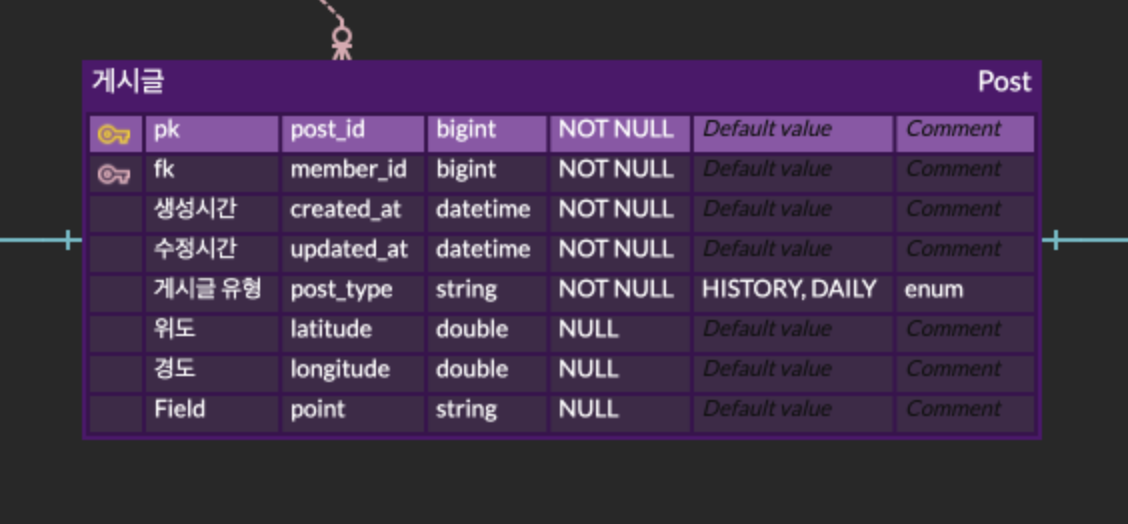
처음에는 Jpa를 사용해서 아래와 같은 방식으로 구현했다. 
하지만 현재 프론트의 상황이 안그래도 지도 렌더링이 굉장히 느렸기 때문에, 지도에 게시글 핀을 찍을 때는 게시글의 데이터를 전부 보내지 않고 최소한의 데이터만 보내도록 수정하고 싶었다.
그래서 게시글 유형, 위도, 경도, 게시글 ID 필드만 가지는 DTO를 만들고, 쿼리도 "Select * From ~"이 아니라 특정필드만 조회하여 가져오도록 수정하기로 했다.
하지만 여지껏은 하나의 엔티티를 전부 조회하는 방식으로 코드를 짜왔기 때문에 약간 시간이 걸렸다.
List<Post> posts = postRepository.findPostByDistance(stringPoint, distance);원래라면 위 코드처럼 JpaRepository interface를 상속한 repository를 만들어서 구현했지만 이번에는 쿼리의 결과를 특정 필드만 있는 DTO에 매핑해줘야 했다.
찾아보니 JPQL을 사용해서 대충 아래처럼 할 수도 있는 거 같았다.
@Query(value = "SELECT new com.dto.way.post.web.dto.postDto.PostResponseDto.GetPinResultDto(p.id,  p.latitude, p.longitude,p.postType) FROM Post p " +
            "WHERE ST_Contains(ST_MakeEnvelope(:x1, :y1, :x2, :y2, 4326), p.point) = true",nativeQuery = true)
    List<PostResponseDto.GetPinResultDto> findPinByRange(@Param("x1") Double left_x,
                                                         @Param("y1") Double left_y,
                                                         @Param("x2") Double right_x,
                                                         @Param("y2") Double right_y);
하지만 우리는 PostGIS의 메서드도 함께 써야해서 nativeQuery를 써야했고 위 방법의 경우 Select문의 조건절이 JPQL을 사용하는 방법이기 때문에 사용할 수 없었다.
해결
그래서 서비스단에서 직접 쿼리를 짜서 날리고, 그 결과를 DTO의 필드에 직접 매핑해주는 과정을 거쳤다.
@Override
    public PostResponseDto.GetPinListResultDto getPinListByRange(Double longitude1, Double latitude1, Double longitude2, Double latitude2) {

        String sql = "SELECT p.post_id,  p.latitude, p.longitude, p.post_type FROM post p WHERE ST_Contains(ST_MakeEnvelope(:x1, :y1, :x2, :y2, 4326), p.point) = true";
        Query query = entityManager.createNativeQuery(sql);
        query.setParameter("x1", longitude1);
        query.setParameter("y1", latitude1);
        query.setParameter("x2", longitude2);
        query.setParameter("y2", latitude2);

        List<Object[]> rawResultList = query.getResultList();
        List<PostResponseDto.GetPinResultDto> dtoList = rawResultList.stream()
                .map(result -> {
                    PostResponseDto.GetPinResultDto dto = new PostResponseDto.GetPinResultDto();
                    dto.setPostId((Long) result[0]);
                    dto.setLatitude((Double) result[1]);
                    dto.setLongitude((Double) result[2]);
                    dto.setPostType(Enum.valueOf(PostType.class,(String) result[3]));
                    return dto;
                })
                .collect(Collectors.toList());

        PostResponseDto.GetPinListResultDto result = new PostResponseDto.GetPinListResultDto(dtoList);
        return result;
    }
query.getResult()의 결과가 List<Object[]>라서 stream을 사용해서 DTO로 매핑해주는 과정을 구현하였다.
결론
사실 여지껏 스프링부트로 프로젝트를 진행하면서, JPA가 간편하고 쉬워서 그것만 사용해왔기 때문에 이번에 생긴 이슈를 해결하는데 꽤나 시간이 걸렸다.
그래도 이 방법을 이제 알았으니, API 설계를 할 때 더 선택의 폭이 넓어졌고, 성능부분에서 약간의 이득을 더 챙길 수 있게 된 거 같다.