4*4 키패드 모듈
아두이노 모듈로 4*4 키패드 모듈이 있다.
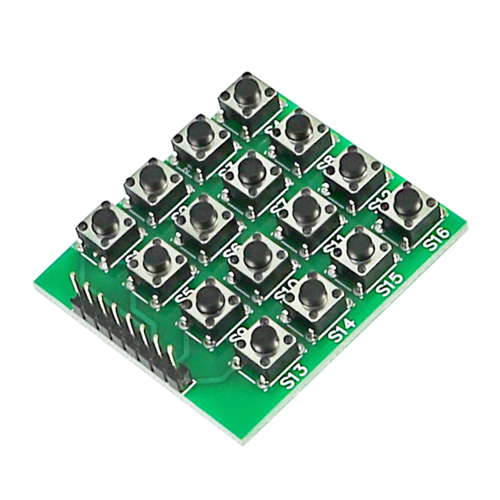
아두이노에서는 keypad 라이브러리를 사용해서 손쉽게 사용할 수 있지만
Aurix는 지원하지않아 새롭게 구현해야한다.
LED 글을 통해 공부했던 GPIO를 통해 구현해보겠다.
모듈 소개
핀이 8개있다.
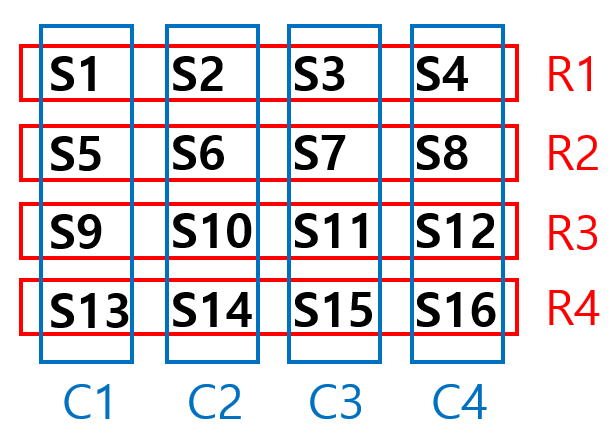
C1 ~ C4, R1 ~ R4
핀 세팅
Aurix에 핀을 연결하기 위해 GPIO 핀을 지원하는 port중
33번 포트를 사용하였다.
P33_0 ~ P33_3 은 R1 ~ R4
P33_4 ~ P33_7 은 C1 ~ C4
연결하였다.
스위치 상태 읽어오는 과정
- 먼저 R 과 연결된 핀들은 인풋모드로 pullup저항에 연결한다.
기본적으로 스위치가 눌리지 않은 상태에서는 Vcc와 연결되어 HIGH 전압을 읽고 GND 와 연결시 LOW 전압을 읽게 된다. - C와 연결된 핀들은 아웃풋모드로 pushpull 모드로 전환한다.
- 아웃풋모드는 P33_4 ~ P33_7 을 하나씩 GND로 연결한다.
- GND로 연결되었을때 LOW 전압을 읽은 핀을 찾는다. 그 핀이 스위치가 눌린 곳이다.
코드
초기화
void keypad_init(void)
{
    IfxPort_setPinModeInput(&MODULE_P33, IfxPort_P33_0.pinIndex, IfxPort_InputMode_pullUp);
    IfxPort_setPinModeInput(&MODULE_P33, IfxPort_P33_1.pinIndex, IfxPort_InputMode_pullUp);
    IfxPort_setPinModeInput(&MODULE_P33, IfxPort_P33_2.pinIndex, IfxPort_InputMode_pullUp);
    IfxPort_setPinModeInput(&MODULE_P33, IfxPort_P33_3.pinIndex, IfxPort_InputMode_pullUp);

    IfxPort_setPinModeOutput(&MODULE_P33, IfxPort_P33_4.pinIndex, IfxPort_OutputMode_pushPull, IfxPort_OutputIdx_general);
    IfxPort_setPinModeOutput(&MODULE_P33, IfxPort_P33_5.pinIndex, IfxPort_OutputMode_pushPull, IfxPort_OutputIdx_general);
    IfxPort_setPinModeOutput(&MODULE_P33, IfxPort_P33_6.pinIndex, IfxPort_OutputMode_pushPull, IfxPort_OutputIdx_general);
    IfxPort_setPinModeOutput(&MODULE_P33, IfxPort_P33_7.pinIndex, IfxPort_OutputMode_pushPull, IfxPort_OutputIdx_general);
}
P33_0 ~3 은 인풋 모드이며 pullUp 저항에 연결
P33_4 ~7 은 아웃풋 모드로 초기화를 하였다.
스위치 값 읽기
int keypad_read(void)
{
    pressedkey = 0;

    for(int col_num = 0; col_num<4; col_num++)
    {
        IfxPort_setPinLow(&MODULE_P33,colPins[col_num]);

        for(int row_num = 0; row_num<4; row_num++)
        {
            if(!IfxPort_getPinState(&MODULE_P33,rowPins[row_num]))
            {
                pressedkey = keys[row_num][col_num];
            }
        }

        IfxPort_setPinHigh(&MODULE_P33,colPins[col_num]);

        if(pressedkey != 0)
        {
            break;
        }
    }
    return pressedkey;

}
IfxPort_setPinLow() 를 통해 C와 연결된 핀들을 하나씩 GND에 연결한다.
그다음 IfxPort_getPinState() 함수를 통해 row 핀들 중 low값을 읽은 핀을 찾는다.
IfxPort_getPinState() 이 true 면 HIGH false 면 low 이고
눌린 핀의 번호를 pressedkey 변수에 넣는다.
IfxPort_setPinHigh() 를 통해 원상 복구 시킨다.
pressedkey가 업데이트되면 for문을 빠져나와 return 한다.
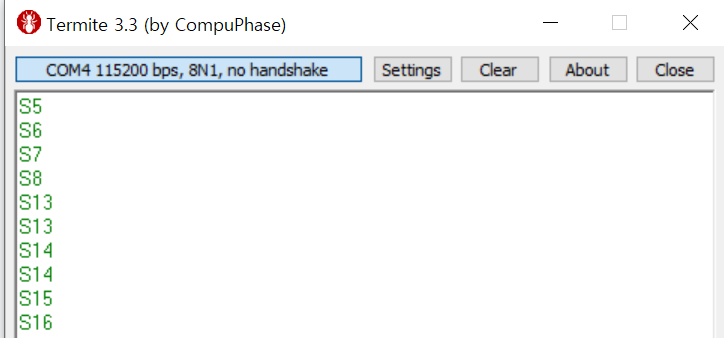
확인
Full code
https://github.com/ysrhee6199/aurix-tc275-study/blob/main/Keypad/keypad.c
문제
P33_0 과 P33_2 에 연결된 스위치는 작동을 하지않는다.
원인은 파악중..

공부한거 정리, 잘못된 정보 태클은 언제나 환영입니다.