
💜 Key Point
axios, cheerio
💜 Today I Learned
오늘부터 최종 프로젝트가 시작되었다.
우리 조는 대략 주제가 정해져있었기에 빠르게 와이어프레임과 erd, 유저플로우를 대략적으로 작성하였다.
ㅤ
기술부분에서 우리의 가장 중요한 스택은 크롤링이기 때문에 한 번 axios를 이용하여 사용해보기로 했다.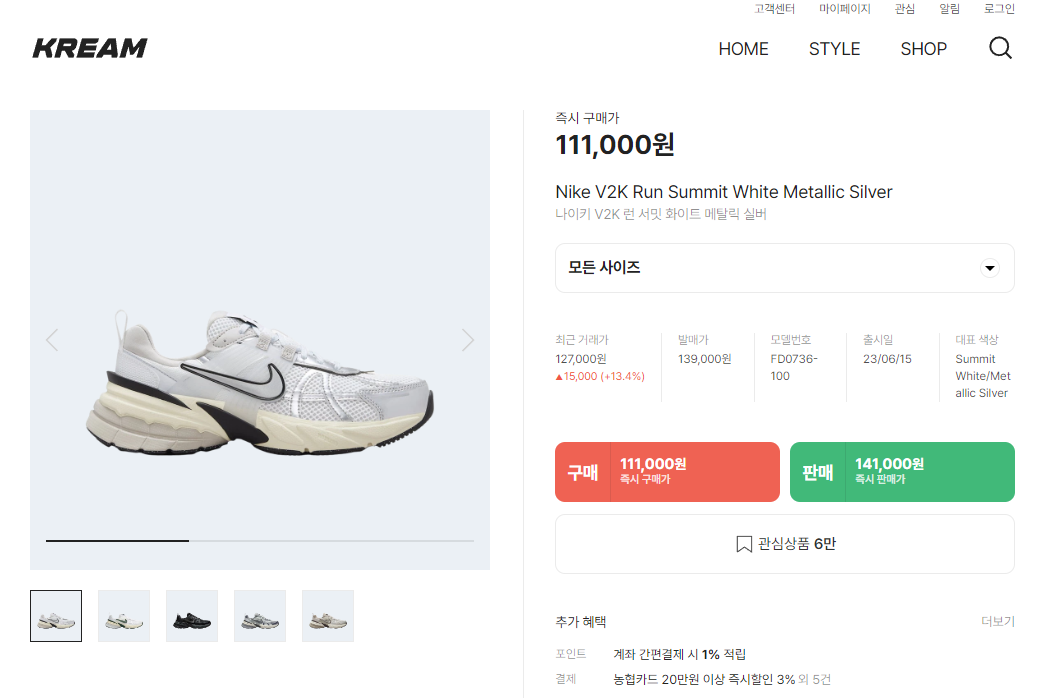 이 웹 사이트에서 제품의 영어이름, 한글이름을 가져오는 코드를 작성했다.
-
코드
async scrapeData(): Promise<void> {
    // 크롤링할 웹 페이지의 URL
    const url = 'https://kream.co.kr/products/137241';

    // Axios를 사용하여 HTML을 가져오기
    const response = await axios.get(url);
    const html = response.data;

    // Cheerio를 사용하여 HTML 파싱
    const $ = cheerio.load(html);

    // Cheerio를 사용하여 원하는 요소를 선택하여 데이터 추출
    const productName = $('.main-title-container')
      .each((_, product) => {
        const $product = $(product);
        const titleEn = $product.find('p.title').text();
        const titleKr = $product.find('p.sub-title').text();

        console.log(titleEn);
        console.log(titleKr);
      })
      .text();
  }
실행을 하게 되면 콘솔창에 titleEn, titleKr의 값이 뜨는 것을 확인할 수 있었다.
- 실행결과

ㅤ
오늘 크롤링의 기초를 핥아본 느낌이었는데 내일은 우리 프로젝트의 필요한 정보가 무엇인지에 대해 자세히 생각해봐야겠다.