들어가며
스터디에서 Kubernetes 오퍼레이터를 공부하다 보니, 가장 기본적인 형태라도 직접 만들어보고 싶다는 생각이 들었습니다.
그래서 이번 글에서는 Kubebuilder를 사용해 Deployment가 생성될 때 자동으로 Prometheus 알림 규칙을 생성하는 Kubernetes 오퍼레이터를 구현한 과정을 정리해보았습니다.
오퍼레이터 시퀀스
- Deployment가 생성되면 컨트롤러가 이를 감지합니다.
- 감지된 Deployment에 맞는 AlertRule을 생성합니다.
- AlertRule 변경을 기반으로 PrometheusRule을 생성합니다.
- Prometheus Operator가 해당 규칙을 로드해 알림을 활성화합니다.
1. 프로젝트 초기화
Kubebuilder 설치
Kubebuilder는 Kubernetes 오퍼레이터를 쉽게 개발할 수 있게 해주는 프레임워크입니다.
brew install kubebuilder프로젝트 초기화
kubebuilder init --domain example.com --repo github.com/Kim-Yukyung/k8s-alert-rule-operator이 명령어는 다음과 같은 기본 구조를 생성합니다.
k8s-alert-rule-operator/
├── cmd/
│   └── main.go             # 오퍼레이터 진입점
├── api/                    # CRD 정의
├── config/                 # Kubernetes 매니페스트
│   ├── crd/                # CRD 정의
│   ├── rbac/               # RBAC 권한
│   ├── manager/            # Manager 배포
│   └── default/            # 기본 설정
├── internal/
│   └── controller/         # 컨트롤러 로직
├── Makefile                # 빌드 스크립트
└── PROJECT                 # 프로젝트 메타데이터
🔎 생성된 주요 파일 설명
cmd/main.go
오퍼레이터의 시작점입니다. Controller Manager를 초기화하고 실행합니다.
mgr, err := ctrl.NewManager(ctrl.GetConfigOrDie(), ctrl.Options{
    Scheme:                 scheme,
    Metrics:                metricsServerOptions,
    WebhookServer:          webhookServer,
    HealthProbeBindAddress: probeAddr,
    LeaderElection:         enableLeaderElection,
    LeaderElectionID:       "a4f6a106.example.com",
})
config/ 디렉토리 구조
config/crd/: Custom Resource Definition 정의config/rbac/: RBAC 설정 (ServiceAccount, Role, RoleBinding)config/manager/: Controller Manager 배포 설정config/default/: 기본 Kustomize 패치 및 통합 설정
2. AlertRule CRD 생성
API 생성
Kubebuilder로 API를 생성하면 AlertRule에 필요한 기본 골격이 자동으로 만들어집니다.
kubebuilder create api --group monitoring --version v1 --kind AlertRule --resource --controller--group monitoring # API 그룹 이름 (monitoring.example.com)
--version v1 # API 버전
--kind AlertRule # 생성할 Kubernetes 리소스 종류 (CRD 이름)
--resource # CRD(리소스 타입) 관련 파일생성
--controller # 컨트롤러 코드 생성AlertRule 타입 정의
api/v1/alertrule_types.go 파일을 수정하여 알림 규칙에 필요한 필드를 정의합니다.
type AlertRuleSpec struct {
    // 필수 필드
    Alert string `json:"alert"`        // 알림 이름
    Expr  string `json:"expr"`         // PromQL 표현식

    // 선택 필드
    Severity     string            `json:"severity,omitempty"`      // critical, warning, info
    For          string            `json:"for,omitempty"`           // 알림 지속 시간
    Labels       map[string]string `json:"labels,omitempty"`        // 알림 레이블
    Annotations  map[string]string `json:"annotations,omitempty"`   // 알림 주석
    DeploymentRef *DeploymentReference `json:"deploymentRef,omitempty"` // Deployment 참조
}

type DeploymentReference struct {
    Namespace string `json:"namespace"`
    Name      string `json:"name"`
}
CRD 자동 생성
타입 정의를 수정한 후 다음 명령어로 CRD를 생성합니다.
make manifests이 명령어는 controller-gen을 사용해 Go 타입을 분석하고 Kubebuilder 마커를 반영해 최종 CRD YAML을 자동으로 생성합니다.
-> config/crd/bases/monitoring.example.com_alertrules.yaml
3. Deployment 컨트롤러 구현
컨트롤러 생성
Deployment를 감시하고 AlertRule을 자동 생성하는 컨트롤러를 만듭니다.
internal/controller/deployment_controller.go 핵심 로직
func (r *DeploymentReconciler) Reconcile(ctx context.Context, req ctrl.Request) (ctrl.Result, error) {
    // 1. Deployment 가져오기
    deployment := &appsv1.Deployment{}
    if err := r.Get(ctx, req.NamespacedName, deployment); err != nil {
        if apierrors.IsNotFound(err) {
            return r.deleteAlertRuleForDeployment(ctx, req.Namespace, req.Name)
        }
        return ctrl.Result{}, err
    }

    // 2. AlertRule 이름 생성: {deployment-name}-alert
    alertRuleName := fmt.Sprintf("%s-alert", deployment.Name)

    // 3. 기존 AlertRule 확인
    alertRule := &monitoringv1.AlertRule{}
    err := r.Get(ctx, client.ObjectKey{Namespace: req.Namespace, Name: alertRuleName}, alertRule)

    if apierrors.IsNotFound(err) {
        // 4. AlertRule이 없으면 생성
        newAlertRule := r.createDefaultAlertRule(deployment, alertRuleName)
        return ctrl.Result{}, r.Create(ctx, newAlertRule)
    }

    return ctrl.Result{}, nil
}
기본 AlertRule 생성
func (r *DeploymentReconciler) createDefaultAlertRule(deployment *appsv1.Deployment, name string) *monitoringv1.AlertRule {
    alertRule := &monitoringv1.AlertRule{
        ObjectMeta: metav1.ObjectMeta{
            Name:      name,
            Namespace: deployment.Namespace,
            OwnerReferences: []metav1.OwnerReference{
                {
                    APIVersion: deployment.APIVersion,
                    Kind:       deployment.Kind,
                    Name:       deployment.Name,
                    UID:        deployment.UID,
                    Controller: func() *bool { b := true; return &b }(), // Garbage Collection
                },
            },
        },
        Spec: monitoringv1.AlertRuleSpec{
            Alert:    fmt.Sprintf("%sPodDown", deployment.Name),
            Expr:     fmt.Sprintf("kube_deployment_status_replicas_available{deployment=\"%s\", namespace=\"%s\"} == 0",
                                 deployment.Name, deployment.Namespace),
            For:      "1m",
            Severity: "critical",
            Labels: map[string]string{
                "deployment": deployment.Name,
                "namespace":  deployment.Namespace,
            },
            Annotations: map[string]string{
                "summary":     fmt.Sprintf("Pod %s is down", deployment.Name),
                "description": fmt.Sprintf("Pod %s in namespace %s has been down", deployment.Name, deployment.Namespace),
            },
            DeploymentRef: &monitoringv1.DeploymentReference{
                Namespace: deployment.Namespace,
                Name:      deployment.Name,
            },
        },
    }

    // OwnerReference 설정
    ctrl.SetControllerReference(deployment, alertRule, r.Scheme)
    return alertRule
}
컨트롤러 등록
cmd/main.go에 컨트롤러를 등록합니다.
if err := (&controller.DeploymentReconciler{
    Client: mgr.GetClient(),
    Scheme: mgr.GetScheme(),
}).SetupWithManager(mgr); err != nil {
    setupLog.Error(err, "unable to create controller", "controller", "Deployment")
    os.Exit(1)
}
4. AlertRule → PrometheusRule 변환
PrometheusRule 생성 로직
AlertRule이 생성되면 PrometheusRule로 변환해야 합니다. PrometheusRule은 외부 CRD이므로 unstructured.Unstructured를 사용합니다.
internal/controller/alertrule_controller.go 핵심 로직
func (r *AlertRuleReconciler) Reconcile(ctx context.Context, req ctrl.Request) (ctrl.Result, error) {
    // 1. AlertRule 가져오기
    alertRule := &monitoringv1.AlertRule{}
    if err := r.Get(ctx, req.NamespacedName, alertRule); err != nil {
        if apierrors.IsNotFound(err) {
            return r.deletePrometheusRule(ctx, req.Namespace, req.Name)
        }
        return ctrl.Result{}, err
    }

    // 2. PrometheusRule 생성/업데이트
    if err := r.reconcilePrometheusRule(ctx, alertRule); err != nil {
        if strings.Contains(err.Error(), "no matches for kind") {
            logger.Info("PrometheusRule CRD not available, skipping")
        } else {
            return ctrl.Result{}, err
        }
    }

    // 3. Status 업데이트
    return ctrl.Result{}, r.updateStatus(ctx, alertRule)
}
PrometheusRule 생성
func (r *AlertRuleReconciler) createPrometheusRule(alertRule *monitoringv1.AlertRule) *unstructured.Unstructured {
    prometheusRule := &unstructured.Unstructured{}
    prometheusRule.SetGroupVersionKind(schema.GroupVersionKind{
        Group:   "monitoring.coreos.com",
        Version: "v1",
        Kind:    "PrometheusRule",
    })
    prometheusRule.SetName(alertRule.Name)
    prometheusRule.SetNamespace(alertRule.Namespace)

    labels := map[string]string{
        "managed-by": "alert-rule-operator",
        "release":    "monitoring", // Prometheus Operator 선택을 위해 필수!
    }
    prometheusRule.SetLabels(labels)

    // OwnerReference 설정
    ownerRef := metav1.OwnerReference{
        APIVersion: alertRule.APIVersion,
        Kind:       alertRule.Kind,
        Name:       alertRule.Name,
        UID:        alertRule.UID,
        Controller: func() *bool { b := true; return &b }(),
    }
    prometheusRule.SetOwnerReferences([]metav1.OwnerReference{ownerRef})

    // PrometheusRule spec 구성
    groups := []interface{}{
        map[string]interface{}{
            "name": fmt.Sprintf("%s-group", alertRule.Name), // 유니크한 그룹 이름
            "rules": []interface{}{r.buildPrometheusRule(alertRule)},
        },
    }

    spec := map[string]interface{}{
        "groups": groups,
    }
    unstructured.SetNestedMap(prometheusRule.Object, spec, "spec")

    return prometheusRule
}
5. 빌드 및 배포
Docker 이미지 빌드 및 배포
# 이미지 빌드
make docker-build IMG=controller:latest

# 배포
make deploy IMG=controller:latest
6. 테스트
Deployment 생성
kubectl create deployment test-app --image=nginx:latest자동 생성 확인
# AlertRule 확인
kubectl get alertrules.monitoring.example.com -A

# PrometheusRule 확인
kubectl get prometheusrules -A | grep test-app
Prometheus UI에서 확인
# Port forwarding
kubectl port-forward -n default svc/monitoring-kube-prometheus-prometheus 9090:9090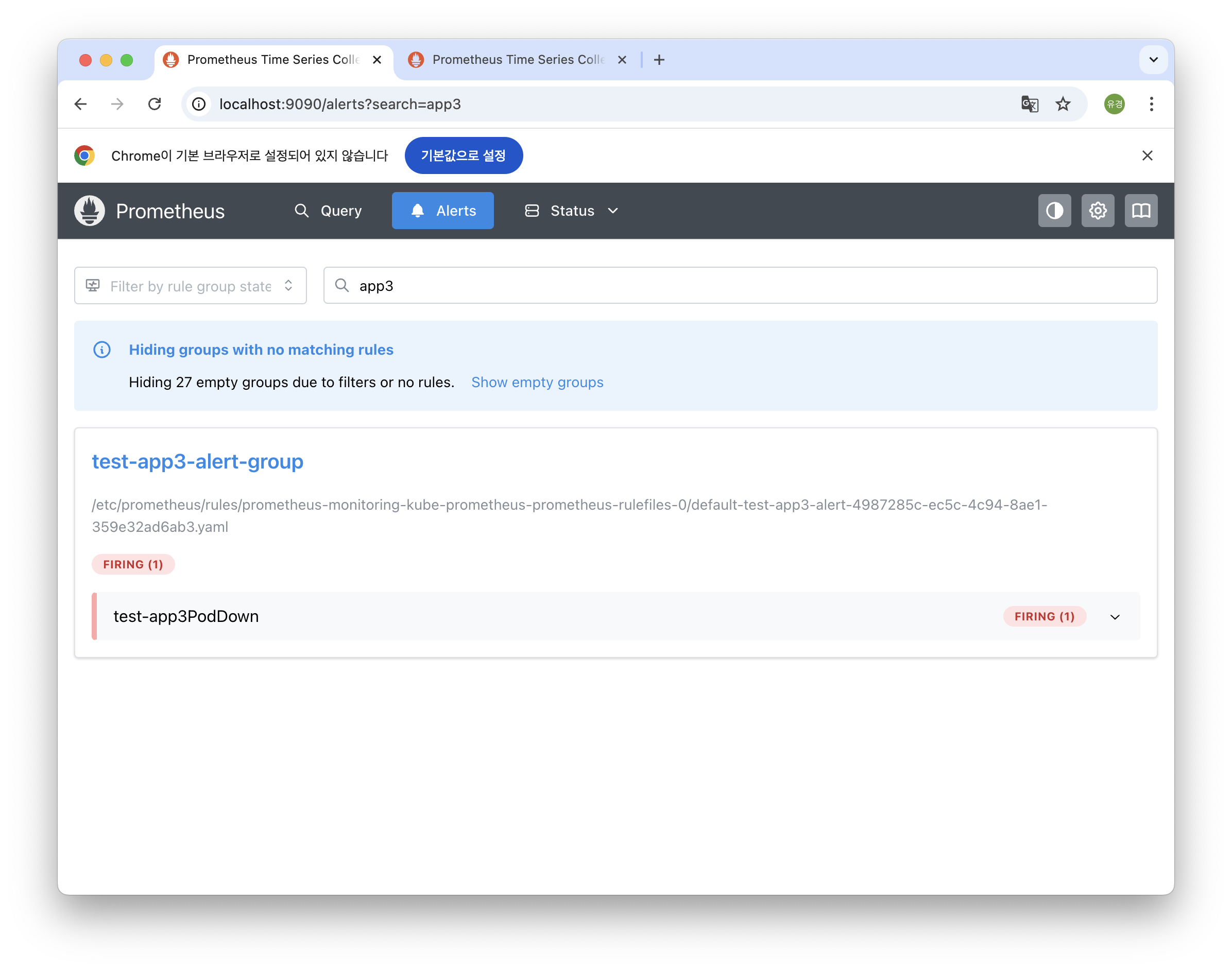
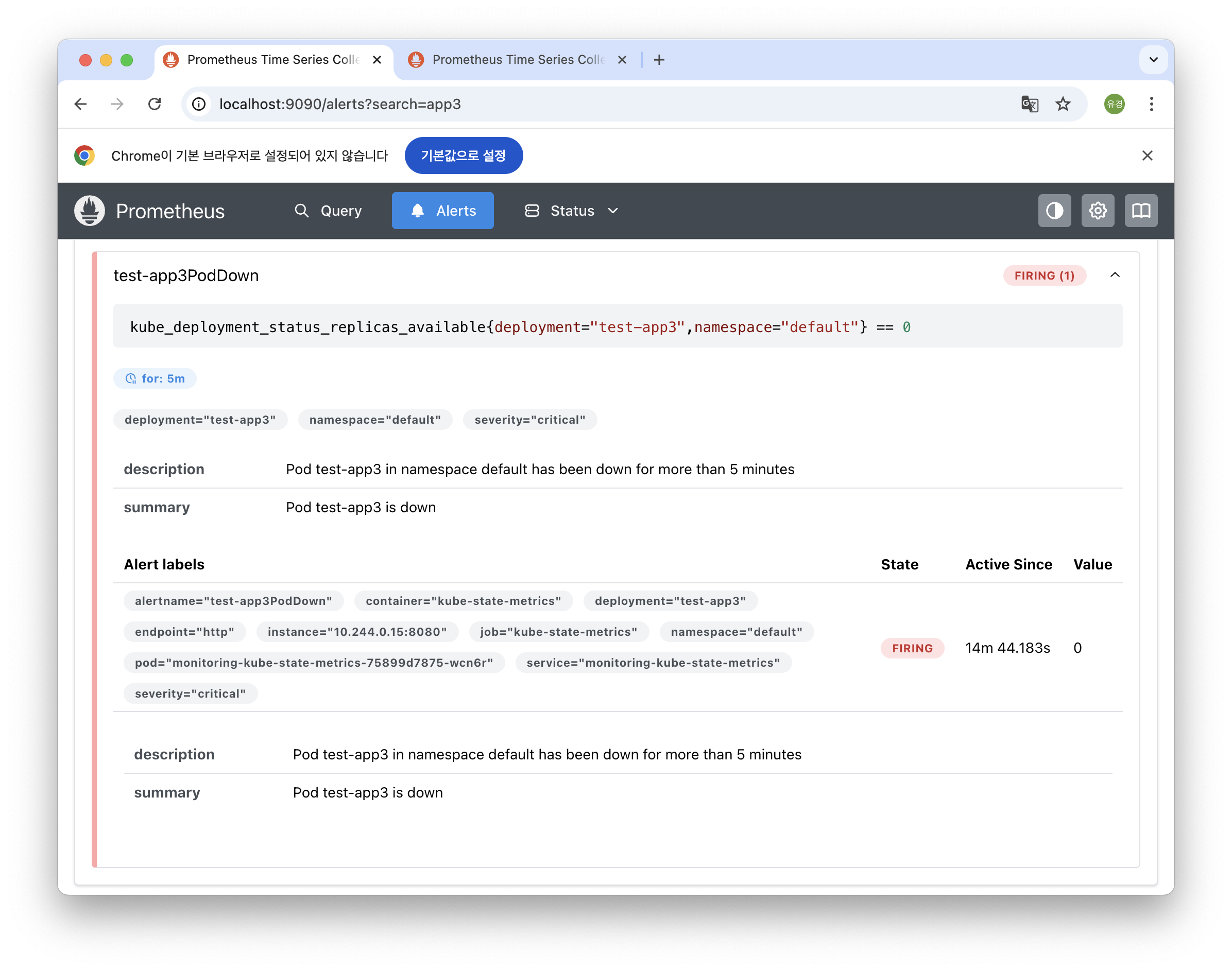
핵심 개념
OwnerReference
Kubernetes에서는 리소스 간 소유 관계를 설정해 두면, 부모 리소스가 삭제될 때 자식 리소스도 자동으로 삭제됩니다. 오퍼레이터가 생성하는 리소스를 계층 구조로 안전하게 관리할 수 있게 해줍니다.
OwnerReferences: []metav1.OwnerReference{
    {
        Controller: func() *bool { b := true; return &b }(),
    },
}
Reconcile 패턴
오퍼레이터는 Reconcile 함수를 통해 클러스터의 실제 상태를 읽고, 의도한 상태에 맞게 조정합니다. 리소스 생성, 수정, 삭제 이벤트마다 호출되며, 컨트롤러의 모든 로직이 이 함수 안에서 실행됩니다.
func (r *Reconciler) Reconcile(ctx context.Context, req ctrl.Request) (ctrl.Result, error) {
    // Desired State와 Actual State를 비교하여 조정
}
Unstructured Client
PrometheusRule처럼 프로젝트가 정의하지 않은 CRD는 고정된 Go 타입이 없습니다. 이때 unstructured.Unstructured를 사용하면 Group/Version/Kind만 지정해 어떤 리소스든 동적으로 생성하거나 수정할 수 있습니다.
prometheusRule := &unstructured.Unstructured{}
prometheusRule.SetGroupVersionKind(schema.GroupVersionKind{...})
RBAC 마커
컨트롤러가 Deployment나 PrometheusRule 같은 리소스에 접근하려면 특정 권한이 필요합니다. Kubebuilder는 주석만 추가하면 필요한 RBAC Role YAML을 자동으로 생성해 줍니다.
// +kubebuilder:rbac:groups=apps,resources=deployments,verbs=get;list;watch
// +kubebuilder:rbac:groups=monitoring.coreos.com,resources=prometheusrules,verbs=create
마지막으로
짧은 시간에 오퍼레이터를 만들어보면서 쿠버네티스가 어떻게 동작하고, 내부 리소스들이 어떤 방식으로 연결되고 관리되는지 더 깊이 이해할 수 있었습니다. 아직 배워야 할 부분도 많지만, 쿠버네티스의 확장성이 확실히 느껴지는 경험이었습니다.
전체 코드
🔗 https://github.com/Kim-Yukyung/k8s-alert-rule-operator.git