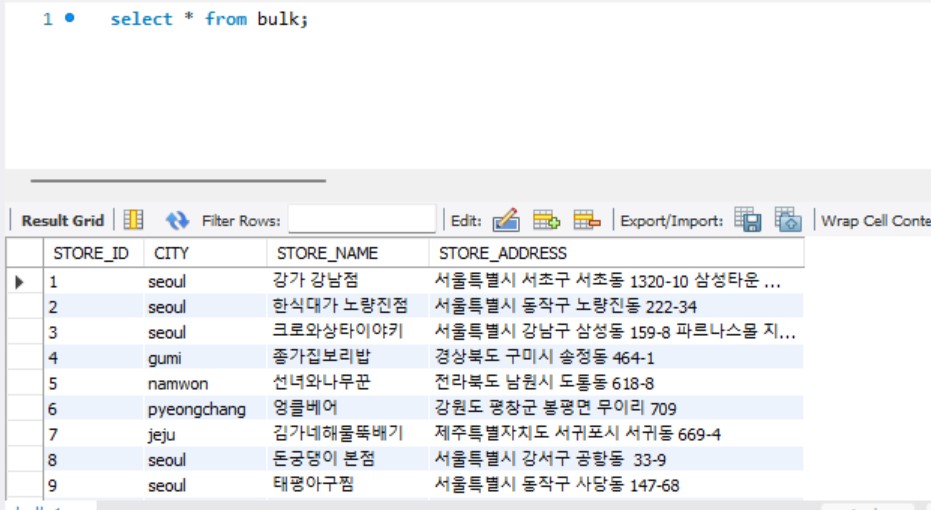
Mysql에 csv파일을 넣으려고 했는데 오류가 났다
처음에 workbench만 다운을 받아서, Mysql설정파일(my.ini)이 없었다.
그래서 MysqlServer를 다운받아, port를 3308로 해서 새로 하나 만들어주었다.
port 3308에 데이터를 load할 예정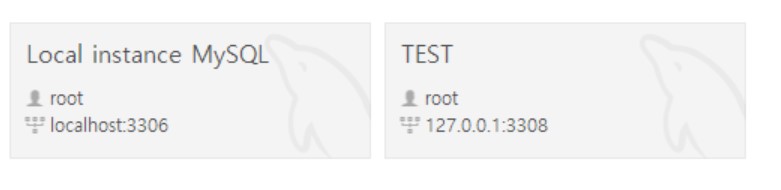
use test;
LOAD DATA INFILE "C:\Users\yunaj\Crawling3\output\output.csv"
INTO TABLE bulk
FIELDS terminated by ','
ENCLOSED BY '"'
LINES TERMINATED BY '\r\n'
IGNORE 1 ROWS;
아래서부는 에러->fix..의 무한루프과정
1. Error Code: 1290. The MySQL server is running with the --secure-file-priv
option so it cannot execute this statement
secure_file_priv에 특정 경로가 설정되어 있음을 확인할 수 있다. 이 경로에 있는 파일들만 데이터를 업로드할 수 있다. 따라서 특정경로 -> "" 해 주면은 어디서든? 업로드 해 줄 수 있겠음 해줬다. mysql의 설정 파일은 윈도우의 경우 my.ini 명칭으로 존재, 리눅스의 my.conf 파일
# secure_file_priv에 위치를 볼 수 있다
SHOW VARIABLES LIKE "secure_file_priv";
특정 경로에 있는 업로드 위치를
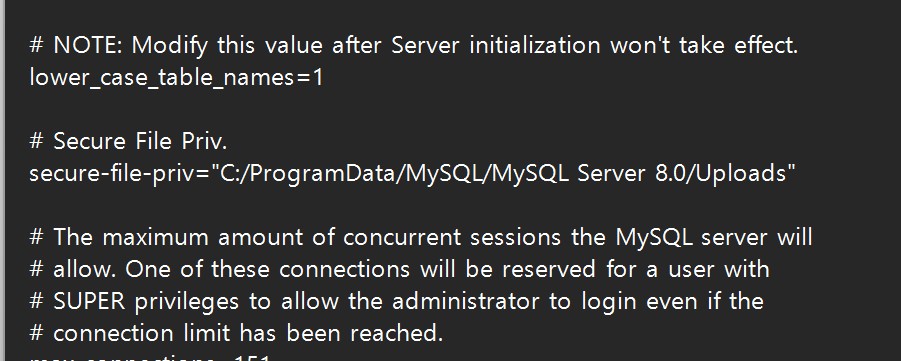
아무 경로에서나 업로드 할 수 있도록 변경
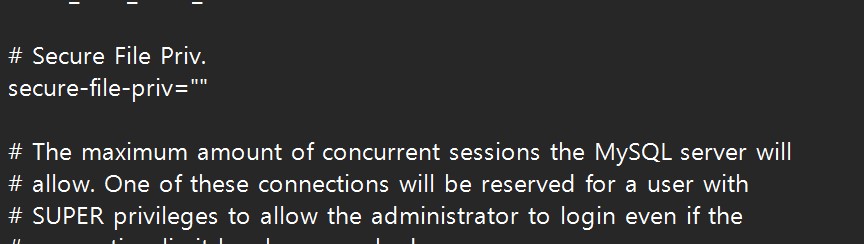
2번째 Error
2.Error Code: 29. File 'C:\ProgramData\MySQL\MySQL Server 8.0\Data\UsersyunajCrawling3outputoutput.csv' not found (OS errno 2 - No such file or directory)역슬래쉬로 (/) 바꿔줌
LOAD DATA INFILE 'C:/Users/yunaj/Crawling3/output/output.csv'
INTO TABLE bulk
FIELDS terminated by ','
ENCLOSED BY '"'
LINES TERMINATED BY '\r\n'
IGNORE 1 ROWS;
3번째 Error
3.Error Code: 29. File 'C:\Users\yunaj\Crawling3\output\output.csv' not found (OS errno 13 - Permission denied)
permission denied 라해서 권한 문제같애서 아래 블로그보고 Mysql 폴더에 권한을 root와 똑같이 주었다. 그래도 똑같은 에러 발생..
LOAD DATA INFILE에 LOCAL를 붙여봄
LOAD DATA LOCAL INFILE 'C:/Users/yunaj/Crawling3/output/output.csv'
INTO TABLE bulk
FIELDS terminated by ','
ENCLOSED BY '"'
LINES TERMINATED BY '\r\n'
IGNORE 1 ROWS;
4번째 error
Error Code: 3948. Loading local data is disabled; this must be enabled on both the client and server sides 0.000 secC:\Users\yunaj>mysql -h 127.0.0.1 -P 3308 -u root -p
mysql> SHOW VARIABLES LIKE 'local_inflie';
Empty set, 1 warning (0.00 sec)
mysql> SHOW GLOBAL VARIABLES LIKE 'local_infile';
+---------------+-------+
| Variable_name | Value |
+---------------+-------+
| local_infile | OFF |
+---------------+-------+
1 row in set, 1 warning (0.00 sec)
## off를 on으로 바꾸쟈
mysql> set global local_infile=true;
Query OK, 0 rows affected (0.00 sec)
mysql> SHOW GLOBAL VARIABLES LIKE 'local_infile';
+---------------+-------+
| Variable_name | Value |
+---------------+-------+
| local_infile | ON |
+---------------+-------+
1 row in set, 1 warning (0.00 sec)
5번쨰 error
Error Code: 2068. LOAD DATA LOCAL INFILE file request rejected due to restrictions on access.C:\Users\yunaj>mysql --local_infile -h 127.0.0.1 -P 3308 -u root -p test
Enter password: ****
Welcome to the MySQL monitor. Commands end with ; or \g.
Your MySQL connection id is 17
Server version: 8.0.30 MySQL Community Server - GPL
Copyright (c) 2000, 2022, Oracle and/or its affiliates.
Oracle is a registered trademark of Oracle Corporation and/or its
affiliates. Other names may be trademarks of their respective
owners.
Type 'help;' or '\h' for help. Type '\c' to clear the current input statement.
mysql> show databases;
+--------------------+
| Database |
+--------------------+
| information_schema |
| mysql |
| performance_schema |
| sys |
| test |
+--------------------+
5 rows in set (0.00 sec)
mysql> use test
Database changed
mysql> LOAD DATA LOCAL INFILE 'C:/Users/yunaj/Crawling3/output/output.csv'
-> INTO TABLE bulk
-> FIELDS terminated by ','
-> ENCLOSED BY '"'
-> LINES TERMINATED BY '\r\n'
-> IGNORE 1 ROWS;
Query OK, 99 rows affected, 1 warning (0.03 sec)
Records: 100 Deleted: 0 Skipped: 1 Warnings: 1