math.js

function add(a,b){
  return a + b;
}

main.js
// require함수는 모듈을 로드해서 객체 1개를 리턴
let m = require("./math.js");


// 하나의 모듈에서 다른 모듈을 사용하기
console.log(m.add(1,2));
// 에러남
console.log(m.add(1,2));
TypeError: m.add is not a function
at Object.<anonymous> (C:\NodeJs\기본개념\main.js:7:15)
at Module._compile (node:internal/modules/cjs/loader:1105:14)
at Object.Module._extensions..js (node:internal/modules/cjs/loader:1159:10)
at Module.load (node:internal/modules/cjs/loader:981:32)
at Function.Module._load (node:internal/modules/cjs/loader:822:12)
at Function.executeUserEntryPoint [as runMain] (node:internal/modules/run_main:77:12)
at node:internal/main/run_main_module:17:47How to fix it?!
=> 모듈 내부의 것들을 외부로 공개해야 한다.
 math.js
function add(a,b){
  return a + b;
}

** 오른쪽은 모듈 내부에서의 이름, 왼쪽은 외부로 공개할 이름**
exports.add = add;


C:\NodeJs\기본개념>node main.js
3
// 외부로 보내는 함수 이름 다르게 해보기
math.js
function add(a,b){
return a + b;
}
exports.add_plus = add;
main.js
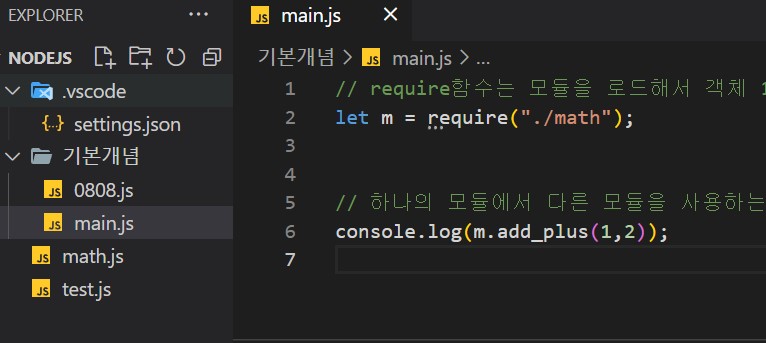
let m = require("./math.js");
console.log(m.add_plus(1,2));모듈 더 알아보기
1. 모듈의 확장자인 .js를 꼭 붙이지 않아도 된다
main.js
let m = require("./math");
console.log(m.add_plus(1,2));


C:\NodeJs\기본개념>node main.js
3
2. 모듈의 경로를 정확하게 작성해야 한다
Error: Cannot find module 'C:\NodeJs\기본개념\math.js'
    at Function.Module._resolveFilename (node:internal/modules/cjs/loader:933:15)
    at Function.Module._load (node:internal/modules/cjs/loader:778:27)
    at Function.executeUserEntryPoint [as runMain] (node:internal/modules/run_main:77:12)
    at node:internal/main/run_main_module:17:47 {
  code: 'MODULE_NOT_FOUND',
  requireStack: []
}
how to fix it?!
=> ./ 를 ../로바꾼당
let m = require("../math.js");

C:\NodeJs\기본개념>node main.js
3
3. require 함수가 리턴하는 객체는 변수보다 상수로 대입
let m = require("./math.js");

const m = require("./math.js");

왜냐하면은

모듈이 리턴한 객체를 변수로 받으면 다른 개발자가 변수 m에 다른 값을 실수로 다시 지정할 수 있다. 모듈이 리턴한 객체를 상수로 받으면, 상수 m에 새로운 값을 다시 지정하려는 코드 자체에서 에러가 발생하여 잘못된 코드를 미리 예방
4. 모듈 안의 모든 것들을 공개할 수 있다.
(변수, 객체, 함수까지 모든 것들을 공개할 수 있다)
math.js
function add(a,b){
  return a + b;
}

const PI = 3.14;
let person  = "연아";
let test = {
  date: '2022-08-09',
  subjects: ["math","eng"],
  printSubjects() {
exports.PI = PI;
exports.person = person;
exports.test = test;
      for(const i in this.subjects) {
        console.log(this.subjects[i]);
      }
   }
};
exports.math_func = add;
main.js
let m = require("./math.js");
console.log(m.math_func(1,2));
console.log(m.PI);
console.log(m.person);
console.log(m.test.date);
console.log(m.test.subjects);
m.test.printSubjects;
C:\NodeJs\기본개념>node main.js
3
3.14
연아
2022-08-09
[ 'math', 'eng' ]모듈 내부의 것을 외부에 공개하는 방법
-
하나씩 exports로
(공개하고 싶은 것들이 많으면 이 방법을 추천한다!)
exports.속성 = 값 -
공개하고 싶은 것들을 모아서 하나의 객체로 만들고
module.exports로 통쨰로 공개
module.exports = 객체
math2.js
exports.PI = 3.14;
exports.add = function add(a,b) {return a + b};
exports.subtract = function subtract(a,b) {return a - b};
exports.multiply = function multiply(a,b) {return a * b};
exports.divide = function divide(a,b) {return a / b};
main2.js
const m = require("./math2.js");

console.log(m.PI);

console.log(m.add(3,4));
console.log(m.subtract(5,4));
console.log(m.multiply(3,4));
console.log(m.divide(10,5));
이것을 한꺼번에 내보내는 것으로 바꾸면?!?!
let calculator = {
  PI : 3.14,
  add: (a,b) => a+b,
  subtract: (a,b) => a-b,
  multiply: (a,b) => a*b,
  divide: (a,b) => a/b,
}

module.exports = calculator;
외부로 내보낼때 하나씩?!?!

exports.내보내고 싶은것이름

모듈로 내보낼때?!

module.exports = 내보내고 싶은것이름