2023-12-08 (2일차) - 논리연산자, 조건문(if, else if, else)
📅 2023-12-08, 2일차
Review
-
산술연산자의 값은 숫자
-
논리연산자의 값은 참/거짓 True/False
-
연산자가 나오면 순서를 따져봐야함
-
연산자 우선순위에 의거해서, 대입연산자가 가장 마지막이다
논리연산자
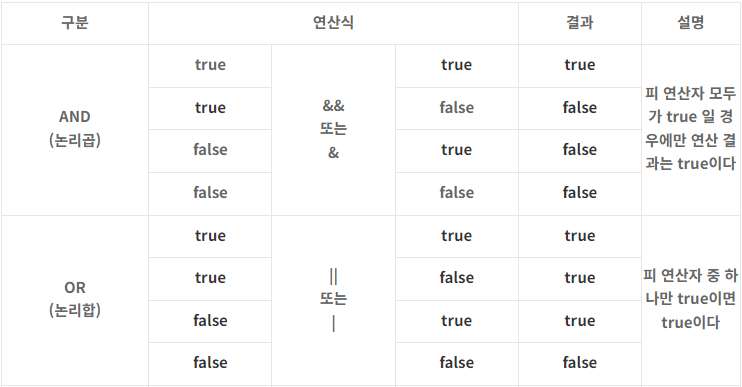
논리연산자 문제풀이
// 문제 : 실행되는 출력문에는 참 그렇지 않으면 거짓 이라고 적어주세요.

class Main {
  public static void main(String[] args) {
    if ( true ) {
      System.out.println("참");
    }

    if ( false ) {
      System.out.println("거짓");
    }

    int a = 10;

    // `==` => 같다.
    if ( a == 10 ) {
      System.out.println("참");
    }

    // `!=` => 같지 않다.
    if ( a != 10 ) {
      System.out.println("거짓");
    }

    if ( a > 10 ) {
      System.out.println("거짓");
    }

    if ( a >= 10 ) {
      System.out.println("참");
    }

    int b = 10;

    if ( a == b ) {
      System.out.println("참");
    }

    // boolean c => c 에는 오직 true/false 만 담을 수 있다.
    boolean c = a != b;

    if ( c ) {
      System.out.println("거짓");
    }

    if ( c == false ) {
      System.out.println("참");
    }

    // `!` => 반전
    if ( !c ) {
      System.out.println("참");
    }

    // `!` => 반전
    if ( !(!c) ) {
      System.out.println("거짓");
    }

    boolean d = true;

    if ( c != d ) {
      System.out.println("참");
    }
        //       T          AND  T   AND       F
        //  T    AND  T    AND    T         AND  FALSE
    if ( 20 > 2 && 10 > 3 && true != false && 10 != 10 ) {
			System.out.println("거짓");
		}
        //        F    OR   F
		if ( 10 != 10 || 10 < 2 ) {
			System.out.println("거짓");
		}
  }
}
자바참조형타입
- 기본타입이 아닌 모든 타입은 전부 참조형!
조건문
if
논리연산자
- && ->
and라는 뜻. 엔퍼센트
- 이 조건과 이 조건을 둘다 만족 시킬 수 있는 기호- || ->
or라는 뜻. 버티컬바
if(변수 > 조건){
System.out.println("(참일경우)출력해");
예시:
public class Main {
  public static void main(String[] args) {

    int age = 27;

    System.out.println("나이 : " + age);

    if(age > 19){
      System.out.println("성인입니다.");
    }
  }
}
else if
- 한덩어리로 묶어서 불필요한 연산 제거.
- else if를 하려면 우선 첫 번째 조건문은 if로 시작하기.
else (그 외)
- if는 첫 번째 조건에 시작하면
- else는 마지막 조건에 들어갈 수 있음.
- if 로 시작하고 그 뒤에 else if면 무조건 if부터 한덩어리.
조건문 문제풀이
class Main {
  public static void main(String[] args) {

    // 문제 : 할인 대상인지 아닌지 출력해주세요.
    // 조건 : 나이가 19세 이하이거나 60세 이상이면 할인 대상입니다.
    // 조건 : 출력예시 처럼 출력되어야 합니다.
    // 조건 : `구현시작` 부분만 수정 할 수 있습니다.
    // 조건 : 4가지 이상의 방법으로 풀어야 합니다.
    // 조건 : 그 중 2가지 방법은 `&&, ||`없이 풀어야 합니다.

    // 출력 => 할인대상입니다. 또는 할인 대상이 아닙니다.

    int age = 65;
    System.out.println("당신의 나이는 " + age + "살 입니다.");

    System.out.println("==ver1==");

    if (age <= 19 || age >= 60) {
      System.out.println("할인 대상입니다.");
    }
    if (age > 19 && age < 60) {
      System.out.println("할인 대상이 아닙니다.");
    }

    System.out.println("==ver2==");

    if (age <= 19 || age >= 60) {
      System.out.println("할인 대상입니다.");
    } else if (age > 19 && age < 60) {
      System.out.println("할인 대상이 아닙니다.");
    }

    System.out.println("==ver3==");

    if (age <= 19 || age >= 60) {
      System.out.println("할인 대상입니다.");
    } else {
      System.out.println("할인 대상이 아닙니다.");
    }

    System.out.println("==ver4==");

    if (age <= 19) {
      System.out.println("할인 대상입니다.");
    }
    if (age >= 60) {
      System.out.println("할인 대상입니다.");
    }
    if (age > 19) {
      if (age < 60) {
        System.out.println("할인 대상이 아닙니다.");
      }
    }

    System.out.println("==ver5==");

    if (age <= 19) {
      System.out.println("할인 대상입니다.");
    } else if (age >= 60) {
      System.out.println("할인 대상입니다.");
    } else if (age > 19) {
      if (age < 60) {
        System.out.println("할인 대상이 아닙니다.");
      }
    }

    System.out.println("==ver6==");

    if (age <= 19) {
      System.out.println("할인 대상입니다.");
    } else if (age >= 60) {
      System.out.println("할인 대상입니다.");
    } else if (age > 19) {
      System.out.println("할인 대상이 아닙니다.");
    }

    System.out.println("==ver7==");

    if (age <= 19) {
      System.out.println("할인 대상입니다.");
    } else if (age >= 60) {
      System.out.println("할인 대상입니다.");
    } else {
      System.out.println("할인 대상이 아닙니다.");
    }

    System.out.println("==ver8==");

    if (age <= 19) {
      System.out.println("할인 대상입니다.");
    } else {
      if (age >= 60) {
        System.out.println("할인 대상입니다.");
      } else {
        System.out.println("할인 대상이 아닙니다.");
      }
    }

  }

}
class Main {
  public static void main(String[] args) {

    int age = 25;
    double income = 55000;
    boolean hasCriminalRecord = false;

    if (age > 21 && (income > 50000 || income <= 0) && !hasCriminalRecord) {
      System.out.println("Eligible for special credit offer");
    } else {
      System.out.println("Not eligible for offer");
    }

  }
}

// 정답 : Eligible for special credit offer"
이클립스 단축키
-
ctrl + shift + f -> 자동 들여쓰기
-
ctrl + space -> 단축키
-
"main" ctrl + space ->main 메서드 자동완성
- public static void main(String[] args) {}
-
"sysou" ctrl + space ENTER -> 출력문 자동완성
- System.out.println()
-
F11 -> run ctrl + F11 (출력하고, 바로 에러도 띄움)
-
syntax error -> 문법에러
-
ctrl + alt 위아래 키 -> 복사붙여넣기
-
alt + 위아래 방향키 -> 줄 이동
-
ctrl + home/end키 -> 블록씌우기
-
ctrl + d -> 줄 삭제
-
ctrl + z -> 되돌리기
-
ctrl + y -> 앞으로 가기
-
alt + shift + a -> 다중편집모드
-
ctrl + shift + r -> 파일찾기 (Open Resource)
-
ctrl + L -> 원하는 줄로 찾아가기‘
-
ctrl + / -> 주석
-
ctrl + shift + c -> 주석
-
ctrl + shift + / -> 선택한 곳만 주석 (줄 주석이 아니라, 원하는 만큼만 주석 달기)
서식지정자
printf -> print format
printf("%c\n",10);
아스키코드
%d -> decimal 십진수
%c -> 캐릭터
%b -> binary 이진수
과제
프로그래머스 자바 입문 -> while문 전 까지

hello world