
( 참조: https://poiemaweb.com/js-rest-api)
🛢 REST
🎄 REST에서 가장 중요한 규칙
- URI는 자원을 표현하는데 집중
- URI는 자원을 표현하는 데에 중점을 두어야 하므로 get같은 행위에 대한 표현이 들어가서는 안된다.
# bad
GET /getTodos/1
GET /todos/show/1
/ / show나 get등을 표현 x


# good
GET /todos/1- 행위에 대한 정의는 HTTP 메서드를 통해 하는 것.
- 자원에 대한 행위는 HTTP Method(GET, PUT, DELETE 등)으로 표현한다.
# bad
GET /todos/delete/1

# good
DELETE /todos/1
🎄 HTTP Method
- 주로 5가지의 Method(GET, POST, PUT, PATCH, DELETE)를 사용하여 CRUD를 구현한다.
-
GET: 모든/특정 리소스를 조회 (페이로드 X)
-
POST: 리소스 생성 (페이로드 O)
-
PUT: 리소스의 전체를 교체 (페이로드O)
-
PATCH: 리소스의 일부를 수정 (페이로드O)
-
DELETE: 모든/특정 리소스를 삭제 (페이로드 X)
🎄 REST API의 구성
| 구성 요소 | 내용 | 표현 방법 |
|---|---|---|
| Resource | 자원 | HTTP URI |
| Verb | 자원에 대한 행위 | HTTP Method |
| Representations | 자원에 대한 행위의 내용 | HTTP Message Pay Load |
🎄 json-server를 이용한 REST API 예시
$ mkdir rest-api-exam && cd rest-api-exam
$ npm init -y
$ npm install json-server
db.json
{
  "todos": [
    { "id": 1, "content": "HTML", "completed": false },
    { "id": 2, "content": "CSS", "completed": true },
    { "id": 3, "content": "Javascript", "completed": false }
  ]
}
npm script를 사용하여 json-server를 실행한다. 아래와 같이 package.json을 수정한다.
{
  "name": "rest-api-exam",
  "version": "1.0.0",
  "description": "",
  "scripts": {
    "start": "json-server --watch db.json --port 5000"
  },
  "dependencies": {
    "json-server": "^0.15.0"
  }
}
🎈 GET(조회하기)
서버측
const xhr = new XMLHttpRequest();
xhr.open('GET', 'http://localhost:5000/todos');
xhr.send();

xhr.onreadystatechange = function (e) {
  if (xhr.readyState !== XMLHttpRequest.DONE) return;

  if(xhr.status === 200) { // 200: OK => https://httpstatuses.com
    console.log(xhr.responseText);
  } else {
    console.log("Error!");
  }

};
클라이언트 (터미널)
$ curl -X GET http://localhost:5000/todos
// 전체 조회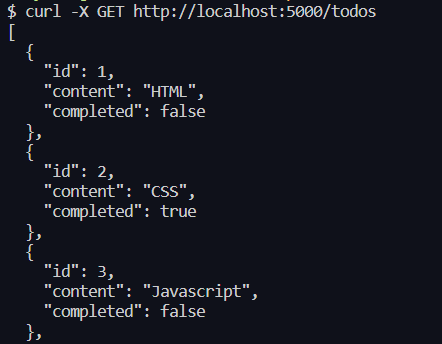
$ curl -X GET http://localhost:5000/todos/1
// 특정 번호 조회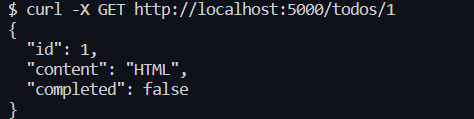
🎈 POST(생성하기)
서버측
- stringify안에 받을 데이터를 정의해주어서 처리
const xhr = new XMLHttpRequest();
xhr.open('POST', 'http://localhost:5000/todos');
xhr.setRequestHeader('Content-type', 'application/json');
xhr.send(JSON.stringify({ id: 4, content: 'Angular', completed: true }));

xhr.onreadystatechange = function (e) {
  if (xhr.readyState !== XMLHttpRequest.DONE) return;

  if(xhr.status === 201) { // 201: Created
    console.log(xhr.responseText);
  } else {
    console.log("Error!");
  }
};
클라이언트 (터미널)
$ curl -X POST http://localhost:5000/todos -H "Content-Type:
application/json" -d '{"id": 4, "content": "Angular", "completed": true}'
🎈 PUT(수정하기)
서버측
const xhr = new XMLHttpRequest();
xhr.open('PUT', 'http://localhost:5000/todos/4');
xhr.setRequestHeader('Content-type', 'application/json');
xhr.send(JSON.stringify({ id: 4, content: 'React', completed: false }));

xhr.onreadystatechange = function (e) {
  if (xhr.readyState !== XMLHttpRequest.DONE) return;

  if(xhr.status === 200) {
    console.log(xhr.responseText);
  } else {
    console.log("Error!");
  }
};
클라이언트 (터미널)
$ curl -X PUT http://localhost:5000/todos/4 -H "Content-Type: application/json" -d '{"id": 4, "content": "React", "completed": false}'
🎈 PETCH(특정 리소스의 일부 갱신)
서버측
const xhr = new XMLHttpRequest();
xhr.open('PATCH', 'http://localhost:5000/todos/4');
xhr.setRequestHeader('Content-type', 'application/json');
xhr.send(JSON.stringify({ completed: true }));

xhr.onreadystatechange = function (e) {
  if (xhr.readyState !== XMLHttpRequest.DONE) return;

  if(xhr.status === 200) {
    console.log(xhr.responseText);
  } else {
    console.log("Error!");
  }
};
클라이언트 (터미널)
$ curl -X PATCH http://localhost:5000/todos/4 -H "Content-Type: application/json" -d '{"completed": true}'🎈 DELETE(삭제하기)
서버측
const xhr = new XMLHttpRequest();
xhr.open('DELETE', 'http://localhost:5000/todos/4');
xhr.send();

xhr.onreadystatechange = function (e) {
  if (xhr.readyState !== XMLHttpRequest.DONE) return;

  if(xhr.status === 200) {
    console.log(xhr.responseText);
  } else {
    console.log("Error!");
  }
};
클라이언트 (터미널)
$ curl -X DELETE http://localhost:5000/todos/4🎃 CURL 명령어 옵션 설명
-crul을 통해서 http 요청 테스트, API 테스트 및 디버깅, 파일 다운로드, HTTP 메서드 변경, HTTP 요청에 데이터 추가, HTTP 헤더 추가, FTP,SCP 등 다양한 프로토콜 사용 등등 많은 것을 할 수 있다.
- RESTful API를 테스트하거나 디버깅할 때, 요청 및 응답을 확인하는 데 curl을 활용한다.
- 특히, 특정 헤더나 요청 방식을 테스트할 때 유용하다.
-X 옵션
- -X 옵션은 HTTP 메서드를 지정하는 데 사용됩니다. 다양한 HTTP 메서드를 사용할 수 있다.
curl -X POST http://example.com/api/resource
- 위 명령은 POST 메서드를 사용하여 http://example.com/api/resource에 요청을 보낸다
-H 옵션
- -H 옵션은 HTTP 헤더를 지정하는 데 사용됩니다. 특히, Content-Type과 같은 헤더를 설정할 때 유용하다.
curl -H "Content-Type: application/json" http://example.com/api/resource
- 위 명령은 Content-Type을 application/json으로 설정하여 http://example.com/api/resource에 요청을 보낸다
-d 옵션
- -d 옵션은 요청 본문 데이터를 지정하는 데 사용됩니다. 주로 POST 요청과 함께 사용되며, JSON 형식의 데이터를 전송할 때 많이 활용됩니다.
curl -X POST -H "Content-Type: application/json" -d '{"id": 4, "content": "Angular", "completed": true}' http://example.com/api/resource
- 위 명령은 POST 메서드를 사용하고, Content-Type을 application/json으로 설정하며, JSON 형식의 데이터를 요청 본문에 포함하여 http://example.com/api/resource에 요청을 보낸다.
이러한 CURL 명령어의 옵션들을 적절히 조합하여 다양한 HTTP 요청을 생성할 수 있다.

개발 일지 블로그