코루틴 스코프 함수가 소개되기 전에 사용한 방법들
// 데이터를 동시에 가져오지 않고, 순차적으로 가져온다.
suspend fun getUserProfile(): UserProfileData {
    val user = getUserData()            // (1초 후)
    val notifications = getNotifications() // (1초 후)

    return UserProfileData(
        user = user,
        notifications = notifications,
    )
}
위 코드는 중단 함수에서 중단 함수를 호출한다. 이때, 작업이 동시에 진행되지 않는다.
하나의 엔드포인트에서 데이터를 얻는 데 1초씩 걸리기 때문에 함수가 끝나는 데 1초 대신 2초가 걸린다.
// 이렇게 구현하면 안 된다!
suspend fun getUserProfile(): UserProfileData {
    val user = GlobalScope.async { getUserData() }
    val notifications = GlobalScope.async {
        getNotifications()
    }

    return UserProfileData(
        user = user.await(),           // (1초 후)
        notifications = notifications.await(),
    )
}
두 개의 중단 함수를 동시에 실행하려면 async로 래핑해야 한다. 이때, async는 스코프를 필요로 하며 GlobalScope를 사용하는 건 좋은 방법이 아니다.
public object GlobalScope : CoroutineScope {
    override val coroutineContext: CoroutineContext
        get() = EmptyCoroutineContext
}GlobalScope는 EmptyCoroutineContext를 가진 스코프다.
GlobalScope에서 async를 호출하면 부모 코루틴과 아무런 관계가 없다.
이때 async 코루틴은
- 취소될 수 없다(부모가 취소되어도
async내부의 함수가 실행 중인 상태가 되므로 작업이 끝날 때까지 자원이 낭비된다). - 부모로부터 스코프를 상속받지 않는다(항상 기본 디스패처에서 실행되며, 부모의 컨텍스트를 신경쓰지 않는다).
그 결과 다음과 같은 일이 발생한다.
- 메모리 누수가 발생할 수 있으며 쓸데없이 CPU를 낭비한다.
- 코루틴을 단위 테스트하는 도구가 작동하지 않아 함수를 테스트하기 어려워진다.
// 이렇게 구현하면 안 된다!
suspend fun getUserProfile(
    scope: CoroutineScope
): UserProfileData {
    val user = scope.async { getUserData() }
    val notifications = scope.async { getNotifications() }

    return UserProfileData(
        user = user.await(),           // (1초 후)
        notifications = notifications.await(),
    )
}

// 또는

// 이렇게 구현하면 안 된다!
suspend fun CoroutineScope.getUserProfile(): UserProfileData {
    val user = async { getUserData() }
    val notifications = async { getNotifications() }

    return UserProfileData(
        user = user.await(),           // (1초 후)
        notifications = notifications.await(),
    )
}
위 방식은 스코프를 인자로 넘겨 취소가 가능하며 단위 테스트를 할 수 있다는 점에서 좀 더 나은 방식이라 할 수 있다.
문제는 스코프가 함수로 전달되어야 한다는 것이다.
예를 들면, async에서 예외가 발생하면 모든 스코프가 닫히게 된다(SupervisorJob이 아닌 Job을 사용한다는 가정). 또한 스코프에 접근하는 함수가 cancel 메서드를 사용해 스코프를 취소하는 등 스코프를 조작할 수도 있다.
따라서 이 방식은 다루기 어려울 뿐만 아니라 잠재적으로 위험하다고 볼 수 있다.
data class Details(val name: String, val followers: Int)
data class Tweet(val text: String)

fun getFollowersNumber(): Int =
    throw Error("Service exception")

suspend fun getUserName(): String {
    delay(500)
    return "marcinmoskala"
}

suspend fun getTweets(): List<Tweet> {
    return listOf(Tweet("Hello, world"))
}

suspend fun CoroutineScope.getUserDetails(): Details {
    val userName = async { getUserName() }
    val followersNumber = async { getFollowersNumber() }
    return Details(userName.await(), followersNumber.await())
}

fun main() = runBlocking {
    val details = try {
        getUserDetails()
    } catch (e: Error) {
        null
    }
    val tweets = async { getTweets() }
    println("User: $details")
    println("Tweets: ${tweets.await()}")
}
// 예외만 발생한다...
위 방식은 사용자 세부사항을 들고 오는 데 문제가 있더라도 최소한 Tweets는 볼 수 있다.
하지만 getFollowersNumber에서 발생한 예외가 async를 종료시키고, 전체 스코프가 종료되는 걸로 이어져 프로그램이 끝나 버리게 된다.
coroutineScope
suspend fun <R> coroutineScope(
    block: suspend CoroutineScope.() -> R
): RcoroutineScope는 스코프를 시작하는 중단 함수이며, 인자로 들어온 함수가 생성한 값을 반환한다.
fun main() = runBlocking {
    val a = coroutineScope {
        delay(1000)
        10
    }
    println("a is calculated")
    val b = coroutineScope {
        delay(1000)
        20
    }
    println(a) // 10
    println(b) // 20
}
// (1초 후)
// a is calculated
// (1초 후)
// 10
// 20
coroutineScope 함수는 새로운 코루틴을 생성하지만 새로운 코루틴이 끝날 때까지 coroutineScope를 호출한 코루틴을 중단하기 때문에 호출한 코루틴이 작업을 동시에 시작하지는 않는다.
생성된 스코프는 바깥의 스코프에서 coroutineContext를 상속받지만 컨텍스트의 Job을 오버라이딩 한다. 따라서 생성된 스코프는 부모가 해야 할 책임을 이어받는다.
- 부모로부터 컨텍스트를 상속받는다.
- 자신의 작업을 끝내기 전까지 모든 자식을 기다린다.
- 부모가 취소되면 자식들 모두를 취소한다.
suspend fun longTask() = coroutineScope {
    launch {
        delay(1000)
        val name = coroutineContext[CoroutineName]?.name
        println("[$name] Finished task 1")
    }
    launch {
        delay(2000)
        val name = coroutineContext[CoroutineName]?.name
        println("[$name] Finished task 2")
    }
}

fun main() = runBlocking(CoroutineName("Parent")) {
    println("Before")
    longTask()
    println("After")
}
// Before
// (1초 후)
// [Parent] Finished task 1
// (1초 후)
// [Parent] Finished task 2
// AftercoroutineScope는 모든 자식이 끝날 때까지 종료되지 않으므로 'After'가 마지막에 출력되는 것을 볼 수 있다. 또한 CoroutineName이 부모에서 자식으로 전달되는 것도 확인할 수 있다.
data class Details(val name: String, val followers: Int)
data class Tweet(val text: String)
class ApiException(
    val code: Int,
    message: String
) : Throwable(message)

fun getFollowersNumber(): Int =
    throw ApiException(500, "Service unavailable")

suspend fun getUserName(): String {
    delay(500)
    return "marcinmoskala"
}

suspend fun getTweets(): List<Tweet> {
    return listOf(Tweet("Hello, world"))
}

suspend fun getUserDetails(): Details = coroutineScope {
    val userName = async { getUserName() }
    val followersNumber = async { getFollowersNumber() }
    Details(userName.await(), followersNumber.await())
}

fun main() = runBlocking<Unit> {
    val details = try {
        getUserDetails()
    } catch (e: ApiException) {
        null
    }

    val tweets = async { getTweets() }
    println("User: $details")
    println("Tweets: ${tweets.await()}")
}
// User: null
// Tweets: [Tweet(text=Hello, world)]
코루틴 빌더와 달리 coroutineScope나 스코프에 속한 자식에서 예외가 발생하면 다른 모든 자식이 취소되고 예외가 다시 던져진다.
coroutineScope를 사용하는 것이 이전에 소개되었던 'Tweet 예제'의 해결책이 되는 이유이다.
data class Details(val name: String, val followers: Int)
data class Tweet(val text: String)
class ApiException(
    val code: Int,
    message: String
) : Throwable(message)

fun getFollowersNumber(): Int =
    throw ApiException(500, "Service unavailable")

suspend fun getUserName(): String {
    delay(500)
    return "marcinmoskala"
}

suspend fun getTweets(): List<Tweet> {
    return listOf(Tweet("Hello, world"))
}

suspend fun getUserDetails(): Details = coroutineScope {
    val userName = async { getUserName() }
    val followersNumber = async { getFollowersNumber() }
    Details(userName.await(), followersNumber.await())
}

fun main() = runBlocking<Unit> {
    val details = try {
        getUserDetails()
    } catch (e: ApiException) {
        null
    }

    val tweets = async { getTweets() }
    println("User: $details")
    println("Tweets: ${tweets.await()}")
}
// User: null
// Tweets: [Tweet(text=Hello, world)]
위에서 본 것처럼 coroutineScope는 중단 메인 함수 본체를 래핑할 때 주로 사용된다. runBlocking 함수를 coroutineScope가 대체한 것이다.
coroutineScope 함수는 기존의 중단 컨텍스트에서 벗어나 새로운 스코프를 만든다. 부모로부터 스코프를 상속받고 구조화된 동시성을 지원한다.
코루틴 스코프 함수
supervisorScope는 coroutineScope와 비슷하지만, Job 대신 SupervisorJob을 사용한다.
withContext는 코루틴 컨텍스트를 바꿀 수 있는 coroutineScope이다. withTimeout은 타임아웃이 있는 coroutineScope이다.
코루틴 스코프 함수는 중단 함수에서 코루틴 스코프를 만들기 위해 사용된다.
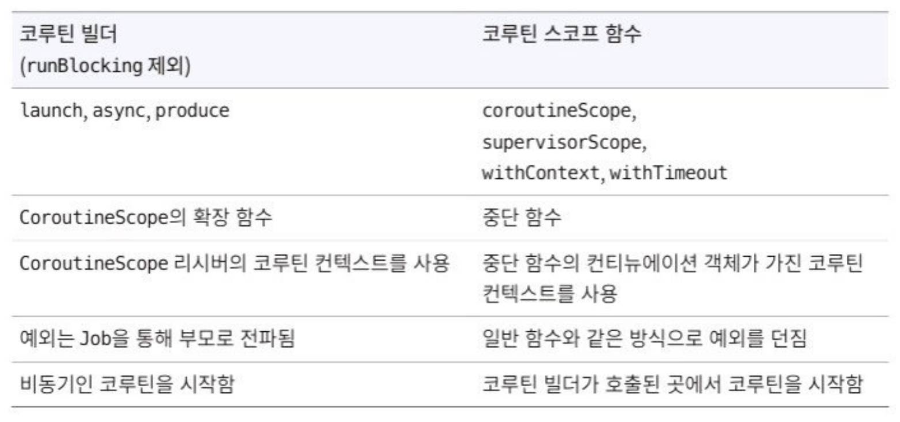
코루틴 스코프 함수와 runBlocking의 가장 큰 차이점은 코루틴 스코프 함수는 중단 함수지만, runBlocking은 블로킹 함수라는 것이다.
withContext
withContext 함수는 coroutineScope와 비슷하지만 스코프의 컨텍스트를 변경할 수 있다는 점에서 다르다.
인자로 컨텍스트를 제공하면 부모 스코프의 컨텍스트를 대체한다. 따라서 withContext(EmptyCoroutineContext)와 coroutineScope()는 같은 방식으로 동작한다.
launch(Dispatchers.Main) {
    view.showProgressBar()
    withContext(Dispatchers.IO) {
        fileRepository.saveData(data)
    }
    view.hideProgressBar()
}
withContext 함수는 기존 스코프와 컨텍스트가 다른 코루틴 스코프를 설정하기 위해 디스패처와 함께 주로 사용된다.
(디스패처는 다음 포스팅에서..)
supervisorScope
supervisorScope 함수는 호출한 스코프로부터 상속받은 CoroutineScope를 만들고 지정된 중단함수를 호출한다는 점에서 coroutineScope와 비슷하다.
둘의 차이는 컨텍스트의 Job을 SupervisorJob으로 오버라이딩하는 것이다.
suspend fun notifyAnalytics(actions: List<UserAction>) =
    supervisorScope {
        actions.forEach { action ->
            launch {
                notifyAnalytics(action)
            }
        }
}supervisorScope는 서로 독립적인 작업을 시작하는 함수에서 주로 사용된다.
class ArticlesRepositoryComposite(
    private val articleRepositories: List<ArticleRepository>,
) : ArticleRepository {
    override suspend fun fetchArticles(): List<Article> =
        supervisorScope {
            articleRepositories
                .map { async { it.fetchArticles() } }
                .mapNotNull {
                    try {
                        it.await()
                    } catch (e: Throwable) {
                        e.printStackTrace()
                        null
                    }
                }
                .flatten()
                .sortedByDescending { it.publishedAt }
        }
}async를 사용한다면 예외가 부모로 전파되는 걸 막는 것 외에 추가적인 예외처리가 필요하다.
await를 호출하고 async 코루틴이 예외로 끝나게 된다면 await는 예외를 다시 던지게 된다. 따라서 async에서 발생하는 예외를 전부 처리하려면 try-catch 블록으로 await 호출을 래핑해야 한다.
withTimeout
withTimeout은 인자로 들어온 람다식을 실행할 때 시간 제한이 있다.
suspend fun test(): Int = withTimeout(1500) {
    delay(1000)
    println("Still thinking")
    delay(1000)
    println("Done!")
    42
}

suspend fun main(): Unit = coroutineScope {
    try {
        test()
    } catch (e: TimeoutCancellationException) {
        println("Cancelled")
    }
    delay(1000) // `test` 함수가 취소되었기 때문에,
    // 타임아웃 시간을 늘려도 아무런 도움이 되지 않는다.
}

// (1초 후)
// Still thinking
// (0.5초 후)
// Cancelled
너무 오래 걸리면 람다식은 취소되고 TimeoutCancellationException을 던진다.
class Test {
    @Test
    fun testTime2() = runTest {
        withTimeout(1000) {
            // 1000ms보다 적게 걸리는 작업
            delay(900) // 가상 시간
        }
    }

    @Test(expected = TimeoutCancellationException::class)
    fun testTime1() = runTest {
        withTimeout(1000) {
            // 1000ms보다 오래 걸리는 작업
            delay(1100) // 가상 시간
        }
    }

    @Test
    fun testTime3() = runBlocking {
        withTimeout(1000) {
            // 그다지 오래 걸리지 않는 일반적인 테스트
            delay(900) // 실제로 900ms만큼 기다린ㅈ다.
        }
    }
}
withTimeout 함수는 테스트할 때 유용하다. 특정 함수가 시간이 많게 혹은 적게 걸리는지 확인하는 용도로 사용된다.
runTest 내부에서 사용된다면 withTimeout은 가상 시간으로 작동한다.
suspend fun main(): Unit = coroutineScope {
    launch { // 1
        launch { // 2, 부모에 의해 취소된다.
            delay(2000)
            println("Will not be printed")
        }
        withTimeout(1000) { // 이 코루틴이 launch를 취소한다.
            delay(1500)
        }
    }
    launch { // 3
        delay(2000)
        println("Done")
    }
}
// (2초 후)
// DonewithTimeout은 cancellationException(코루틴이 취소되었을 때 던지는 예외)의 서브타입인 TimeoutCancellationException을 던지고, 해당 코루틴만 취소가 되며 부모에게는 영향을 주지 않는다.
suspend fun fetchUser(): User {
    // 영원히 실행됩니다.
    while (true) {
        yield()
    }
}

suspend fun getUserOrNull(): User? =
    withTimeoutOrNull(5000) {
        fetchUser()
    }

suspend fun main(): Unit = coroutineScope {
    val user = getUserOrNull()
    println("User: $user")
}
// (5초 후)
// User: nullwithTimeoutOrNull은 예외를 던지지 않는다. 타임아웃을 초과하면 람다식이 취소되고 null이 반환된다.