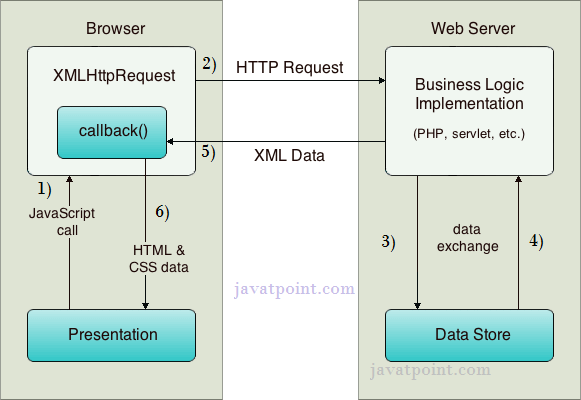
AJAX란?
Asynchronous JavaScript and XML == 비동기적 자바스크립트와 xml
전체코드. AJAX 요청을 사용하여 외부 JSON 파일에서 데이터를 불러와 HTML 표시
<!-- https://www.mockaroo.com : 임시로 데이터파일 만들어주는 툴  -->
<!DOCTYPE html>
<html lang="en">
  <head>
    <title>Title</title>
    <!-- Required meta tags -->
    <meta charset="utf-8" />
    <meta
      name="viewport"
      content="width=device-width, initial-scale=1, shrink-to-fit=no"
    />

    <!-- Bootstrap CSS v5.2.1 -->
    <link
      href="https://cdn.jsdelivr.net/npm/bootstrap@5.3.2/dist/css/bootstrap.min.css"
      rel="stylesheet"
      integrity="sha384-T3c6CoIi6uLrA9TneNEoa7RxnatzjcDSCmG1MXxSR1GAsXEV/Dwwykc2MPK8M2HN"
      crossorigin="anonymous"
    />
  </head>

  <body>
    <header>
      <!-- place navbar here -->
    </header>
    <main>
      <div class="container-fluid">
        <div class="row justify-content-center align-items-center g-2">
          <div class="col-6">Column</div>
          <div>
            <div class="table-responsive">
              <table class="table table-secondary">
                <thead>
                  <tr>
                    <th scope="col">ID</th>
                    <th scope="col">Product Name</th>
                    <th scope="col">Price</th>
                    <th scope="col">Options</th>
                  </tr>
                </thead>
                <tbody></tbody>
              </table>
            </div>
          </div>
          <div class="col-6">Column</div>
        </div>
      </div>
    </main>
    <footer>
      <!-- place footer here -->
    </footer>
    <!-- Bootstrap JavaScript Libraries -->
    <script
      src="https://cdn.jsdelivr.net/npm/@popperjs/core@2.11.8/dist/umd/popper.min.js"
      integrity="sha384-I7E8VVD/ismYTF4hNIPjVp/Zjvgyol6VFvRkX/vR+Vc4jQkC+hVqc2pM8ODewa9r"
      crossorigin="anonymous"
    ></script>

    <script
      src="https://cdn.jsdelivr.net/npm/bootstrap@5.3.2/dist/js/bootstrap.min.js"
      integrity="sha384-BBtl+eGJRgqQAUMxJ7pMwbEyER4l1g+O15P+16Ep7Q9Q+zqX6gSbd85u4mG4QzX+"
      crossorigin="anonymous"
    ></script>
    <script>
        const load = () =>{
            const xmlhttp = new XMLHttpRequest(); // 1. create XML HTTP Request object
            //onREadyStateChange will call the function each time the readyState is changing
            //onLoad will call the function when readyState is 4 - meaning the request has finished and response is ready
            //xmlhttp.onLoad =() =>{
            xmlhttp.onreadystatechange = () =>{ // 2. create the call back function using either onReadyStateChange or onLoad

                console.log(xmlhttp.readyState); //important methods for xmlhttp are : 1. readyState
                console.log(xmlhttp.status);// 2. status

                if(xmlhttp.status == 200){
                    console.log(xmlhttp.responseText);
                }else{
                    console.log(xmlhttp.statusText);
                }

            }
            xmlhttp.open("GET","http://127.0.0.1:5500/JS/Day4/products_file.json") //loopback address
            xmlhttp.send();
        }
        load();
    </script>
  </body>
</html>
AJAX 요청하는 부분
const load = () =>{
            const xmlhttp = new XMLHttpRequest(); // 1. create XML HTTP Request object
            //onREadyStateChange will call the function each time the readyState is changing
            //onLoad will call the function when readyState is 4 - meaning the request has finished and response is ready
            //xmlhttp.onLoad =() =>{
            xmlhttp.onreadystatechange = () =>{ // 2. create the call back function using either onReadyStateChange or onLoad

                console.log(xmlhttp.readyState); //important methods for xmlhttp are : 1. readyState
                console.log(xmlhttp.status);// 2. status

                if(xmlhttp.status == 200){
                    console.log(xmlhttp.responseText);
                }else{
                    console.log(xmlhttp.statusText);
                }

            }
            xmlhttp.open("GET","http://127.0.0.1:5500/JS/Day4/products_file.json") //loopback address
            xmlhttp.send();
        }
load();- const xmlhttp = new XMLHttpRequest();
설명: XMLHttpRequest 객체를 생성합니다. 이 객체는 서버와 비동기적으로 데이터를 주고받을 수 있는 AJAX 요청을 만들기 위해 사용됩니다. - onLoad() vs onReadyStateChange()
onload와 onreadystatechange는 둘 다 AJAX 요청의 상태 변화를 처리하는데 사용되는 이벤트 핸들러입니다. 하지만 그 사용 방식과 호출되는 타이밍에는 차이가 있습니다.
- onload
- 정의: onload는 AJAX 요청이 완전히 완료되었을 때 호출됩니다.
- 호출 시점: 서버로부터의 응답이 완전히 받아져서 요청이 성공적일 때, 즉 readyState가 4가 되고, HTTP 상태 코드가 200일 때 한 번만 호출됩니다.
- 용도: 서버의 응답을 처리하는 코드를 작성할 때 주로 사용됩니다. 중간 상태를 처리할 필요가 없을 때 사용하기 적합합니다.
xmlhttp.onload = function() {
    if (xmlhttp.status == 200) {
        console.log(xmlhttp.responseText); // 요청 성공 시 응답 출력
    } else {
        console.error("Error: " + xmlhttp.statusText);
    }
};- 장단점
- 장점: 요청이 성공적으로 완료된 후에만 호출되기 때문에, 중간 상태를 고려하지 않고 결과만 처리하면 됩니다.
- 단점: 요청 진행 상태(예: 서버와 연결이 성립되었는지, 데이터가 전송 중인지)를 알 수 없습니다.
- onreadystatechange
- 정의: onreadystatechange는 XMLHttpRequest 객체의 readyState 값이 변경될 때마다 호출됩니다.
- 호출 시점: readyState가 0에서 4로 변할 때마다 호출됩니다. readyState는 AJAX 요청의 진행 상태를 나타내며, 각 단계에서 호출됩니다.
- 용도: 요청의 각 상태를 세밀하게 확인하고, 그에 따라 적절히 반응해야 할 때 사용됩니다. 예를 들어, 요청이 성공했는지, 실패했는지, 아직 진행 중인지 확인할 수 있습니다.
- readyState 값 설명:
- 0: 요청이 초기화되지 않음 (객체가 생성만 된 상태)
- 1: 서버 연결이 성립됨 (open()이 호출된 상태)
- 2: 요청이 서버에 수신됨 (send()가 호출된 상태)
- 3: 요청을 처리 중 (응답의 일부를 받은 상태)
- 4: 요청이 완료되었고 응답이 준비됨
xmlhttp.onreadystatechange = function() {
    if (xmlhttp.readyState == 4 && xmlhttp.status == 200) {
        console.log(xmlhttp.responseText); // 요청 성공 시 응답 출력
    }
};
- 장단점
- 장점: 요청의 진행 상태를 매 단계마다 확인할 수 있습니다. 필요한 경우 특정 상태에서 다른 작업을 수행할 수 있습니다.
- 단점: readyState가 변경될 때마다 호출되므로, 불필요한 호출을 막기 위해 항상 readyState == 4인지 확인해야 합니다.
- onLoad vs onReadyStateChange
- onload: 요청이 완료되었을 때 한 번만 호출됨. 응답을 처리할 때 사용.
- onreadystatechange: 요청의 진행 상태가 변경될 때마다 호출됨. 요청의 중간 상태까지 세밀하게 제어 가능.
- 따라서 onload는 단순히 요청이 성공적으로 완료되었을 때만 신경 쓸 때 사용하고, onreadystatechange는 요청의 진행 상황을 모두 제어하고 싶을 때 사용하면 됨.
- console.log(xmlhttp.status);
설명: HTTP 상태 코드를 콘솔에 출력합니다. 이 상태 코드는 요청이 성공했는지, 실패했는지를 나타내는 숫자입니다. 일반적으로 상태 코드 200은 요청이 성공적으로 완료되었음을 의미합니다. - if문은 xmlhttp.status가 200인지 확인하는 조건입니다.
만약 status가 200이라면 (즉, 요청이 성공적으로 완료되었다면), 서버 응답인 responseText를 출력합니다. 그렇지 않다면 (즉, 요청이 실패했다면) statusText를 출력합니다. - xmlhttp.open("GET", "http://127.0.0.1:5500/JS/Day4/products_file.json");
설명: open 메서드를 호출하여 HTTP 요청을 초기화합니다. 첫 번째 인수 "GET"은 서버로부터 데이터를 가져오는 GET 요청임을 나타냅니다. 두 번째 인수는 요청을 보낼 URL(로컬 서버의 products_file.json 파일 경로)입니다. - xmlhttp.send();
설명: 서버로 요청을 전송합니다. open 메서드로 초기화된 요청을 실제로 실행하는 단계입니다. 이 메서드가 호출되면 브라우저는 서버로 요청을 보내고 응답을 기다립니다. - load();
설명: 방금 정의한 load 함수를 호출하여, JSON 데이터를 서버에서 가져오는 작업을 시작합니다.