문제 상황
nginX, Spring Cors Configuration, 로그인 관련 response 부분에서 모두 Cors 관련 코드를 추가해 다루고 있다보니 아래와 같은 상황이 발생 했다. 중복된 헤더 추가로 CORS 관련 에러가 나서 서버와 클라이언트가 통신을 못하고 있는 상황. 이전에는 단순히 security config 에 cors 관련 코드를 추가해 일괄 처리 했다면 response 에 직접 header 를 추가해 우회 처리 할수도 있고, 인프라 단에서 nginX 에서 일괄 처리해 불필요한 코드 없이 우회할 수 있는 방법도 있어 정리차 포스팅 하게 되었다.

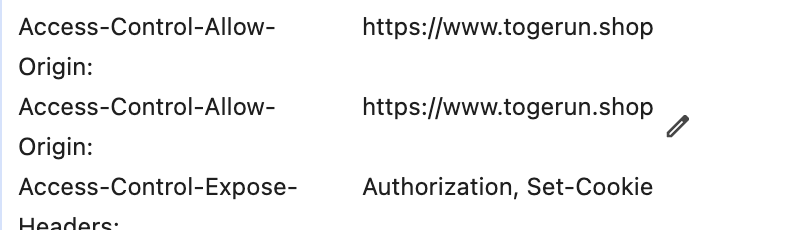
CORS 정책을 접근 방식
2-1. Nginx만 사용하는 방법
장점:
- 인프라 레벨에서 일괄 처리 가능
- 애플리케이션 코드 수정 없이 설정 변경 가능
- 성능상 이점 (웹서버 레벨에서 처리)
단점:
- 세밀한 제어가 상대적으로 어려움
- 동적인 CORS 정책 적용이 제한적
설정 예시:
(nginX.conf)
location
/api {
add_header 'Access-Control-Allow-Origin' '*';
add_header 'Access-Control-Allow-Methods' 'GET, POST, OPTIONS';
add_header 'Access-Control-Allow-Headers' 'DNT,X-CustomHeader,Keep-Alive,User-Agent...';
if ($request_method = 'OPTIONS') {
add_header 'Access-Control-Max-Age' 1728000;
add_header 'Content-Type'
'text/plain charset=UTF-8';
add_header 'Content-Length' 0;
return 204;    }
proxy_pass http://backend; }
2-2. Spring Configuration만 사용하는 방법
장점:
- 세밀한 제어가 용이
- 동적인 CORS 정책 적용 가능
- 개발자가 직관적으로 이해하기 쉬움
단점:
- 애플리케이션 레벨에서 처리되어 약간의 오버헤드 발생
- 설정 변경시 재배포 필요
설정 예시:
@Configuration
@EnableWebMvc
public class WebConfig implements WebMvcConfigurer {
@Override
public void addCorsMappings(CorsRegistry registry) {
registry
	.addMapping("/api/**")
	.allowedOrigins("*")
	.allowedMethods("GET", "POST", "PUT", "DELETE", "OPTIONS")               .allowedHeaders("*")
	.maxAge(3600);
} }
2-3 선택한 방법
spring cors cofiguration 과 nginX 를 병용해 세밀한 보안제어를 목표로 하다 잦은 충돌로 인해 nginX 에서 CORS Configuration 을 일임하는 방향으로 구현.
nginx.conf 작성 예시
location / {
  # 기본적인 보안 헤더
  add_header Strict-Transport-Security "max-age=31536000; includeSubDomains" always;
  add_header X-Frame-Options "SAMEORIGIN";
  add_header X-Content-Type-Options "nosniff";
  add_header X-XSS-Protection "1; mode=block";

  # CORS 기본 설정
  add_header 'Access-Control-Allow-Origin' 'https://www.****.shop' always;
  add_header 'Access-Control-Allow-Credentials' 'true';

  # OPTIONS 요청 처리
  if ($request_method = 'OPTIONS') {
    add_header 'Access-Control-Allow-Methods' 'GET, POST, OPTIONS, PUT, DELETE';
    add_header 'Access-Control-Allow-Headers' '*';
    add_header 'Content-Type' 'text/plain charset=UTF-8';
    add_header 'Content-Length' 0;
    return 204;
  }

  proxy_pass http://spring-app;
  proxy_http_version 1.1;
  # ... 나머지 proxy 설정 유지
}
CustomSecurity class - corsConfiguration
이전에 nginX 추가 이전 spring boot 에서 제공하는 corsConfiguration 클래스를 이용한 CORS 관련 코드. *모두 주석 처리했다.
@Bean
public CorsConfigurationSource corsConfigurationSource() {
    CorsConfiguration configuration = new CorsConfiguration();
    configuration.setAllowedOriginPatterns(List.of(
            "http://localhost:3000",
            "https://www.***.shop",
            "https://***.shop"
    ));
    configuration.setAllowedMethods(List.of("HEAD", "GET", "POST", "PUT", "DELETE", "OPTIONS"));
    configuration.setAllowedHeaders(List.of(
            "Authorization",
            "Cache-Control",
            "Content-Type",
            "Accept",
            "Last-Event-ID"));
    configuration.setExposedHeaders(List.of("Authorization","Set-Cookie"));
    configuration.setAllowCredentials(true);
    configuration.setMaxAge(3600L); // 1 시간 동안 preflight 요청 캐시

    UrlBasedCorsConfigurationSource source = new UrlBasedCorsConfigurationSource();
    source.registerCorsConfiguration("/**", configuration);

    return source;
}
CustomOauthSuccessHandler
응답에 직접 추가하던 헤더도 nginX.conf 에 전역설정으로 인해 모두 주석처리 했다.
@Component
@Log4j2
@RequiredArgsConstructor
public class CustomOauthSuccessHandler extends SimpleUrlAuthenticationSuccessHandler {

    private final AuthenticationService authenticationService;


    @Value("${app.frontend-url}")
    private String frontendUrl;

    @Override
    public void onAuthenticationSuccess(HttpServletRequest request, HttpServletResponse response, Authentication authentication) throws IOException, ServletException {

        CustomOAuth2User oAuth2User = (CustomOAuth2User) authentication.getPrincipal();
        UserDTO userDTO = oAuth2User.getUserDTO();
        Map<String, Object> claims = userDTO.getClaim();

        authenticationService.setAuthenticationTokens(claims, response);
           //response.setHeader("Access-Control-Allow-Credentials", "true");

        //response.setHeader("Access-Control-Allow-Origin", "https://www.***.shop");


        response.sendRedirect(determineRedirectUrl(claims));

    }
}
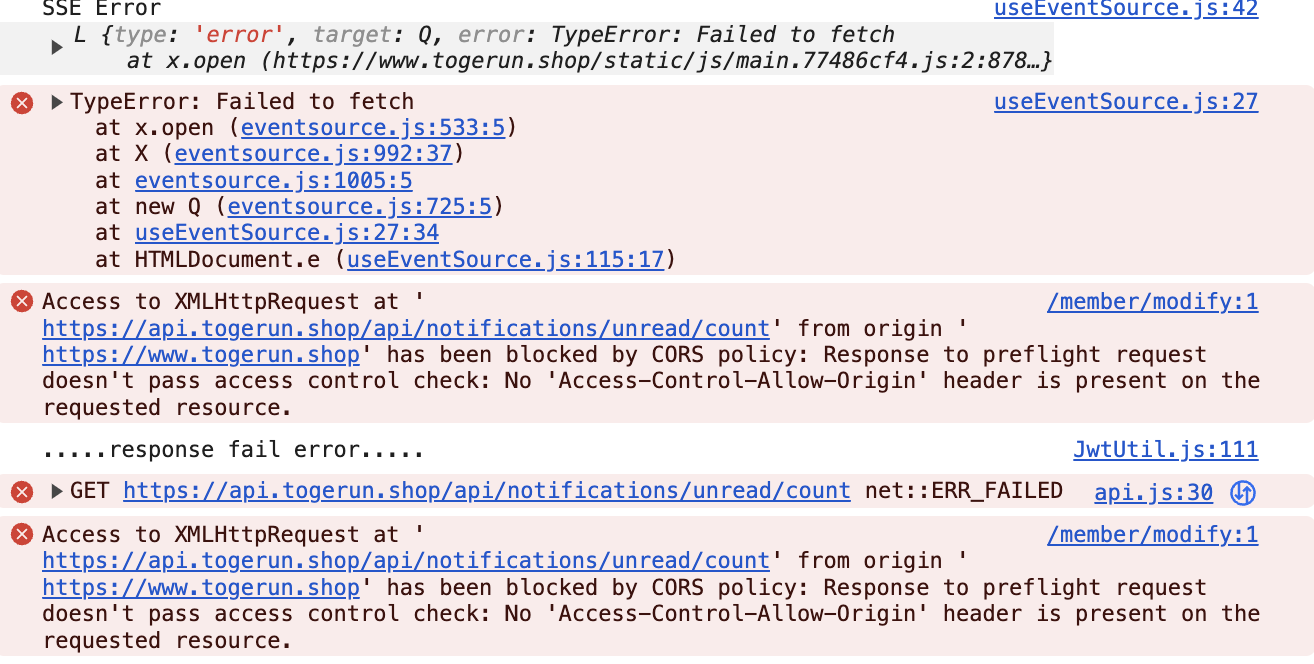
추가 발생한 SSE 관련 CORS 오류 발생
- 클라이언트 -> 서버 에서 요청을 보내고 있지만 해당 헤더가 없어서 오류가 발생되고 있다.
- credentials 가 true 일 때
Access-Control-Allow-Origin에 와일드카드*를 쓸수 없다. - https 와 http 는 서로 다른 origin 이므로 정확히 표기 해야 한다.
최종 nginX.conf
# nginx.conf 생성
cat << EOF > nginx.conf
events {
    worker_connections 1024;
    multi_accept on;
    use epoll;c
}

http {
    include /etc/nginx/mime.types;
    default_type application/octet-stream;

    upstream spring-app {
        server spring-boot:8080;
        keepalive 32;
    }

    map \$http_origin \$cors_origin {
        default "";
        "https://www.***.shop" "\$http_origin";
        "https://***.shop" "\$http_origin";
        "http://localhost:3000" "\$http_origin";
    }

    server {
        listen 80;
        listen [::]:80;
        server_name api.***.shop;

        location /.well-known/acme-challenge/ {
            root /var/www/certbot;
        }

        location / {
            return 301 https://\$host\$request_uri;
        }
    }

    server {
        listen 443 ssl;
        listen [::]:443 ssl;
        http2 on;
        server_name api.***.shop;

        ssl_certificate /etc/letsencrypt/live/api.***.shop/fullchain.pem;
        ssl_certificate_key /etc/letsencrypt/live/api.***.shop/privkey.pem;
        ssl_protocols TLSv1.2 TLSv1.3;
        ssl_ciphers ECDHE-ECDSA-AES128-GCM-SHA256:ECDHE-RSA-AES128-GCM-SHA256;
        ssl_prefer_server_ciphers off;
        ssl_session_cache shared:SSL:10m;
        ssl_session_timeout 10m;

        location / {
            if (\$request_method = 'OPTIONS') {
                add_header 'Access-Control-Allow-Origin' \$cors_origin always;
                add_header 'Access-Control-Allow-Methods' 'GET, POST, OPTIONS, PUT, DELETE' always;
                add_header 'Access-Control-Allow-Headers' 'Authorization, Cache-Control, Content-Type, Accept, Last-Event-ID' always;
                add_header 'Access-Control-Allow-Credentials' 'true' always;
                add_header 'Access-Control-Max-Age' 3600 always;
                add_header 'Content-Type' 'text/plain charset=UTF-8' always;
                add_header 'Content-Length' 0 always;
                return 204;
            }

            # 보안 헤더
            add_header Strict-Transport-Security "max-age=31536000; includeSubDomains" always;
            add_header X-Frame-Options "SAMEORIGIN" always;
            add_header X-Content-Type-Options "nosniff" always;
            add_header X-XSS-Protection "1; mode=block" always;

            # CORS 헤더
            add_header 'Access-Control-Allow-Origin' \$cors_origin always;
            add_header 'Access-Control-Allow-Credentials' 'true' always;
            add_header 'Access-Control-Allow-Methods' 'GET, POST, OPTIONS, PUT, DELETE' always;
            add_header 'Access-Control-Allow-Headers' 'Authorization, Cache-Control, Content-Type, Accept, Last-Event-ID' always;

            # 프록시 설정
            proxy_pass http://spring-app;
            proxy_http_version 1.1;

            # 헤더 설정
            proxy_set_header Host \$host;
            proxy_set_header X-Real-IP \$remote_addr;
            proxy_set_header X-Forwarded-For \$proxy_add_x_forwarded_for;
            proxy_set_header X-Forwarded-Proto \$scheme;

            # WebSocket 지원
            proxy_set_header Upgrade \$http_upgrade;
            proxy_set_header Connection "upgrade";

            # 타임아웃 설정
            proxy_connect_timeout 300;
            proxy_send_timeout 300;
            proxy_read_timeout 300;
            send_timeout 300;

            # SSE 설정
            proxy_buffering off;
            proxy_cache off;

            # 쿠키 설정
            proxy_cookie_path / "/; secure; Domain=.***.shop";
        }
    }
}
참고
리버스 프록시로 스프링 CORS 문제 해결
https://braindisk.tistory.com/40Spring boot, NginX Cors 문제 해결
https://velog.io/@tkdwns414/CORS-%EC%96%B4%EB%96%BB%EA%B2%8C-%ED%95%B4%EA%B2%B0%ED%95%A0%EA%B9%8C-Spring-boot-Nginx