김영한 강사님의 스프링 MVC 1편 - 백엔드 웹 개발 핵심 기술을 듣고 정리한 내용입니다. 자세한 내용은 강의를 참고해주세요
요청 매핑
http에 url로 요청이 오면, 어떻게 컨트롤러와 매칭을 하는지 알아보겠다
-
Controller- 스프링 MVC에서 에노테이션 기반의 컨트롤러로 인식하고, 스프링이 내부의 스프링 빈으로 등록을 한다
- 반환 값이 String이라면 -> String이름의 뷰 이름으로 인식된다 -> 뷰를 찾고 렌더링 된다
-
RestController
- 스프링 MVC에서 에노테이션 기반의 컨트롤러로 인식한다. Controller와 ResponseBody역할을 같이 한다- 반환 값으로 뷰를 찾는 것이 아니라 -> 반환 값 그대로 http message body에 넣어서 API형태로 반환해준다
-
RequestMapping(url)- 서버에 url로 호출이오면 이 메서드가 실행되도록 메핑한다
- 배열로 다중 설정이 가능하다
method= Request.GET이렇게 인자값을 넣어서요청 헤더를 지정할 수 있다- HTTP 메서드를 축약한 에노테이션
GetMapping,PostMapping등등이 있다
PathVariable(경로 변수)사용
- 경로 변수는 정말 많이 사용한다
- 최근 HTTP API는 리소스 경로에 식별자를 넣는 스타일을 선호 한다
- /mapping/uesrA
- /users/1
@RequestMapping은 URL 경로를 템플릿화 할 수 있는데,@PathVariable을 사용하면 매칭 되는 부분을 편리하게 조회할 수 있다
@RestController
public class MappingController {
	@GetMapping("/mapping/{userId}")
    public String mappingPath(@PathVariable("userId") String data){
        log.info("mappingPath userId = {}", data);
        return "ok";
    }
}
- mapping의 userId부분을 식별자로 넣고,
@PathVariable("userId")인자로 메서드에서 받았다
다음은 요청메핑에 들어가는 파라미터들을 봐보겠다
params= "mode=debug" : 파라미터에 꼭들어와야 된다. 특정 파라미터가 있어야 매핑이 된다. /mapping-param?mode=debugheaders= "mode=debug" : 요청 http 메시지 header를 사용해야 한다consumes= "application/json" : Http 요청의 Content-type 헤더기반 타입으로 매핑한다. 맞지 않으면HTTP 415상태코드 반환produces= "text/html" : 클라이언트 요청의, Accept 헤더를 기반의 미디어 타입으로 매핑한다. 맞지 않으면HTTP 406상태코드 반환
요청 매핑 - API 예시
회원관리 API라고 해보자
- 회원 목록 조회 : GET /users
- 회원 등록 : POST /users
- 회원 조회 : Get /users/{userId}
- 회원 수정 : Patch /users/{userId}
- 회원 삭제 : Delete /users/{userId}
@RestController
@RequestMapping("/mapping/users")
public class MappingClassController {
    @GetMapping
    public String users(){
        return "get users";
    }
    @PostMapping
    public String addUsers(){
        return "post user";
    }
    @GetMapping("/{userId}")
    public String findUser(@PathVariable("userId") String userId){
        return "get userId" + userId;
    }
    @PatchMapping("/{userId}")
    public String updateIser(@PathVariable("userId") String userId){
        return "update userId" + userId;
    }
    @DeleteMapping("/{userId}")
    public String deleteUser(@PathVariable("userId") String userId){
        return "delete userId" + userId;
    }
}- 지금까지 url 매핑 방법에 대해서 알아보았다
- 매핑 방법을 이해했으니, http 요청이 보내는 데이터들을 스프링 MVC로 어떻게 조회하는지 알아보자!
HTTP 요청 - 기본/헤더 조회
- http 요청 메시지의 header정보를 조회하는 방법이다
- 스프링 에노테이션 기반의 컨트롤러는 다양한 파라미터 정보를 받을 수 있다
- 동적으로 받을 수 있다 -> 스프링이 지원하는건 다 된다!!
- 인터페이스로 파라미터, 반환값등이 정형화 되어있는게 아니므로 대부분 모든 것들을 받을 수 있게 설계되어있다!!!
@Slf4j
@RestController
public class RequestHeaderController {

    @RequestMapping("/headers")
    public String headers(HttpServletRequest request,
                          HttpServletResponse response,
                          HttpMethod httpMethod,
                          Locale locale,
                          @RequestHeader MultiValueMap<String,String> headerMap,
                          @RequestHeader("host") String host,
                          @CookieValue(value = "myCookie", required = false) String cookie){

        log.info("request={}", request);
        log.info("response={}", response);
        log.info("httpMethod={}", httpMethod);
        log.info("locale={}", locale);
        log.info("headerMap={}", headerMap);
        log.info("header host={}", host);
        log.info("myCookie={}", cookie);
        return "ok";

    }
}
HttpServletRequestHttpServletResponseHttpMethod: HTTP 메서드를 조회한다.org.springframework.http.HttpMethod-> GETLocale: Locale 정보를 조회한다. 언어 정보!@RequestHeaderMultiValueMap<String, String> headerMap, 요청 헤더의 모든 HTTP 헤더를MultiValueMap형식으로 조회한다.@RequestHeader("host")String host- 특정 HTTP 헤더를 조회한다.
- 속성
필수 값 여부:required
기본 값 속성:defaultValue
@CookieValue(value = "myCookie", required = false) String cookie- 특정 쿠키를 조회한다.
- 속성
필수 값 여부:required
기본 값:defaultValue
-> 정말 많은 타입의 파라미터를 받을 수 있다... 에토이션 기반이 사기다,,,
cf) MultiValueMap
- MAP과 유사한데, 하나의 키에 여러 값을 받을 수 있다.
- HTTP header, HTTP 쿼리 파라미터와 같이 하나의 키에 여러 값을 받을 때 사용한다.
- keyA=value1&keyA=value2
HTTP 요청 데이터 조회
클라이언트에서 서버로 요청 데이터를 전달할 때에는 다음의 3가지 방법을 사용한다
1. GET - 쿼리 파라미터
2. POST - HTML Form
3. HTTP message body에 데이터 담아서 전달
HTTP 요청 파라미터 - 쿼리 파라미터, HTML Form
- 이 방법은 다음 1,2 방법의 내용이다
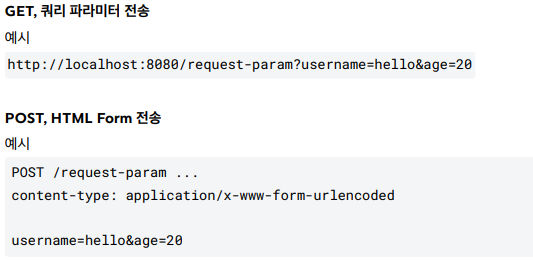
- Get 쿼리 파라미터 전송 방식이든, POST HTML Form 전송 방식이등 둘다 형식이 쿼리 파라미터로 같으므로 구분없이 조회할 수 있다.
V1
- 먼저
HttpServletRequest의getParameter()메서드를 사용하는 방법이다 - 아까도 말했듯 에노테이션 기반이라서 아무 파라미터나 받을 수 있다
@Slf4j
@Controller
public class RequestParamController {

    @RequestMapping("/request-param-v1")
    public void requestParamV1(HttpServletRequest request, HttpServletResponse response) throws IOException {
        String username = request.getParameter("username");
        int age = Integer.parseInt(request.getParameter("age"));

        log.info("username={}, age={}", username, age);

        response.getWriter().write("ok");
    }
V2
@RequestParam: 쿼리 파라미터 방식의 http 요청에서, 바로 쿼리 파라미터를 파라미터로 받는방법- 이것 또한 Spring MVC 프레임워크가 에노테이션 기반이기 때문에...
- HttpServletRequest에서 파라미터를 찾아서 로그를 찍어보는게 아니라, 그냥 매핑과정에서 파라미터로 받아버리는 방법!
@ResponseBody // ok이라는 반환값을 가지고 view를 찾는게 아니라 http응답 메시지 body에 넣어서 반환
    @RequestMapping("/request-param-v2")
    public String requestParamV2(
            @RequestParam("username") String memberName,
            @RequestParam("age") int memberAge) {
        log.info("username={}, age={}", memberName, memberAge);
        return "ok";
    }
RequestParam required, defaultValue
required: 우리가 파라티터를 받을 때, 필수 값을 설정하거나 받지 않아도 되는 값을 설정할 수 있다defaultValue: 만약 파라미터의 값이 들어오지 않을 때, 기본값을 넣어서 파라미터를 받을 수 있다- 기본값을 적용하면, required는 의미가 없어진다
 @ResponseBody
    @RequestMapping("/request-param-default")
    public String requestParamDefault(
            @RequestParam(name = "username",required = true, defaultValue = "guest") String username,
            @RequestParam(name = "age",required = false, defaultValue = "-1") int age){

        // null, "" 는 다른거인거 인지하기!
        // 원시형 자료 age,float,byte등등에는 null들어가지 못함 ->Integer,이렇게 wrapper클래스로 바꿔줘야한다
        log.info("username={}, age={}", username, age);
        return "ok";
    }
파라미터를 Map형태로 조회하기 - requestParam Map
- 파라미터를 Map, MultiValueMap으로 조회할 수 있다
- 파라미터 값이 1개라면 -> Map, 그렇지 않다면 MultiValueMap으로 사용!
@ResponseBody
    @RequestMapping("/request-param-map")
    public String requestParamMap(@RequestParam Map<String, Object> paramMap)
           {
        log.info("username={}, age={}", paramMap.get("username"), paramMap.get("age"));
        return "ok";
    }
Http 요청 파라미터 - @ModelAttribute
- 우리가 실제 개발을 하면 요청 파라미터를 받아서 필요한 객체를 만들고 그 객체에 값을 넣어줘야 한다
- 그럴 때마다 new를 이용해 인스턴스를 생성하고 프로퍼티(setter,getter)을 이용해서 값을 넣어주는 것은 힘들다
@ModelAttribute: 기본적으로@RequestParam과 비슷하다. 하지만@ModelAttribute는 객체를 요청 파라미터로 받는 것이 차이점이다- 다음은 Spring MVC에서
@ModelAttribute의 실행 과정이다
- 객체의 인스턴스를 생성한다
- 요청 파라미터의 이름으로 객체의 프로퍼티를 찾는다. 해당 프로퍼티의 setter를 호출해서 파라미터의 값을 입력(바인딩) 한다
@ResponseBody
    @RequestMapping("/model-attribute-v1")
    public String modelAttributeV1(@ModelAttribute HelloData helloData){
        log.info("username={}, age={}", helloData.getUsername(),helloData.getAge());
        log.info("hellomodel={}",helloData);
        return "ok";
}- 객체에서 사용할 파라미터 값은 프로퍼티 getter를 호출해서 값을 사용한다
<정리>
- String, int, Integer과 같은 단순 타입의 파라미터 받기 =
@RequestParam - 내가 만든 자료형은 자동으로
@ModelAttribute로 객체 자체를 파라미터로 받기argument resolver로 지정된 타입은 제외다
HTTP 요청 메시지 - 단순 텍스트
- 이제는 HTTP API에서 주로 사용하는 방식이다
- 현재는 주로 json 형식을 상요하는데 먼저 텍스트부터 알아보자
- HTTP 요청 메시지의 body부분에 데이터가 직접 넘어오는 경우에는
@RequestParam,@ModerAttribute를 사용할 수 없다 - 요청 파라미터로 들어오는게 아니라 http message body를 직접 조회해야 한다
- Servlet에서 했던
InputStream이 먼저 떠오른다
V1
- servlet의
InputStream
@Slf4j
@Controller
public class RequestBodyStringController {

    @PostMapping("/request-body-string-v1")
    public void requestBodyStringV1(HttpServletRequest request, HttpServletResponse response) throws IOException {
        ServletInputStream inputStream = request.getInputStream();
        String messageBody = StreamUtils.copyToString(inputStream, StandardCharsets.UTF_8);

        log.info("messageBody={}",messageBody);
        response.getWriter().write("ok");

    }
V2
- 스프링 MVC는
InputStream,OutputStream,Writer을 지원 - 다시 한번 에노테이션의 위대함을 깨닫는다...
@PostMapping("/request-body-string-v2")
    public void requestBodyStringV2(InputStream inputStream, Writer responseWriter) throws IOException {

        String messageBody = StreamUtils.copyToString(inputStream, StandardCharsets.UTF_8);

        log.info("messageBody={}",messageBody);
        responseWriter.write("ok");

    }
V3
- 에노테이션의 위대함은 어디까질까??
- 그냥 Http를 내가 제네렉타입으로 지정해서 Http부분을 가져와 버릴까?
HttpEntity<T>: 이렇게 가져와지네...???
@PostMapping("/request-body-string-v3")
    public HttpEntity<String> requestBodyStringV3(HttpEntity<String> httpEntity) throws IOException {
        String messageBody = httpEntity.getBody();
        log.info("messageBody={}", messageBody);
        return new HttpEntity<>("ok");
}-
가져온 httpBody에 getBody해서 message Body부분 빼서 사용, getHeader도 된다
-
HttpEntity: HTTP header, body 정보를 편리하게 조회- 메시지 바디 정보를 직접 조회
- 요청 파라미터를 조회하는 기능과 관계 없음
@RequestParamX,@ModelAttributeX
-
HttpEntity<T>는 응답에도 사용 가능- 메시지 바디 정보 직접 반환
- 헤더 정보 포함 가능
- view 조회X
-
http message converter:HttpEntitiy<String>- 아 너 문자로 바꾸고 싶구나?
- 그러면 내가 httpBody에 있는 거를 문자로 바꿔서 너한테 넣어줄게
httpmessageconverter가 저렇게 동작해버린다- 그다음 getbody() 메서드를 사용해 httpbody에 있는 컨텐트(변환된 바디)를 꺼내온다
- 자세한건 이따가 나온다!!!
-
HttpEntity<T>를 상속받은 다음 객체들도 같은 기능을 제공한다.-
RequestEntity
HttpMethod, url 정보가 추가, 요청에서 사용 -
ResponseEntity
HTTP 상태 코드 설정 가능, 응답에서 사용
return new ResponseEntity("Hello World", responseHeaders,
HttpStatus.CREATED)참고
스프링MVC 내부에서 HTTP 메시지 바디를 읽어서 문자나 객체로 변환해서 전달해주는데, 이때 HTTP 메시지컨버터(HttpMessageConverter)라는 기능을 사용한다. 이것은 조금 뒤에 HTTP 메시지 컨버터에서 자세히 설명한다.
-
V4
- 근데 나 body부분만 필요한데... 이부분만 받아볼까? 에노테이션이니까 되잖아ㅎㅎ
@RequestBody- @RequestBody 를 사용하면 HTTP 메시지 바디 정보를 편리하게 조회할 수 있다.
- 참고로 헤더 정보가 필요하다면 HttpEntity 를 사용하거나 @RequestHeader 를 사용하면 된다.
- 이렇게 메시지 바디를 직접 조회하는 기능은 요청 파라미터를 조회하는
@RequestParam,@ModelAttribute와는 전혀 관계가 없다. - @ResponseBody 를 사용하면 응답 결과를 HTTP 메시지 바디에 직접 담아서 전달할 수 있다.
- 물론 이 경우에도 view를 사용하지 않는다.
HTTP 요청 메시지 - Json
- json도 당연히 요청 파라미터가 아닌 http 메시지 body에 받아진 데이터를 읽는 것이다
- 서블릿에서 했던 것처럼, json을
ObjectMapper을 이용해 객체로 변환해줘야 한다
V1
@Slf4j
@Controller
public class RequestBodyJsonController {

    private ObjectMapper objectMapper = new ObjectMapper();

    @PostMapping("request-body-json-v1")
    public void requestBodyJsonV1(HttpServletRequest request, HttpServletResponse response) throws IOException {
        ServletInputStream inputStream = request.getInputStream();
        String messageBody = StreamUtils.copyToString(inputStream, StandardCharsets.UTF_8);

        log.info("messageBody={}",messageBody);
        HelloData helloData = objectMapper.readValue(messageBody, HelloData.class);
        log.info("username={}, age={}",helloData.getUsername(),helloData.getAge());

        response.getWriter().write("ok");

}- HttpServletRequest를 사용해서 직접 HTTP 메시지 바디에서 데이터를 읽어와서, 문자로 변환한다.
- 문자로 된 JSON 데이터를 Jackson 라이브러리인
objectMapper를 사용해서 자바 객체로 변환한다.
V2
@ResponseBody
@PostMapping("request-body-json-v2")
public String requestBodyJsonV2(@RequestBody String messageBody) throws IOException {

        log.info("messageBody={}",messageBody);
        HelloData helloData = objectMapper.readValue(messageBody, HelloData.class);
        log.info("username={}, age={}",helloData.getUsername(),helloData.getAge());

        return "ok";

}- 이전에 학습했던 @RequestBody 를 사용해서 HTTP 메시지에서 데이터를 꺼내고 messageBody에 저장한다.
- 문자로 된 JSON 데이터인 messageBody 를 objectMapper 를 통해서 자바 객체로 변환한다.
- 흠,,, 문자로 변환하고 다시 json으로 변환하는 과정이 불편하다.
@ModelAttribute처럼 한번에 객체로 변환할 수는 없을까?
V3
@ResponseBody
@PostMapping("request-body-json-v3")
public String requestBodyJsonV3(@RequestBody HelloData helloData) {
        log.info("username={}, age={}",helloData.getUsername(),helloData.getAge());
        return "ok";

}- @RequestBody HelloData data
- @RequestBody 에 직접 만든 객체를 지정할 수 있다.
- HttpEntity , @RequestBody 를 사용하면
HTTP 메시지 컨버터가 HTTP 메시지 바디의 내용을 우리가 원하는 문자나 객체 등으로 변환해준다. - HTTP 메시지 컨버터는 문자 뿐만 아니라 JSON도 객체로 변환해주는데, 우리가 방금 V2에서 했던 작업을 대신 처리해준다.
- 자세한 내용은 뒤에 HTTP 메시지 컨버터에서 다룬다.
- HelloData에 @RequestBody 를 생략하면 @ModelAttribute 가 적용되어버린다.
- HelloData data @ModelAttribute HelloData data
- 따라서 생략하면 HTTP 메시지 바디가 아니라 요청 파라미터를 처리하게 된다
V4
- 앞에서 배운것 처럼
HTTPEntity<T>를 사용해도 된다
@ResponseBody
@PostMapping("request-body-json-v4")
public String requestBodyJsonV4(HttpEntity<HelloData> httpEntity) {
        HelloData data = httpEntity.getBody();
        log.info("username={}, age={}",data.getUsername(),data.getAge());
        return "ok";

    }
V5
- 응답까지 json으로 바로?
-@ResponseBody- 응답의 경우에도 @ResponseBody 를 사용하면 해당 객체를 HTTP 메시지 바디에 직접 넣어줄 수 있다.
- 물론 이 경우에도 HttpEntity 를 사용해도 된다.
- @RequestBody 요청
- JSON 요청 HTTP 메시지 컨버터 객체
- @ResponseBody 응답
- 객체 HTTP 메시지 컨버터 JSON 응답
@ResponseBody
@PostMapping("request-body-json-v5")
public HelloData requestBodyJsonV5(HttpEntity<HelloData> httpEntity) {
        HelloData data = httpEntity.getBody();
        log.info("username={}, age={}",data.getUsername(),data.getAge());
        return data;

}- 반환 타입을 HelloData로 해버린다
@ResponseBody를 사용해서 HelloData 타입을 바로 http message body에 담아서 응답 http 메시지를 반환해버린다!
HTTP 응답
- Http 응답 또한 요청과 마찬가지로 3가지 방법이 있다
- 정적 리소스
- 예) 웹 브라우저에 정적인 HTML, css, js를 제공할 때는, 정적 리소스를 사용한다.
- 뷰 템플릿 사용
- 예) 웹 브라우저에 동적인 HTML을 제공할 때는 뷰 템플릿을 사용한다.
- HTTP 메시지 사용
- HTTP API를 제공하는 경우에는 HTML이 아니라 데이터를 전달해야 하므로, HTTP 메시지 바디에JSON 같은 형식으로 데이터를 실어 보낸다
정적 리소스
정적 리소스는 스프링 부트 다음과 같은 클래스패스 디렉토리에서 제공된다
/static , /public , /resources , /META-INF/resources
- src/main/resources 는 리소스를 보관하는 곳이고, 또 클래스패스의 시작 경로이다.
- 따라서 다음 디렉토리에 리소스를 넣어두면 스프링 부트가 정적 리소스로 서비스를 제공한다.
- 정적 리소스는 해당 파일을 변경 없이 그대로 서비스하는 것이다.
- 다음 경로에 파일이 들어있으면 src/main/resources/static/basic/hello-form.html
- http://localhost:8080/basic/hello-form.html 이렇게 웹브라우저에서 실행하면 된다
뷰 템플릿
- 뷰 템플릿을 거쳐 HTML이 생성되고, view가 응답을 만들어 전달한다
- 일반적으로 html을 동적으로 생성하는 용도, 뷰 템플릿이 만드는 것 뭐든지 가능
- Spirng boot의 기본 뷰 템플릿 경로 : src/main/resources/templates
- 우리는 thympleaf를 주로 쓴다
 @RequestMapping("/response-view-v1")
 public ModelAndView responseViewV1(){
        ModelAndView mav = new ModelAndView("response/hello")
                .addObject("data","hello!");
        return mav;
}- v1은
ModelAndView를 생성후, addObject로 데이터를 추가하고, 반환타입을 다시ModelAndView로 반환한다
@RequestMapping("/response-view-v2")
public String responseViewV2(Model model){
        model.addAttribute("data","hello!");
        return "response/hello";
}- v2는 Model 인터페이스를 인자값으로 사용 한다
- addAttribute 메서드로 데이터를 하고
- 문자열로 반환을 한다
@ResponseBody가 없으면 -> 문자열의 view파일을 찾아 렌더링 한다@ResponseBody가 있으면 -> http message body에 리턴값을 넣어서 뷰 리졸버를 사용하지 않고 바로 반환한다
cf) @ResponseBody , @HttpEntity를 사용하면 뷰 템플릿을 사용하는 것이 아니라 Http message body에 직접 응답 데이터를 넣어 출력할 수 있다
HTTP응답 - HTTP API, 메시지 바디에 직접 입력
- 이제 마지막으로 HTTP API를 제공하는 경우, HTML이 아니라 데이터를 전달해야 하므로 HTTP message body에 json 같은 형식으로 데이터를 실어 보낸다
- 이 경우에는 정적 리소스, 뷰 템플릿을 거치지 않고, 직접 HTTP message body에 응답 메시지를 전달하는 경우이다
@Slf4j
@Controller
public class ResponseBodyController {

    @GetMapping("/response-body-string-v1")
    public void responseBodyV1(HttpServletResponse response) throws IOException {
        response.getWriter().write("ok");
    }

    @GetMapping("/response-body-string-v2")
    public ResponseEntity<String> responseBodyV2() throws IOException {
        return new ResponseEntity<>("ok", HttpStatus.OK);
    }
    @ResponseBody
    @GetMapping("/response-body-string-v3")
    public String responseBodyV3() {
        return "ok";
    }

    @GetMapping("/response-body-json-v1")
    public ResponseEntity<HelloData> responseBodyJsonV1(){
        HelloData helloData = new HelloData();
        helloData.setUsername("userA");
        helloData.setAge(23);

        return new ResponseEntity<>(helloData,HttpStatus.OK);
    }
    @ResponseStatus(HttpStatus.OK)
    @ResponseBody
    @GetMapping("/response-body-json-v2")
    public HelloData responseBodyJsonV2(){
        HelloData helloData = new HelloData();
        helloData.setUsername("userA");
        helloData.setAge(23);

        return helloData;
    }
}responseBodyV1- 서블릿을 직접 다룰 때 처럼 HttpServletResponse 객체를 통해서 HTTP 메시지 바디에 직접 ok 응답 메시지를 전달한다.
- response.getWriter().write("ok")
responseBodyV2- ResponseEntity 엔티티는 HttpEntity 를 상속 받았는데, HttpEntity는 HTTP 메시지의 헤더, 바디 정보를 가지고 있다. ResponseEntity 는 여기에 더해서 HTTP 응답 코드를 설정할 수 있다.
- HttpStatus.CREATED 로 변경하면 201 응답이 나가는 것을 확인할 수 있다.
responseBodyV3@ResponseBody를 사용하면 view를 사용하지 않고, HTTP 메시지 컨버터를 통해서 HTTP 메시지를 직접 입력할수 있다.- ResponseEntity 도 동일한 방식으로 동작한다.
responseBodyJsonV1ResponseEntity를 반환한다.HTTP 메시지 컨버터를 통해서 JSON 형식으로 변환되어서 반환된다.
responseBodyJsonV2- ResponseEntity 는 HTTP 응답 코드를 설정할 수 있는데,
@ResponseBody를 사용하면 이런 것을 설정하기 까다롭다. @ResponseStatus(HttpStatus.OK)애노테이션을 사용하면 응답 코드도 설정할 수 있다.- 물론 애노테이션이기 때문에 응답 코드를 동적으로 변경할 수는 없다. 프로그램 조건에 따라서 동적으로 변경하려면
ResponseEntity를 사용하면 된다.
- ResponseEntity 는 HTTP 응답 코드를 설정할 수 있는데,
@RestController
- @Controller 대신에
@RestController애노테이션을 사용하면, 해당 컨트롤러에 모두@ResponseBody가 적용되는 효과가 있다 - 따라서 뷰 템플릿을 사용하는 것이 아니라, HTTP 메시지 바디에 직접 데이터를 입력한다
- 이름 그대로
Rest API(HTTP API)를 만들 때 사용하는 컨트롤러이다 @ResponseBody는 클래스 레벨에 두면 전체 메서드에 적용되는데,@RestController에노테이션 안에@ResponseBody가 적용되어 있다.
HTTP Message Converter
- 아니 그래서 이게 뭔데?
- 뷰 템플릿으로 HTML을 생성해서 응답하는게 아니라, HTTP APU처럼 JSON 데이터를 HTTP message body에서 직접 읽거나 쓰는 경우
HTTP Message Converter을 이용한다
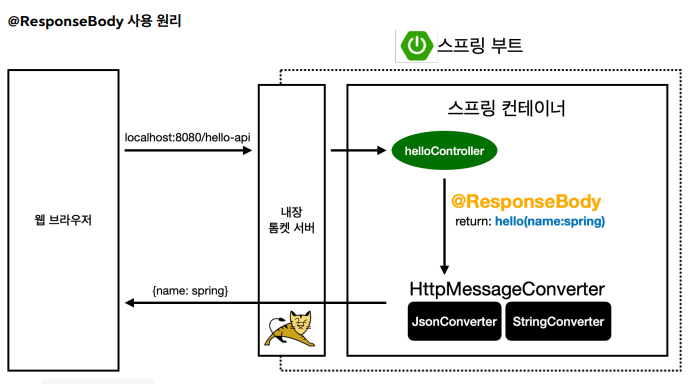
@ResponseBody를 사용했기 때문에 return 값에 대해viewResolver적 용대신에Http Message Converter가 적용이 된다- 기본 문자처리: StringHttpMessageConverter
- 기본 객체처리: MappingJackson2HttpMessageConverter
- byte 처리 등등 기타 여러 HttpMessageConverter가 기본으로 등록되어 있음
- 응답의 경우 클라이언트의 Http Accept 헤더와 서버의 컨트롤러 반환 정보 타입을 조합해서 맞는 HttpMessageConverter을 선택한다
스프링 MVC가 메시지 컨퍼터를 적용하는 경우
- HTTP 요청:
@RequestBody,HttpEntity(RequestEntity) , - HTTP 응답:
@ResponseBody,HttpEntity(ResponseEntity) ,
스프링 부트 기본 메시지 컨버터
0 = ByteArrayHttpMessageConverter
1 = StringHttpMessageConverter
2 = MappingJackson2HttpMessageConverter
- 스프링 부트는 다양한 메시지 컨버터를 제공하는데, 대상 클래스 타입과 미디어 타입 둘을 체크해서 사용여부를 결정한다.
- 만약 만족하지 않으면 다음 메시지 컨버터로 우선순위가 넘어간다.
ByteArrayHttpMessageConverter: byte[] 데이터를 처리한다.- 클래스 타입: byte[] , 미디어타입: / ,
- 요청 예) @RequestBody byte[] data
- 응답 예) @ResponseBody return byte[] 쓰기 미디어타입 application/octet-stream
StringHttpMessageConverter: String 문자로 데이터를 처리한다.- 클래스 타입: String , 미디어타입: /
- 요청 예) @RequestBody String data
- 응답 예) @ResponseBody return "ok" 쓰기 미디어타입 text/plain
MappingJackson2HttpMessageConverter: application/json- 클래스 타입: 객체 또는 HashMap , 미디어타입 application/json 관련
- 요청 예) @RequestBody HelloData data
- 응답 예) @ResponseBody return helloData 쓰기 미디어타입 application/json 관련
HTTP 요청 데이터 읽기
- HTTP 요청이 오고, 컨트롤러에서 @RequestBody , HttpEntity 파라미터를 사용한다.
- 메시지 컨버터가 메시지를 읽을 수 있는지 확인하기 위해 canRead() 를 호출한다.
- 대상 클래스 타입을 지원하는가.
- 예) @RequestBody 의 대상 클래스 ( byte[] , String , HelloData )
- HTTP 요청의 Content-Type 미디어 타입을 지원하는가.
- 예) text/plain , application/json , /
- canRead() 조건을 만족하면 read() 를 호출해서 객체 생성하고, 반환한다.
HTTP 응답 데이터 생성
- 컨트롤러에서 @ResponseBody , HttpEntity 로 값이 반환된다.
- 메시지 컨버터가 메시지를 쓸 수 있는지 확인하기 위해 canWrite() 를 호출한다.
- 대상 클래스 타입을 지원하는가.
- 예) return의 대상 클래스 ( byte[] , String , HelloData )
- HTTP 요청의 Accept 미디어 타입을 지원하는가.(더 정확히는 @RequestMapping 의 produces )
- 예) text/plain , application/json , /
- canWrite() 조건을 만족하면 write() 를 호출해서 HTTP 응답 메시지 바디에 데이터를 생성한다.
요청 매핑 헨들러 어뎁터 구조
- 그렇다면 의문이 생긴다..
- Http Message Converter는 스프링 MVC의 어디쯤에서 사용되는 것일까?
- 다음은 SpringMVC 구조이다
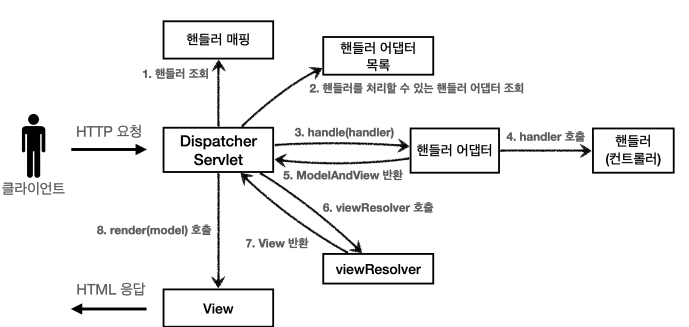
- 정답은,, 에노테이션 기반의 컨트롤러, 즉
@RequestMapping을 처리하는 핸들러 어댑터인RequestMappingHandlerAdapter즉요청 매핑 헨들러 어뎁터이다
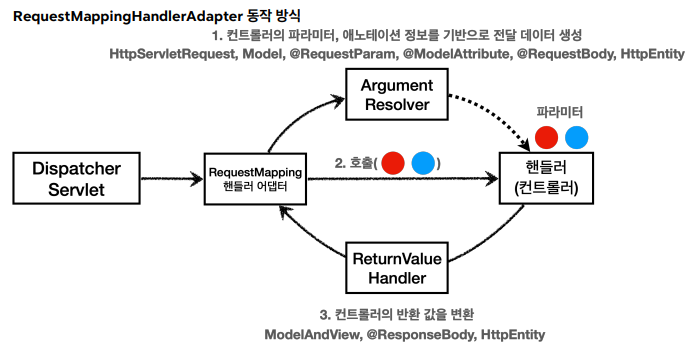
-
지금까지 에노티이션의 엄청난 유연성으로, 여러 파라미터를 마음대로 받아서 사용할 수 있었다
-
HttpServletRequest , Model 은 물론이고, @RequestParam , @ModelAttribute 같은 애노테이션 그리고 @RequestBody , HttpEntity 같은 HTTP 메시지를 처리하는 부분까지 매우 큰 유연함을 보여주었다.
-
이것이 바로
Argument Resolver덕분이다 -
에노테이션 기반 컨트롤러를 처리하는
RequstMappingHandlerAdapter가,Argument Resolver을 호출해 컨트롤러가 원하는 파라미터를 생성하게 요청한다 -
Argument Resolver가 요청받은 파라미터를 생성하고, 이를 가지고 핸들러(컨트롤러)를 호출하면서 값을 넘겨준다!!! -
이
Argument Reoslver인터페이스를 구현하는 새로운 클래스를 만들어서, 확장할 수 있다 -
ReturnValueHandeler -
우리가 반환값을 String으로 해도 되고, ModelAndView로 해도 되고... 이것 또한 에노테이션 기반의 유연성인데,
Argument Resolver과 비슷한ReturnValueHandler덕분이다 -
이것은 응답 값을 변환하고 처리한다
HTTP 메시지 컨버터
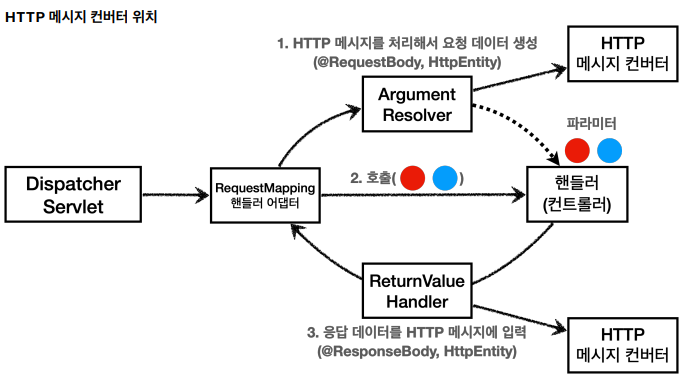
- Http Message Converter는
@RequestBody로 핸들러가 필요로 하는 파라미터 값을 변환할 때 사용한다 Argument Reolver한테 핸들러 어뎁터가 요청을 하면,HTTP message Converter가 그 값으로 변환해서 반환해준다- 응답시에도
@ResponseBody의 경우 'ReturnValueHandler'가HTTP message Converter를 호출해서 원하는 결과를 만들어 반환해준다 - @RequestBody @ResponseBody 가 있으면
RequestResponseBodyMethodProcessor() - HttpEntity 가 있으면
HttpEntityMethodProcessor()를 사용한다.
