설정파일 구조
/etc/nginx/nginx.conf
- Nginx의 메인 설정 파일이다.
- 전역 설정, worker 수, 로그 경로, 포함할 설정 등을 정의한다.
user  nginx;
worker_processes  auto;

error_log  /var/log/nginx/error.log notice;
pid        /var/run/nginx.pid;


events {
    worker_connections  1024;
}


http {
    include       /etc/nginx/mime.types;
    default_type  application/octet-stream;

    log_format  main  '$remote_addr - $remote_user [$time_local] "$request" '
                      '$status $body_bytes_sent "$http_referer" '
                      '"$http_user_agent" "$http_x_forwarded_for"';

    access_log  /var/log/nginx/access.log  main;

    sendfile        on;
    #tcp_nopush     on;

    keepalive_timeout  65;

    #gzip  on;

    include /etc/nginx/conf.d/*.conf;
}
/etc/nginx/conf.d/default.conf
- `nginx.conf에 의해 자동으로 로드되는 서버 관련 설정파일이다.
- 직접 작성하면 바로 반영이 되며, 이름 규칙 없이
.conf파일만 있으면 자동 적용된다. conf.d에 여러default.conf파일을 두고nginx.conf에서 이를 include하여 서버 관련 설정을 추가할수 있다.
include /etc/nginx/conf.d/*.conf;-
해당 설정 파일에서는
server블록을 정의해서 여러 도메인/포트/경로에 따라 각각 다른 설정이 가능하다. -
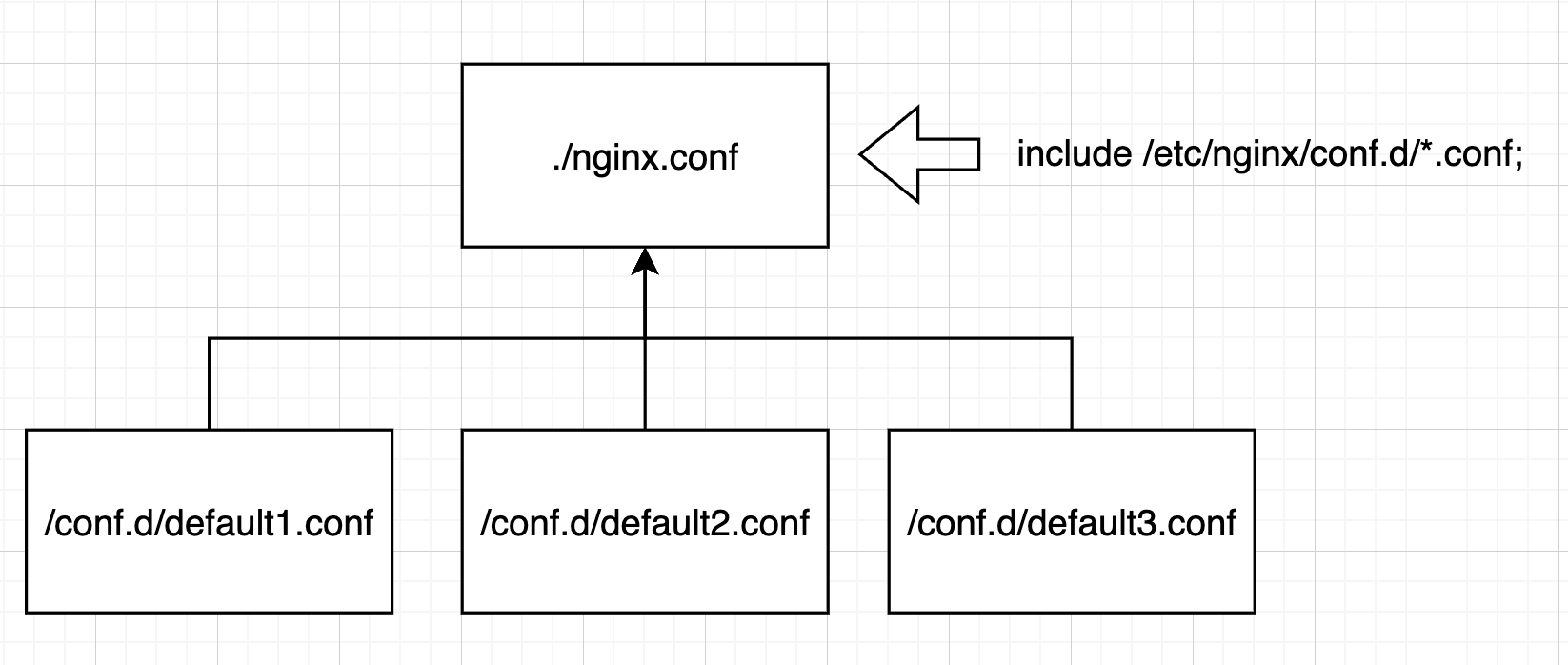
이를 도식화하면 다음과 같다.
-
nginx.conf에서include /etc/nginx/conf.d/*.conf;로 설정하여conf.d/디렉토리 내부에 있는 모든 .conf파일들을 적용할 수 있다. -
이 각각의
conf.d/*.conf파일들은server블록을 설정하여 여러 개의 포트포워딩을 설정할 수 있다.
/etc/nginx/sites-available/
- 설정파일을 보관하는 디렉토리이다.
- 우분투 등에서 많이 사용된다.
nginx.conf에include /etc/nginx/sites-enabled/*;가 있어야 적용된다.
/etc/nginx/sites-enabled/
- 실제로 적용되는 설정 파일들이 들어있는 디렉토리이다.
sites-available에 들어있는 설정 파일을 심볼릭 링크로 연결해서 어떤 설정이 활성화 되어있는지 확인하고 제어하는 역할을 가진다.- 심볼링 링크로 연결되어 있기에 해당 폴더의 설정파일을 직접 수정하는건 권장되지 않는다.
server블록 기본 설정
- nginx 설정 파일에 작성할 수 있는 server블록 설정의 예시는 아래와 같다.
server {
	listen 80;
	server_name example.com;

	location / {
		proxy_pass http://localhost:8000;
	}
}- 80포트를 listen하고, server_name이 example.com인 요청에 대해 동작하는 server블록이다.
- server블록 내의 location 블록은 url 패턴별 처리 방법을 정의한다.
- 위 설정은 모든 경로(/)에 대한 요청을 localhost의 8000포트로 proxy_pass(전달)한다.
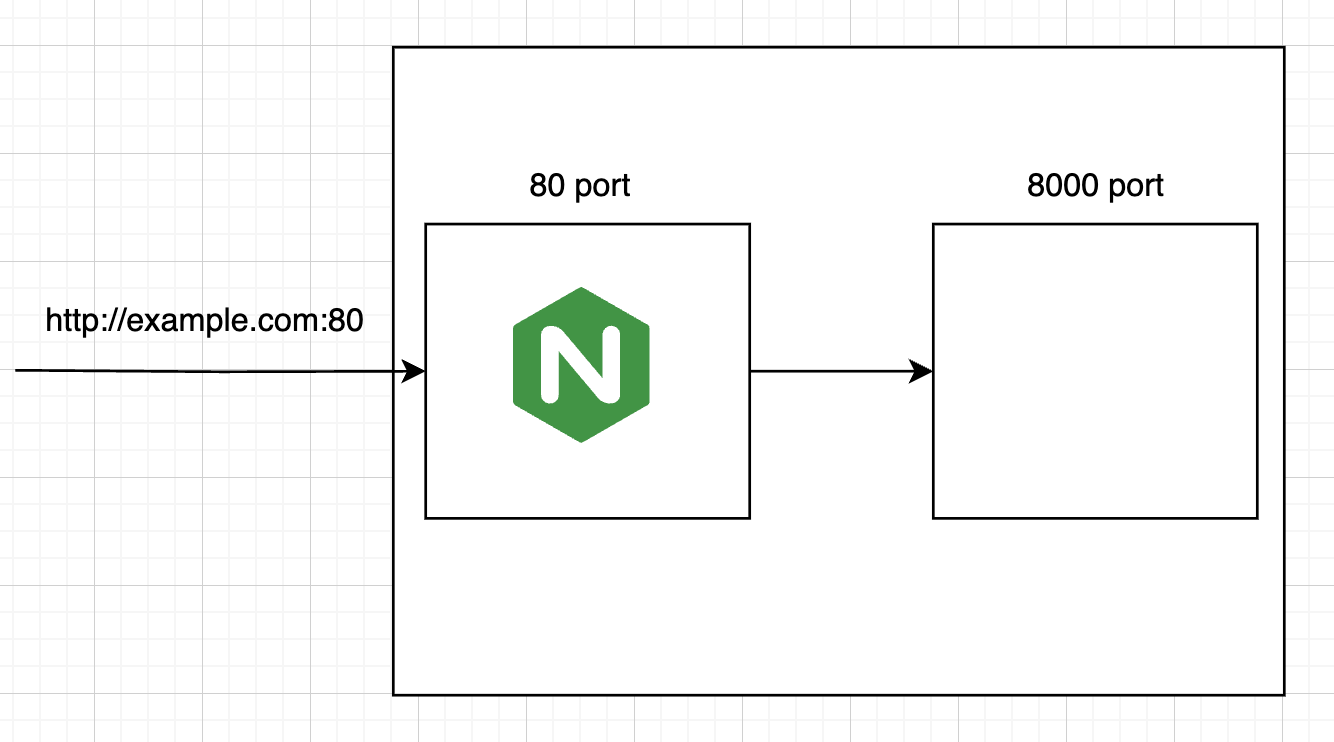
- 위 그림처럼 example.com도메인으로 들어온 모든 80포트 요청은 위에서 설정한 server블록에 따라 동일한 로컬서버의 8000포트로 전달함을 알 수 있다.
server {
	listen 80;
	server_name example.com;

	location / {
		proxy_pass http://localhost:8000;
	}

	location /error {
		root /usr/share/nginx/html;
		index error.html;
	}
}- 만약 example.com:80/error을 요청했을 때 에러 페이지가 응답으로 나오도록 설정하고 싶다면, 이렇게 설정하면 된다.
- location블록을 추가하여 /error요청이 들어왔을 때, root지시어를 통해 기준 디렉토리를 지정하고, index지시어를 사용하여 보여줄 파일을 설정할 수 있다.
- 이와같은 방법을 통해 다수의 포트포워딩과 로드밸런싱을 구현할 수 있다.
- nginx docs에서 다양한 블록과 설정에 대해 확인할 수 있다. 이를 통해 더 다양한 nginx의 기능을 사용할 수 있다.
https://nginx.org/en/docs/ngx_core_module.html?&_ga=2.56914090.145481367.1744161794-1099335624.1744161794#events
블록 (Block)
- 논리적 구조와 범위를 나눌 때 사용된다.
- 중괄호롤 감싸 영역을 표시하고, 내부에 지시어를 작성하여 설정한다.
- 블록간의 상하관계가 설정되어있다. main > events, http, mail, stream > server > lcation 순서로 블럭을 설정해야한다.
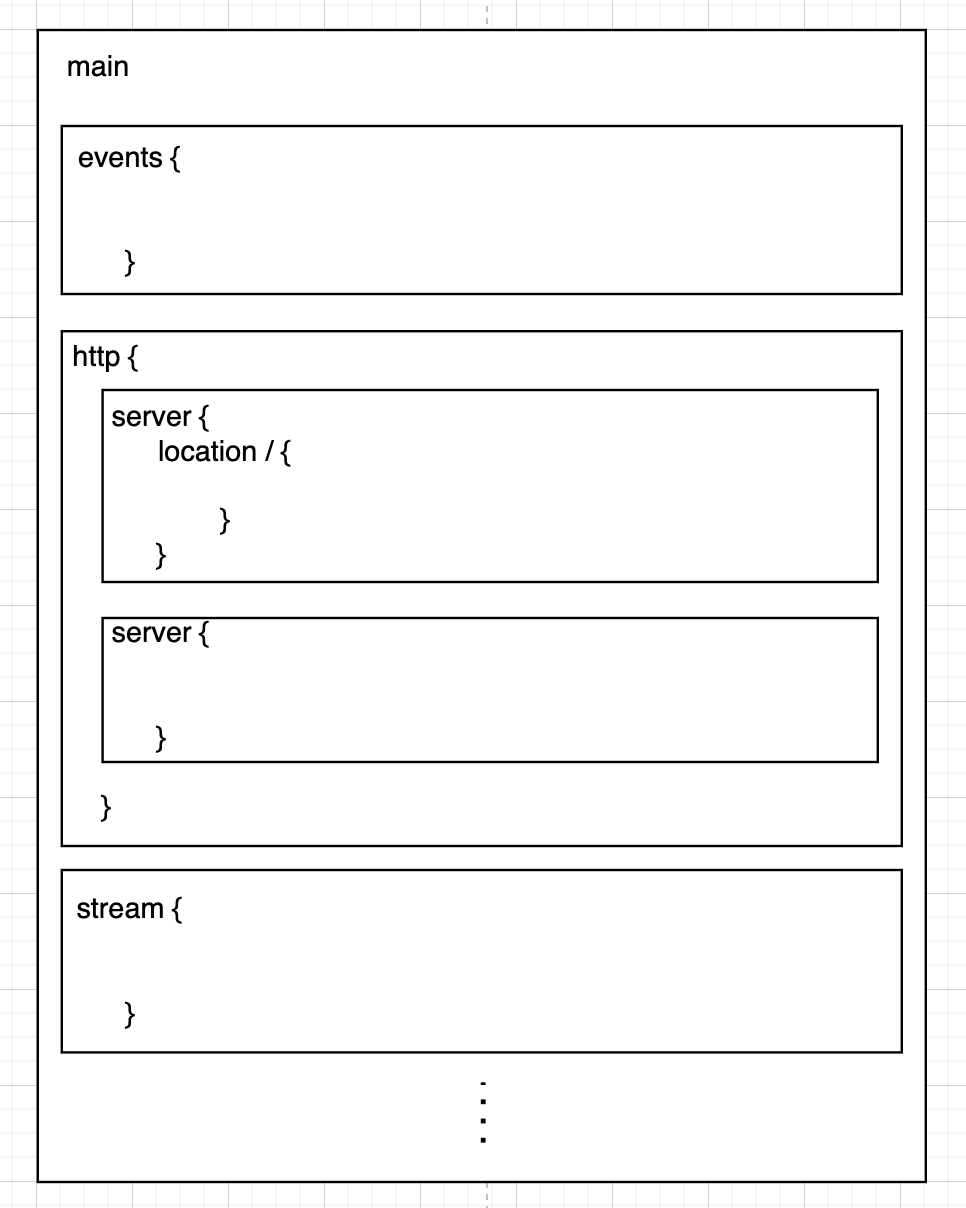
- 각 블록 내에서 설정할 수 있는 지시어가 존재한다.
main
- nginx 전역의 설정을 정의한다. (main context)
- main블록은 최상위 블록이어서 중괄호로 감싸지 않는다.
user nginx; # nginx 프로세스를 실행할 리눅스 사용자 계정
worker_processes auto; # 동시 처리할 worker프로세스 개수 (auto : 코어 수에 맞춰 설정)
error_log /var/log/nginx/error.log # 에러 로그 파일 경로 지정
pid /run/nginx.pid; # 마스터 프로세스의 PID를 기록할 파일 경로
events block
- 해당 컨텍스트는 블록으로 설정한다.
- 연결 처리에 관련 설정을 정의한다.
events {
	worker_connections 1024; # 각 worker가 동시에 처리할 수 있는 최대 연결 수
	multi_accept on; # 여러 연결을 수락할지 여부 (on | off)
	use epoll; # 사용할 이벤트 처리 모델 지정
}- 보통 worker_connection을 제외한 설정은 자동으로 처리하도록 한다.
http block
- 전체 Http 요청 관련 설정을 정의한다. 해당 블럭에서 http관련한 server 블럭을 정의한다.
mail block
- 전체 mail 요청 관련 설정을 정의한다. 해당 블럭에서 mail관련한 server 블럭을 정의한다.
stream block
- 전체 TCP/UDP 요청 관련 설정을 정의한다. 해당 블럭에서 TCP/UDP관련한 server 블럭을 정의한다.
server block
- http, mail, stream 블럭 내에서 사용 가능한 가상 호스트이다.
- server block내에서 location블럭을 통해 url경로에 따른 설정이 가능하다.
server block 지시어
listen: 해당 블록이 바이딩할 포트 지정server_name: 해당 블록이 적용될 도메인 이름 (중복 가능)root: 정적 파일의 기준 경로index: 디렉토리 접근 시 기본으로 보여줄 파일 이름proxy_pass: 요청을 다른 서버로 전달error_page: 오류 발생 시 보여줄 페이지 경로try_files: 요청 경로에 다른 파일 확인 및 대체 응답 설정return: 특정 응답 상태 및 url로 리다이렉션rewrite: 요청 url을 다른 경로로 재작성
upstream block
- 여러 서버를 묶어 이름으로 관리할 수 있게 도와줌
upstream my_backend {
	server localhost:8080;
	server localhost:8081;
}- 위와 같이 설정하면 server block에서 다음과 같이 사용 가능
server {
	listen 80;
	server_name example.com;

	location / {
		proxy_pass http://my_backend;
	}
}- my_backend에 설정한 server로 proxy_pass하게 된다.
