오늘은 저번 컨스트레인트 레이아웃에 이어 두번째인 리니어 레이아웃에 대해서 설명할 것이다.
리니어 레이아웃은 4종류의 레이아웃 중에서 가장 많이 쓰는 레이아웃이다. 그만큼 간편하고 형태가 직관적이며 화면에 UI요소들을 일렬로 배치할 수 있는 안정감 때문이다.
리니어 레이아웃을 사용하는 방법은 간단하다. 원하는 위젯들에게 공통되게 부여할 옵션들을 리니어 레이아웃 처음부분 괄호 안에 넣고 위젯 마지막 줄에 리니어레이아웃으로 다시 감싸기만 하면 된다. 그럼 그 안에 위젯들이 리니어레이아웃에 설정한 옵션들이 공통되게 적용된다.
<LinearLayout
    android:layout_width="match_parent"
    android:layout_height="match_parent"
    android:orientation="horizontal">

    <TextView
        android:layout_width="wrap_content"
        android:layout_height="wrap_content"
        android:textSize="24sp"
        android:background="#4CAF50"
        android:id="@+id/text1"
        android:text="TEXT1" />

    <TextView
        android:layout_width="wrap_content"
        android:layout_height="wrap_content"
        android:textSize="24sp"
        android:background="#FF9800"
        android:id="@+id/text2"
        android:text="TEXT2" />

    <TextView
        android:layout_width="wrap_content"
        android:layout_height="wrap_content"
        android:textSize="24sp"
        android:background="#009688"
        android:id="@+id/text3"
        android:text="TEXT3" />

</LinearLayout>
여기서 제일 첫 부분(1~3줄) 에서 리니어레이아웃 꺽쇠 안에 layout_width 와 height로 값을 설정해준 것을 볼 수 있다. 리니어레이아웃 안 세 텍스트뷰 위젯에 모두 똑같게 저 옵션이 적용된다. 결과는 다음과 같다.
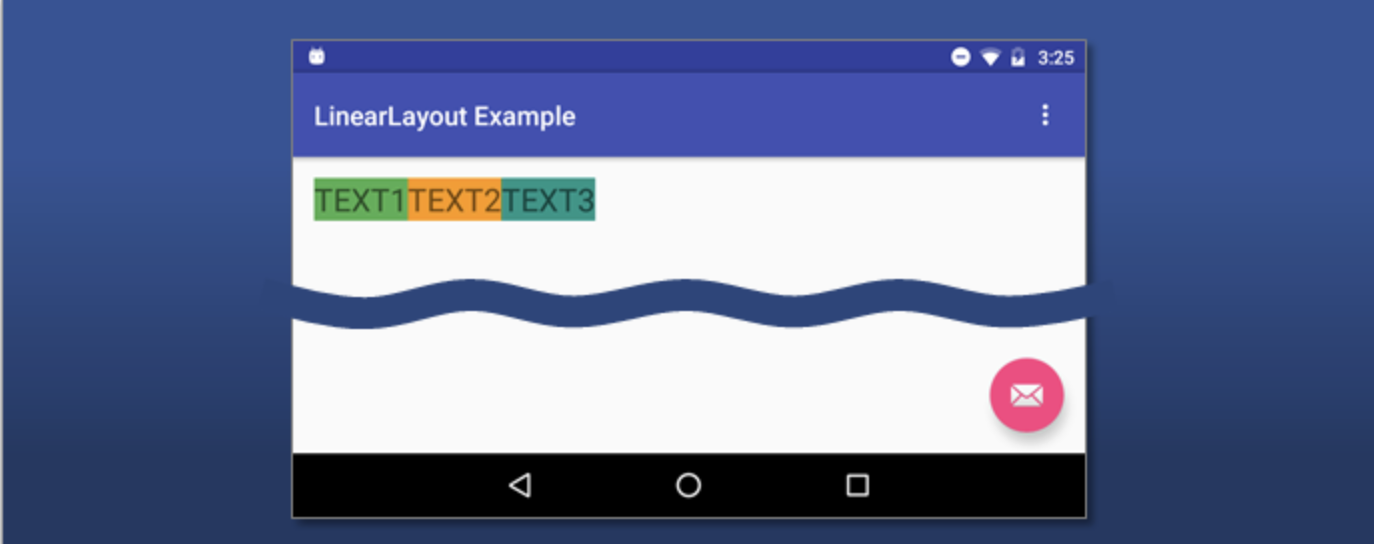
이렇게 텍스트뷰 1, 2, 3 의 크기가 리니어레이아웃에 설정한 옵션대로 설정되고 나란히 3개가 나온것을 볼 수 있다.
리니어 레이아웃에서 가장 많이 사용하는 대표적인 옵션으로는 orientation 이 있는데, 이건 자식 뷰들을 가로로 나열할지 세로로 나열할지 결정하는 부분이다. 가로로 나열하고 싶으면 저 옵션에 horizontal, 세로로 나열하고싶으면 vertical 을 넣으면 된다.
<LinearLayout
    android:layout_width="match_parent"
    android:layout_height="match_parent"
    android:orientation="horizontal">
저 horizontal 자리에 vertical 을 넣으면 된다.
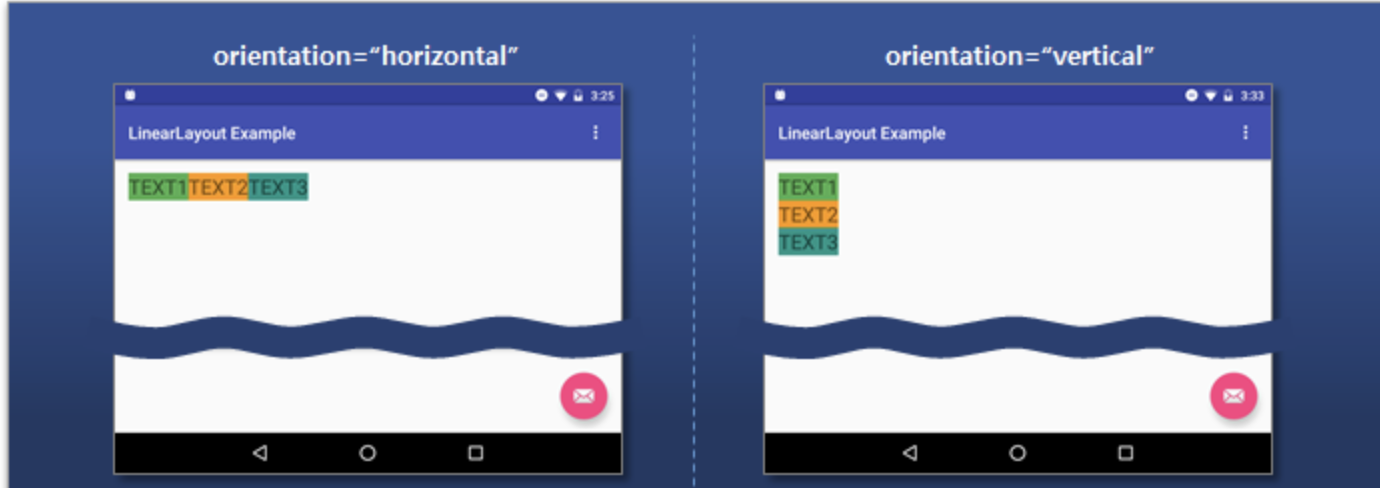
위와 같은 모양이 된다.
각 위젯마다 차지하는 비율을 설정해 주고 싶으면 layout_weight 라는 옵션을 사용해 주면 된다. 아래의 예시는 모든 위젯에 weight 값을 1로 지정해 같은 비율을 갖도록 설정한 것이다.
    <TextView
        android:layout_width="0dp"
        ...
        android:layout_weight="1"
        android:id="@+id/text1"
        android:text="TEXT1" />

    <TextView
        android:layout_width="0dp"
        ...
        android:layout_weight="1"
        android:id="@+id/text2"
        android:text="TEXT2" />

    <TextView
        android:layout_width="0dp"
        ...
        android:layout_weight="1"
        android:id="@+id/text3"
        android:text="TEXT3" />

</LinearLayout>
이러면 각 뷰의 비율이 1:1:1 로 설정이 된다. 저 숫자를 바꾸면 그만큼의 비율을 차지하게 된다.
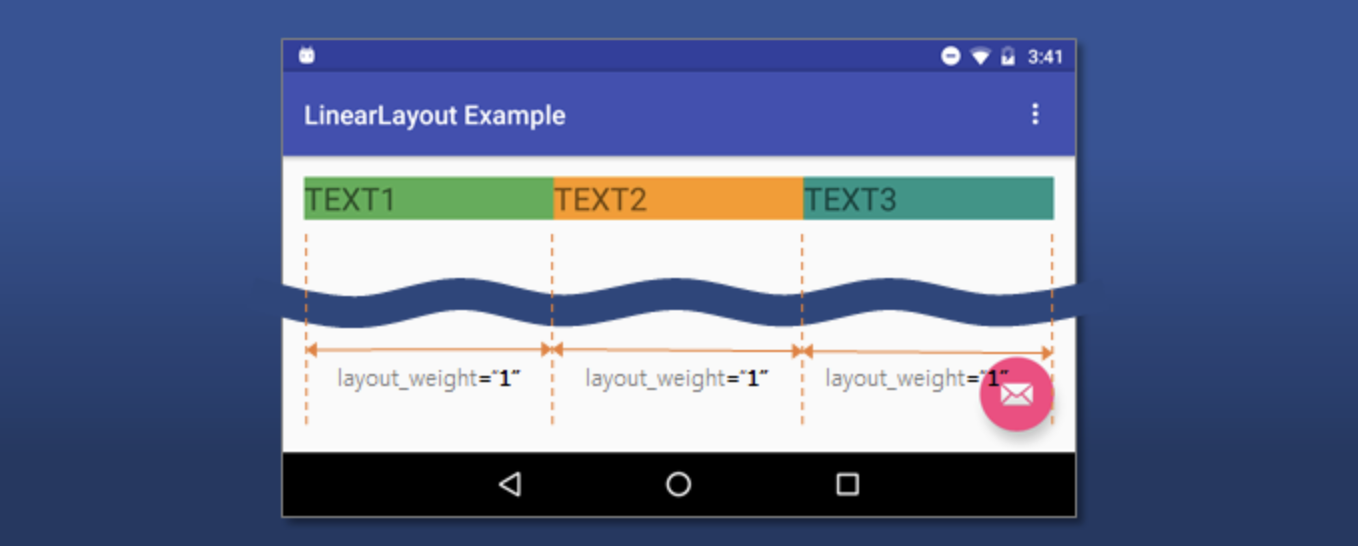
만약 저중에 하나라도 width를 설정하지 않는다면 어떻게 될까, width를 설정한 뷰들 우선으로 비율을 차지하고 나머지 비율을 설정하지 않은 뷰가 차지하게 된다.
이렇게 리니어 레이아웃 기초에 대한 포스팅을 마치도록 하겠다.
