502~523
명시적 시간모델
동시성 상황에서 의도하지 않은 순서로 로직이 실행되는 것을 막기 위한 방법
1. Queue : 큐에 추가된 항목은 독립적으로 하나의 타임라인에서 실행된다.
2. Cut : 모든 타임라인이 완료되면 콜백을 불러 새로운 타임라인을 시작한다.
3. JustOnce : 여러번 불러도 한번만 실행된다.
4. DroppingQueue : 큐와 비슷하지만 항목이 빠르게 늘어나면 작업을 건너뛴다.
타임 라인의 수를 줄인다. 타임라인의 길이를 줄인다. 공유 자원을 없앤다, 동시성 기본형으로 자원을 공유한다. 동시성 기본형으로 조율한다.
반응형 아키텍처
원인과 효과를 분리한다. X가 일어나면 언제나 Y를 한다. 데이터 변환 단계를 파이프라인으로 처리한다. 계산을 조합할 수 있다.
셀
function ValueCell(initialValue) {
  let currentValue = initialValue;
  return {
    val: () => {
      return currentValue;
    },
    update: (f) => {
      const oldValue = currentValue;
      const newValue = f(oldValue);
      currentValue = newValue;
    },
  };
}

cell = ValueCell(1);
console.log(cell.val());
cell.update((x) => x + 1);
console.log(cell.val());


1
2
감시자 <Watcher, Observer, listener, eventHandler, callback>
function ValueCell(initialValue) {
  let currentValue = initialValue;
  let watchers = [];
  return {
    val: () => {
      return currentValue;
    },
    update: (f) => {
      const oldValue = currentValue;
      const newValue = f(oldValue);
      if (oldValue !== newValue) {
        currentValue = newValue;
        watchers.forEach((watcher) => watcher(newValue));
      }
    },
    addWatcher: (f) => {
      watchers.push(f);
    },
  };
}

cell = ValueCell(1);
console.log(cell.val());
cell.update((x) => x + 1);
console.log(cell.val());

cell.addWatcher((x) => console.log('watcher1', x));
cell.addWatcher((x) => console.log('watcher2', x));

cell.update((x) => x + 1);

1
2
watcher1 3
watcher2 3
FormulaCell은 파생된 값을 계산한다.
다른셀의 변화가 감지되면 값을 다시 계산한다.
function ValueCell(initialValue) {
  let currentValue = initialValue;
  let watchers = [];
  return {
    val: () => {
      return currentValue;
    },
    update: (f) => {
      const oldValue = currentValue;
      const newValue = f(oldValue);
      if (oldValue !== newValue) {
        currentValue = newValue;
        watchers.forEach((watcher) => watcher(newValue));
      }
    },
    addWatcher: (f) => {
      watchers.push(f);
    },
  };
}

function FormulaCell(upstreamCell, f) {
  //계산을 한 값을 초기값으로 세팅
  let myCell = ValueCell(f(upstreamCell.val()));

  upstreamCell.addWatcher((newUpstreamValue) => {
    myCell.update((currentValue) => {
      return f(newUpstreamValue);
    });
  });
  return {
    val: myCell.val,
    addWatcher: myCell.addWatcher,
  };
}

// A1 셀에 2를 세팅하고, A2 셀에 3을 세팅합니다.
let A1 = ValueCell(2);
let A2 = FormulaCell(A1, (a) => a + 3);

console.log(A1.val()); // 2
console.log(A2.val()); // 5

// A1 셀의 값을 5로 변경합니다.
A1.update(() => 5);

console.log(A1.val()); // 5
console.log(A2.val()); // 8

// B1 셀에 4를 세팅하고, B2 셀에 B1 셀의 값에 2를 곱하는 계산식을 설정합니다.
let B1 = ValueCell(4);
let B2 = FormulaCell(B1, (b) => b * 2);

console.log(B1.val()); // 4
console.log(B2.val()); // 8

// B1 셀의 값을 6으로 변경합니다.
B1.update(() => 6);

console.log(B1.val()); // 6
console.log(B2.val()); // 12
값을 기준으로 카피온라이트를 반복하며 값을 전달한다. 하위 셀들은 상위 셀로부터 전달한 값만들 사용하기 때문에 최상위셀의 값을 사용하는 일은 하지 않는다.
같은 효과가 여러군데 있다면 한 군데로 합칠 수 있다.
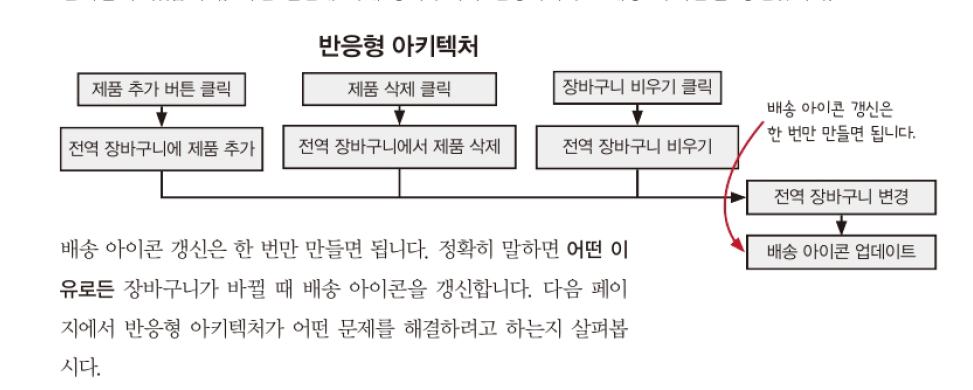
결합의 분리는 원인과 효과의 중심을 관리한다.
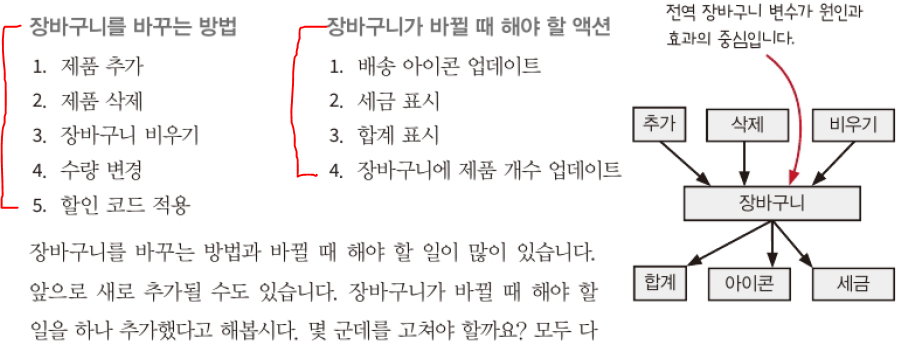
분리 하지 않는다면 5*4 가지의 코드를 수정해야하지만 분리 된다면 5+4가 된다.
단일 이벤트 대신 데이터 스트림이라면 RX를 사용하자.
Kafka나 RabbitMQ같은 외부 스트림 서비스로 파이프라인을 구현 할 수 있다.
데이터를 전달하지 않으면 파이프라인이 아니다.
공유하는 자원이 없다면 타임라인이 많아져도 문제가 없다.