여러 타입에서 사용할 수 있도록 재사용 함수나 재사용 클래스를 정의할 수 있게 해 주는 특수 기능 또는 특수 구문입니다.
Generic은 함수나 클래스의 선언 시점이 아닌, 사용 시점에 타입을 선언할 수 있는 방법을 제공합니다.
Built-In Generic
홑화살괄호(<>) 안에 타입을 넣어 일반적인 배열 type annotation의 대체 구문으로 사용할 수 있습니다.
일반 type annotation
const nums: number[] = [0, 1, 2, 3]제네릭 사용
// 홑화살괄호 안에 타입을 입력
const nums: Array<number> = [0, 1, 2, 3]

// 배열 안에 문자열이 있다면 에러
// Type 'string' is not assignable to type 'number'.
const nums: Array<number> = ["hello world"]
제네릭 함수 호출 방법
1. 타입 인수 추론 을 사용하는 방법
function identity<Type>(arg: Type): Type {
  return arg;
}

// 경고 없음
let output = identity(0);

let output = identity("myString");
2. 함수에 타입 인수를 포함한 모든 인수를 전달하는 방법
function identity<Type>(arg: Type): Type {
  return arg;
}

let output = identity<string>("hello world");

// Argument of type 'number' is not assignable to parameter of type 'string'
let output = identity<string>(0);

// Argument of type 'string' is not assignable to parameter of type 'number'
let output = identity<number>("hello world");
querySelector에서 사용 예시
문제점
querySelector는 Element를 가져오기 때문에 querySelector로 input DOM을 가리키면 Element 타입으로 인식합니다.
<!-- HTML -->

<!-- querySelector로 가져올 태그 -->
<input id="username" type="text" placeholder="username" />
// javascript
const inputEl = document.querySelector("#username")
문제는 input요소는 value 프로퍼티를 가지고 있지만 가장 기본적인 DOM 요소인 Element는 value 프로퍼티를 가지고 있지 않습니다.
해결
제네릭 함수는 어떤 타입을 지정하면 그 타입의 요소를 반환해 줍니다.
HTMLInputElement 를 제네릭 함수에 사용하면 value 프로퍼티를 사용할 수 있습니다.
이때 Non-Null 단언 연산자(!)를 사용하여 null이 반환되지 않는 다는 것을 알려줘야 합니다.
const inputEl = document.querySelector<HTMLInputElement>("#username")!;
inputEl.value = "Hacked!";

const btn = document.querySelector<HTMLButtonElement>(".btn")!;
재사용 예시, 제네릭 사용 이유
같은 타입의 매개변수 두개를 배열에 담아 반환하는 함수를 만들어보겠습니다.
문제점 1. 경우의 수가 너무 많다
일반적인 type annotation으로 함수를 구성한다면,
매번 다른 이름으로 각각의 함수를 만들어야 하고 작성할 수 있는 타입의 범위도 제한됩니다
// 경우의 수1
function numberIdentity(item1: number, item2: number): number[] {
  return [item1, item2];
}

// 경우의 수 2
function stringIdentity(item1: string, item2: string): string[] {
  return [item1, item2];
}

// 경우의 수 3
function booleanIdentity(item1: boolean, item2: boolean): boolean[] {
  return [item1, item2];
}
문제점 2. 유니온도 마찬가지
유니온을 사용하면 타입별 각각의 함수는 만들지 않아도 되지만,
가독성이 떨어지고 입력 타입과 출력 타입 간의 관계를 잃게 되며,
다른 타입을 동시에 받을 수 있게 되어버립니다.
function identity(
	 item1: number | string | boolean,
     item2: number | string | boolean
     ): (number | string | boolean)[] {
  return [item1, item2];
}

identity('3', true)
문제점 3. any는 사용하나 마나인 타입
any 타입으로 사용하는 것은 TypeScript의 취지에 어긋나며,
입력 타입과 출력 타입 간의 관계를 잃게 되고,
유니온과 마찬가지로 다른 타입을 동시에 받을 수 있게 되어버립니다.
function identity(item1: any, item2: any): any[] {
  return [item1, item2];
}

identity('3', true)
해결
제네릭 함수를 사용하면 입력 타입에 따라 그 타입으로 반환한다는 관계를 설정한 것이 됩니다.
따라서 같은 타입의 매개변수 두개를 배열에 담아 반환하는 함수가 문제없이 구현됩니다.
function identity<Type>(item1: Type, item2: Type): Type[] {
  return [item1, item2];
}

// 두 개의 매개변수가 같은 타입이여야 함
// Argument of type 'boolean' is not assignable to parameter of type 'string'
identity('3', true)

identity<string>("3", "4");
identity<boolean>(true, false);
identity<number>(3, 4);
추론되는 generic type parameter
제네릭을 사용할 때 홑화살괄호(Angle Bracket, <>)안에는 Type이 아닌 다른 구문으로 바꾸어도 되지만 일반적으로 대문자 T를 사용합니다.
또한 일반적으로 함수에 타입을 선언할 필요도 없습니다.
function identity<T>(item: T): T {
  return item;
}

indentity<number>(7)
identity<string>("hello");

// 타입 파라미터 선언이 필요 없는 경우
identity(7);
identity("hello");
단, getElementById나 querySelector 같은 함수는 ID 또는 Class...와 해당 DOM 요소가 어떤 관계인지 알 수 없기 때문에 타입을 추론할 수 없어, 타입의 선언이 필요합니다.
// 타입 파라미터 선언이 필요한 경우
const btn = document.querySelector<HTMLButtonElement>(".btn")!;
화살표 함수, TSX 파일(JavaScript에 HTML 템플릿을 작성하는 방식)
JSX 혹은 TSX에서 화살표 함수를 사용할 경우 파라미터 앞 제네릭 구문에 후행 쉼표를 붙여야 합니다.
이유는 HTML 템플릿을 작성하는 방식이기 때문입니다.
(<input/> 등...)
// 제네릭에 후행 쉼표 필수
const getRandomElement = <T,>(list: T[]): T => {
  const randIdx = Math.floor(Math.random() * list.length);
  return list[randIdx];
}

// 후행 쉼표가 없다면 error
const getRandomElement = <T>(list: T[]): T => {
  const randIdx = Math.floor(Math.random() * list.length);
  return list[randIdx];
}
여러 타입 파라미터를 갖는 제네릭 함수
만약 단일 타입 파라미터가 아닌 여러 타입 파라미터를 갖을 경우 제네릭 구문도 여러개를 사용할 수 있습니다.
function merge<T, U>(object1: T, object2: U) {
  return {
    ...object1,
    ...object2,
  };
}

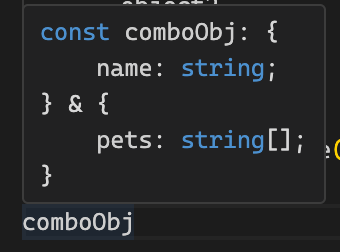
const comboObj = merge({ name: "zima" }, { pets: ["air", "stone"] });

comboObjT는 string, U는 string[]타입이 되었습니다.
타입 제한 추가
extends를 사용하여 타입 파라미터의 타입을 제한할 수 있습니다.
예시
제네릭에 extends object을 활용하여 타입을 객체로 제한합니다.
단, 객체 안에 값의 타입은 상관 없습니다.
function merge<T extends object, U extends object>(object1: T, object2: U) {
  return {
    ...object1,
    ...object2,
  };
}

merge({ name: "zima" }, { pets: ["air", "stone"] });

// 9는 객체가 아니기 때문에 Error
// Argument of type 'number' is not assignable to parameter of type 'object'.
merge({ name: "zima" }, 9)
매개변수 thing은 length프로퍼티를 가진 값이여야 합니다.
length프로퍼티를 가진 값은 Array와 String 타입이 있습니다.
// length 프로퍼티는 숫자 값을 반환
interface Lengthy {
  length: number;
}

function printDoubleLength<T extends Lengthy>(thing: T): number {
  // 매개변수.length 프로퍼티를 사용
  return thing.length * 2;
}

// "abcdef"의 길이는 6
console.log(printDoubleLength("abcdef")
// 12

// [1, 2, 3]의 길이는 3
console.log(printDoubleLength([1, 2, 3]))
// 6
기본 타입 파라미터
원하는 기본 타입을 타입 파라미터 뒤에 등호(=)를 붙여서 적어주면 해당 타입을 기본으로 갖게 됩니다.
기본값은 타입 파라미터를 특정하지 않을 때만 개입하게 됩니다.
// T의 기본 타입은 number
function makeEmptyArray<T = number>(): T[] {
  return [];
}

// 타입 파라미터를 특정하지 않을 때
// makeEmptyArray<number>(): number[]
const nums = makeEmptyArray();

// 타입 파라미터를 boolean으로 특정했을 때
// makeEmptyArray<boolean>(): boolean[]
const bools = makeEmptyArray<boolean>();
제네릭 클래스 예시
// 인터페이스
interface Song {
  title: string;
  artist: string;
}
interface Video {
  title: string;
  creator: string;
  resolution: string;
}

// 클래스
class Playlist<T> {
  public queue: T[] = [];

  add(el: T) {
    this.queue.push(el);
  }
}

// 인스턴트
const songs = new Playlist<Song>();
songs.add({ title: "Through the Night", artist: "IU" });

const videos = new Playlist<Video>();
videos.add({
  title: "ZIMA BLUE",
  creator: "Alastair Reynolds",
  resolution: "4k",
});
generic과 any의 차이
any를 사용할 경우 상수 a의 타입은 any이기 때문에 아래의 코드에는 어떠한 경고도 해주지 않습니다.
type SuperPrint = (a: any[]) => any

const superPrint: SuperPrint = (a) => a[0]

const a = superPrint([1, "b", false])

// 문자열이 아닌 값도 있지만 경고 없음
a.upperCase()
하지만 generic을 사용하면 a의 타입은 매개변수로 들어온 값에 따라 변하기 때문에 옳지 않게 사용했을 때 경고해줍니다.
type SuperPrint = <T>(a: <T>[]) => T

const superPrint: SuperPrint = (a) => a[0]

const a = superPrint([1, "b", false])

// 경고
// Property 'upperCase' does not exist on type 'string | number | boolean'.
// Property 'upperCase' does not exist on type 'string'.
a.upperCase()