<!DOCTYPE html>
<html lang="ko">
<head>
    <meta charset="UTF-8">
    <meta name="viewport" content="width=device-width, initial-scale=1.0">
    <title>Calculator</title>

    <style>
      * {
        margin: 0;
        padding: 0;
        box-sizing: border-box;
      }

      body {
        background-color: #949494;
        display: flex;
        justify-content: center;
        align-items: center;
        height: 100vh;
      }

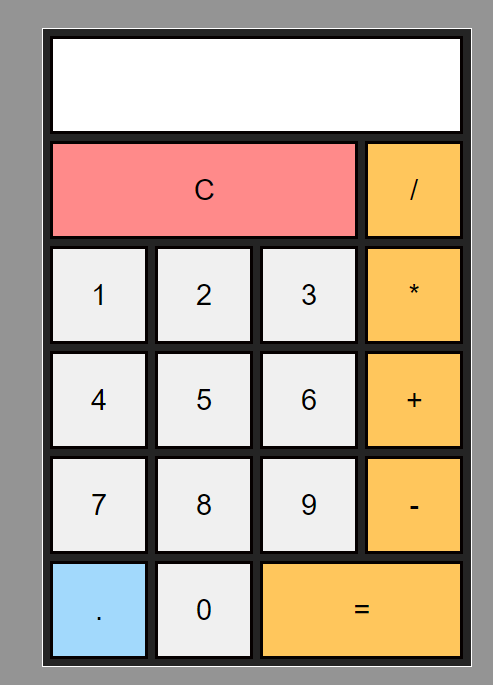
      .calculator {
        width: 287px;
        border: 1px solid #ffffff;
        background-color: #242424;
        padding: 5px;
      }

      .calculator form {
        display: grid;
        grid-template-columns: repeat(4, 65px);
        grid-auto-rows: 65px;
        grid-gap: 5px;
      }

      .calculator form input {
        border: 2px solid #050000;
        cursor: pointer;
        font-size: 19px;
      }

      .calculator form input:hover {
        box-shadow: 1px 1px 2px #000000;
      }

      .calculator form .clear {
        background-color: #ff8a8a;
      }

      .calculator form .operator {
        background-color: rgb(255, 198, 92);
      }

      .calculator form .dot {
        background-color: rgb(162, 217, 252);
      }

      .calculator form input[type='text'] {
        grid-column: span 4;
        text-align: right;
        padding: 0 10px;
      }

      .calculator form .clear {
        grid-column: span 3;
      }

      .calculator form .result {
        grid-column: span 2;
      }
    </style>
</head>
<body>

<div id="app">
    <div class="calculator">
        <form>
            <input type="text" v-model="output" readonly />
            <input type="button" class="clear" value="C" @click="operation('C')" />
            <input type="button" class="operator" value="/" @click="operation('/')" />
            <input type="button" value="1" @click="operation('1')" />
            <input type="button" value="2" @click="operation('2')" />
            <input type="button" value="3" @click="operation('3')" />
            <input type="button" class="operator" value="*" @click="operation('*')" />
            <input type="button" value="4" @click="operation('4')" />
            <input type="button" value="5" @click="operation('5')" />
            <input type="button" value="6" @click="operation('6')" />
            <input type="button" class="operator" value="+" @click="operation('+')" />
            <input type="button" value="7" @click="operation('7')" />
            <input type="button" value="8" @click="operation('8')" />
            <input type="button" value="9" @click="operation('9')" />
            <input type="button" class="operator" value="-" @click="operation('-')" />
            <input type="button" class="dot" value="." @click="operation('.')" />
            <input type="button" value="0" @click="operation('0')" />
            <input type="button" class="operator result" value="=" @click="operation('=')" />
        </form>
    </div>
</div>

<script src="https://unpkg.com/vue@3/dist/vue.global.js"></script>
<script>
  const app = Vue.createApp({
    data() {
      return {
        output: '',
        prev: null,
        cur: null,
        operator: null,
        operatorActions: {
          '+': (a, b) => a + b,
          '-': (a, b) => a - b,
          '*': (a, b) => a * b,
          '/': (a, b) => a / b,
        },
      };
    },
    methods: {
      clear() {
        this.output = '';
        this.prev = null;
        this.cur = null;
        this.operator = null;
      },
      calculate() {
        if (this.prev !== null && this.cur !== null && this.operator !== null) {
          this.prev = this.operatorActions[this.operator](parseFloat(this.prev), parseFloat(this.cur));
          this.output = this.prev.toString();
          this.cur = null;
          this.operator = null;
        }
      },
      operation(value) {
        if (value === 'C') {
          this.clear();
        } else if (['+', '-', '*', '/'].includes(value)) {
          if (this.cur !== null) {
            if (this.prev === null) {
              this.prev = this.cur;
            } else {
              this.calculate();
            }
          }
          this.operator = value;
          this.cur = null;
        } else if (value === '=') {
          if (this.cur !== null) {
            this.calculate();
          }
        } else {
          if (this.cur === null) {
            this.cur = value;
          } else {
            this.cur += value;
          }
          this.output = this.cur;
        }
      },
      handleKeydown(e) {
        const key = e.key;

        if (key >= '0' && key <= '9') {
          this.operation(key);
        } else if (['+', '-', '*', '/'].includes(key)) {
          this.operation(key);
        } else if (key === 'Enter') {
          this.operation('=');
        } else if (key === 'Q' || key ==='q') {
          this.operation('C');
        } else if (key === '.') {
          this.operation('.');
        } else if (key === 'Backspace') {
          this.backspace();
        }
      },
      backspace() {
        if (this.cur !== null && this.cur.length > 0) {
          this.cur = this.cur.slice(0, -1); // 현재 입력된 숫자에서 마지막 문자 제거
          this.output = this.cur;
        }
      }
    },
    mounted() {
      window.addEventListener('keydown', this.handleKeydown);
    },
    beforeUnmount() {
      window.removeEventListener('keydown', this.handleKeydown);
    }
  });

  app.mount('#app');
</script>

</body>
</html>

넙-죽