구축 구성도
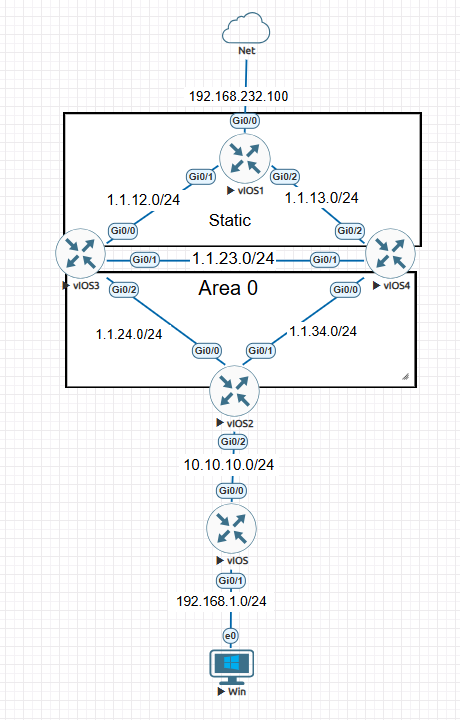
적용기술
- OSPF(p-to-p)
- OSPF 디폴트 라우팅
- passive interface
- static
- 재분배
- nat
장비 설정현황
R1
interface GigabitEthernet0/0
 ip address 192.168.232.100 255.255.255.0 //ISP 공인IP
 ip nat outside
 ip virtual-reassembly in
 duplex auto
 speed auto
 media-type rj45
!
interface GigabitEthernet0/1
 ip address 1.1.12.1 255.255.255.0 R2라우터 시리얼 구간
 ip nat inside
 ip virtual-reassembly in
 duplex auto
 speed auto
 media-type rj45
!
interface GigabitEthernet0/2
 ip address 1.1.13.1 255.255.255.0 R3라우터 시리얼 구간
 ip nat inside
 ip virtual-reassembly in
 duplex auto
 speed auto
 media-type rj45
!
interface GigabitEthernet0/3
 no ip address
 shutdown
 duplex auto
 speed auto
 media-type rj45
!
ip forward-protocol nd
!
!
no ip http server
no ip http secure-server
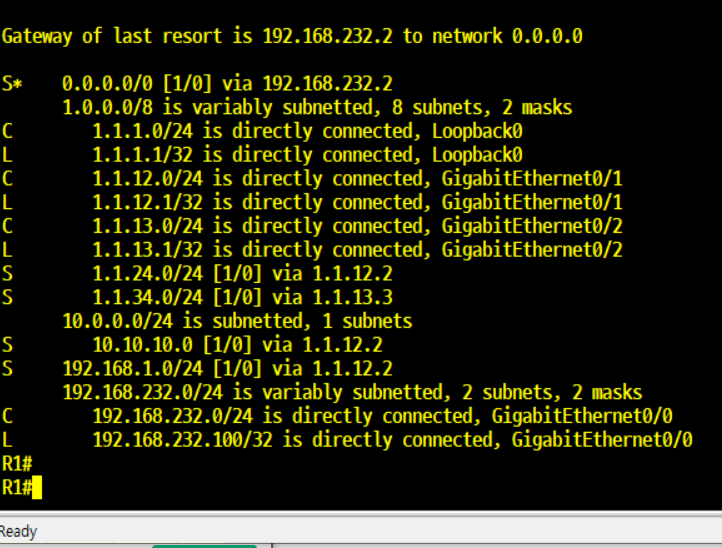
ip nat inside source list 10 interface GigabitEthernet0/0 overload //nat 적용 정책
ip route 0.0.0.0 0.0.0.0 192.168.232.2 //ISP 인터넷 경로
ip route 1.1.24.0 255.255.255.0 1.1.12.2 //R2의 내부 IP 진입 경로
ip route 1.1.34.0 255.255.255.0 1.1.13.3 //R3의 내부 IP 진입 경로
ip route 10.10.10.0 255.255.255.0 1.1.12.2 //R4의 내부 IP 진입 경로
ip route 10.10.10.0 255.255.255.0 1.1.13.3 2 //R5의 내부 IP 진입 경로(백업 경로)
ip route 192.168.1.0 255.255.255.0 1.1.12.2 //실사용자 네트워크 경로
ip route 192.168.1.0 255.255.255.0 1.1.13.3 2 //실사용자 네트워크 경로(백업 경로)
!
!
!
access-list 10 permit 192.168.1.0 0.0.0.255 //nat 정책 적용 출발지 IP주소
!
위에 R1장비 같은 경우 딱히 설정 상 크게 어려운 설정이 없다 해당 장비에서 가장 핵심 설정은 nat와 ISP 디폴트 경로라고 개인적으로 생각된다
라우팅 테이블
R2
interface Loopback0
 ip address 2.2.2.2 255.255.255.0 라우터-ID
 ip ospf network point-to-point
!
interface GigabitEthernet0/0
 ip address 1.1.12.2 255.255.255.0 R1라우터 시리얼 구간
 duplex auto
 speed auto
 media-type rj45
!
interface GigabitEthernet0/1
 ip address 1.1.23.2 255.255.255.0 R3라우터 시리얼 구간
 ip ospf network point-to-point
 duplex auto
 speed auto
 media-type rj45
!
interface GigabitEthernet0/2
 ip address 1.1.24.2 255.255.255.0 R4라우터 시리얼 구간
 ip ospf network point-to-point
 duplex auto
 speed auto
 media-type rj45
!
interface GigabitEthernet0/3
 no ip address
 shutdown
 duplex auto
 speed auto
 media-type rj45
!
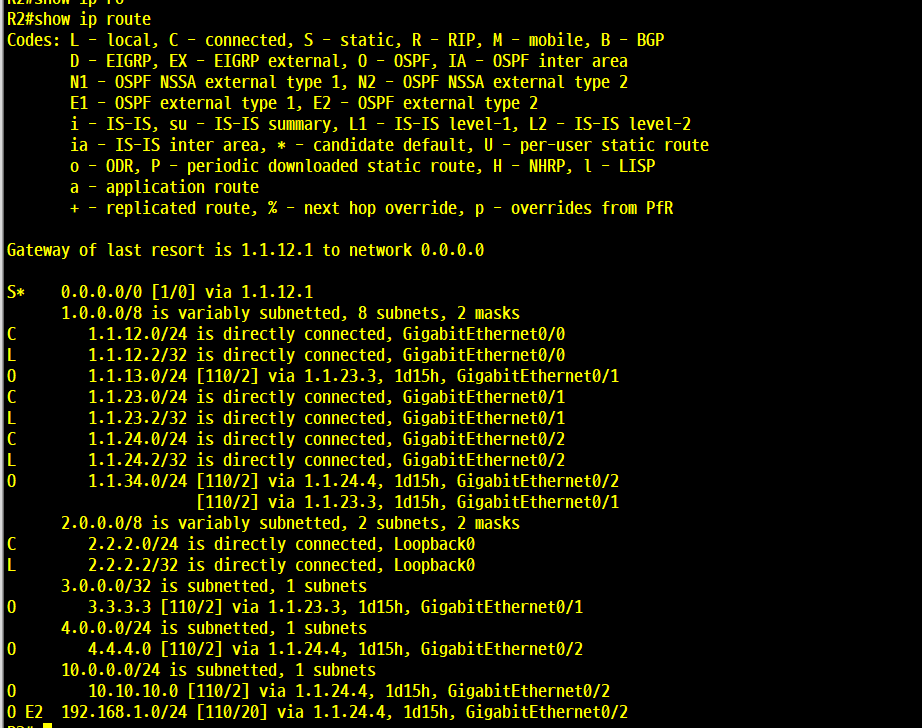
router ospf 1 //OSPF 프로세스
 router-id 2.2.2.2 //OSPF 라우터-ID
 passive-interface GigabitEthernet0/0 //OSPF hello 패킷 차단
 network 1.1.12.0 0.0.0.255 area 0 //12대역 에러이어 0홍보
 network 1.1.23.0 0.0.0.255 area 0 //23대역 에러이어 0홍보
 network 1.1.24.0 0.0.0.255 area 0 //24대역 에러이어 0홍보
 network 2.2.2.0 0.0.0.255 area 0 //라우터 ID홍보
 default-information originate always //OSPF 디폴트 게이트웨이 홍보
!
ip forward-protocol nd
!
!
no ip http server
no ip http secure-server
ip route 0.0.0.0 0.0.0.0 1.1.12.1 //static 디폴트 라우팅 설정
라우팅테이블
R3
interface Loopback0
 ip address 3.3.3.3 255.255.255.0 라우터-ID
!
interface GigabitEthernet0/0
 ip address 1.1.34.3 255.255.255.0 R4연결 구간
 ip ospf network point-to-point
 duplex auto
 speed auto
 media-type rj45
!
interface GigabitEthernet0/1
 ip address 1.1.23.3 255.255.255.0 R2연결 구간
 ip ospf network point-to-point
 duplex auto
 speed auto
 media-type rj45
!
interface GigabitEthernet0/2
 ip address 1.1.13.3 255.255.255.0 R1연결 구간
 duplex auto
 speed auto
 media-type rj45
!
interface GigabitEthernet0/3
 no ip address
 shutdown
 duplex auto
 speed auto
 media-type rj45
!
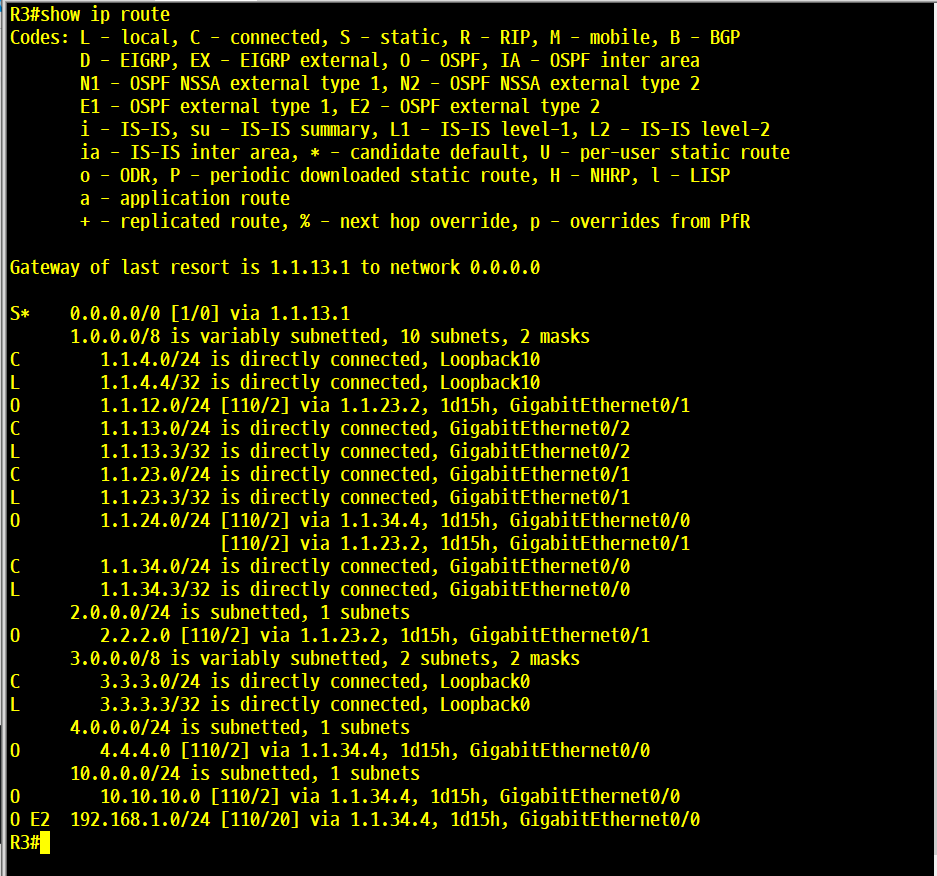
router ospf 1 //OSPF 프로세스 번호
 router-id 3.3.3.3  //OSPF 라우터-ID
 passive-interface GigabitEthernet0/2 //OSPF hello 패킷 차단
 network 1.1.13.0 0.0.0.255 area 0 //13대역 에어리어 0으로 홍보
 network 1.1.23.0 0.0.0.255 area 0 //23대역 에어리어 0으로 홍보
 network 1.1.34.0 0.0.0.255 area 0 //34대역 에어리어 0으로 홍보
 network 3.3.3.0 0.0.0.255 area 0 //라우터 ID 홍보
 default-information originate always //디폴트 경로 OSPF그룹에 홍보
!
ip forward-protocol nd
!
!
no ip http server
no ip http secure-server
ip route 0.0.0.0 0.0.0.0 1.1.13.1 //디폴트 라우팅
라우팅 테이블
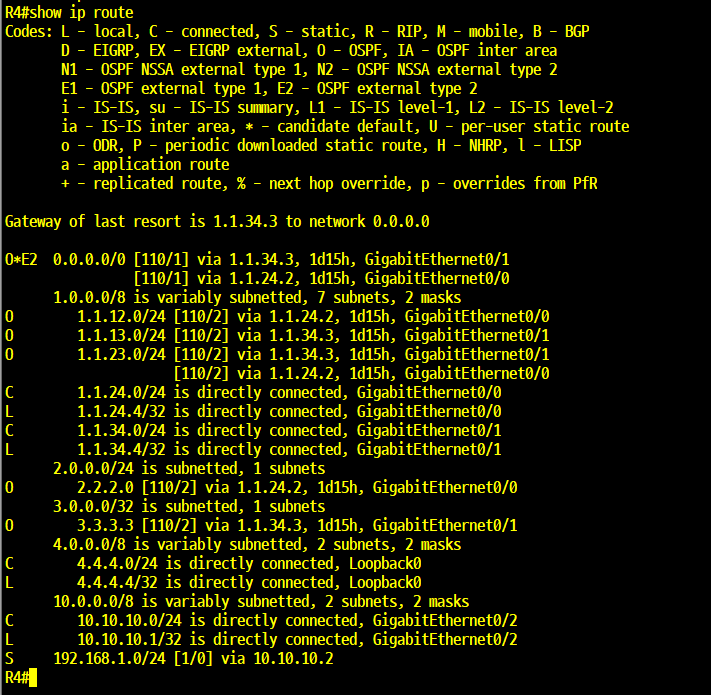
R4
interface Loopback0
 ip address 4.4.4.4 255.255.255.0 라우터-id
 ip ospf network point-to-point
!
interface GigabitEthernet0/0
 ip address 1.1.24.4 255.255.255.0 R2연결구간
 ip ospf network point-to-point
 duplex auto
 speed auto
 media-type rj45
!
interface GigabitEthernet0/1
 ip address 1.1.34.4 255.255.255.0 R3연결구간
 ip ospf network point-to-point
 duplex auto
 speed auto
 media-type rj45
!
interface GigabitEthernet0/2
 ip address 10.10.10.1 255.255.255.0 R5시러얼 구간
 duplex auto
 speed auto
 media-type rj45
!
interface GigabitEthernet0/3
 no ip address
 shutdown
 duplex auto
 speed auto
 media-type rj45
!
router ospf 1 //OSPF 프로세스 번호
 router-id 4.4.4.4 //OSPF 라우터-ID
 redistribute static subnets //192.168.1.0 static경로 OSPF그룹에게 재분배 홍보
 passive-interface GigabitEthernet0/2 //OSPF hello패킷 차단
 network 1.1.24.0 0.0.0.255 area 0 //24대역 에어리어 0으로 홍보
 network 1.1.34.0 0.0.0.255 area 0 //34대역 에어리어 0으로 홍보
 network 4.4.4.0 0.0.0.255 area 0 //라우터-ID대역 에어리어 0으로 홍보
 network 10.10.10.0 0.0.0.255 area 0 //시리얼구간 홍보
!
ip forward-protocol nd
!
!
no ip http server
no ip http secure-server
ip route 192.168.1.0 255.255.255.0 10.10.10.2 //내부 사용자 static 경로
라우팅 테이블
R5
interface GigabitEthernet0/0
 ip address 10.10.10.2 255.255.255.0 R4시리얼 구간
 duplex auto
 speed auto
 media-type rj45
!
interface GigabitEthernet0/1
 ip address 192.168.1.1 255.255.255.0 사용자 네트워크대역 GW
 duplex auto
 speed auto
 media-type rj45
!
interface GigabitEthernet0/2
 no ip address
 shutdown
 duplex auto
 speed auto
 media-type rj45
!
interface GigabitEthernet0/3
 no ip address
 shutdown
 duplex auto
 speed auto
 media-type rj45
!
ip forward-protocol nd
!
!
no ip http server
no ip http secure-server
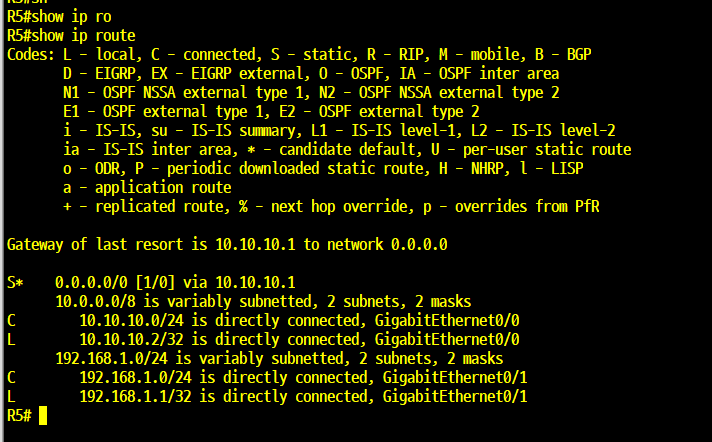
ip route 0.0.0.0 0.0.0.0 10.10.10.1 디폴트 경로
!
!
!
!
라우팅 테이블
통신 및 서비스 결과
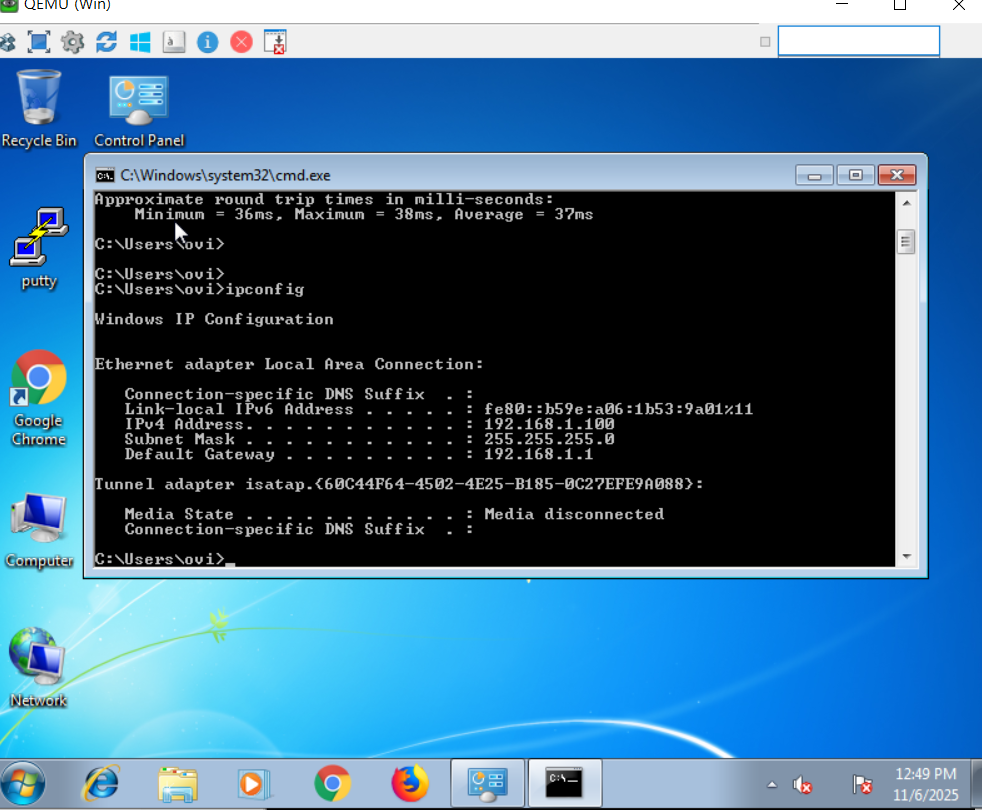
PC ip셋팅
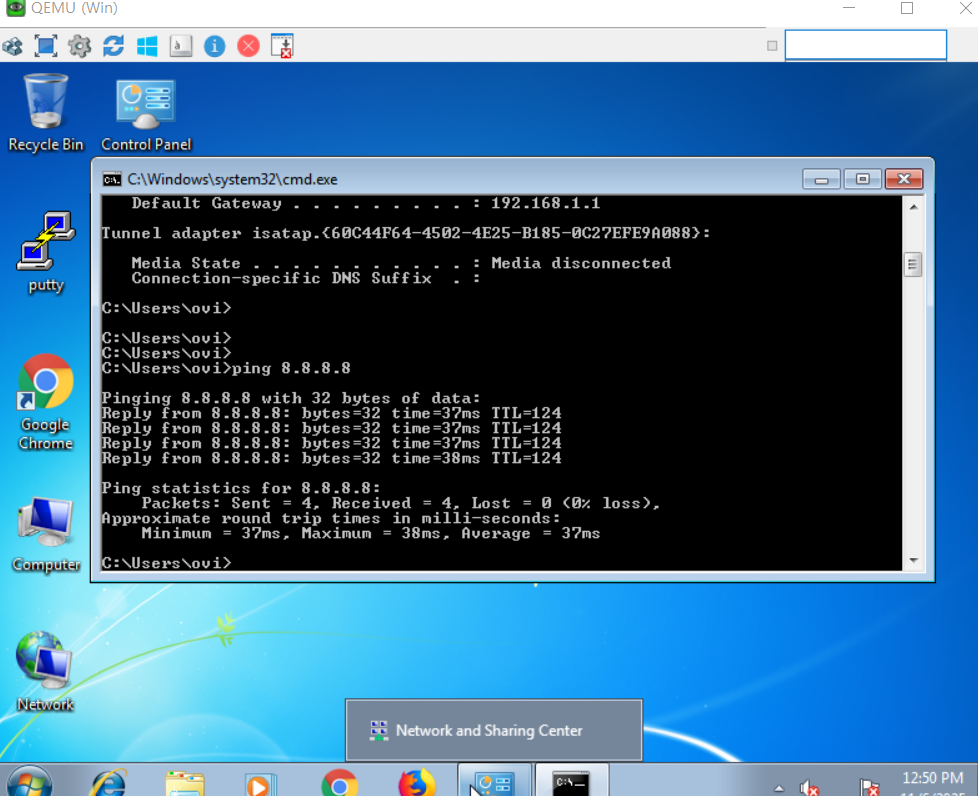
인터넷 통신 테스트
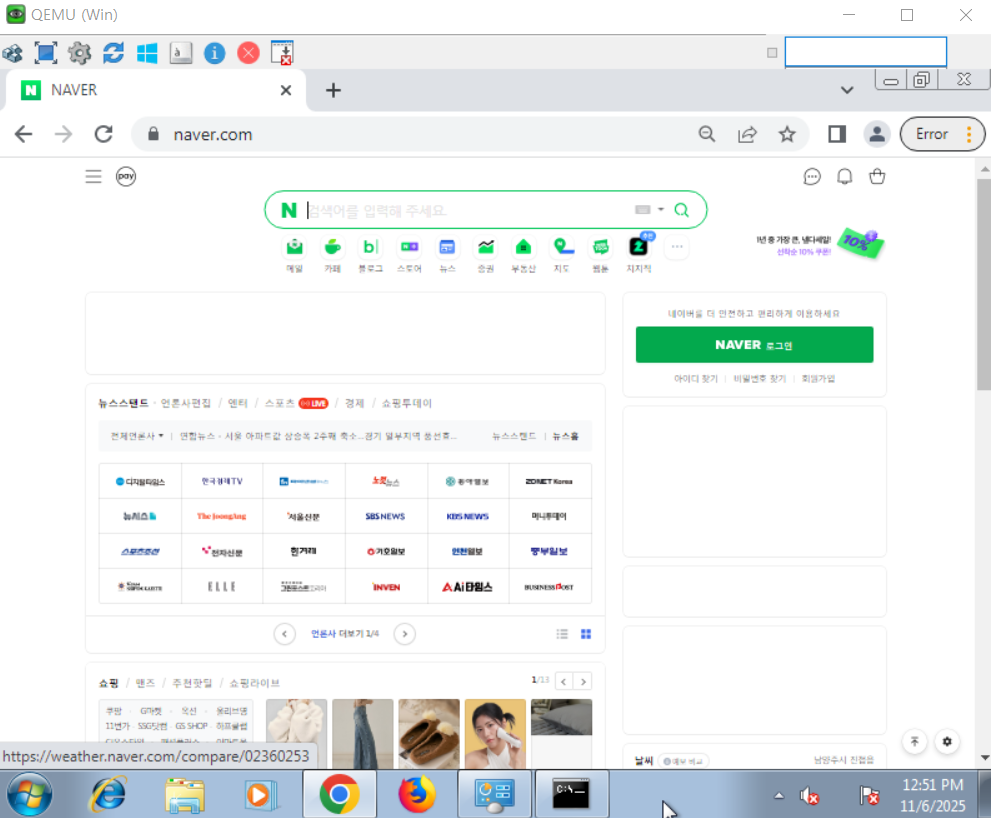
인터넷 서비스 확인 완료

겸손, 감사, 사랑, 열정, 즐거움 같이 웃어요