게이트웨이 이중화란?
게이트웨이란 ? 이전에 설명했듯이 다른 네트워크로 넘어가기 위한 관문(출구)이다.
만약 출구가 막히면 어떻게 될까? 그렇다 다른 네트워크로 넘어 갈수 없어서 통신이 안될 것이다.
그러면 참도 사용자들이 좋아겠다
이처럼 게이트웨이 이중화 원래 사용하고 있는 출구가 막혔을때 비상구를 바로 열어주는 것이라고 생각하면 된다.
이중화 프로토콜
이중화 프로토콜에는 두가지 종류가 있다
HSRP와 VRRP가 있다,
이 둘은 크게 별차이가 없는 것 같다.
굳이 고르라면 나는 CISCO전용 프로토콜이냐? 표준프로토콜이냐 차이?라고 생각을 한다 개인적으로
- HSRP
Active 장비 우선순위
- priority 값이 높은 장비
- IP주소가 큰 장비
만약 Priority 값이 동일하면, HSRP는 Router의 실제 IP 주소를 비교해서 결정합니다.
IP 주소가 큰 쪽이 Active Router가 됨.
예를 들어:
Router A → 192.168.1.2, priority 100
Router B → 192.168.1.3, priority 100
⇒ 192.168.1.3을 가진 Router B가 Active.
Active 역할
1. 클라이언트가 보낸 ARP 요청에 대해 해당 VIP(게이트웨이-IP)의 가상 MAC주소를 넣어 응답한다.
2. standby에게 주기적으로 Hello패킷을 전달하며 자신의 상태를 전달 함
Standby 역할
1. Active 장비가 전달하는 Hello패킷을 수신하여 Active장비의 상태를 체크
2. 평소에는 게이트웨이 역할을 하지 않고 Active장비의 문제 발생 시 역할을 넘겨 받는다.
3. HSRP 상태 변화과정: Intital>Listen>Speak>Standby>Active
- VRRP
- IEEE의 표준 프로토콜
- 메인 장비를 Master, 예비 장비를 Backup이라고 칭한다.
- priority 값이 높은 장비
- IP주소가 큰 장비
Master는 장비의 상태를 체크하기 위해 주기적으로 체크와 같이 반복적인 패킷을 통해 MAster여부를 확인한다.
실습
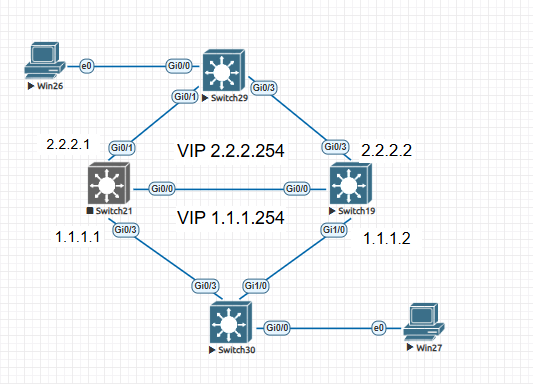
테스트 구성도
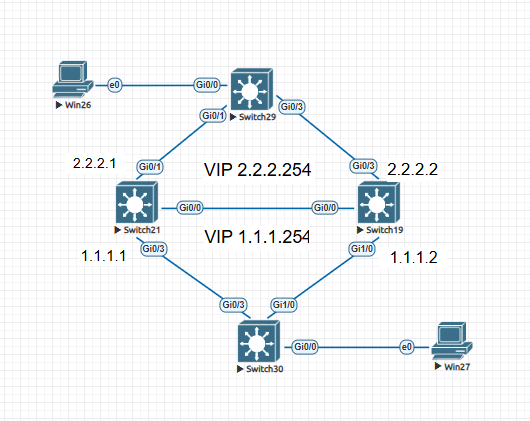
HSRP
Switch21
conf t
!
! VLAN 생성
vlan 10
vlan 20
!
interface GigabitEthernet0/1
 switchport access vlan 10
 switchport mode access
 negotiation auto
!
interface GigabitEthernet0/3
 switchport access vlan 20
 switchport mode access
 media-type rj45
 negotiation auto
!
interface GigabitEthernet0/0
 switchport trunk encapsulation dot1q
 switchport mode trunk
 switchport trunk allowed vlan 10,20
!
!
interface Vlan10
 ip address 2.2.2.1 255.255.255.0
 standby 10 ip 2.2.2.254
 standby 10 priority 110
 standby 10 preempt
!
!
interface Vlan20
 ip address 1.1.1.1 255.255.255.0
 standby 20 ip 1.1.1.254
 standby 20 priority 110
 standby 20 preempt
!
end
wr
Switch#show standby brief
                     P indicates configured to preempt.
                     |
Interface   Grp  Pri P State   Active          Standby         Virtual IP
Vl10        10   110 P Active  local           2.2.2.2         2.2.2.254
Vl20        20   110 P Active  local           1.1.1.2         1.1.1.254
Switch19
conf t
!
vlan 10
vlan 20
!
interface GigabitEthernet0/0
switchport trunk encapsulation dot1q
switchport mode trunk
switchport trunk allowed vlan 10,20
!
interface GigabitEthernet0/3
switchport access vlan 10
switchport mode access
media-type rj45
negotiation auto
!
interface GigabitEthernet1/0
switchport access vlan 20
switchport mode access
media-type rj45
negotiation auto
!
interface Vlan10
ip address 2.2.2.2 255.255.255.0
standby 10 ip 2.2.2.254
standby 10 priority 90
standby 10 preempt
!
interface Vlan20
ip address 1.1.1.2 255.255.255.0
standby 20 ip 1.1.1.254
standby 20 priority 90
standby 20 preempt
!
end
wrSwitch#show standby brief
P indicates configured to preempt.
|
Interface Grp Pri P State Active Standby Virtual IP
Vl10 10 90 P Standby 2.2.2.1 local 2.2.2.254
Vl20 20 90 P Standby 1.1.1.1 local 1.1.1.254위처럼 설정을 진행한 후에 이중화 상태를 확인해보면 우선순위 값이 높은 스위치가 active가 되어있다.
테스트
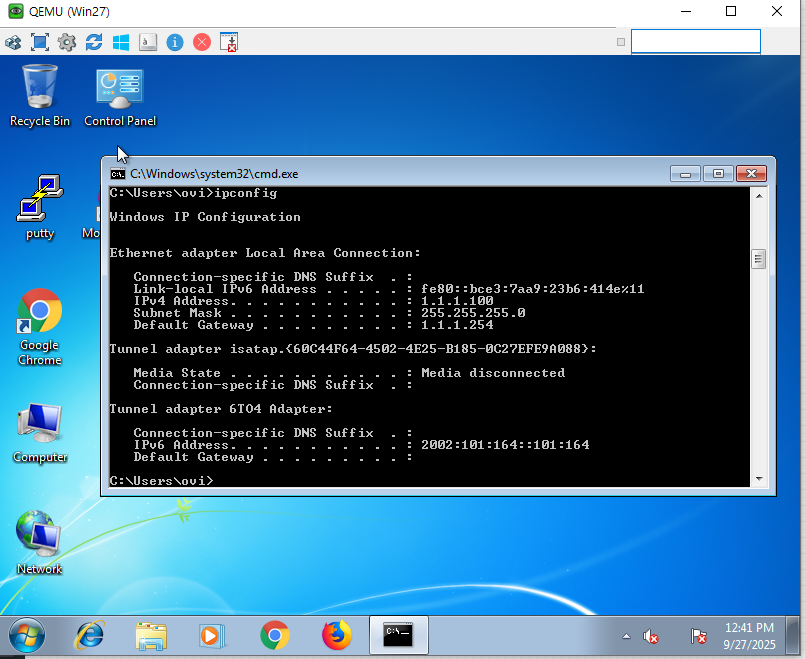
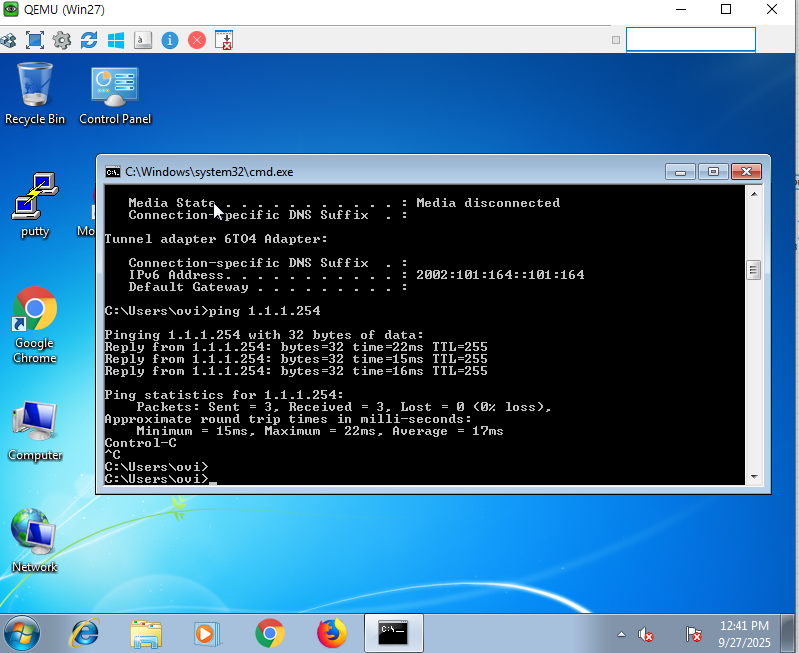
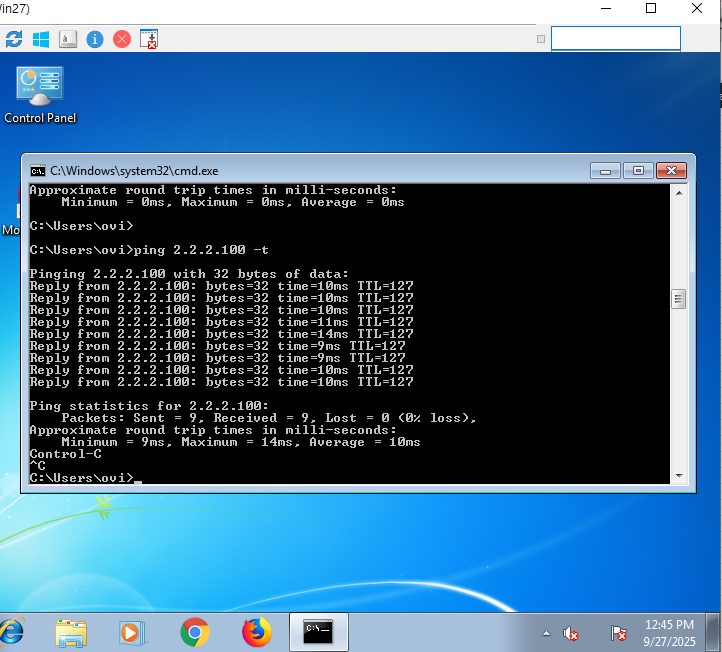
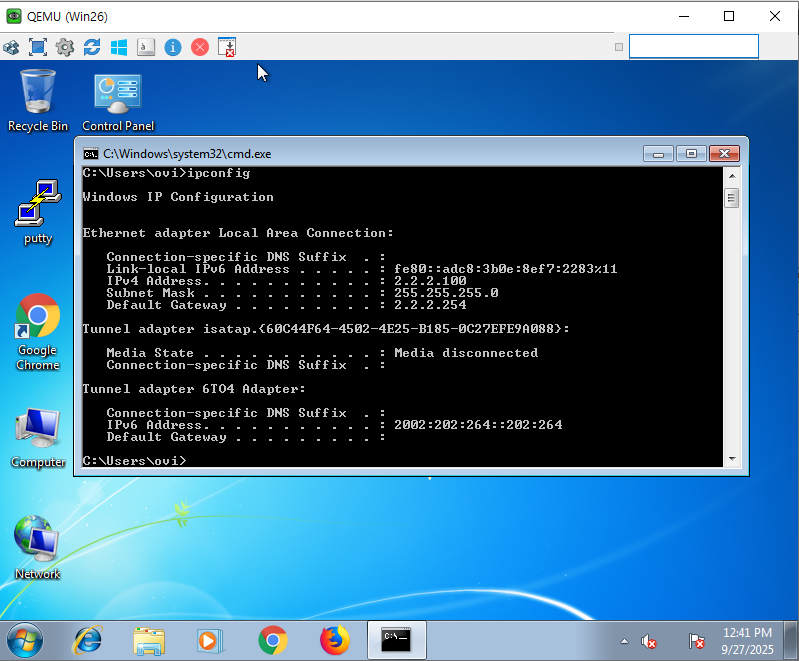
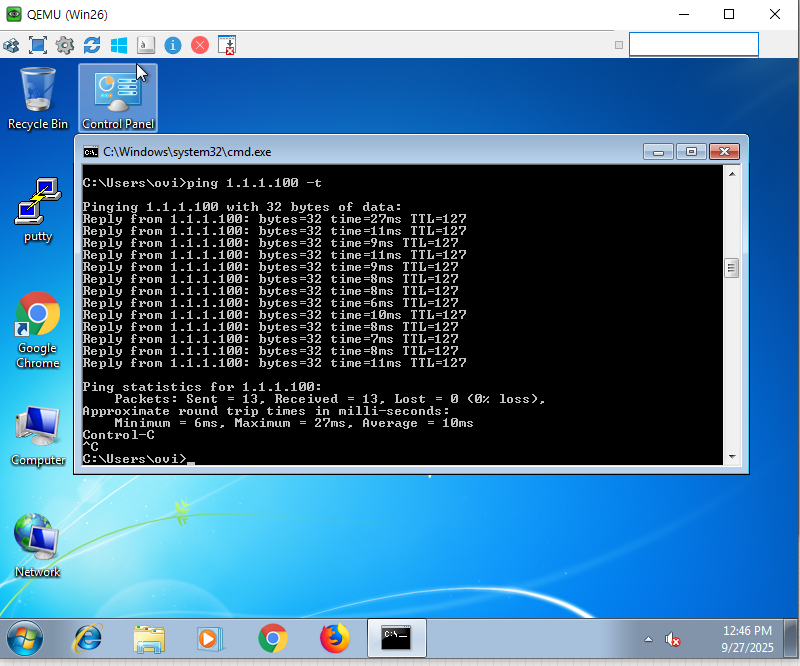
각각의 PC들은 본인의 네트워크의 GW로 통신이 되는 걸 확인 할 수 있다.
이때 PC들의 게이트웨이는 스위치들의 포트에 있는 리얼IP가 아닌 VIP이중화 IP로 지정을 해줘야 추후에 기존 1호기 장비가 문제 발생 2호 장비를 통해 계속 통신을 할 수 있다.
게이트웨이 지정 후 이제 다른 네트워크의 호스트에 통신을 하면 잘 될 것이다 왜 통신되는지 L3스위치 동작과정 글 읽으면 바로 이해 할 것이라고 생각한다.
절제 테스트
기존 active장비를 죽인 후 통신 되는지 확인 할 것이다.
Switch#write
Building configuration...
Compressed configuration from 3418 bytes to 1644 bytes[OK]
Switch#
*Sep 27 12:41:39.722: %HSRP-5-STATECHANGE: Vlan20 Grp 20 state Standby -> Active
*Sep 27 12:41:40.634: %HSRP-5-STATECHANGE: Vlan10 Grp 10 state Standby -> Active
Switch#
기존 standby 스위치에서 active로 전환되었다고 로그를 가 보일 것이다
그리고
Switch#show standby brief
                     P indicates configured to preempt.
                     |
Interface   Grp  Pri P State   Active          Standby         Virtual IP
Vl10        10   90  P Active  local           unknown         2.2.2.254
Vl20        20   90  P Active  local           unknown         1.1.1.254
해당 스위치가 VIP갖고 온것을 확인할 수 있다
그러면 PC들은 서로 통신이 되고 있나?
그렇다
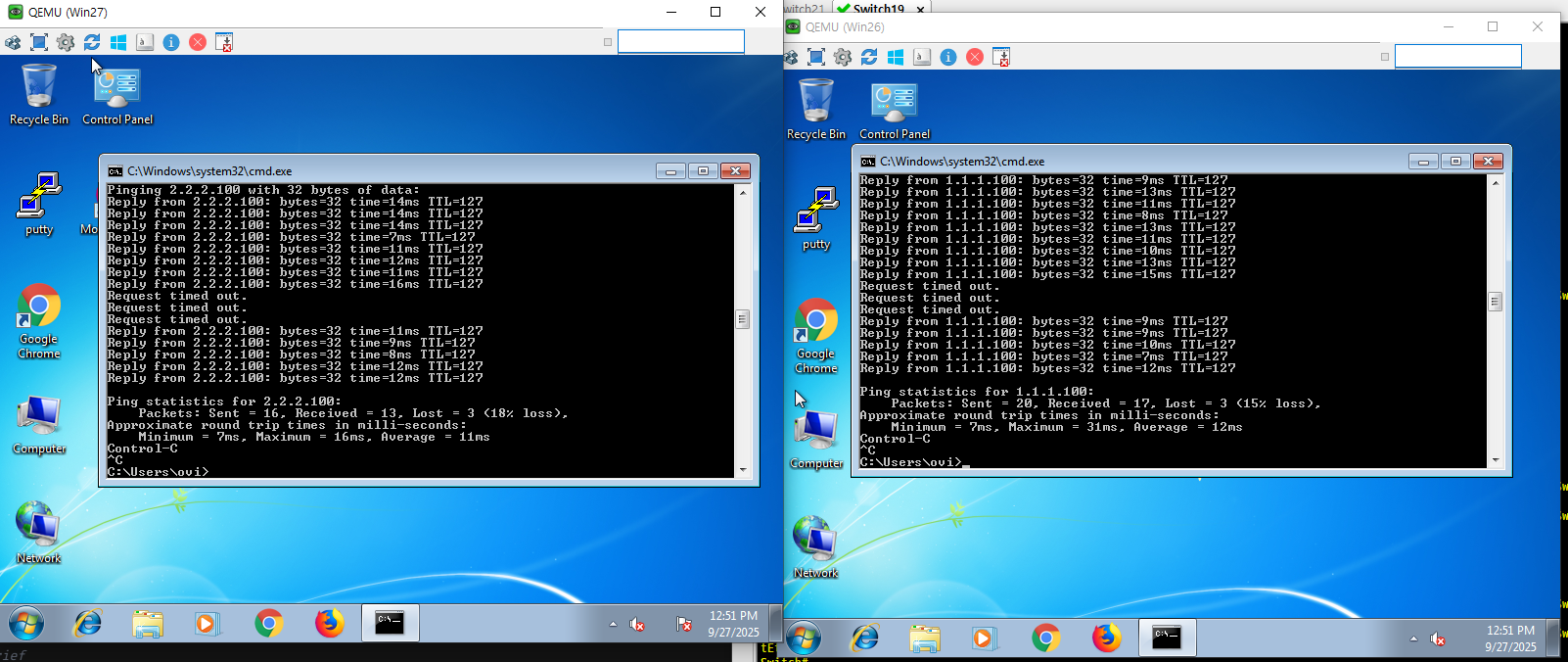
PC들은 서로 통신이 되고 있다 하지만 중간에 ping 3개정도 빠진걸 볼수 있다
이건 기존 standby->active 전환 시 과정때문에 그렇다
standby는 active 전환 시 active로 VIP를 받게 된다 그러면 active까지의 올라오는 과정이 있으며, 또한 해당 네트워크 브로드캐스트에 GARP뿌려 이제 본인이 해당 VIP를 갖고 있다고 홍보를 먼저 때린다.
ARP는 상대의 mac주소를 확인하기 위한 프로토콜이라면 GARP는 내가 먼저 해당 네트워크 이 IP주소는 이제 나한테 있다고 먼저 홍보를 때려주는 프토콜이다.
상하단 스위치는 기존 VIP에 대한 mac주소의 경로를 SW21번으로 잡고 있었을 것이다
하지만 standby가 active전환 시 상하단 스위치들은 VIP에 대한 mac주소의 경로를 SW19번호으로 연결 된 링크로 쪽으로 전환 했을 것이다 GARP때문에
Switch#show arp
Protocol  Address          Age (min)  Hardware Addr   Type   Interface
Internet  1.1.1.2                 -   5000.0013.8014  ARPA   Vlan20
Internet  1.1.1.100               4   5000.001b.0000  ARPA   Vlan20
Internet  1.1.1.254               -   0000.0c07.ac14  ARPA   Vlan20
Internet  2.2.2.1                24   5000.0015.800a  ARPA   Vlan10
Internet  2.2.2.2                 -   5000.0013.800a  ARPA   Vlan10
Internet  2.2.2.100               4   5000.001a.0000  ARPA   Vlan10
Internet  2.2.2.254               -   0000.0c07.ac0a  ARPA   Vlan10```
Switch30#sho mac address-table
          Mac Address Table

Vlan    Mac Address       Type        Ports
----    -----------       --------    -----
   1    0000.0c07.ac14    DYNAMIC     Gi1/0
   1    5000.0013.0004    DYNAMIC     Gi1/0
   1    5000.001b.0000    DYNAMIC     Gi0/0
밑에 L2스위치 mac주소 테이블을 보면 mac에 대한 경로가 정상적을 갱신된 것을 확인할 수 있다.
간혹 통신이 안될때가 있는데 해당 경우는 상하단 스위치들이 mac주소 경로를 갱신을 못 할때 발생하는 경우가 있다
이때는 해당 장비의 테이블을 한번 날려주면 해결 된다.
원본 테스트
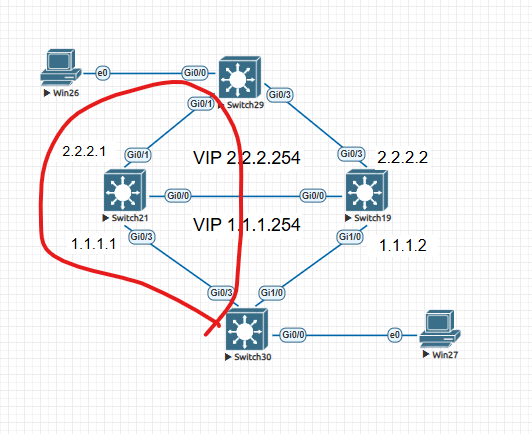
Switch#show mac address-table
          Mac Address Table
-------------------------------------------

Vlan    Mac Address       Type        Ports
----    -----------       --------    -----
   1    0000.0c07.ac14    DYNAMIC     Gi0/3
   1    5000.0013.0004    DYNAMIC     Gi1/0
   1    5000.0013.8014    DYNAMIC     Gi1/0
   1    5000.0015.0003    DYNAMIC     Gi0/3
   1    5000.0015.8014    DYNAMIC     Gi0/3
   1    5000.001b.0000    DYNAMIC     Gi0/0
Total Mac Addresses for this criterion: 6`
기존 active장비를 살리고 다시 L2스위치의 맥주소 테이블을 보면 VIP에 대한 경로가 갱신된 것을 확인 할 수 있다.